• -zł 20.00
Google Analytycs 4.0 module for PrestaShop 1.6x and 1.7.x
Google Analytics 4 in PrestaShop – GA4 Pro module | PrestaDev

Google Analytics 4 Pro module for PrestaShop

Module version: 1.4.2

PrestaShop compatibility: 1.7.x 8.x 9.x

Module file updated: 09/14/2026 07:56:44

Product data updated: 10/15/2026 15:08:08


4 Reviews

Google Analytics 4 Pro adds Google tracking to PrestaShop for product, cart, checkout, search and account events. Version 1.4.2 sends qualifying purchases and refunds to the primary GA4 stream via Measurement Protocol, requiring an API Secret, saved attribution and active PD Cookie Pro in live mode with Consent Mode v2 and analytics consent. Options include a second GA4 ID, User ID, user-provided data and Google Ads dynamic remarketing. The module does not configure Google accounts or guarantee complete reporting.

License type / update
zł 169.00
zł 137.40no tax zł 189.00 -zł 20.00
Lowest price in last 30 days before discount: zł 189.00

Description

Version 1.4.2 requires at least PHP 7.2.5 because of its bundled HTTP libraries; the PHP version must also meet the requirements of your PrestaShop version. Server-side purchase and refund tracking additionally requires active PD Cookie Pro in live mode with Consent Mode v2, a matching consent revision, analytics consent and saved client/session attribution. An API Secret alone is not sufficient.

Server-side purchase is not sent for orders with paid gift wrapping, more than 200 order lines or a missing reference/EAN when that item_id format is selected. Credit slips must have consistent amounts and items; records with partial != 0 and voucher types are rejected. Type 2 is supported only for an unambiguous shipping-only refund. A partial refund of product quantities is not the same as the technical partial flag.

Key features and functionalities

  • 15 named e-commerce and account events: view_item, view_item_list, select_item, add_to_cart, remove_from_cart, view_cart, begin_checkout, add_shipping_info, add_payment_info, purchase, refund, search, view_search_results, sign_up and login.
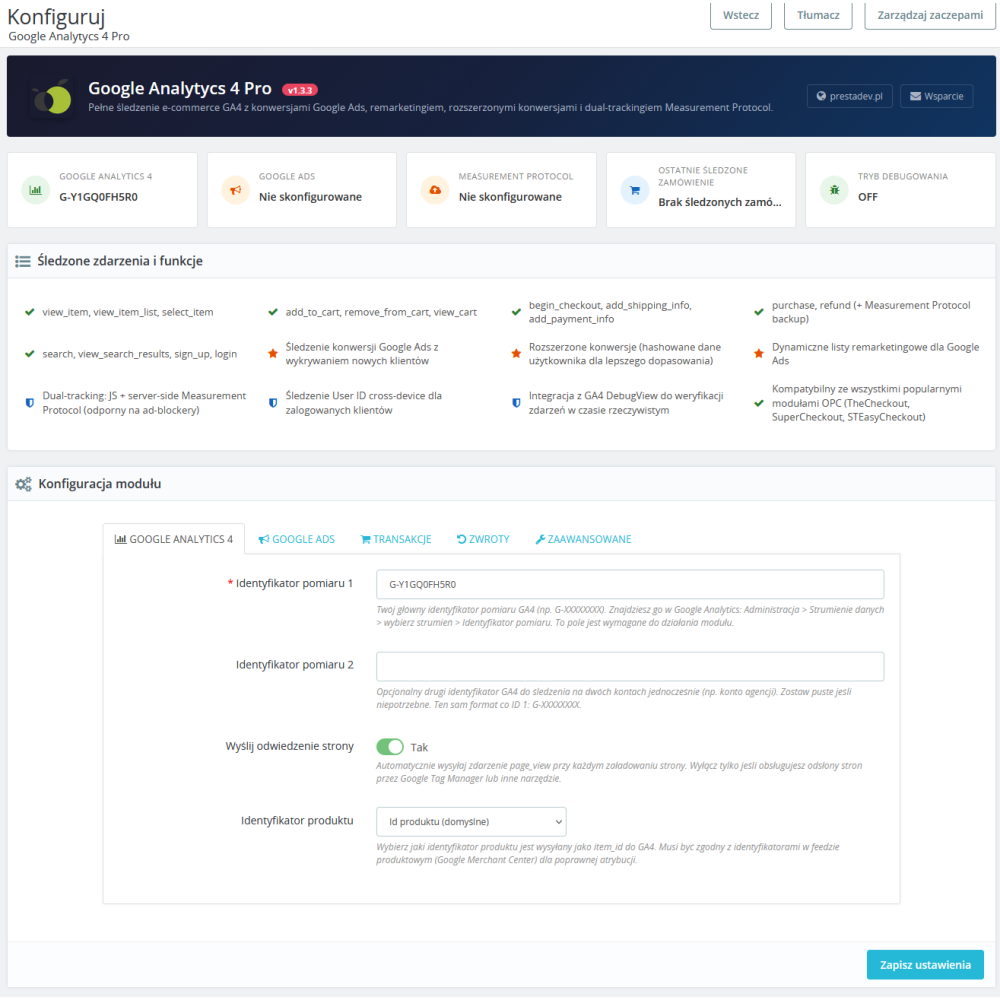
  • Optional page_view: the administrator can keep automatic pageview measurement in the module or disable it when pageview tracking is handled by Google Tag Manager or another solution.
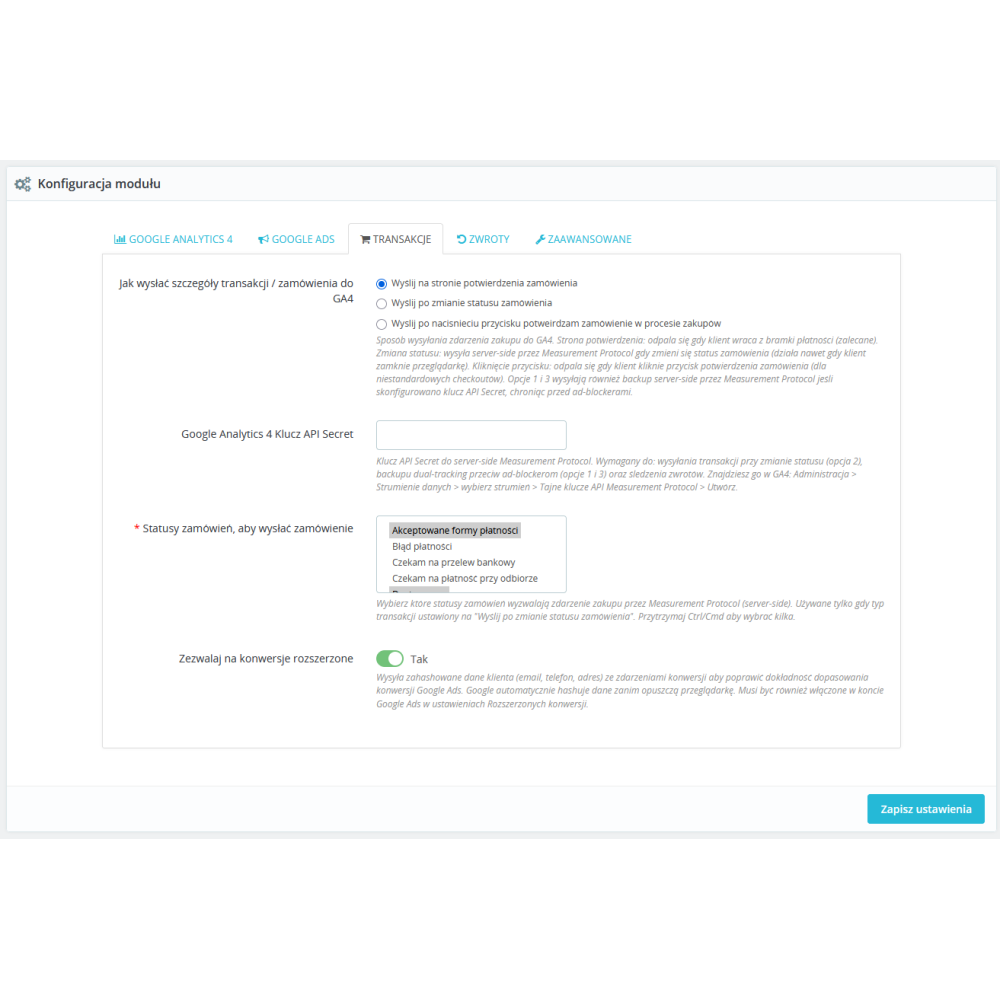
  • Purchase after a configured status: version 1.4.2 sends purchase from the server after a status selected by the administrator as confirming payment is saved in the order history and the other conditions are met. The module does not independently verify settlement with the payment provider.
  • Measurement Protocol for financial operations: sending purchase and refund requires the primary Measurement ID, API Secret, saved attribution/session data, and current analytics consent.
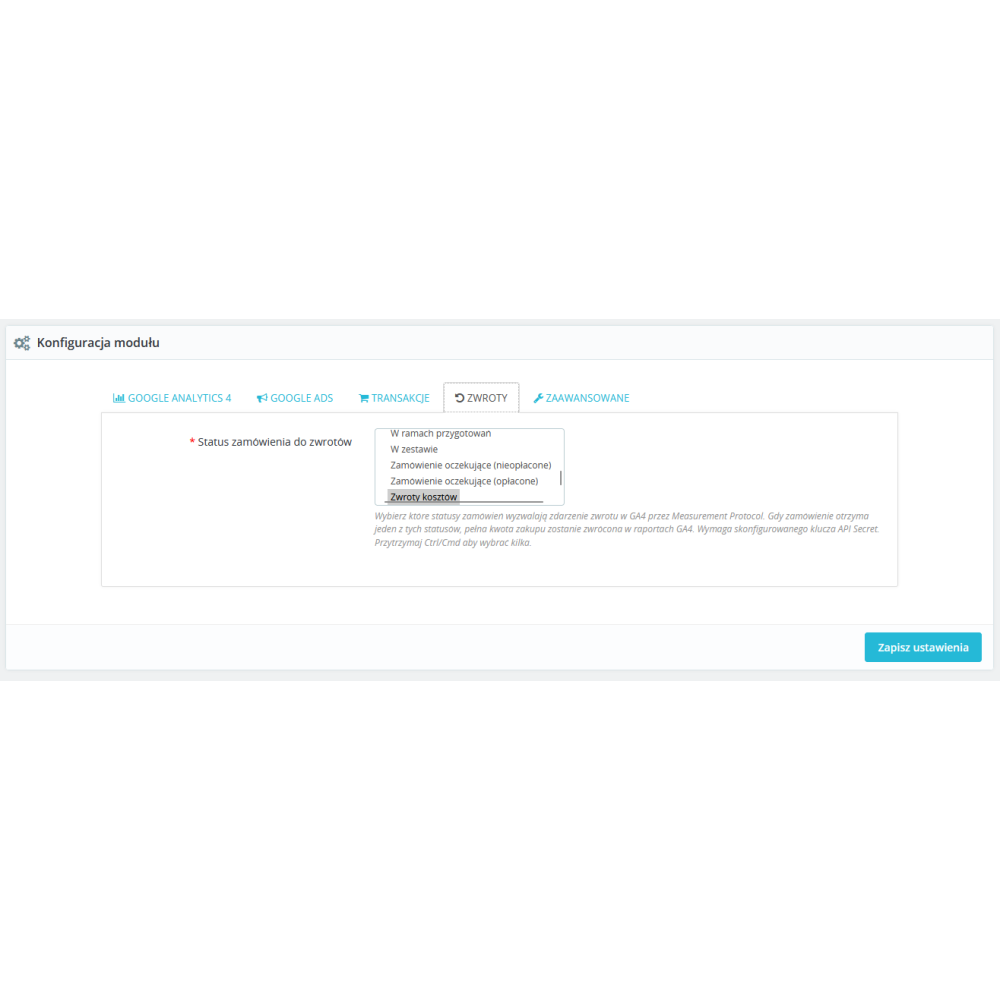
  • Controlled refunds: the module supports a full refund after the selected status and new PrestaShop credit slips, including partial corrections, only when a qualifying purchase has previously been recorded.
  • Financial operations log: a persistent register and per-order lock control the module's own purchases and refunds; the back office offers a read-only view with filtering, sorting and pagination. This does not deduplicate events sent independently by GTM or other modules.
  • Two Measurement IDs: you can configure the primary and an optional second GA4 ID for events sent from the browser tag.
  • Five ways to build item_id: product ID, product ID with combination ID separated by a hyphen, product ID with combination ID separated by an underscore, reference, or EAN.
  • Catalog data in events: the module sends, among other things, the identifier, name, variant, brand, categories, price, discount, quantity, currency, and product list data, if available in PrestaShop.
  • Discount coupons: supported browser events can include the applied cart rule's name and code. In version 1.4.2, the server-side purchase payload sent via Measurement Protocol does not include coupon codes.
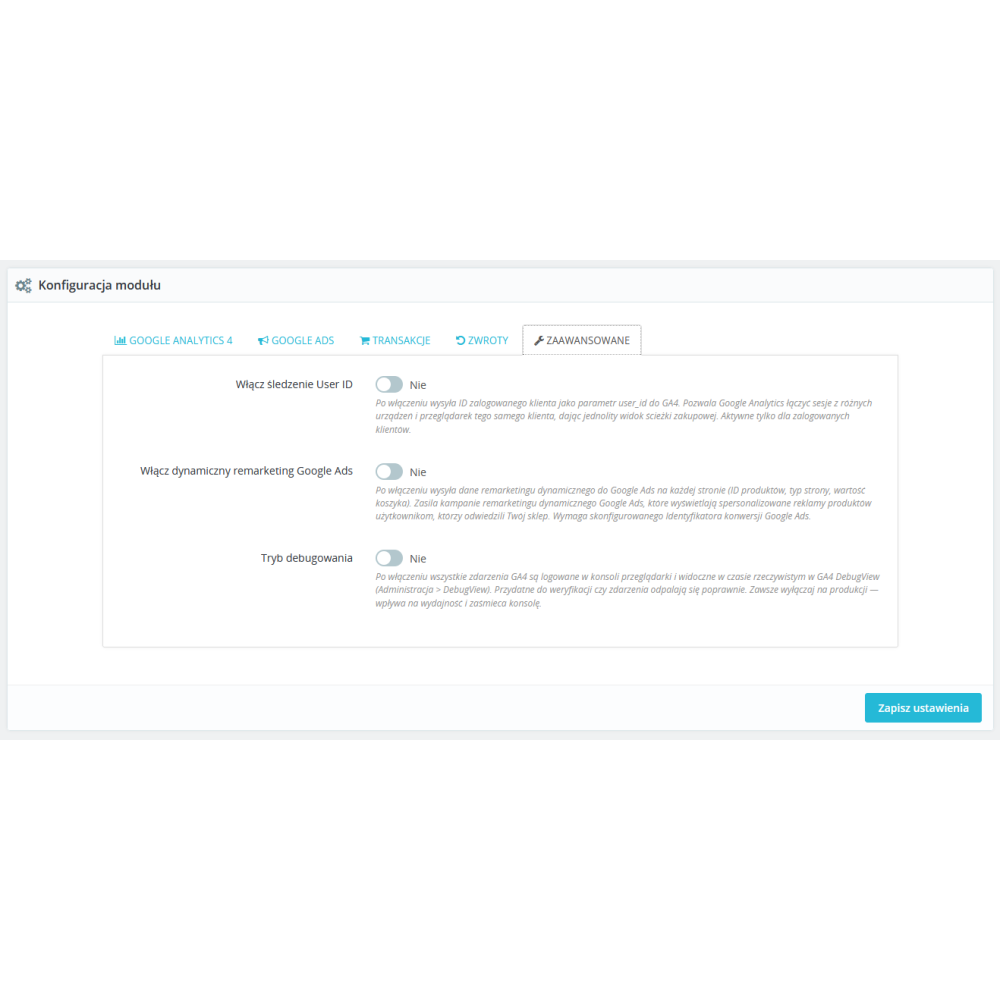
  • User ID for a logged-in customer: when the option is enabled, the module sends the technical customer identifier to GA4 with analytics_storage consent; this does not replace contact data.
  • User-provided data: when the option is enabled and current ad_user_data consent is present, the module can send the email address and available phone number or address in the format required by Google; identifying data is normalized and hashed with SHA-256.
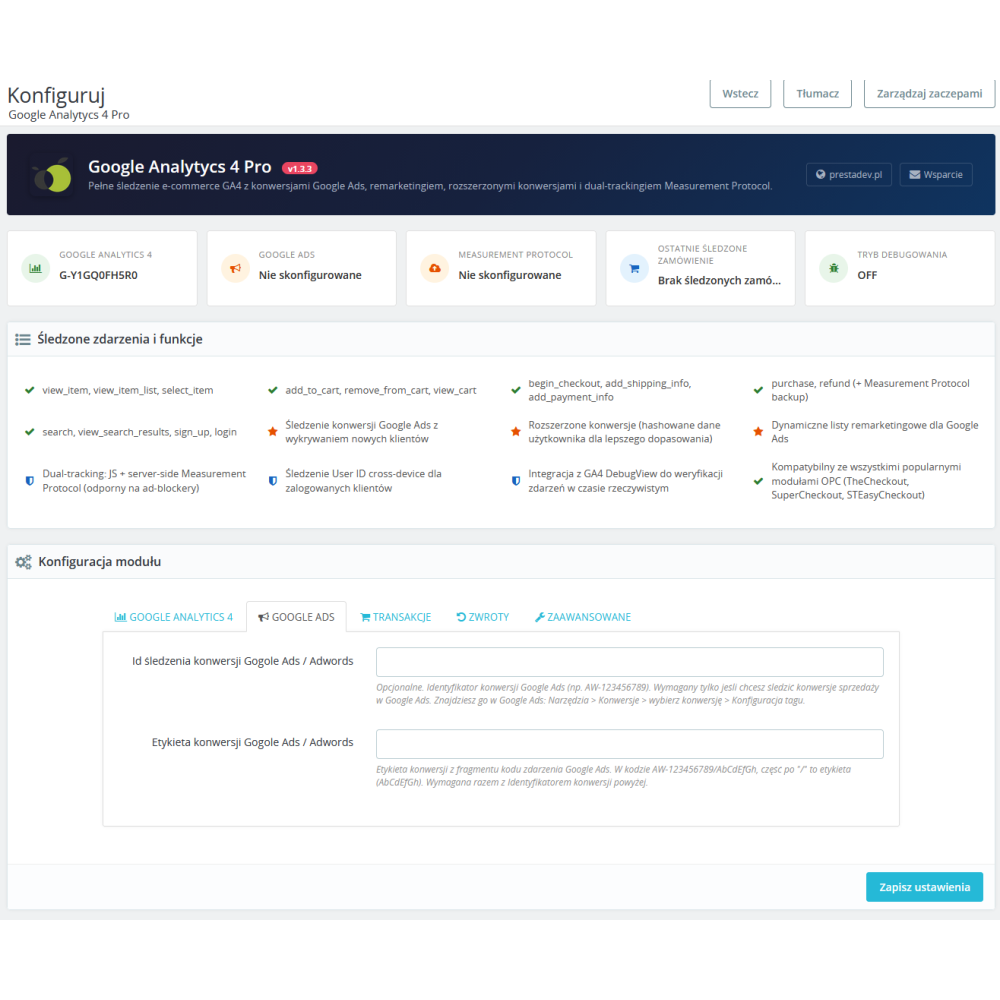
  • Google Ads dynamic remarketing: when the feature is enabled and the Google Ads ID is provided, the tag receives product identifiers, page type, and cart value.
  • DebugView and diagnostics: debug mode logs browser events and sets their debug_mode flag for GA4 DebugView. It does not set this flag for server-side purchase and refund. The panel shows configuration status and the last purchase with an HTTP 2xx response; verify financial events in the log and GA4 reports.
  • PrestaShop 1.7.x, 8.x and 9.x: this is the range declared by version 1.4.2, not a guarantee for every PHP version, theme or checkout. The code includes paths for the standard checkout and selected one-page checkout modules; verify your store's actual order flow.

Which sales stages does the GA4 module for PrestaShop measure?

Store stage Events sent by the module Data scope
Lists and product page view_item_list, select_item, view_item Product, variant, brand, categories, price, discount, and list position.
Cart add_to_cart, remove_from_cart, view_cart Cart items, quantities, values, currency, and available coupon.
Checkout begin_checkout, add_shipping_info, add_payment_info Cart contents and information selected during the order process.
Purchase and refund purchase, refund Server-side snapshot of a qualifying transaction or refund sent via Measurement Protocol.
Search and account search, view_search_results, sign_up, login Search term, search results, or the account creation and login event.

Purchase and refund tracking via Measurement Protocol

In the current financial mode, the module does not treat a button click or the confirmation page itself as proof of payment. The purchase event is created after one of the selected payment statuses is saved in the order history. For a refund, the module first checks whether there is a previous purchase for that order recorded as sent in the log; it then settles only the remaining, non-refunded value. A full refund can be triggered by the selected status, and new PrestaShop credit slips are handled independently, including partial ones.

The sent status in the log means an HTTP 2xx response, i.e. the request was accepted by the Measurement Protocol endpoint. This is not confirmation that the event has already been processed or displayed in Google Analytics reports. The module does not recreate historical purchases or refunds after an update and has no automatic queue, CRON, or button to force a retry of an uncertain send.

GA4, Google Ads, consents, and user data

The module can initialize the GA4 tag for one or two Measurement IDs. For Google Ads dynamic remarketing, it additionally requires an identifier in the AW-… format. In the current purchase-by-payment-status mode, the purchase and refund events are sent to GA4 via Measurement Protocol; in this mode, the module does not send a direct browser-based purchase conversion to Google Ads.

The user-provided data option requires active PD Cookie Pro with Consent Mode v2 and current ad_user_data consent. In addition, the store owner must enable the collection of such data in the GA4 property and in the Google tag settings; configuring enhanced conversions in Google Ads is a separate task on the Google account side. Withdrawing consent removes identifying data from the tag configuration, and the server-side sending of financial operations checks the current consent again before sending. User ID and user-provided data also rely on active PD Cookie Pro in live mode, Consent Mode v2 and the current consent revision. Withdrawing analytics_storage clears User ID in the tag; withdrawing ad_user_data clears user_data. This does not delete data already sent to Google.

Configuration and implementation verification

  1. Enter the primary GA4 Measurement ID, and the second ID only if it is needed.
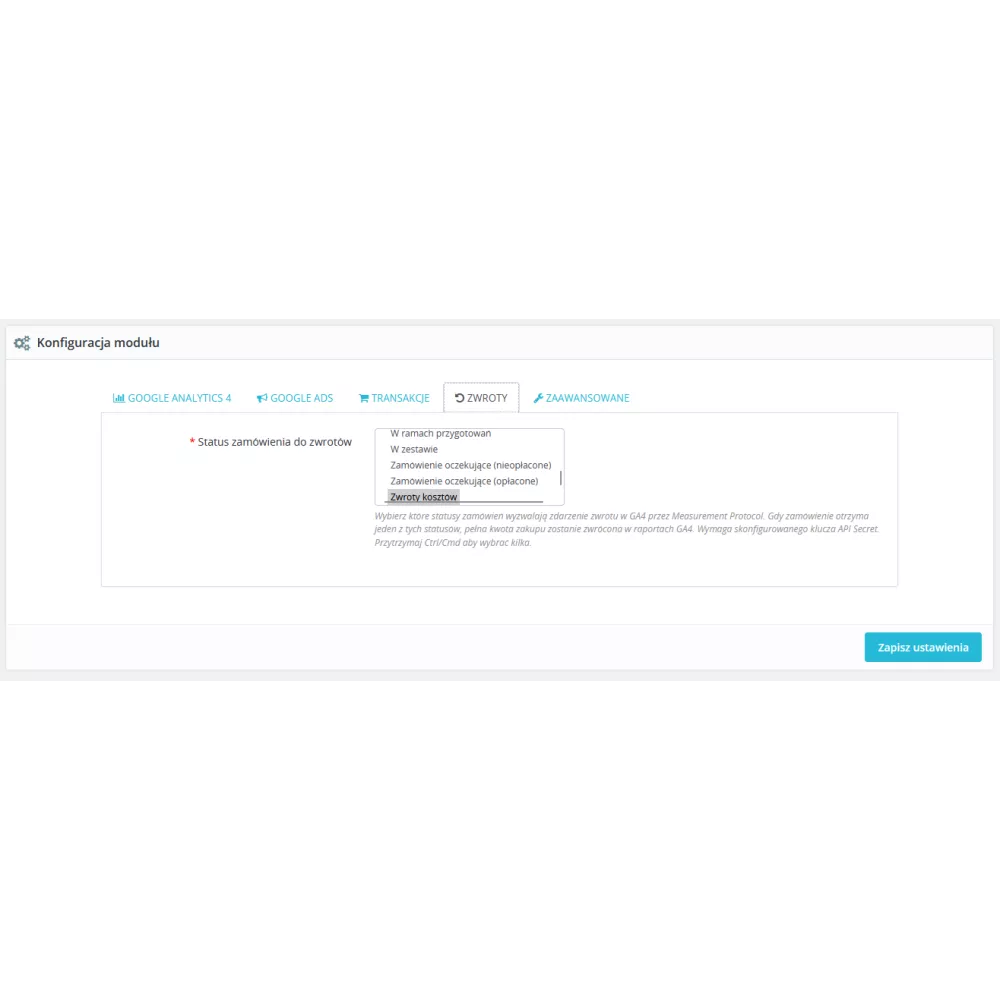
  2. For purchases and refunds, provide the Measurement Protocol API Secret and select the statuses that actually confirm payment and a full order refund in the given store.
  3. Match the item_id format to the identifier used in the catalog or product feed.
  4. Enable only the required Google Ads, User ID, and user-provided data features, after checking the settings and consents in Google tools.
  5. For testing, use debug mode and GA4 DebugView, and for financial operations check the module log. The test should be performed on the actual purchase path and the correct order status.

Module scope and important limitations

  • The module sends data to the configured Google services; it does not create or administer a GA4, Google Ads, Merchant Center account, or advertising campaigns.
  • It does not replace consent configuration or the store’s legal analysis. The store owner is responsible for the legal basis for data processing, the content of consents, and Google account settings.
  • Script blocking, lack of consent, missing saved attribution, incorrect identifiers, or Google settings may limit measurement. The module does not guarantee data completeness.
  • Sending data with the API Secret requires correct GA4 configuration. An HTTP 2xx response should be treated as confirmation of request receipt, not as proof of transaction visibility in reports.


Product Details

Prestashop 9.x support
Yes
Support for Prestashop 8.x
Yes
Prestashop 1.7.x support
Yes
Module translations
EN, EN
Free support
Yes
Free updates (1 year)
Yes
Easy Installation
Yes
Requires engine modification
No
PDGA4P-FULL

You might also like

Changelog

Release history for this product. Expand an entry to see what changed.

  • poprawiono litrówki w tłumaczeniach

  • dodano obsługę PrestaShop w wersji 9.x
  • nowy system tłumaczeń wdrożono do modułu
  • poprawiono obsługę wysyłania zdarzeń zakupu po zmianie statusu zamówienia tak by działało w każdym przypadku

FAQ

Find answers to the most common questions about this product.

Google Analytics 4 Pro adds the Google tag to the store and sends product-, cart-, checkout-, search-, and customer account-related events to Google Analytics 4. A separate part of the module sends qualifying purchases and supported refunds to the main GA4 stream via the Measurement Protocol. The module does not create a GA4 account or manage Google Ads campaigns.

Version 1.4.2 declares compatibility with PrestaShop 1.7.x, 8.x and 9.x. The bundled HTTP libraries require at least PHP 7.2.5; you must also meet the PHP requirements of your PrestaShop version. This does not imply PHP 7.0 or 7.1 support or verification of the entire version matrix. Check the module in your particular store, theme and checkout before deployment, because other modules and the page HTML and JavaScript affect browser events.

The basis is the main GA4 Measurement ID in the format G-XXXXXXXX. For server-side sending of purchases and refunds, you need to provide the Measurement Protocol API Secret and select the order statuses that actually confirm payment and a full refund. Google Ads functions require a separate AW-XXXXXXXXX identifier, and the user-provided data option also requires the appropriate settings and consents on the Google side. In version 1.4.2, server-side purchase and refund also require an active PD Cookie Pro in live mode with Consent Mode v2, the current revision of analytical consent, and preserved client context.

The module code lists 15 named e-commerce and account events: view_item, view_item_list, select_item, add_to_cart, remove_from_cart, view_cart, begin_checkout, add_shipping_info, add_payment_info, purchase, refund, search, view_search_results, sign_up, and login. The automatic page_view can be enabled or disabled independently. Therefore, the 15 listed events themselves should not be referred to as “16 e-commerce events.”

On supported product lists, the module sends view_item_list, and after clicking a product, select_item. On the product page, it sends view_item, also after changing the variant in the supported interface. For events, it may pass the product ID, name, variant, brand, categories, price, discount, and position on the list.

The module supports add_to_cart, remove_from_cart and view_cart, and upon entering a supported order process, begin_checkout. The checkout templates also pass add_shipping_info and add_payment_info. The events contain cart items, quantities, prices, currency and the available coupon, if the data is available in PrestaShop.

Yes. The module's list of functions includes the search, view_search_results, sign_up, and login events. For search, the code retrieves the search phrase and prepares the available product results; it is worth checking how the specific event works in DebugView on the theme being used.

Since version 1.4, the purchase is sent from the server only after the status selected in the configuration as confirming payment or cash on delivery collection has been saved in the order history. Simply clicking the payment button and the confirmation page itself are not considered payment confirmation. An additional attempt on the confirmation page can only process an unsent order that meets the same conditions.

Version 1.4.2 needs the primary Measurement ID, API Secret, a selected purchase status, saved attribution with client_id and session_id, and current analytics consent. A full refund triggered by a status needs separate refund status configuration. The consent record comes from PD Cookie Pro active in the store, in live mode with Consent Mode v2 and the current consent revision; another CMP does not automatically meet this requirement. The ad_user_data consent is checked separately for user data. A purchase is not sent for paid gift wrapping, more than 200 product lines or an empty reference/EAN when that item_id format is selected. Amounts and items must also pass validation.

No. In the module log, the sent status means that the Measurement Protocol endpoint returned an HTTP 2xx response, i.e. it accepted the request. This is not confirmation that the event was processed or that it is visible in Google Analytics reports. Receipt must be verified in the appropriate Google service and stream.

There is no such guarantee. Server-side purchase dispatch requires previously stored attribution, including session data, as well as current analytics consent. Script blocking, lack of consent, incorrect configuration, or limitations on Google's side may prevent or limit measurement.

For a full refund, the administrator selects separate statuses that trigger the refund. The module requires a prior purchase recorded as sent in its log and a prior paid status. Reapplying the same status does not send another full refund, and only the amount remaining after previous refunds is settled.

The module supports qualifying new PrestaShop credit slips with saved items, including refunds of part of a product quantity, if a purchase was previously recorded as sent and a qualifying purchase status exists. Not every credit slip is supported: records with the technical flag partial != 0 and types other than 0 or 2 are rejected; type 2 is supported only for an unambiguous shipping-only refund. Ambiguous arbitrary amounts and inconsistent items are also rejected. A partial quantity refund is not the same as the partial flag. Historical credit slips from before this handling was enabled are not recreated.

There is no automatic historical backfill. The update records cutoffs for existing orders, status history and credit slips, and does not reset preserved sending flags. For an older order, the earliest qualifying purchase status entry must be newer than the stored history cutoff; a preserved cart record with order_send=0 and no previous send are also required. Setting a status again is not enough if the earlier qualifying entry predates that cutoff.

There is no automatic queue, CRON job or button forcing a retry of a financial operation. An unsent pending operation may be attempted again after another appropriate trigger, such as a qualifying status or the confirmation page, if all conditions are met. The sending state after an interruption and unknown after an uncertain transport result block automatic retries to reduce the risk of duplicates. They are not treated like unsent pending operations.

The module controls its own financial operations through a persistent log with one operation key and a per-order concurrency lock. Purchases and refunds have their amounts, currency and items recorded, and refunds are limited to the value of the previously sent purchase. An uncertain state is not automatically treated as unsent. These mechanisms do not remove duplicate events sent independently by GTM or other modules.

Yes. The configuration includes the main Measurement ID and an optional second Measurement ID. The browser tag initializes both configured identifiers, which can be used, for example, for parallel measurement in a second GA4 service. Server-side purchase and refund are sent to the main stream used for attribution.

The available options are: product ID, product ID with combination ID separated by a hyphen, product ID with combination ID separated by an underscore, product reference, and EAN. The reference or EAN variant uses the combination value if available. The selected format should correspond to the identifier used in the catalog or product feed.

In supported browser events, the module can send the applied cart rule's name and code as coupon information. In version 1.4.2, the server-side purchase sent via Measurement Protocol contains neither the coupon field nor coupon codes on its items. The module does not create discounts, cart rules or promotional codes in PrestaShop.

When User ID is enabled, the module sends the logged-in customer's technical identifier in the browser and the order customer's identifier in server-side events. Version 1.4.2 requires analytics_storage consent from PD Cookie Pro active in that store, in live mode with Consent Mode v2 and a matching current consent revision. User ID is independent of user-provided data, is not an email hash and does not replace contact details.

When the appropriate option is enabled, the module can use the email saved in PrestaShop, and optionally the phone number and address details. A valid email alone is sufficient; the phone number and address are additional data if they meet the validation conditions. The module does not read unsaved fields entered in the form or email addresses from the page content.

Yes. Email, phone number, first and last name are normalized and SHA-256 hashed before being transmitted. For Measurement Protocol dispatch, street hashing is also supported, and the postal code, country, and optional city are formatted as required by Google. Data and hashes are not added to the transaction log or the module configuration.

User-provided data requires current ad_user_data consent from PD Cookie Pro active in that store, in live mode with Consent Mode v2 and a matching current consent revision. User ID and server-side Measurement Protocol sending require analytics_storage consent. Withdrawing analytics_storage clears User ID in the tag, while withdrawing ad_user_data clears user_data; this does not delete data already sent to Google. Before sending a financial event, the module reads the saved consent state and revision again rather than relying on payment callback cookies.

No. The store owner must enable the collection of user-provided data in the GA4 service and in the settings of its Google tag. Enhanced conversions require separate configuration on the Google Ads side. The module does not have access to the Google account settings and cannot enable them automatically.

After enabling the function and configuring the Google Ads Conversion ID, the module sends remarketing data to the tag on the store pages: product identifiers, page type, and cart value. This data can be used in the configuration of Google Ads dynamic remarketing. The module does not create campaigns, audiences, or ads in the Google Ads panel.

In the current purchase mode, after the payment status, the purchase and refund events are sent to GA4 via the Measurement Protocol. In this mode, the module code does not send a direct browser-based Google Ads purchase conversion. The Google Ads ID is used, among other things, to configure the tag and for dynamic remarketing.

No. In version 1.4.2, the second Measurement ID is used to run the browser tag in parallel. Server-side purchase and refund are sent through Measurement Protocol only to the primary stream associated with the saved attribution. The API Secret must belong to that primary stream. Configuring a second Measurement ID does not duplicate server-side purchases and refunds in a second GA4 property.

Debug mode logs browser events to the console and sets debug_mode for GA4 DebugView. In version 1.4.2, the switch does not add this flag to server-side purchase and refund and does not enable the Measurement Protocol validation endpoint. Financial events must be checked separately in the module log and the correct GA4 property and reports; an HTTP 2xx response does not confirm event processing. Disable debug mode after diagnostics.

The status panel shows whether GA4, Google Ads, and Measurement Protocol have been configured, whether debug mode is active, and the last purchase with an HTTP 2xx response. The financial log is read-only and provides filtering, sorting, and pagination of purchase and refund records. It does not expose API secrets, browser identifiers, or raw payloads.

The module code supports the standard order page and the paths used by popular one-page checkout solutions, and the configuration description indicates, among others, TheCheckout, SuperCheckout, and STEasyCheckout. Since browser events depend on the actual checkout HTML and JavaScript, after installation you should test the entire cart–payment–order status path in the theme in use.

Yes. The configuration includes an automatic page_view switch. It can be disabled when page views are already handled by Google Tag Manager or another tool, so as not to create duplicate page view measurement. Disabling page_view does not remove the module's other event functions.

No. The module technically transmits the configured data to Google services, but it does not replace consent implementation, legal analysis, or the configuration of GA4 and Google Ads accounts. The store owner is responsible for the legal basis for data processing, the content of consents, and the settings of Google services. Data completeness and campaign results also depend on user consents, the browser, the theme, the checkout, and Google systems.

Reviews (4)

4 Reviews

Brak obsługi zdarzenia remove_from_cart
Moduł nie obsługuje zdarzenia remove_from_cart. Czyli po klikmnięciu ikonki kosza w koszyku i usunięciu produktu z koszyka, nie wywołuje się zdarzenie remove_from_cart. Tak samo po kliknięciu w przycisk minus w polu ilości produktów. W ogóle brak obsługi tego zdarzenia w kodzie. Poza tym wszystko działa.
By Marek on 05/7/2024

Godny polecenia
Bardzo fajnie działa, oby więcej takich modułów !!!
By on 10/27/2022

Polecamy
Moduł spełnił nasze oczekiwania co do nowego Analitycs 4.0..
By on 10/27/2022

Polecam
Produkt spełnia oczekiwania i posiada konkurencyjną cenę. 5/5
By Łukasz Lewczuk on 10/27/2022