




• New
Google Tag Manager in PrestaShop – DataLayer Pro | PrestaDev

Google Tag Manager Pro module for PrestaShop

Module version: 2.3.4

PrestaShop compatibility: 1.7.x 8.x 9.x

Module file updated: 04/13/2026 22:29:34

Product data updated: 04/13/2026 22:30:01


PD Google Tag Manager Pro is an advanced PrestaShop module for implementing Google Tag Manager with full e-commerce DataLayer, GA4 integration, and support for Google Consent Mode v2. The module automatically embeds the GTM code in the head section and in the noscript part after the opening body tag, can work with a second GTM container, and also supports a server-side GTM address. On the storefront, it sends standard GA4 events for the purchase journey as well as additional supporting events such as login, sign_up, search, search_no_results, page_error, checkout_progress, scroll_depth, time_on_page, and cart_abandonment. In the payloads, it passes product data, categories, variants, prices, discounts, availability, GTIN/MPN identifiers, and on the product page also the rating and number of reviews, if product comments are available in the store. The module also supports Enhanced Conversions, Google Ads Dynamic Remarketing, supporting variables for Meta Pixel, TikTok, and Pinterest, while refund events are queued and sent to GA4 without generating a back-office page view. In the administration panel, you get per-store configuration, GTM container export, a signed debug preview link, and a log of purchase and refund events. This is a solution for stores that want to run precise marketing and analytics measurement in PrestaShop without building the entire data layer from scratch.

zł 246.00
zł 200.00no tax
Price history:

Description

Module features

  • Automatic implementation of Google Tag Manager in PrestaShop, including the head and noscript code.
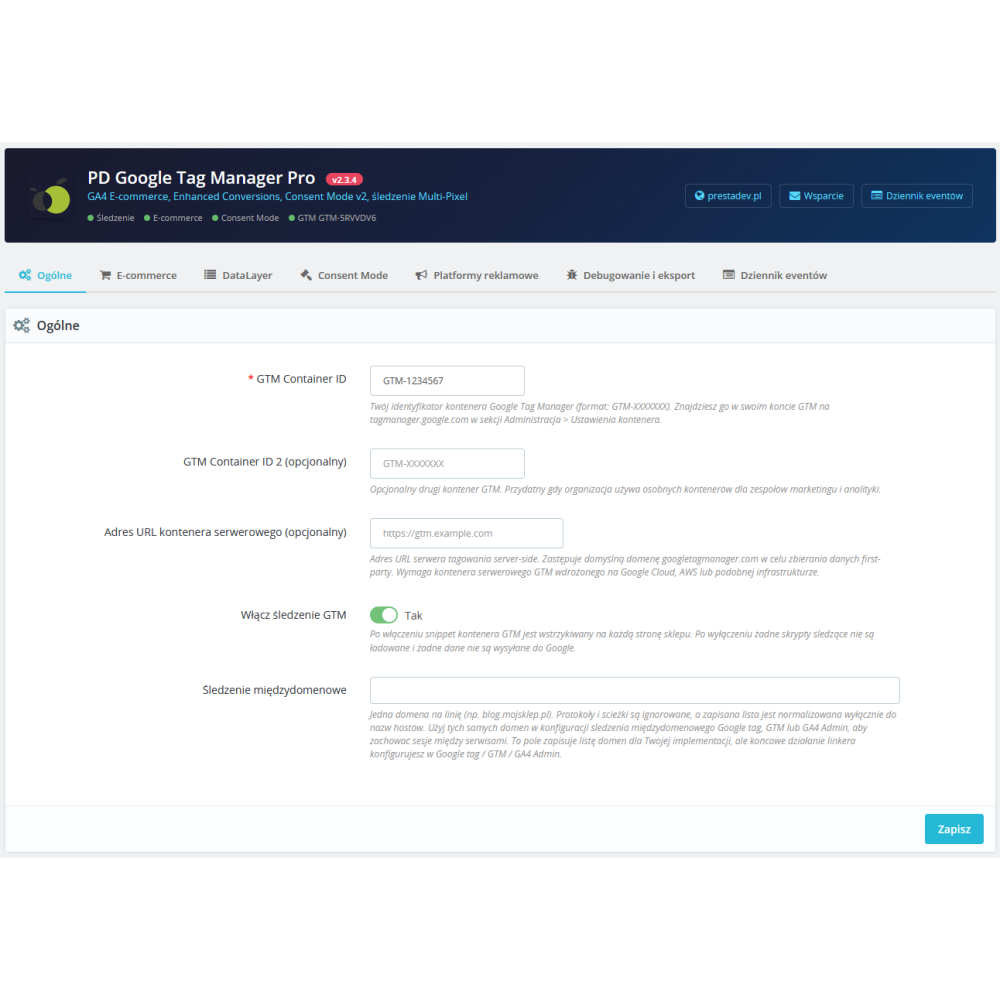
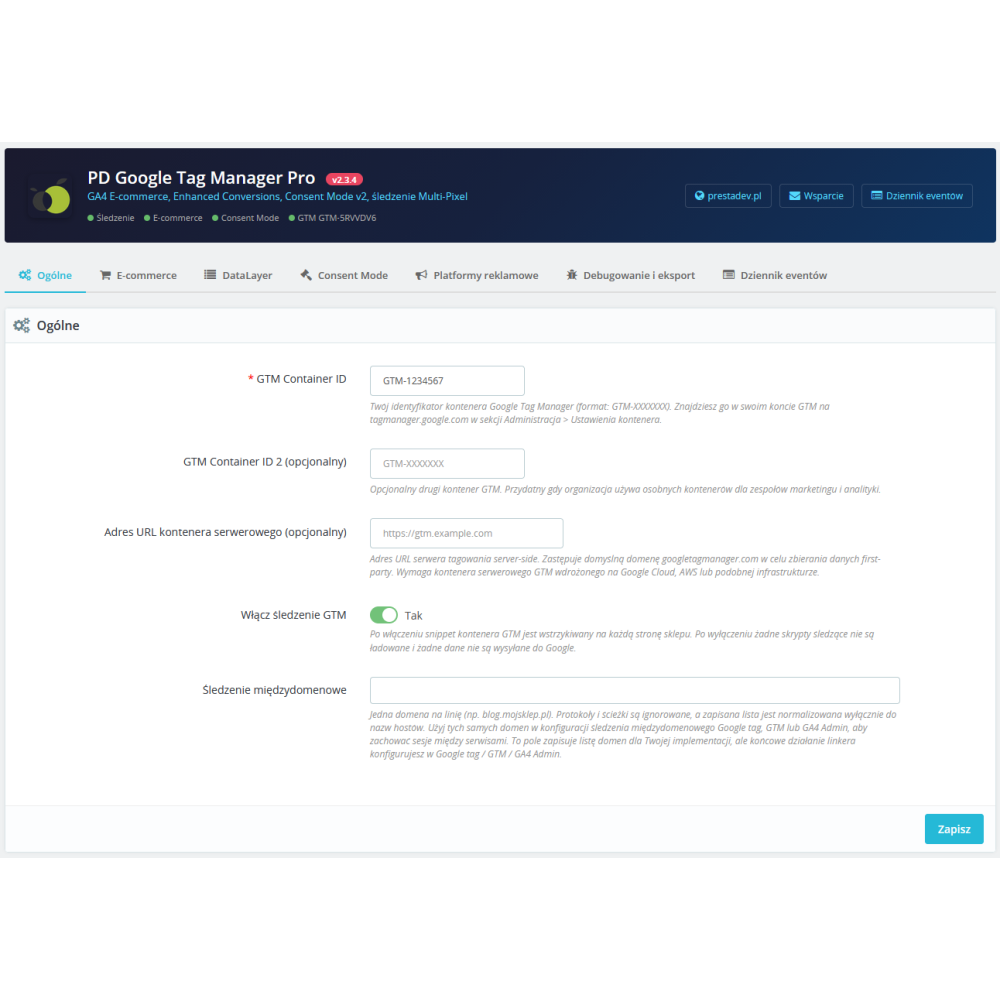
  • Support for one or two GTM containers within a single store installation.
  • Ability to specify a server-side GTM URL for first-party data collection.
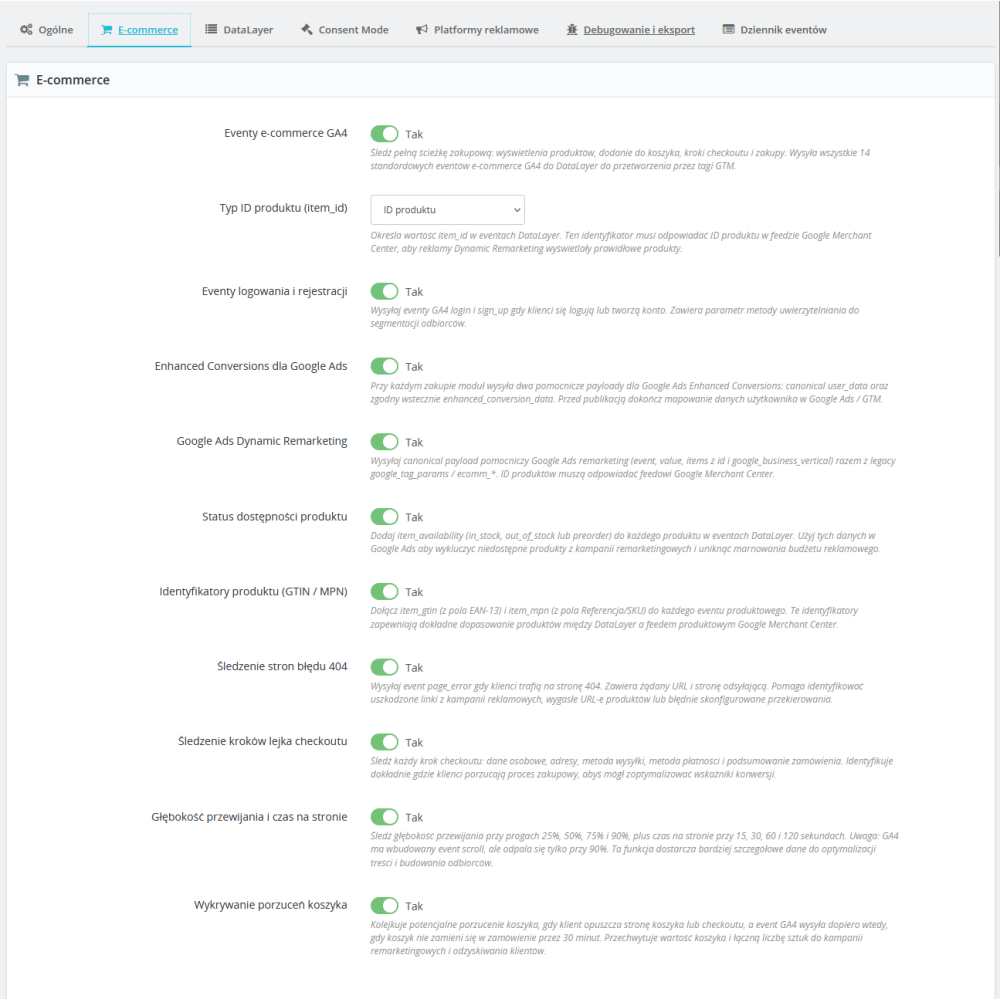
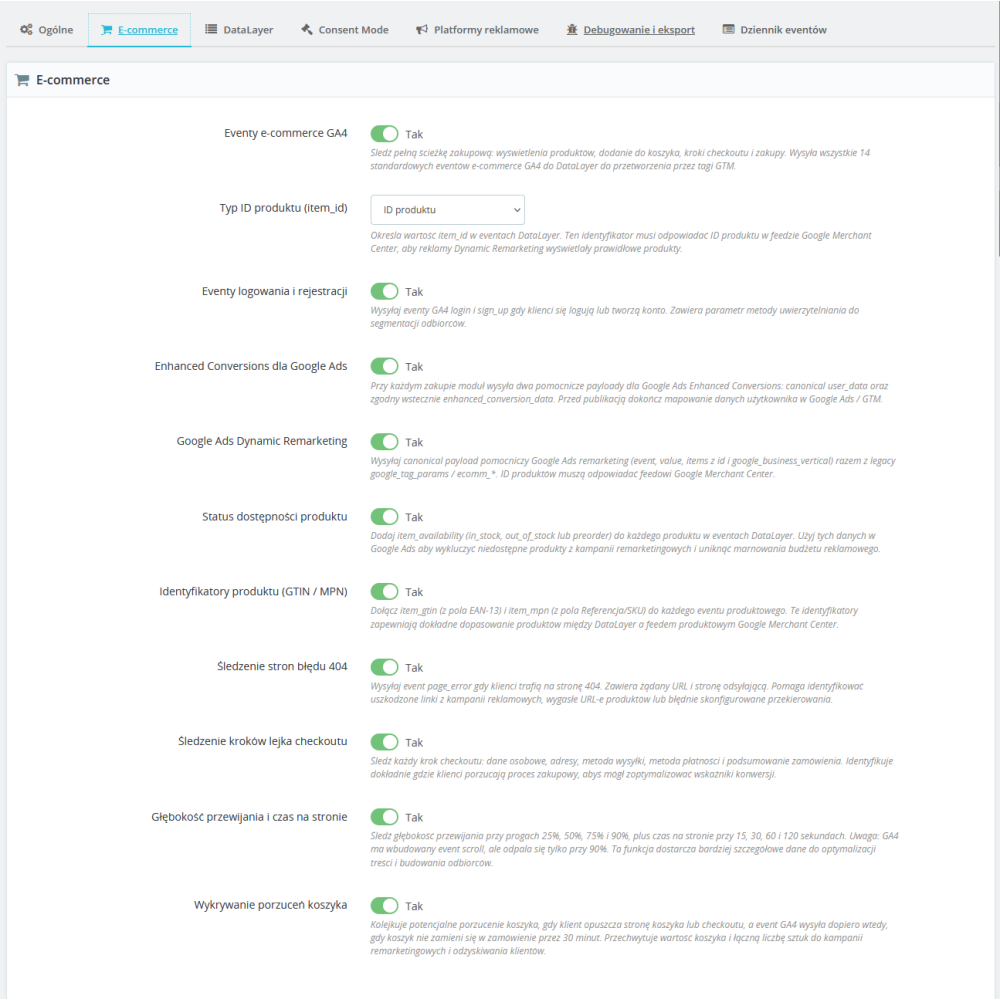
  • Support for 14 standard GA4 e-commerce events, including view_item, add_to_cart, begin_checkout, purchase, and refund.
  • Additional events supporting user behavior analysis: search, search_no_results, page_error, checkout_progress, scroll_depth, time_on_page, and cart_abandonment.
  • Configurable item_id: product ID, ID with variant, SKU, or EAN13, to match data with the Google Merchant Center feed.
  • Extended product data in the DataLayer: brand, categories, variant, price, discount, availability, GTIN, and MPN.
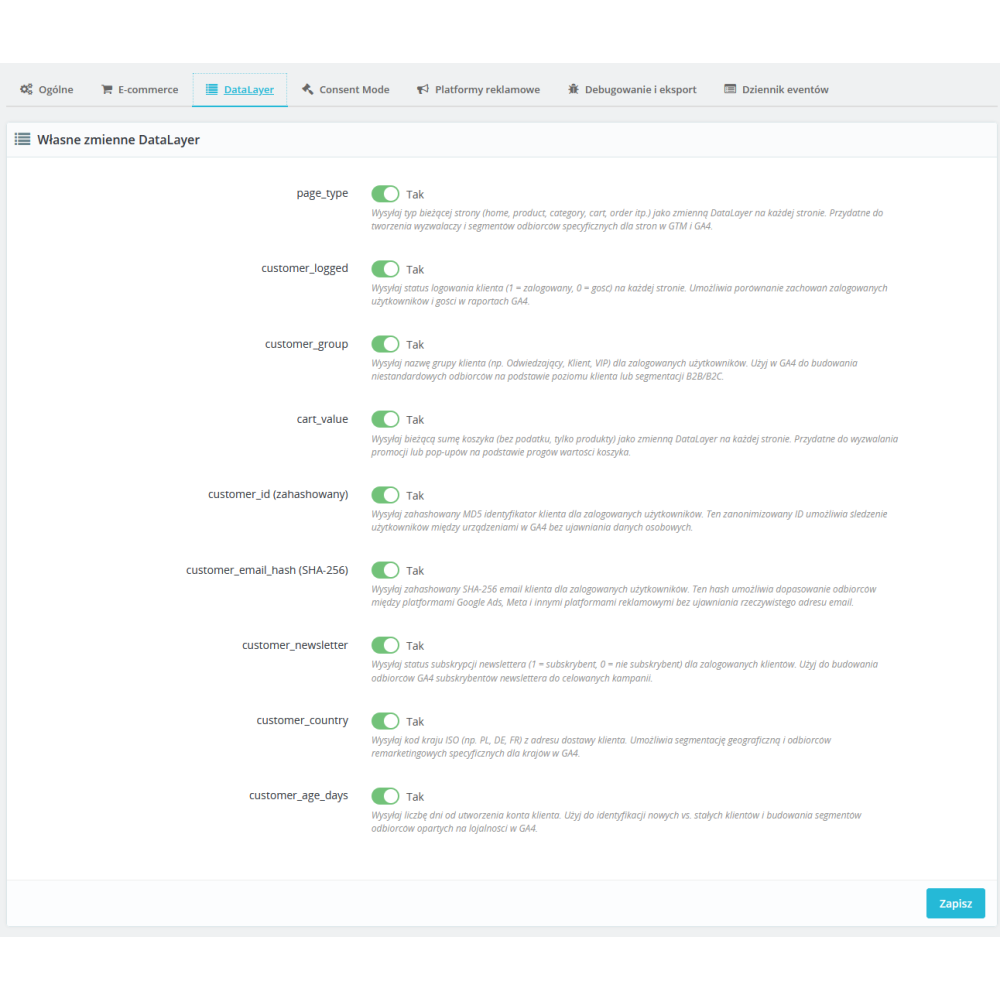
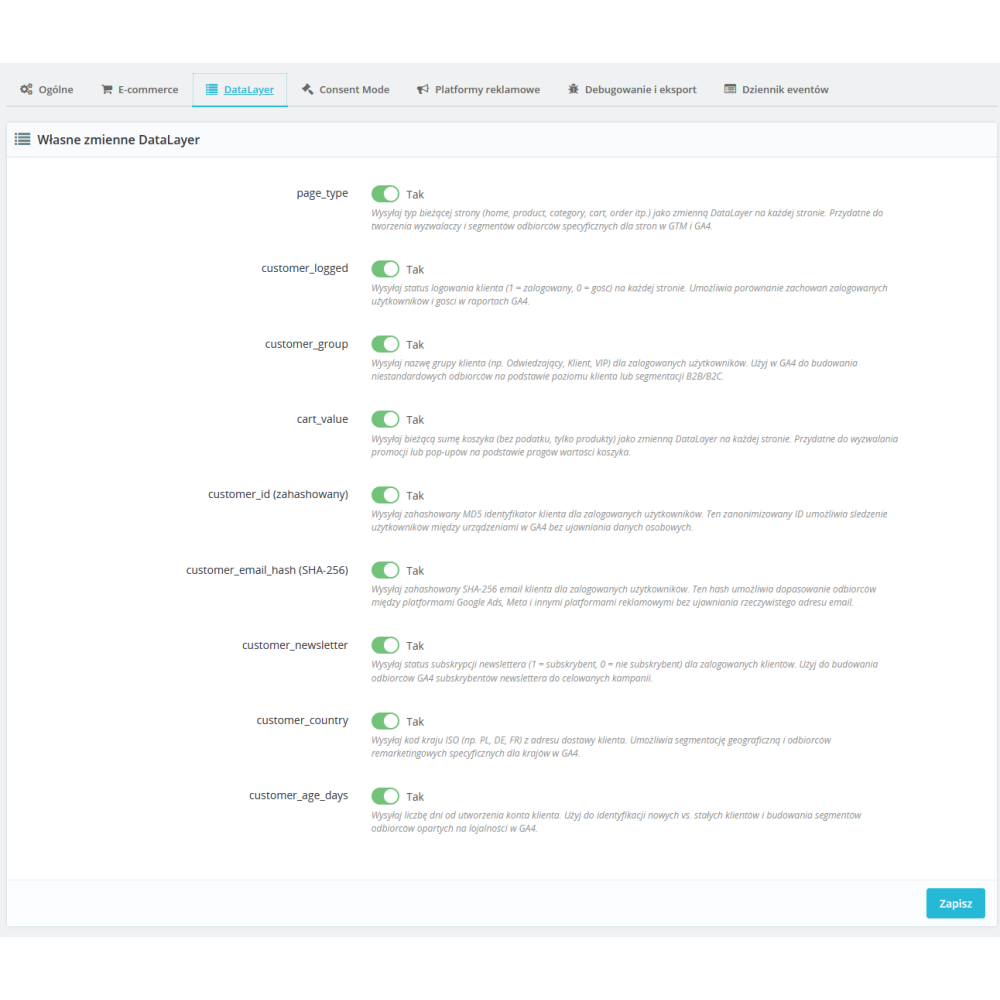
  • Custom DataLayer variables for segmentation, including page_type, customer_logged, customer_group, cart_value, hashed customer_id, email hash, country, newsletter, and customer account age.
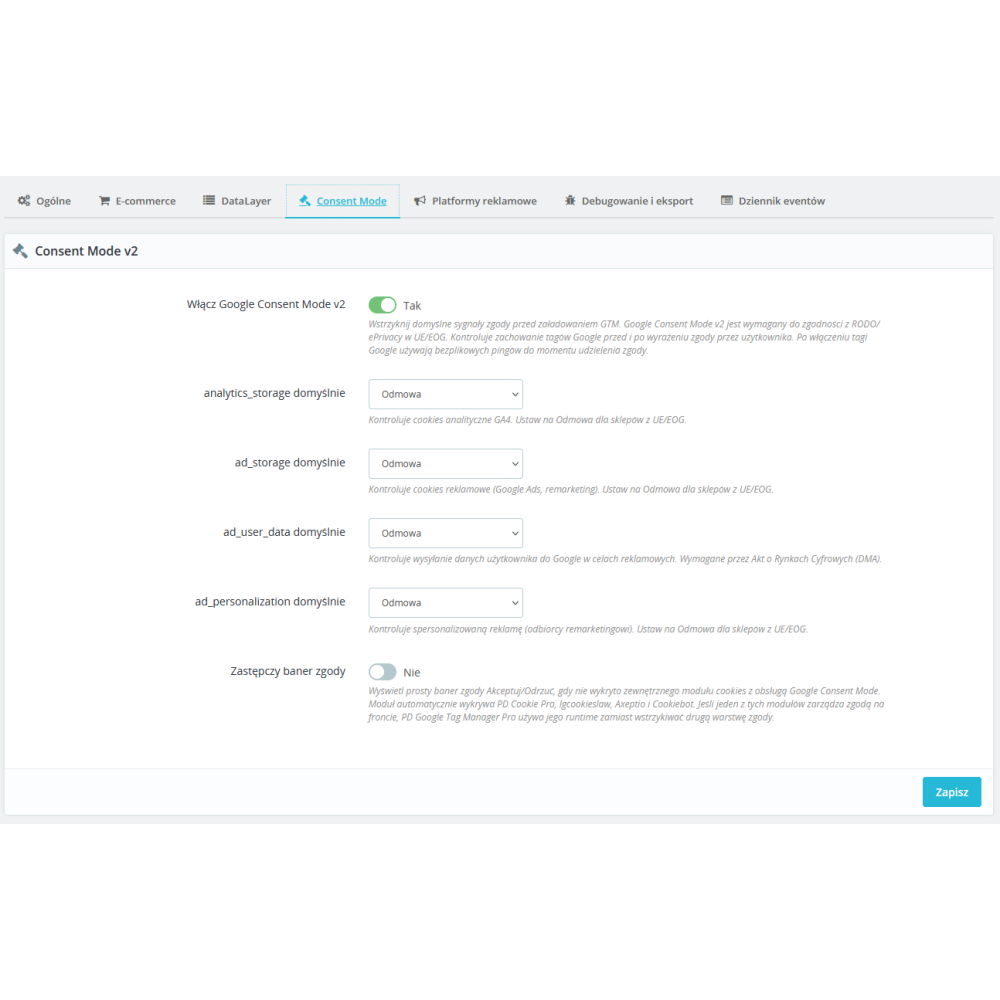
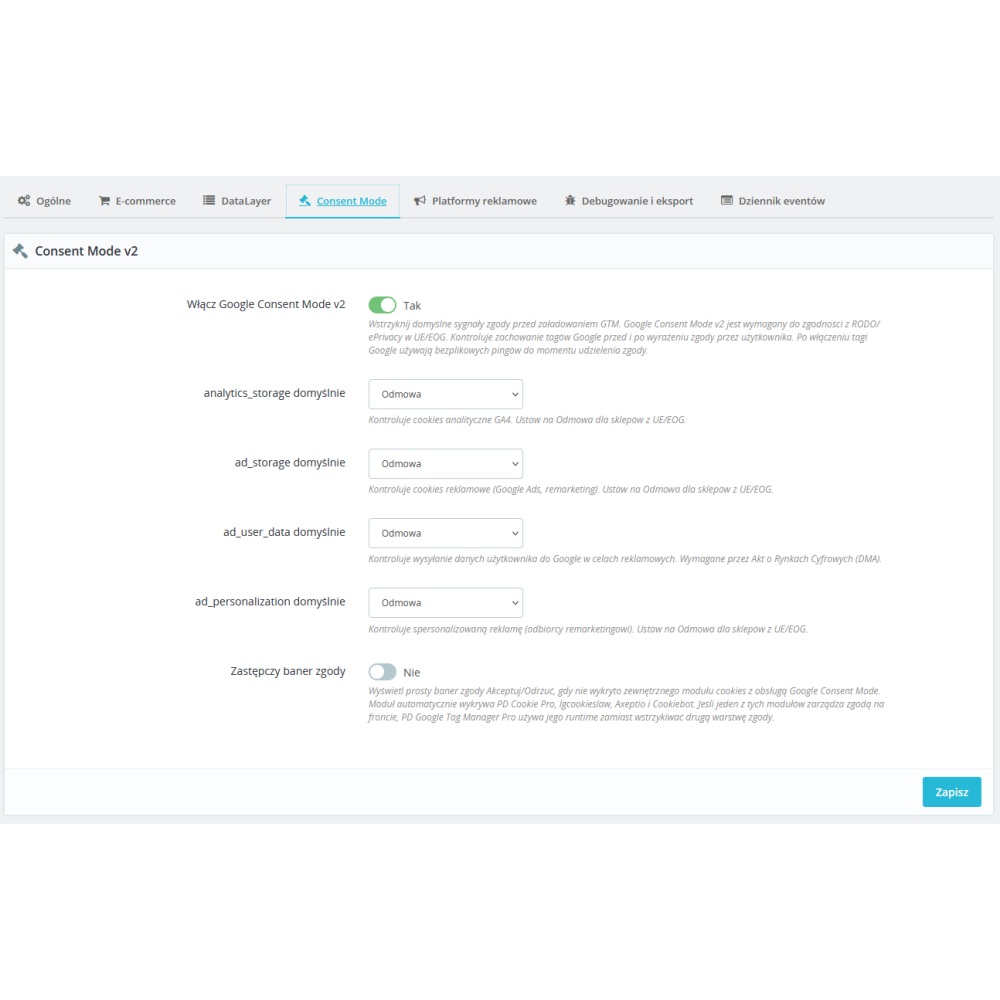
  • Built-in Google Consent Mode v2 with granular default signals for analytics_storage, ad_storage, ad_user_data, and ad_personalization.
  • Detection of popular cookie consent solutions, including PD Cookie Pro, LGCookiesLaw, Axeptio, and Cookiebot, as well as a simple fallback banner when the external runtime is unavailable.
  • Export of a ready-to-use GTM container with GA4 tags, triggers, and helper variables for Google Ads.
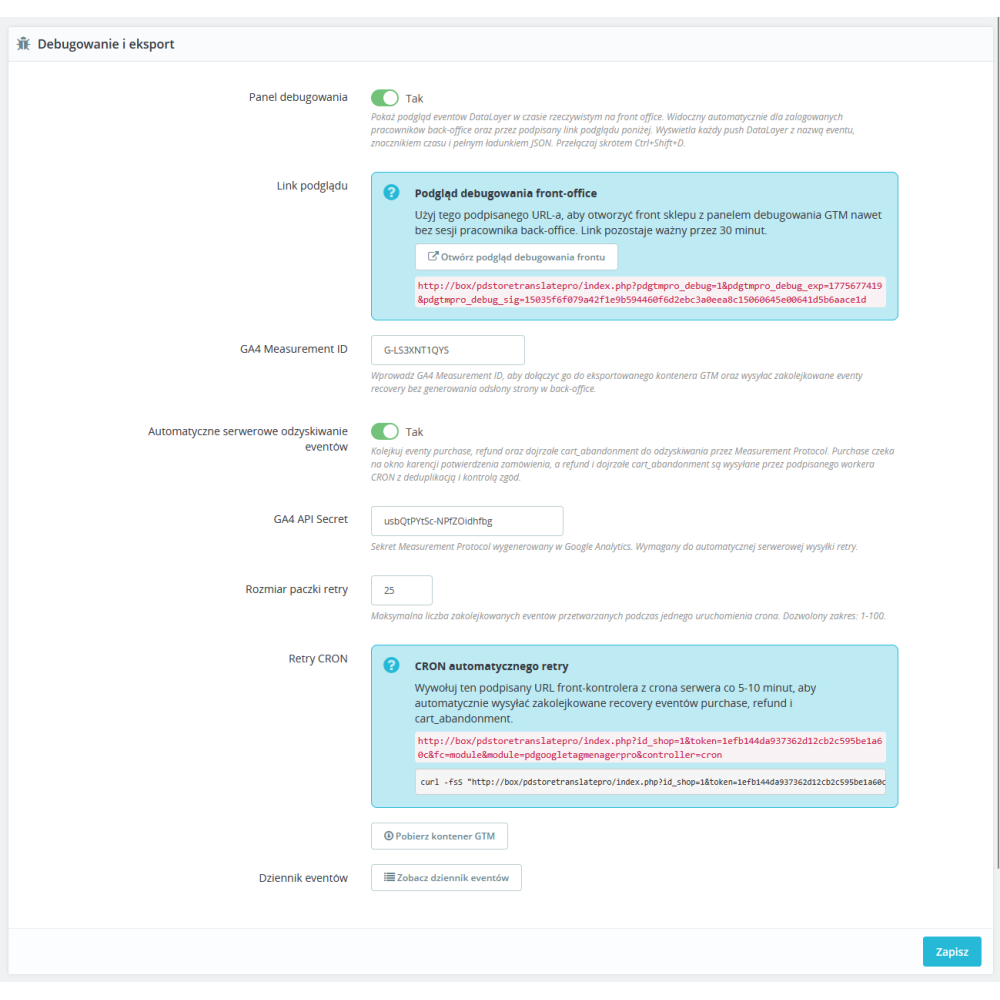
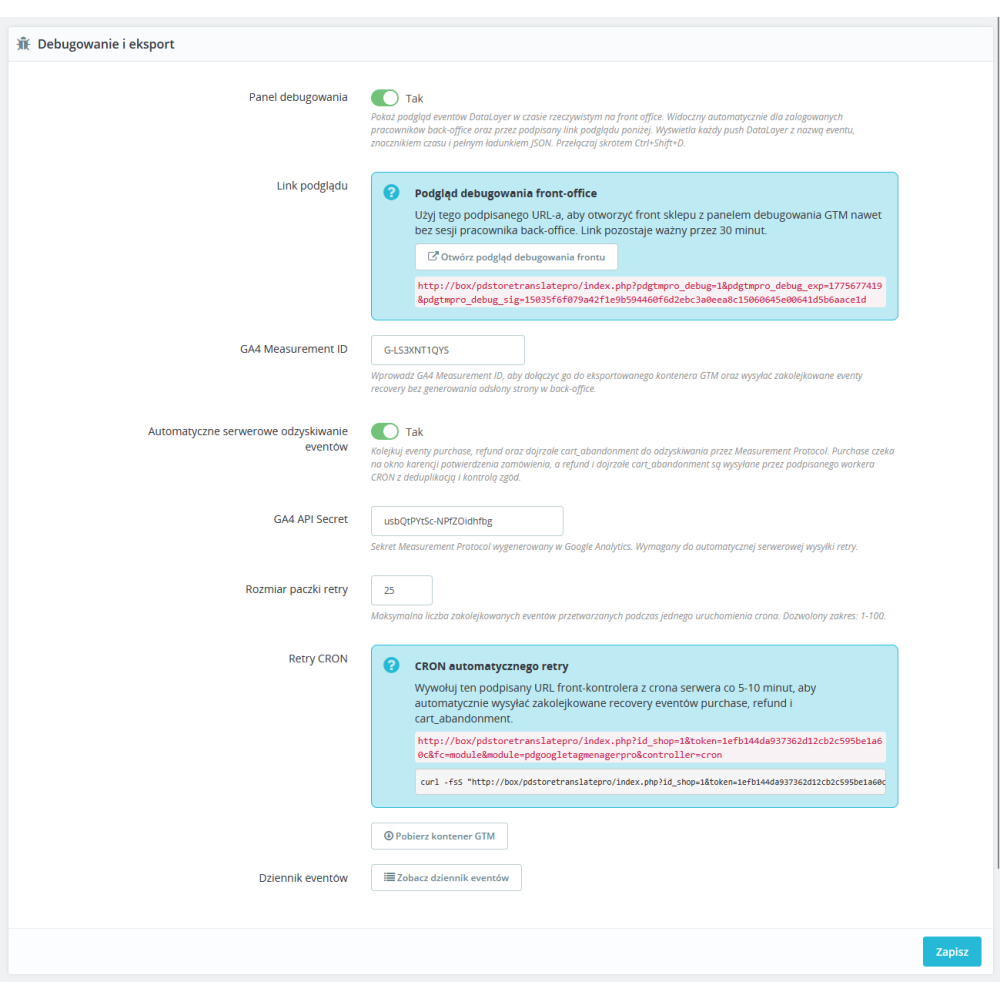
  • Built-in debug panel and a signed link to preview the front office with active debug valid for 6 hours.

Benefits for your store

  • Faster analytics implementation, because the module builds the data layer and container export without manually assembling everything in GTM from scratch.
  • Better marketing data quality thanks to consistent e-commerce, checkout, promotion, remarketing, and refund events.
  • Greater compliance with Google requirements thanks to support for Consent Mode v2, Enhanced Conversions, and Dynamic Remarketing.
  • Easier diagnostics thanks to the event log, debug panel, and signed front-office preview.
  • Greater implementation flexibility through support for a second GTM container, server-side GTM, and cross-domain tracking.
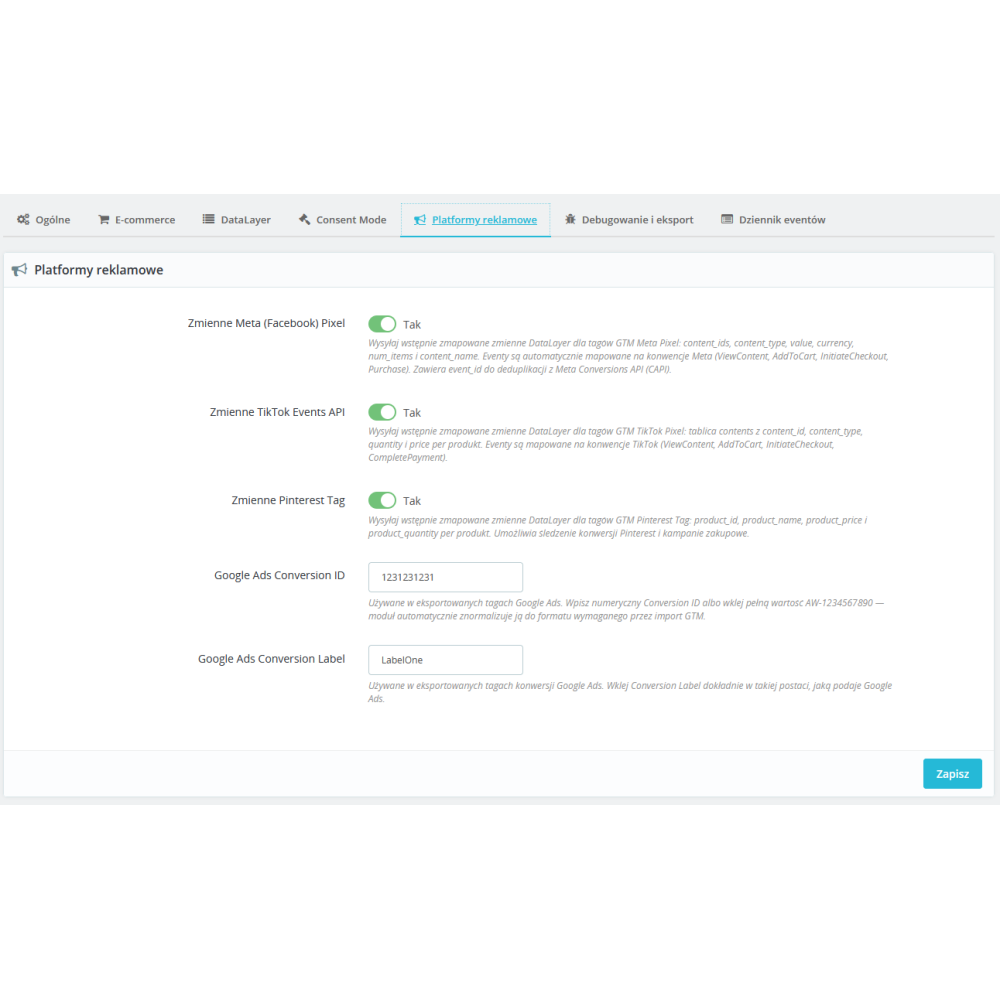
  • Better readiness for advertising campaigns, because the module provides helpers for Google Ads, Meta, TikTok, and Pinterest.
  • Safe operation in multistore, because key runtime, consent, and export settings are stored per store.
  • Refund support — a refund can be queued after a credit slip is created. Optional server-side sending via Measurement Protocol requires automation configuration, Measurement ID, API Secret, preserved customer context, consent, and a CRON task.

Module functionalities

  • Tracking of product pages, listings, cart, checkout, order confirmation, and 404 error pages.
  • Support for add_shipping_info and add_payment_info events via AJAX based on the actual delivery and payment selection.
  • Support for view_promotion and select_promotion for promotions, including a built-in scenario for the price promotions page and custom data-pdgtmpro-promotion attributes.
  • Recording of login and sign_up events after customer authentication and registration.
  • Support for add_to_wishlist based on click or a fallback hook for the wishlist module.
  • Building remarketing payloads with google_tag_params and canonical helpers pdgtmpro_ads_event, pdgtmpro_ads_value, and pdgtmpro_ads_items.
  • Passing user_data and enhanced_conversion_data payloads for Enhanced Conversions on purchase.
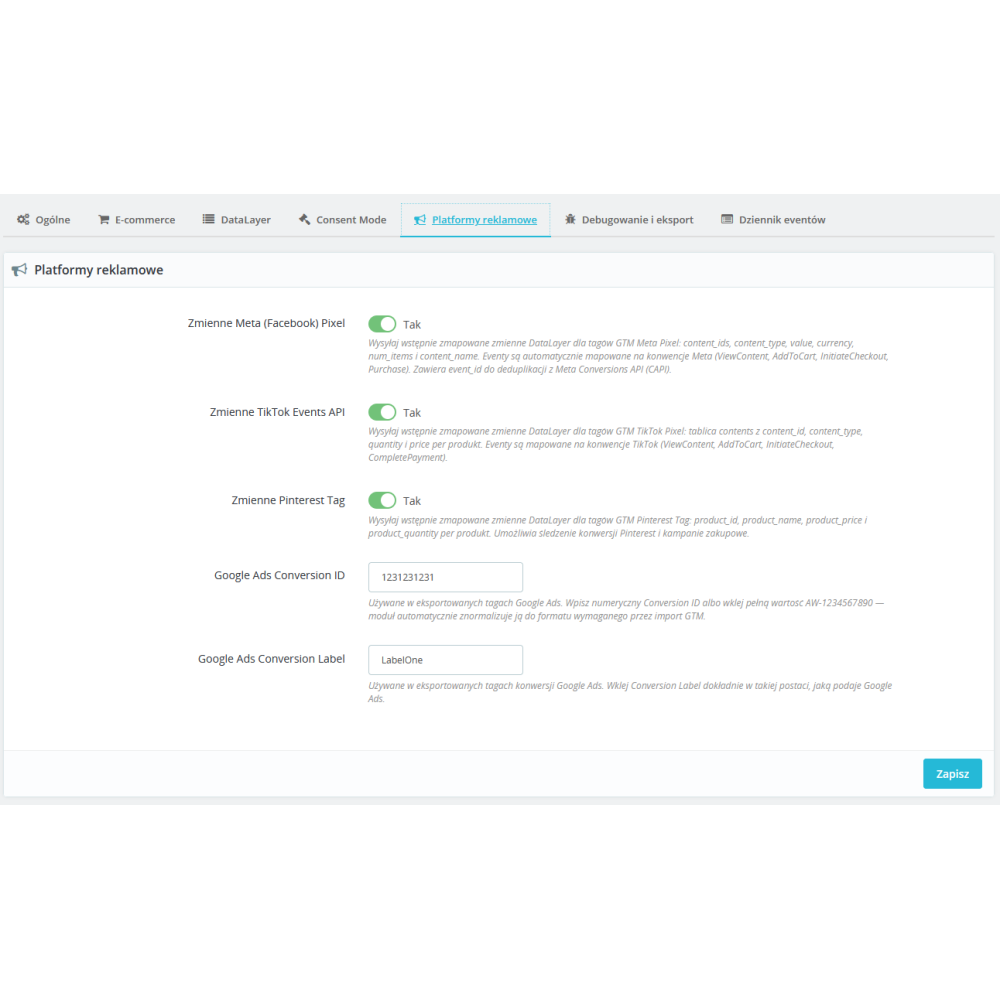
  • Generating helper DataLayer variables for Meta Pixel, TikTok Events API, and Pinterest Tag.
  • Normalization of the domain list for cross-domain tracking and storing it in the module configuration.
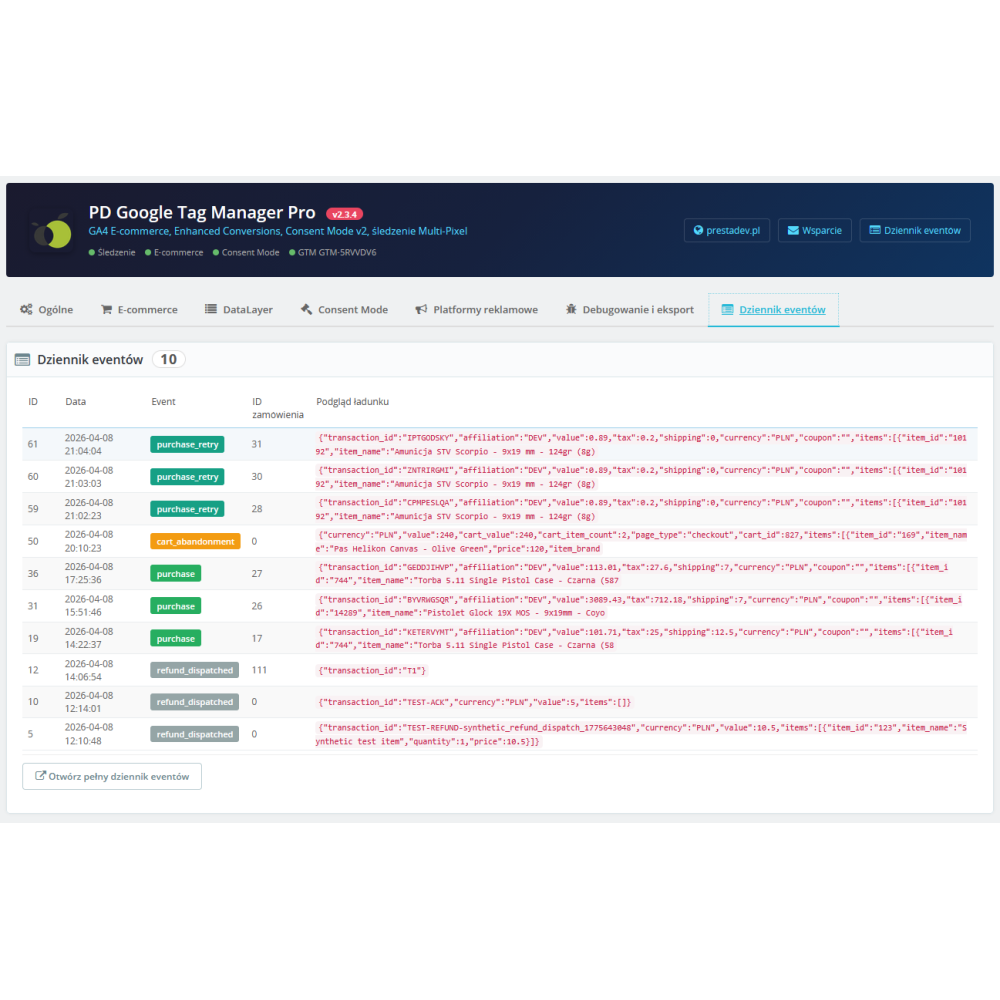
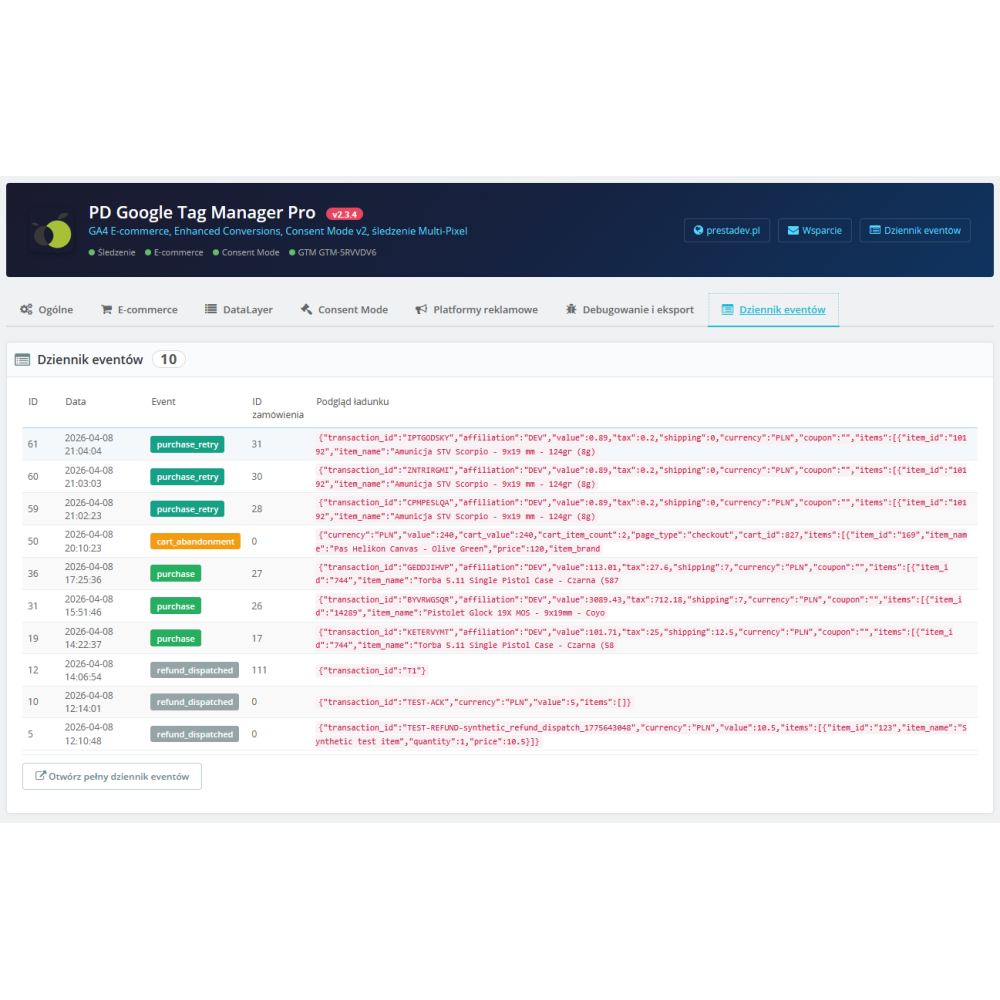
  • Maintaining a purchase and refund event log in a dedicated table and automatically cleaning entries older than 90 days.


Link to the module demo:

Demo admin panel:
https://moduly-prestashop.eu/pdgoogletagmenagerpro/admin-dev

Demo front-end panel:
https://moduly-prestashop.eu/pdgoogletagmenagerpro

What needs to be configured after installing GTM Pro 2.3.4?

The exported container requires import, verification, and publication in GTM. Optional server-side purchase recovery and refund automation require enabling the appropriate module options, Measurement ID, API Secret, saved customer context and consent, as well as a CRON task. A custom gtm.js download URL does not automatically launch the server-side GTM infrastructure.

In this version, the browser-side purchase is generated on order confirmation; it does not use the same paid-status definition as GA4 Pro. See the comparison of GA4 architecture via module and GTM. If you only need container embedding, check the older basic GTM module.

You can find the license, trial copy, and update terms in §7 of the store Terms and Conditions.

After importing the container, check publication and events

The export from the module is material for GTM configuration. Select the correct workspace, check the tags and rules, and then publish the verified version. Compare this scope with basic GTM embedding and direct GA4 Pro integration.

What should be checked before launch?

  • In preview mode, check the data for the product, combination, and purchase process, as well as the absence of a second emitter for the same events.
  • Separate browser-side purchase from optional server-side recovery. Measurement Protocol and CRON requirements apply to a specific path.
  • Changing the gtm.js download URL does not mean the GTM server is launched automatically. The architecture must match the actual configuration.

Product Details

Prestashop 9.x support
Yes
Support for Prestashop 8.x
Yes
Prestashop 1.7.x support
Yes
Free support
Yes
Free updates (1 year)
Yes
Easy Installation
Yes
PDGTMPRO

Changelog

Release history for this product. Expand an entry to see what changed.

  • Checkout funnel step tracking — detailed micro-steps (personal info, addresses, delivery, payment, order review) with MutationObserver
  • User engagement tracking — scroll depth (25/50/75/90%) with IntersectionObserver and time on page (15s/30s/60s/120s)
  • Cart abandonment tracking — fires cart_abandonment event when user leaves cart/checkout with items (visibilitychange + pagehide)
  • Customer segmentation DataLayer variables: customer_email_hash (SHA256), customer_newsletter, customer_country, customer_age_days
  • Admin Event Log Viewer — hidden AdminTab with HelperList showing purchase/refund event history with JSON payload viewer
  • Container Export v2 — updated export with all 14 GA4 events + additional DataLayer variables (affiliation, tax, coupon, item_list, shipping_tier, payment_type, promotion)
  • Granular Consent Mode v2 now uses per-signal defaults with wait_for_update:500
  • Configuration switches for checkout steps, engagement tracking, and cart abandonment in E-commerce tab
  • Configuration switches for customer segmentation in Custom DataLayer tab
  • Link to Event Log Viewer in Debug & Export tab

FAQ

Find answers to the most common questions about this product.

The module is used to implement Google Tag Manager in a PrestaShop store together with an advanced DataLayer layer for e-commerce. It embeds the GTM code in the head section and as a noscript immediately after the opening body tag, and then sends purchase events, product data, consent signals, and additional analytical events for use in GTM, GA4, and ads.

The module supports 14 standard GA4 e-commerce events: view_item, view_item_list, select_item, add_to_cart, remove_from_cart, add_to_wishlist, view_cart, begin_checkout, add_shipping_info, add_payment_info, purchase, refund, view_promotion, and select_promotion. Some of them are triggered on the PHP side, while others are triggered via JavaScript and AJAX based on the customer's actual actions in the store.

In addition to standard e-commerce, the module also sends search, search_no_results, page_error for 404 pages, login, sign_up, checkout_progress, scroll_depth, time_on_page, and cart_abandonment. This allows you to analyse not only sales, but also search, user behaviour, and points where traffic drops off.

Yes. In the configuration, you can provide the primary GTM Container ID, an optional second GTM container, and the server-side GTM address. The second container is useful, for example, when the marketing and analytics teams use separate containers, and the server-side URL allows you to replace the default googletagmanager.com domain with your own endpoint.

The module can send the default Google Consent Mode v2 signals even before GTM is loaded. You configure the values for analytics_storage, ad_storage, ad_user_data, and ad_personalization separately. If the store does not have an external runtime consent solution, the module can display a simple Accept/Reject banner and update the consent signals accordingly.

The module code detects and can use the consent runtime for pdcookiepro, lgcookieslaw, axeptiocookies, and cookiebotconsent. For PD Cookie Pro, the module does not add a second consent layer, but only respects the existing runtime. When no compatible module is available, it can launch its own fallback consent banner.

The module passes, among others, item_id, item_name, price, discount, item_brand, up to five category levels, item_variant and quantity. Optionally, it can also add item_availability, item_gtin and item_mpn. On the product page, it also retrieves item_rating and item_review_count if a product comments table exists in the database and ratings are available for the product.

Yes. The module allows you to choose what the item_id should be: product ID, product ID with combination ID in two separator variants, SKU reference, or EAN13. This is important for Dynamic Remarketing, because the identifier in the DataLayer should correspond to the Product ID in the Google Merchant Center feed.

Yes. When purchasing, the module can push user_data and enhanced_conversion_data payloads to the DataLayer for Enhanced Conversions, as well as remarketing helpers for Google Ads. Additionally, it maintains compatibility with the legacy google_tag_params and its own variables pdgtmpro_ads_event, pdgtmpro_ads_value, and pdgtmpro_ads_items.

Yes. In the Debug & Export tab, you can provide the GA4 Measurement ID and download a JSON file for import into Google Tag Manager. The export includes the GA4 configuration tag, GA4 event tags with triggers, the base Google Ads Conversion and Dynamic Remarketing tags, as well as the auxiliary Data Layer variables required for implementation.

Yes. The module has separate switches for Meta Pixel, TikTok Events API, and Pinterest Tag. Once enabled, pre-mapped variables for these platforms are sent to the DataLayer, e.g. content_ids, value, and num_items for Meta, contents for TikTok, and product_id, product_name, product_price, and product_quantity for Pinterest.

On the checkout page, the module listens for changes to the delivery and payment methods, retrieves the current cart data via AJAX, and sends add_shipping_info and add_payment_info. Additionally, it can record checkout_progress for subsequent steps as well as cart_abandonment when the user leaves the cart or checkout page with products still in the cart.

When the Debug option is enabled, the module panel displays a real-time preview of DataLayer events on the front end, including the event name, timestamp, and full JSON payload. The back office can also generate a signed link to the front-office debug preview. Such a link works without an active employee session and remains valid for 6 hours.

Purchases and refunds are saved to the module’s dedicated log table. A refund can be queued after creating a credit slip and then sent to GA4 from a lightweight back-office controller without generating a back-office page_view. In the configuration and in a separate controller, you can browse the Event Log, and entries older than 90 days are automatically cleaned up.

Yes. The module code maintains configuration per store and ensures that active stores have a complete set of their own settings. This applies, among other things, to the GTM ID, Consent Mode, export settings, and runtime flags. In the context of multistore, the module requires indicating a specific store for configuration so as not to mix data between stores.

According to the declaration, the module supports PrestaShop from version 1.7.0.0 to 9.99.99, and the code has been prepared in a style compatible with PHP 7.x and 8.x. The module uses the classic PrestaShop module system, does not require Composer, and includes its own helper classes for building the DataLayer, products, cart, and consent.

Reviews (0)

No reviews