


TikTok Pixel and Events API for PrestaShop | PrestaDev

TikTok Pixel Tracking Pro module for PrestaShop

Module version: 1.3.0

PrestaShop compatibility: 1.7.x 8.x 9.x

Module file updated: 10/10/2026 18:39:51

Product data updated: 10/10/2026 18:40:04


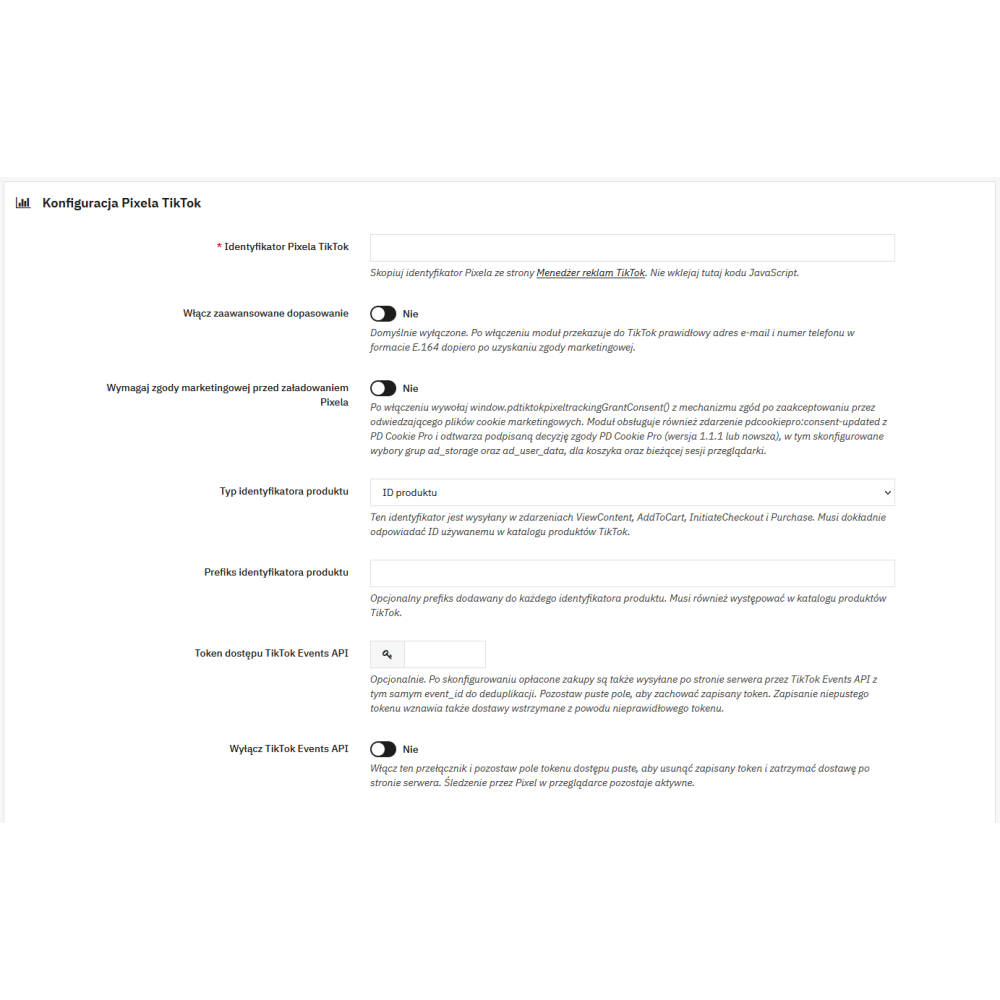
TikTok Pixel Tracking Pro is a PrestaShop module for implementing the TikTok Pixel in an online store. After saving the Pixel ID, the module loads the TikTok code and handles standard events on product, search, cart, checkout, and order confirmation pages. It records ViewContent, Search, AddToCart, InitiateCheckout, AddPaymentInfo, Purchase, and CompleteRegistration, with Purchase being prepared only for an order that has reached the paid status in PrestaShop. The optional TikTok Events API can send paid purchases from the server with the same event_id used by the browser event. The administrator selects the product identifier compatible with the TikTok catalog and can also add a prefix. The module also makes it possible to enable a marketing consent gate and optional Advanced Matching. Settings are saved separately for each store in the multistore environment.

License type / update
zł 119.00
zł 96.75no tax
Price history:

Description

Features and benefits of the TikTok Pixel module for PrestaShop

  • Implement TikTok Pixel from the PrestaShop panel: simply enter the TikTok Pixel ID in the module configuration; there is no need to manually paste the Pixel code into theme files.
  • Support for the purchase journey: the module records the ViewContent, Search, AddToCart, InitiateCheckout, AddPaymentInfo, Purchase, and CompleteRegistration events wherever the corresponding store data is available.
  • Control over the purchase event: Purchase is queued after the order reaches the status marked by PrestaShop as paid, not when the payment process itself is started.
  • Protection of cart data quality: AddToCart is sent after a successful cart update, and the product data for this event is retrieved from the current server state.
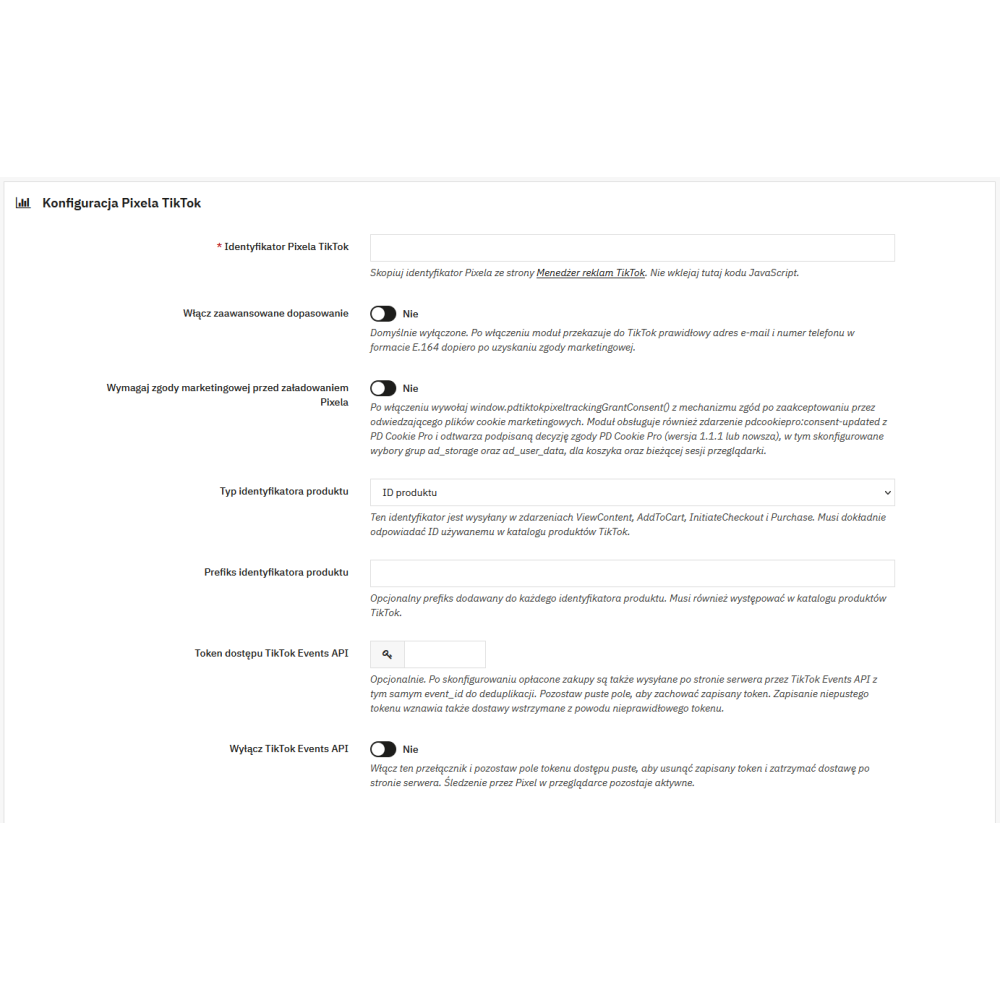
  • Matching the TikTok catalog: for product events, you can choose product ID, product ID with combination, reference, EAN-13, or UPC, and apply a shared identifier prefix.
  • Optional TikTok Events API: the module can also send paid purchases from the server, without disabling standard tracking by TikTok Pixel in the browser.
  • Shared event identifier: browser-side and server-side Purchase use the same deterministic event_id to support deduplication across both delivery channels.
  • Per-store configuration: in multistore, each store can have its own Pixel ID, Events API token, product identifier type, prefix, and consent settings.

Key functionalities

  • Pixel launch and page call: once the configuration and consent conditions are met, the module loads the TikTok Pixel library and calls page.
  • ViewContent on the product page: the event includes the selected product identifier, price, currency, quantity, and item data prepared from the current product.
  • Search on the search page: for a non-empty phrase, the module passes the search query to the Search event.
  • AddToCart after cart change confirmation: the script reacts to a successful PrestaShop cart update and retrieves the event data through the module’s protected endpoint.
  • InitiateCheckout and AddPaymentInfo: the module creates InitiateCheckout on supported checkout pages, and AddPaymentInfo after a change to the standard payment method selection.
  • CompleteRegistration: after account creation, the module queues the registration event and sends it on the next supported customer page.
  • Purchase on the confirmation page: the module uses paid order data, including items, value, and currency, and assigns a deterministic event_id to the event.
  • CRON endpoint for Events API: when Events API is configured, the module provides a token-protected URL for retrying temporary delivery errors of server-side Purchase.

Marketing consent and Advanced Matching

  • Optional consent gate: when the marketing consent requirement is enabled, the Pixel is not loaded until the integration of the consent manager in use calls the module’s provided JavaScript function or event, or until a PD Cookie Pro decision is recognized.
  • Integration with PD Cookie Pro: the module recognizes the signed decision from an active PD Cookie Pro version 1.1.1 or later. The “all” consent grants the module permission for tracking and Advanced Matching, while the Advanced Matching feature itself still requires enabling in the configuration; custom groups require the ad_storage value for tracking and ad_storage and ad_user_data for Advanced Matching.
  • Advanced Matching disabled by default: once enabled and after marketing consent is obtained, the module can send the valid email address and the phone number saved in the delivery address of the logged-in customer, if the number is already in E.164 format.
  • Data in Events API: in server-side Purchase, email and phone are normalized and hashed with SHA-256 only when Advanced Matching is enabled and marketing consent has been recorded.
  • Technical scope: the module helps control Pixel operation according to the consent state, but it does not replace cookie banner configuration, the privacy policy, or the assessment of the store administrator’s legal obligations.

TikTok Events API and delivery reliability

  • Optional server-side connection: the TikTok Events API access token is optional; without it, event tracking through the browser-side TikTok Pixel still works.
  • Paid Purchase only: Events API does not send the full list of browser events; server-side delivery applies exclusively to the paid purchase.
  • Handling transport issues: temporary errors can be retried via CRON, while rejected data or invalid credentials are not resent indefinitely.
  • Secure administrator settings: saving a new Events API token can resume deliveries stopped after a credential error, and the switch allows removing the token and stopping server-side delivery only.

Product identifiers and the TikTok catalog

  • Choice of content_id source: available options are product ID, product ID with combination, reference, EAN-13, and UPC.
  • Identifier prefix: one optional prefix is added to every identifier sent in product events.
  • Catalog compatibility: the selected identifier and prefix should exactly match the values used in the TikTok product catalog. If a value is missing for the selected reference, EAN-13, or UPC, the module skips that item instead of replacing it with another identifier.

Compatibility and multistore

  • PrestaShop: the module declares compatibility with PrestaShop from version 1.7.0.0 to 9.99.99.
  • Multistore: configuration requires selecting a specific store, so tracking settings are not accidentally shared between stores.
  • Themes and checkout: the module uses PrestaShop front-office hooks, supports the standard checkout, and recognizes the one-page checkout controllers indicated in the code, including TheCheckout, SuperCheckout, and OnepageCheckout.

Product Details

Prestashop 9.x support
Yes
Support for Prestashop 8.x
Yes
Prestashop 1.7.x support
Yes
Module translations
EN. EN
Free support
Yes
Free updates (1 year)
Yes
Easy Installation
Yes
PDTTP-FULL

You might also like

Changelog

Release history for this product. Expand an entry to see what changed.

  • dodano obsługę content API TIkTok-a

FAQ

Find answers to the most common questions about this product.

The module implements the TikTok Pixel in the PrestaShop store and sends events related to customer behaviour and the purchase journey. After configuring the TikTok Pixel ID, when consent settings allow it, it supports ViewContent, Search, AddToCart, InitiateCheckout, AddPaymentInfo, Purchase, and CompleteRegistration. The module does not create a TikTok product catalogue, advertising campaigns, or reports in the TikTok Ads Manager panel.

The module loads the TikTok Pixel and triggers page, and also handles ViewContent on the product page, Search on the search page, AddToCart after a successful cart update, InitiateCheckout on the supported checkout page, AddPaymentInfo after changing the standard payment selection, Purchase for a paid order, and CompleteRegistration after account creation.

In the module configuration, enter the TikTok Pixel ID, select the product identifier type and any prefix. You can also enable Advanced Matching, the marketing consent requirement, and optionally provide the TikTok Events API token. The Pixel ID should come from TikTok Ads Manager; you should not paste JavaScript code into the field.

Yes, the TikTok Events API is an optional feature activated after saving the access token. The module sends only the paid Purchase event via the API; the remaining standard events are handled by the TikTok Pixel in the browser. Disabling or removing the token stops only server-side sending, not the basic operation of the Pixel.

If both channels are used for a given paid order, the module creates a deterministic event_id. The same event_id is sent to the browser-based Purchase and to the server-side Purchase sent via the TikTok Events API, which enables deduplication of both delivery channels.

The purchase is queued only when the order reaches the status marked by PrestaShop as paid. On the confirmation page, the module can send the event in the browser, and with the Events API configured, it can also send it from the server. In the case of delayed payment confirmation, the confirmation page performs a limited recheck of the pending purchase.

Yes. The marketing consent requirement switch is optional and disabled by default. Once enabled, the Pixel waits for a signal provided by the consent manager integration via the module’s exposed JavaScript function or event, or for the decision of the active PD Cookie Pro. This is a technical handling of the consent state, not a standalone CMP system or a guarantee of legal compliance.

The integration requires an active PD Cookie Pro version 1.1.1 or later and a correctly signed consent decision. The “all” decision grants consent for tracking and Advanced Matching, while Advanced Matching must also be additionally enabled in the module configuration. With a custom selection of groups, tracking requires the ad_storage value, and Advanced Matching requires both ad_storage and ad_user_data simultaneously.

Advanced Matching is disabled by default. After enabling it and saving marketing consent, the module can pass the correct e-mail address and phone number for the logged-in customer to the browser Pixel, but the phone is used only if it is included in that customer's delivery address and is already in E.164 format. In the server-side Events API, the e-mail and phone number are normalised and hashed with SHA-256.

In the configuration, select one source for content_id: product ID, product ID with combination, reference, EAN-13, or UPC. You can also add a prefix. The selected value must exactly match the identifier in the TikTok catalog; if the product has no value for the selected reference, EAN-13, or UPC, the module skips that item instead of replacing it with the product ID.

CRON is not required for the browser-based TikTok Pixel. When the Events API is configured, the module provides a token-protected CRON URL to retry temporary delivery errors for the server-side Purchase; the configuration panel recommends running it every five minutes.

Yes. The module settings are stored separately for each shop, therefore in multistore mode, before configuration, a specific shop must be selected. In the module code, compatibility with PrestaShop has been declared from version 1.7.0.0 to 9.99.99.

Reviews (0)

No reviews