





• -zł 40.00
Facebook Dynamic Ads Products Feed XML for PrestaShop 1.5.x and 1.6.x

XML product export for Facebook dynamic ads for PrestaShop

Module version: 2.10.5

PrestaShop compatibility: 1.7.x 8.x 9.x

Module file updated: 10/21/2026 17:48:32

Product data updated: 10/21/2026 17:48:36


3 Reviews

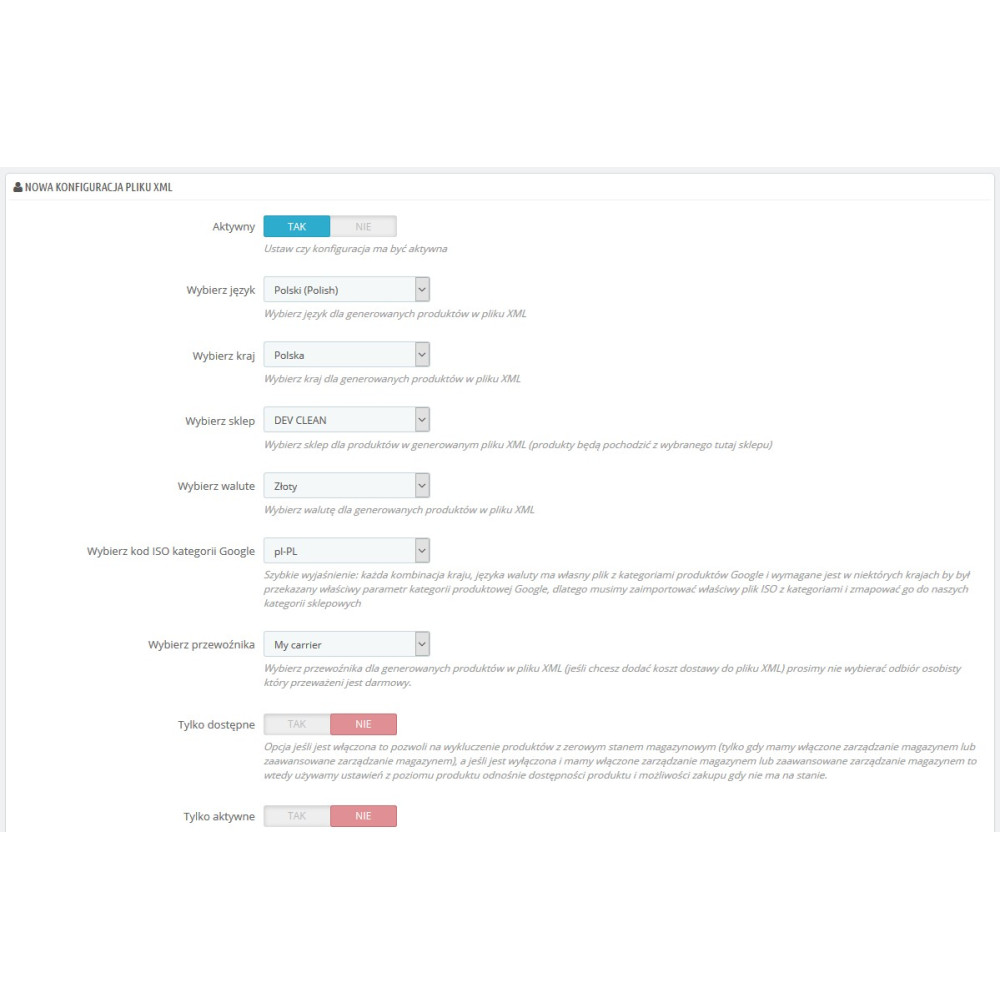
Facebook Product Export for Dynamic Ads Pro is a PrestaShop module that generates XML files with the store offer intended for the Meta catalog and Facebook Dynamic Ads campaigns. For each feed, you can independently select the shop, language, country, currency, customer group, carrier, product range, and the method of data preparation. The export includes, among other things, identifiers, names, descriptions, prices, promotions, availability, actual stock level, images, brand, GTIN, MPN, features, and shipping data. Products with combinations can be passed as separate variants with grouping, basic attributes, and additional variant features. Separate Google and Facebook category mapping panels allow you to complete the google_product_category and fb_product_category fields according to the selected language version of the taxonomy. The file can be generated manually or periodically via a key-protected CRON URL, and the panel shows the configuration status, operation history, and the result of the data quality check. The module does not send products via the Meta API – the generated XML URL should be added as a data source in the catalog configuration.

License type / update
zł 83.00
zł 67.48no tax zł 123.00 -zł 40.00
Lowest price in last 30 days before discount: zł 123.00

Description

Features and benefits

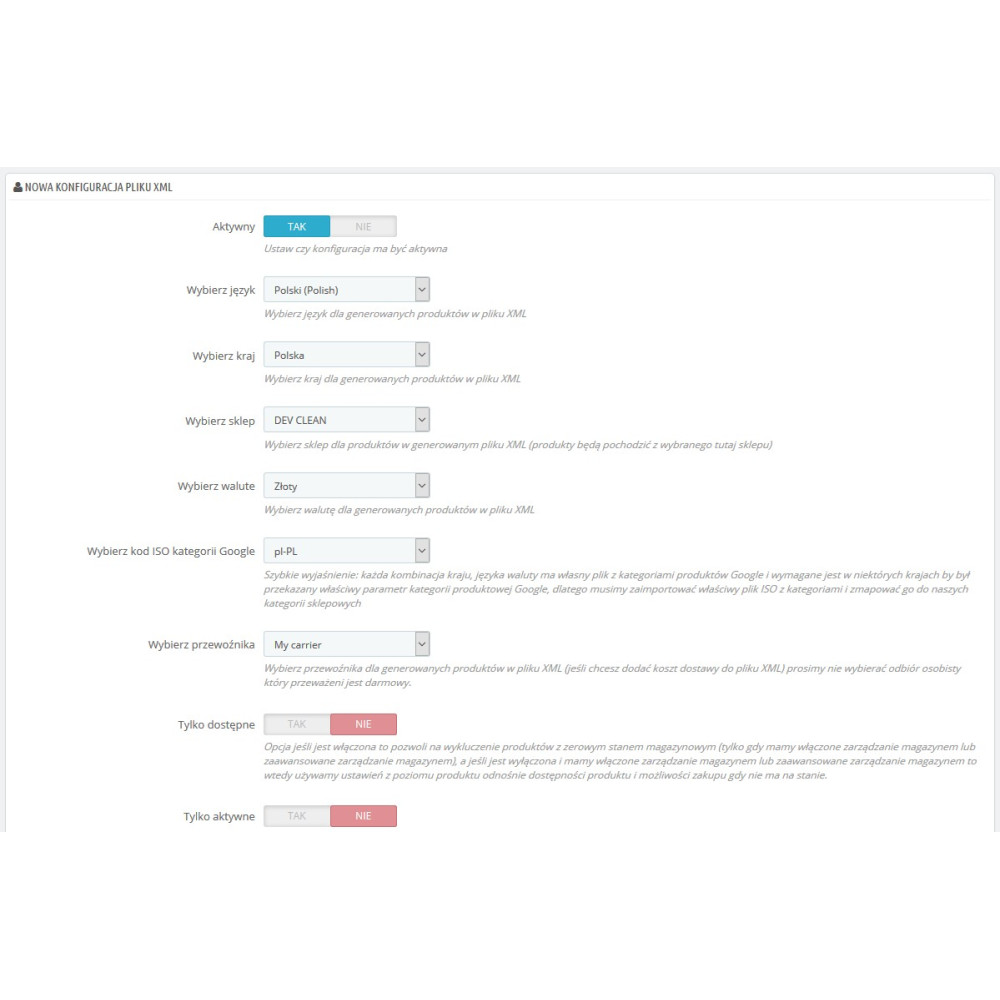
  • Separate feeds for different markets: each configuration can use its own shop, language, country, currency, customer group, carrier, and pricing settings.
  • Data retrieved from PrestaShop: the module creates a file based on current products, combinations, prices, promotions, stock levels, descriptions, images, manufacturers, features, and delivery settings.
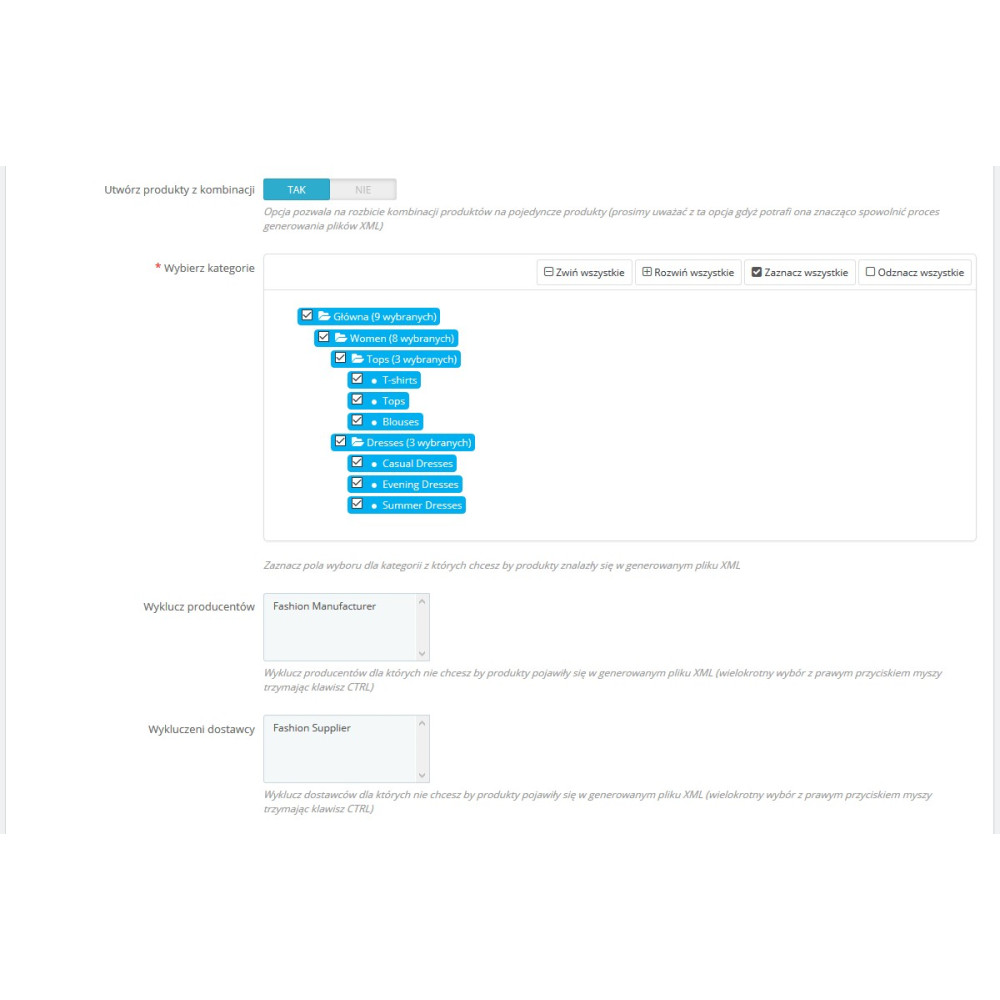
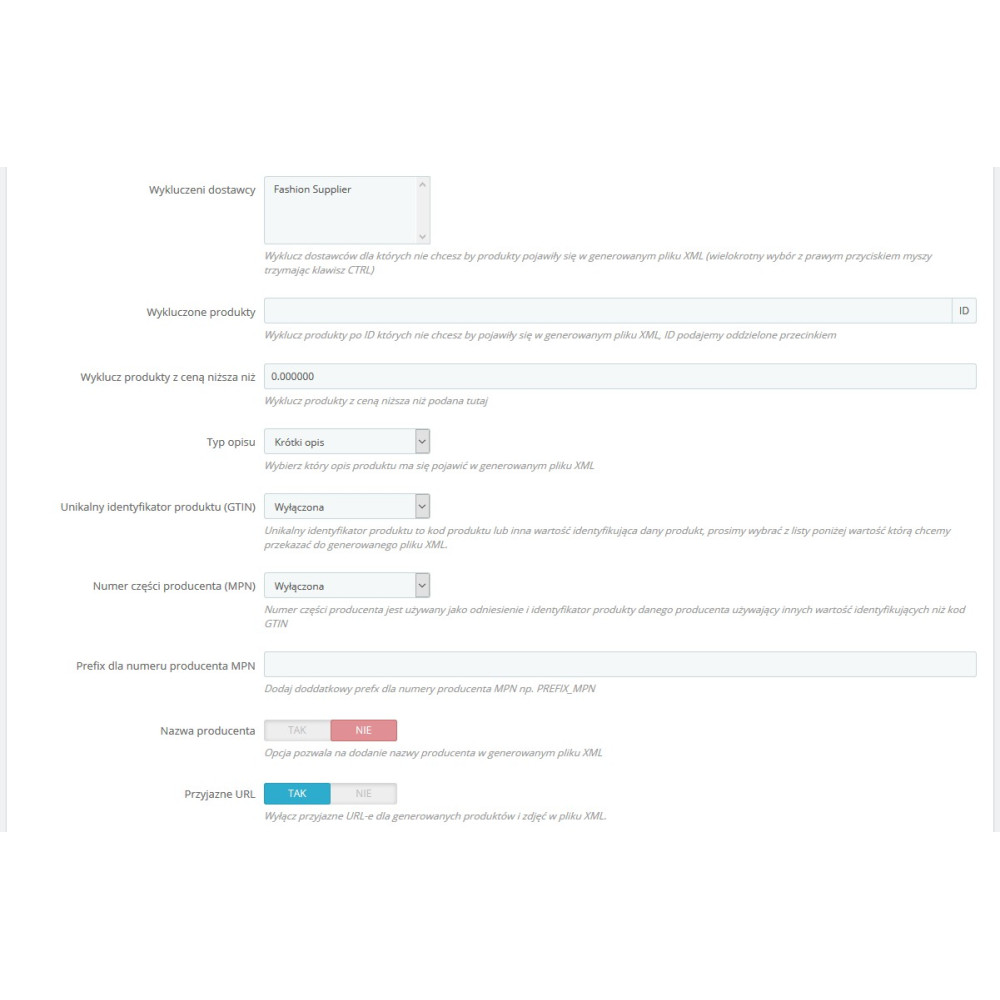
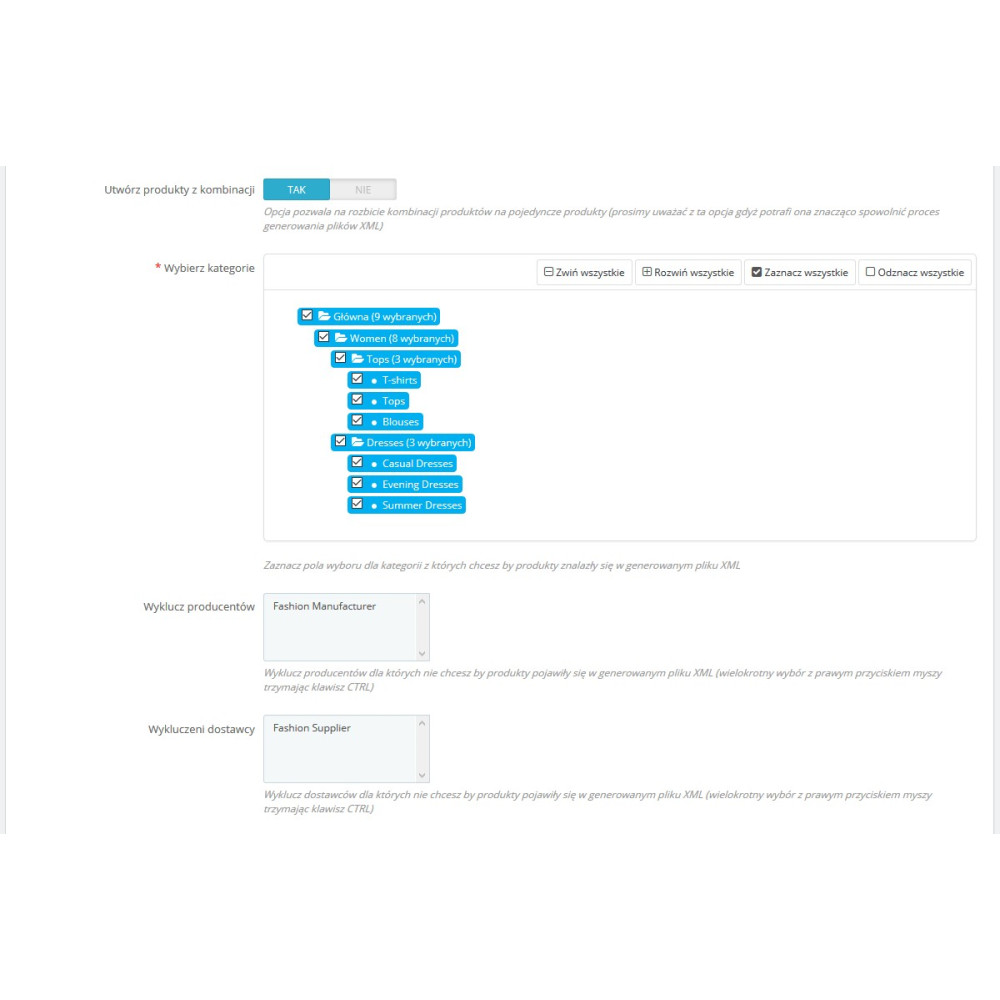
  • Catalog control: products can be qualified by category, manufacturer, supplier, activity, orderability, and minimum price, and can also be specified by identifiers for inclusion or exclusion.
  • Product-level management: the product page and product list in the Back Office allow control over a product’s presence in the export, and the bulk operation supports shop, categories, manufacturers, and suppliers.
  • Variant support: combinations can receive separate identifiers, prices, availability, images, and stock levels, while remaining linked by the item_group_id field.
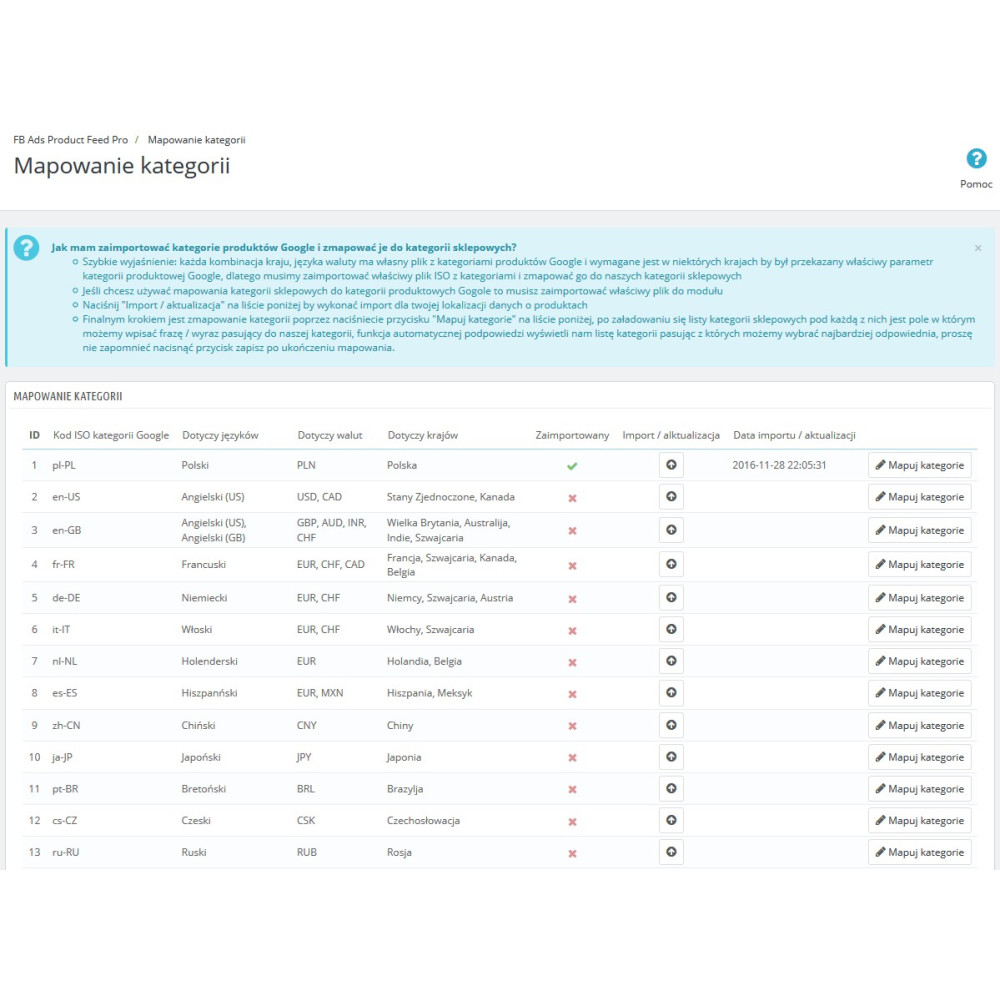
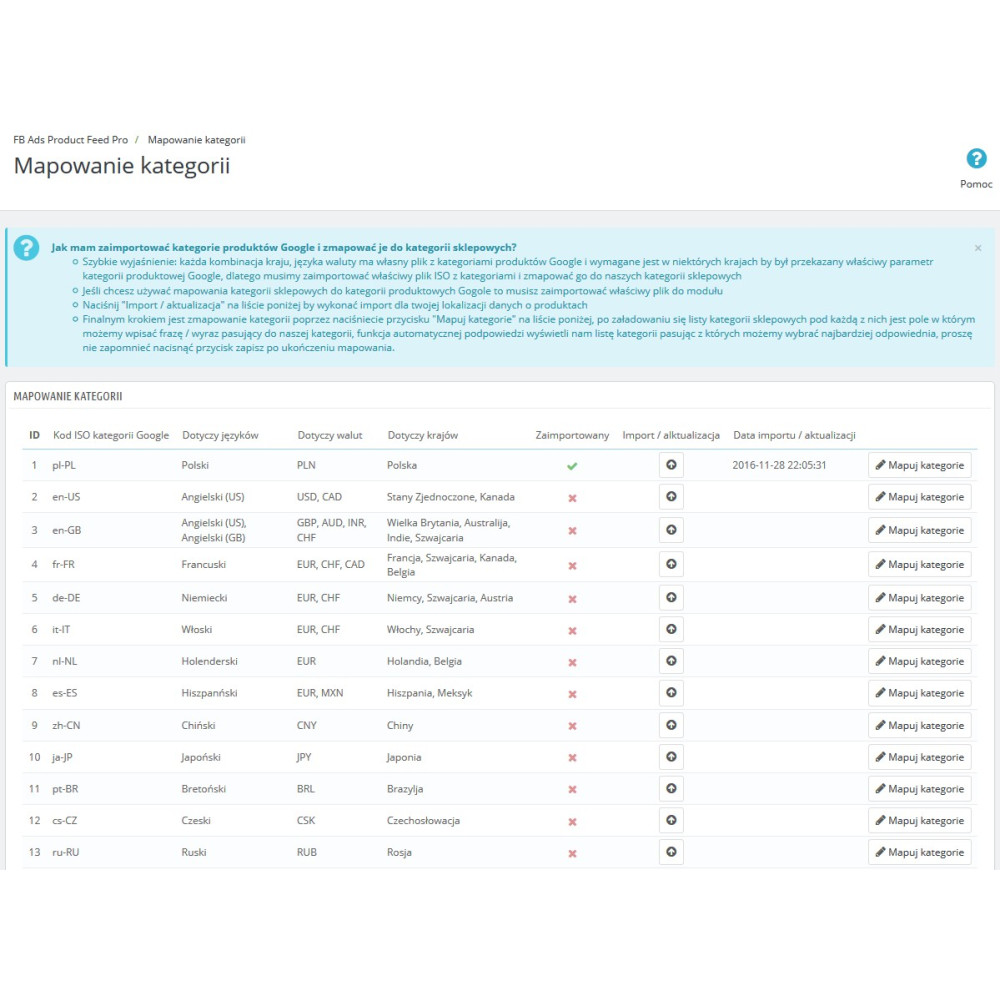
  • Two independent category classifications: Google taxonomy mapping and Facebook category mapping are managed separately, so the feed can contain both appropriate catalog fields.
  • Language-specific mapping: the module imports 26 versions of the Google taxonomy and 48 Facebook category locales provided in the current version’s code.
  • Less manual work with categories: search, automatic suggestions, inheritance of mapping from the parent category, and synchronization of missing mappings between imported locales are available.
  • Catalog-tailored descriptions: the administrator selects the source of the plain description, and the rich_text_description field passes the long product description while preserving HTML and a controlled length limit.
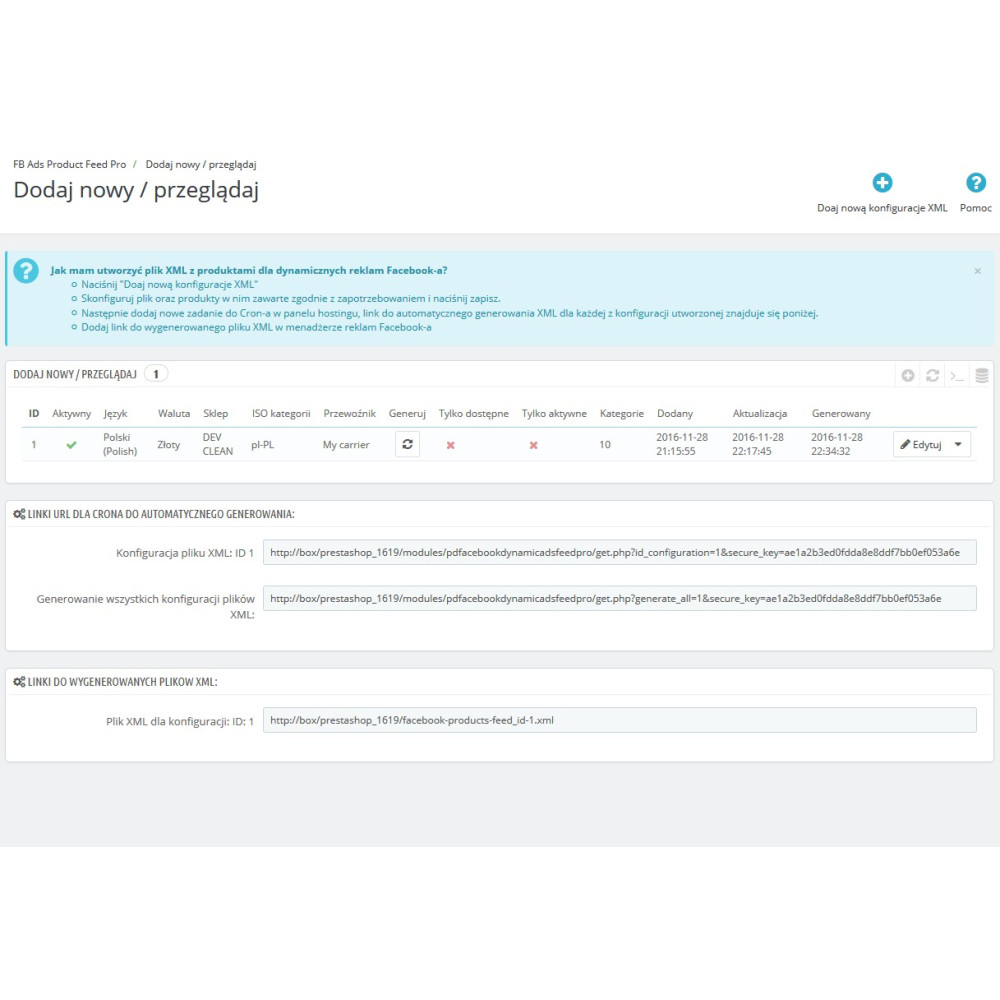
  • Automatic file updates: CRON URLs allow generating a single feed or all configurations without manually starting the operation in the panel.
  • Export quality control: the feed test detects, among other things, missing products, images, descriptions, brand, configured GTIN, price, and Google taxonomy mapping.
  • Safer file publishing: generation uses a temporary file, protection against parallel execution of the same configuration, and an optional token in the XML filename.
  • Multi-store support: configurations, product data, and Facebook category mappings take into account the shop selected in PrestaShop.

Key functionalities

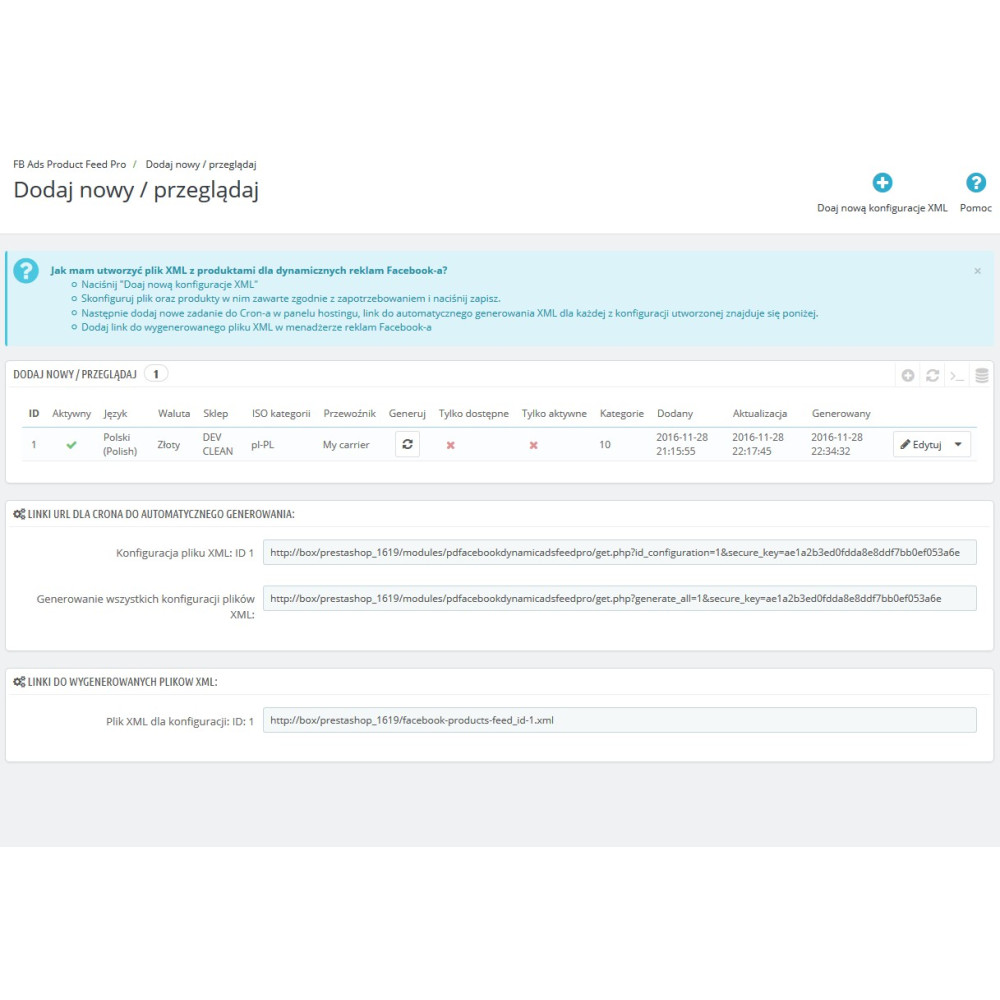
  • Creation of multiple active or inactive XML feed configurations with separate file URLs.
  • Manual feed generation from the configuration list and scheduled generation via a CRON URL secured with a key, separately for one configuration or collectively for all.
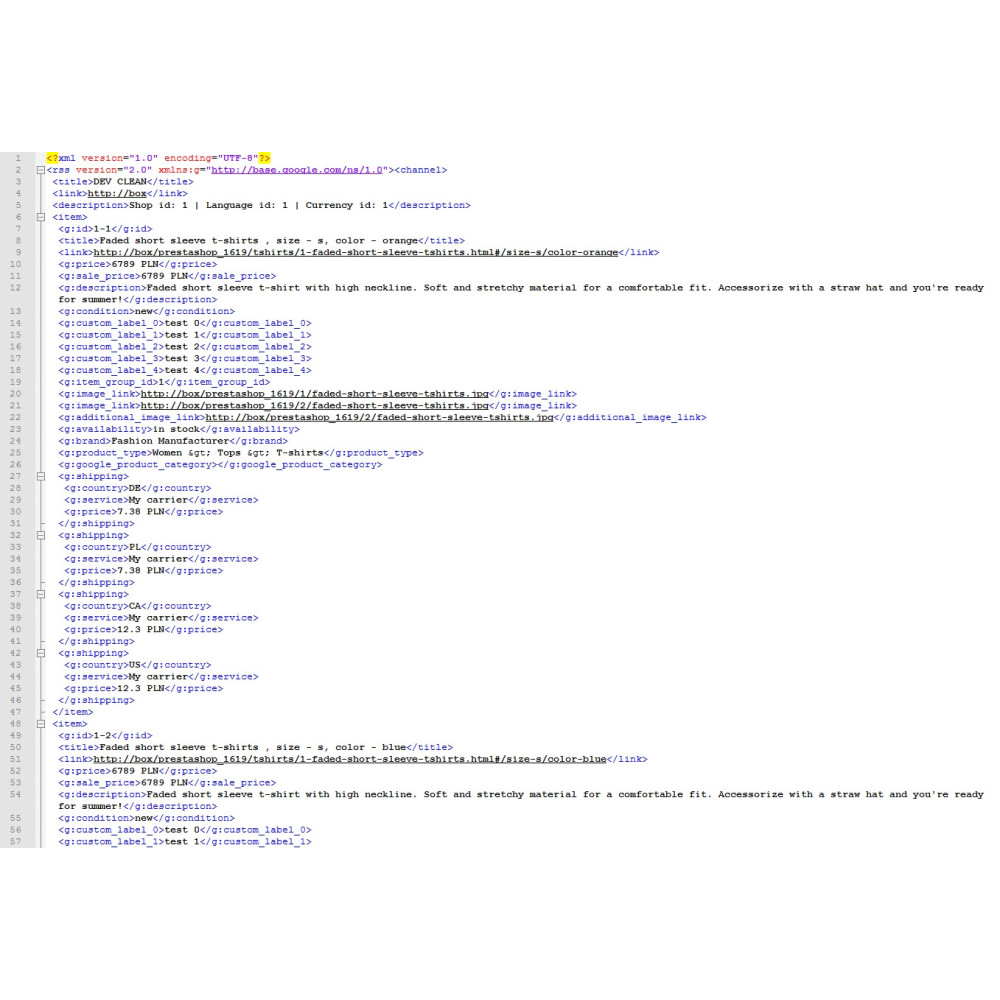
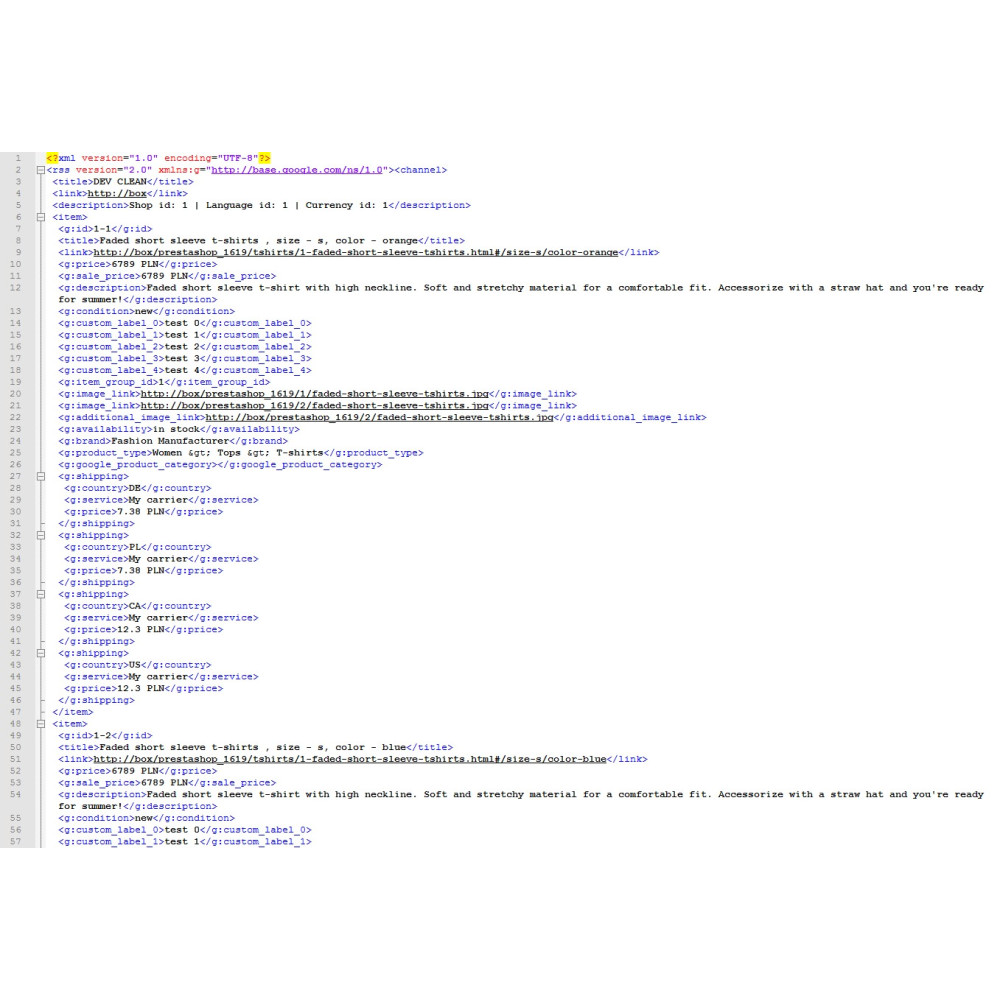
  • Export of basic fields: identifier, title, product URL, canonical URL, price, promotional price with validity period, description, product condition, and availability.
  • Passing the quantity_to_sell_on_facebook field with the non-negative stock level of the product or a specific combination.
  • Passing the rich_text_description field based on the product’s long HTML description and a plain description selected from the short description, long description, or meta description.
  • Export of the fb_product_category field as the numeric Meta category identifier resulting from the mapping for the shop and taxonomy locale.
  • Export of the google_product_category field and the shop category path in the product_type field.
  • Import and update of localized Facebook category files and Google taxonomy files, with import and mapping coverage counters.
  • Manual category search, automatic match suggestions, clearing mappings for the current ISO, and synchronization of missing mappings from another language version.
  • Export of combinations as separate items with size, color, material, pattern, and additional_variant_attribute fields for the remaining variant attributes.
  • Export of the main image and additional images with image type selection and a limit on the number of photos.
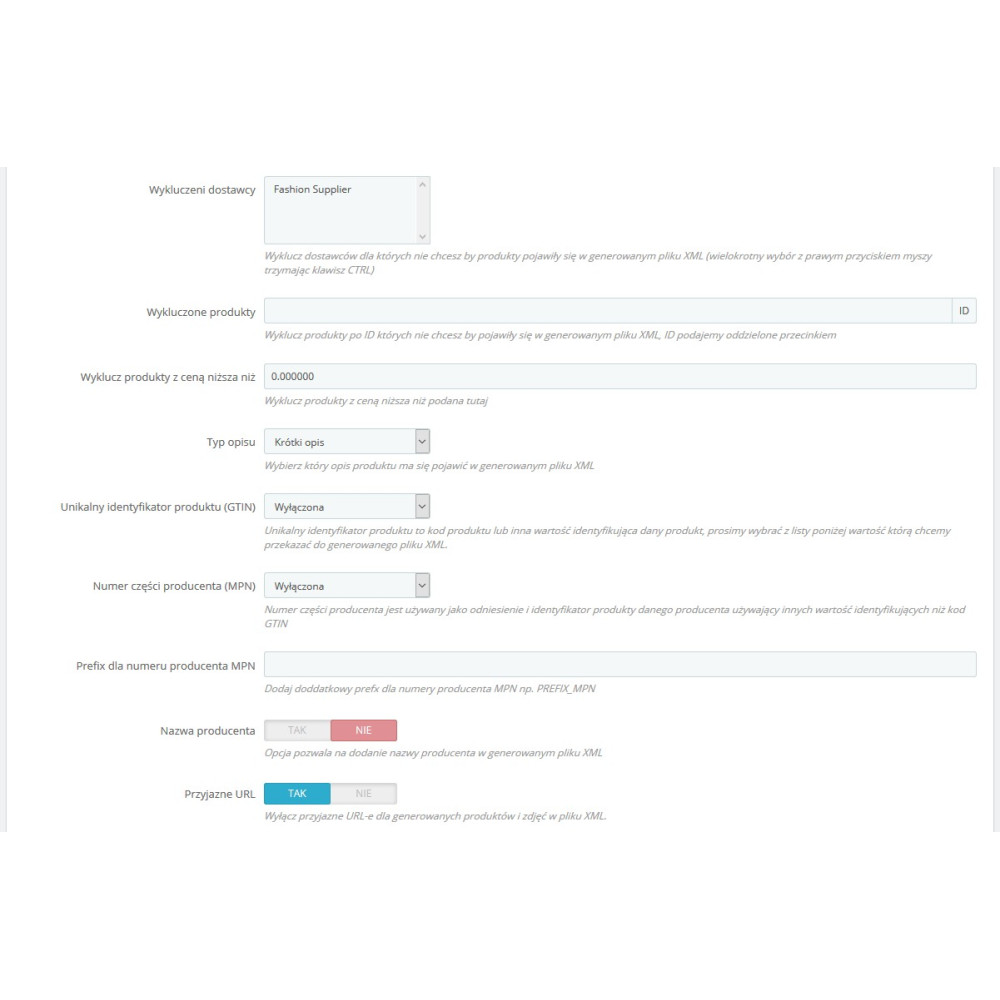
  • Configurable GTIN and MPN sources, optional identifier and MPN prefix, EAN-13 validation, manufacturer brand, and the identifier_exists field when identifiers and brand are missing.
  • Optional shipping cost calculated for the selected country and carrier, together with the service name and feed currency.
  • Export of product features as product_detail, unit price, shipping weight, five custom labels, and up to ten product highlights.
  • Advanced fields set for the product: multipack, bundle, certification, energy class, size type and system, dimensions, weight, age group, gender, promotion ID, ads pause, shipping and transit time labels, and cost of goods sold.
  • Dictionary of name and description replacements with scope of action, case sensitivity, CSV import, effect preview, and rule usage statistics.
  • Statistics panel with the number of active feeds and products, the date and time of the last generation, and a warning about configurations not refreshed for more than 24 hours.
  • Generation history recording status, number of products, number of errors, file size, operation time, and error details.
  • Declared compatibility with PrestaShop 1.7.x, 8.x, and 9.x.

Scope of operation

The module prepares and updates the source XML file on the shop server. It does not create a Meta catalog, does not configure an advertising campaign, and does not send data via the Facebook API; the generated feed URL must be added in the Meta catalog tool, and its retrieval schedule must be set on the platform side.


Link to the module demo:

Admin panel demo:
https://moduly-prestashop.eu/fb-feed/admin-dev

Front office demo:
https://moduly-prestashop.eu/fb-feed

Product Details

Prestashop 9.x support
Yes
Support for Prestashop 8.x
Yes
Prestashop 1.7.x support
Yes
Prestashop 1.6.x support
Yes
PrestaShop 1.5x support
Yes
Free support
Yes
Free updates (1 year)
Yes
Easy Installation
Yes
PDDAFP-FULL

You might also like

Changelog

Release history for this product. Expand an entry to see what changed.

  • dodano obsługę nowych pól xml feed-a

  • dodano obsługę generowania plików XML poprzez PHP CLI

  • dodano obsługę PrestaShop 9.x
  • wprowadzono obsługę GPSR w module

FAQ

Find answers to the most common questions about this product.

The module generates XML files with PrestaShop product data intended for use as a data source for the Meta catalog and Facebook Dynamic Ads campaigns. Each feed is created based on the selected configuration of market, prices, products, categories, delivery, and catalog parameters.

No. The module saves the XML file on the store server and makes its address available. This address must be added as a data source in the Meta catalog configuration; the module does not set up the catalog, does not create campaigns, and does not manage the advertising account.

Yes. The module supports multiple independent configurations, each of which has its own file and can be active or inactive. For the feed, you select the shop, language, country, currency, customer group, carrier, taxonomy, as well as product and pricing settings.

The feed may contain the identifier, title, product URL, canonical URL, price, promotional price and its validity period, description, product condition, availability, images, brand, GTIN, MPN, shipping weight, features and category data. The scope of optional fields depends on the feed configuration and the data saved for the product.

The quantity_to_sell_on_facebook field receives a non-negative number of units read from the current PrestaShop stock level. For a product with combinations, the module retrieves the stock level of the specific variant, and for a product without combinations, the product stock level.

For a standard description field, the administrator can choose the short description, long description, or meta description; if the short or long description is empty, the module uses the fallback variant предусмотренный in the code. The independent rich_text_description field retrieves the product’s long HTML description, safely stores it in XML, and truncates it without breaking the HTML structure to the limit supported by the module.

Yes. When combination export is enabled, each variant can receive a separate identifier, price, stock level, availability, and images, while the item_group_id field links the variants to the parent product. The module supports size, colour, material, and pattern, as well as additional variant attributes.

The additional_variant_attribute field provides the name and value of the combination attribute that does not belong to the basic variant dimensions. Among other things, the module excludes size, colour, material, pattern, gender, and age groups from it to avoid duplicating the basic catalogue fields.

The administrator imports the selected Facebook category locale and assigns store categories to Meta numeric identifiers. When generating the feed, the module selects the appropriate locale based on the configuration settings and enters into fb_product_category the product’s direct or inherited default category mapping.

No. These are two separate panels, data sources, and mapping sets. Google mapping populates google_product_category, while Facebook mapping populates fb_product_category with the numeric identifier of the Meta category.

The current version of the module contains a list of 48 language-regional locales made available for import, including pl_PL, en_GB, en_US, de_DE, fr_FR, cs_CZ and others. The file for the selected locale is downloaded from facebook.com, checked, and saved in the database only after the data has been read correctly.

The module can suggest matches for categories without direct mapping by comparing names and words in the store category paths with the imported Facebook list. The suggestions must be reviewed and saved; the mechanism does not use artificial intelligence and does not guarantee the semantic correctness of every match.

If the product category does not have its own assignment, the module can use the mapping of the nearest parent category. Synchronisation between imported locations copies only missing assignments according to the stable Facebook identifier and does not overwrite existing mappings in the target location.

No. The clearing operation applies to the current shop and the currently open ISO code of the Facebook taxonomy. Mappings of other shops and other locations are not removed by this operation.

The module provides 26 language-regional variants of the Google taxonomy. For the selected ISO, you can download or update the list, search categories, use automatic suggestions, assign store categories, and pass the result to the google_product_category field.

The configuration allows you to select categories, exclude manufacturers and suppliers, specify product IDs to include or exclude, set a minimum price, and take into account only active, available, or orderable products. Independently, the feed presence switch saved for the product and shop also works.

Yes. The bulk operation form assigns or removes products from the feed according to the selected shop and optional category, manufacturer, and supplier criteria. Enabling for newly added products can also be set globally in the module configuration.

The price is calculated for the shop, currency, country and customer group selected in the feed configuration, with the option to include or exclude tax. If a lower price applies, the module exports sale_price, and for a time-limited price entry also sale_price_effective_date.

Yes. When this option is enabled, the module calculates the shipping cost for the country and carrier selected in the configuration, taking into account the product or a specific combination, and saves the country, service name, and price in the feed currency. Optional cart rule analysis during shipping calculation may extend generation time.

The administrator selects the PrestaShop image type and the photo limit. The first image is exported as the main photo, subsequent ones as additional photos, and the generator code also applies a hard limit of ten processed images per item.

The source of the GTIN may be EAN-13 or JAN, UPC, the product reference or MPN, and the source of the MPN: supplier reference, product reference, product identifier or the MPN field. Available options include identifier and MPN prefixes, optional EAN-13 validation, and export of the manufacturer's brand.

The dictionary replaces the specified words or phrases when creating titles and descriptions in the feed, without modifying the original product content in PrestaShop. The rule can apply to the title, description, or both fields, take letter case into account, remove a phrase by using an empty target value, be imported from CSV, and count usages after generation is completed.

The module stores, among other things, an alternative name and a short description for the feed, five custom labels, product highlights, multipack, bundle, certification, energy classes, size type and system, dimensions, weight, age group, gender, promotion ID, ads pause, logistics labels, and cost of goods sold. Only fields that have a value and are supported by the generator are included in the XML.

A single feed can be generated using the button in the configuration list. The panel also displays key-protected CRON URLs for generating a single configuration or all configurations; the execution schedule is configured on the server side.

The generator first saves the data to a temporary file and publishes the finished file after the operation is completed. The lock prevents the same configuration from being generated simultaneously, and an optional token in the XML name makes the address harder to guess and, when enabled, changes the existing link to the file.

Quality control calculates the feed result and checks, among other things, for the absence of eligible products, images, descriptions, brand, configured GTIN, positive price, and Google mapping. The history records the status, number of products, errors, file size, generation time, and error details, and the panel also warns about active feeds that have not been refreshed for more than 24 hours.

Yes. Each feed configuration is assigned to a store, and the selection of products, language, prices, and addresses takes place in the context of that configuration. Additional product data and Facebook category mappings are saved with the store identifier.

The module declares compatibility with PrestaShop from version 1.7.0 to 9.99.99, that is, with the 1.7.x, 8.x and 9.x lines. The interface integrates with the appropriate editing mechanisms and product list depending on the store version.

Reviews (3)

3 Reviews

Wsaprcie techniczne !!!
Miałem problem podczas instalacji gdyż były napisane klasy prestashop ale suport poradził sobie z tym w ciągu 10 minut, polecam
By Pawel on 10/27/2022

Działa bez zarzutu
Super dziękuje...
By on 10/27/2022

Polecamy
Kupiliśmy z polecenia agencji robiącej reklamy dla naszego sklepu. Wszyscy teraz jesteśmy zadowoleni,
By on 10/27/2022