Start your choice between a direct GA4 module and Google Tag Manager by determining who creates the events, when an order is considered a purchase, and who maintains the configuration. The G-… or GTM-… identifier alone does not answer these questions.
We compare specific versions: PD Google Analytics 4 Pro 1.4.2, PD Google Tag Manager Pro 2.3.4, and the older PD Google Tag Manager 1.2.4. The description is based on their code and instructions verified on 26 September 2026. This is the scope of those versions, not a declaration of identical behavior for all modules available for PrestaShop.
Two paths for the same event
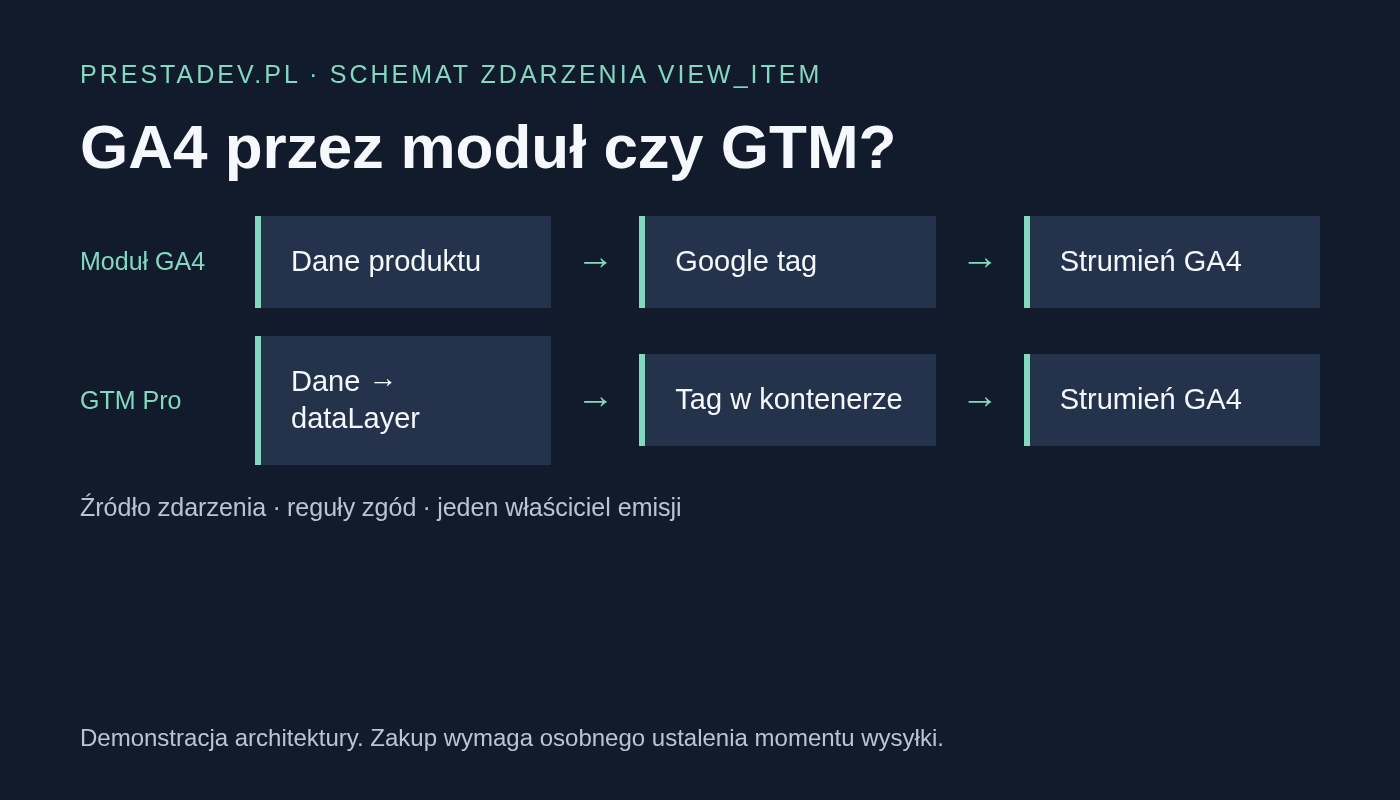
Demonstration diagram of the view_item event. It shows the division of responsibilities, not the measurement result in a live GA4 account.
In the direct variant, the module collects product data and prepares the Google tag call. In the GTM Pro variant, the module passes the event object to dataLayer, and the published container decides whether to trigger the tag and who receives it. For both variants, you need to determine consent rules and parameter correctness separately.
dataLayer also appears when using gtag directly. The mere presence of this variable in the browser does not prove that the store uses a GTM container. Google describes both uses in the data layer documentation.
The most important difference: when is purchase created?
Behavior of the verified module versions
Area
GA4 Pro 1.4.2
GTM Pro 2.3.4
Browser events
The module prepares Google tag calls, including product view and checkout start.
The module creates events in dataLayer. In the container, you need to configure and publish the appropriate tags, rules, and variables.
Purchase
The Measurement Protocol server-side path checks the configured payment status and the history of qualifying payment completion. Browser-side purchase is disabled in this version.
Browser-side purchase is created on the order confirmation. The code for this path does not use the same list of paid statuses as GA4 Pro.
Additional server-side path
It handles financial operations when identification, configuration, and consent requirements are met.
An optional purchase recovery queue requires Measurement Protocol configuration and a CRON job. The record of confirmation rendering affects the decision to retry.
Refund
Operations are provided according to the configured status or correction document, with control of previous purchase and refunds.
A correction document may feed the refund queue; sending depends on context, consent, and active automation.
So do not compare purchase numbers without first determining what they mean. An order created, shown on the confirmation page, and qualified as paid are three different moments. For a bank transfer awaiting payment, the difference may be especially visible.
Event matrix before launching measurement
For each event, record the source, recipient, consent condition, and responsible person. Download the editable CSV matrix. It contains demonstration examples and fields for the result of your own verification.
Example division of responsibilities to complete for your own store
Event
Source
Recipient
Consent and responsibility
view_item
Direct module or dataLayer module and GTM tag — choose one path.
The designated GA4 stream.
The person maintaining analytics checks CMP signals and tag conditions.
purchase
The defined business moment and one owner of the emission.
The same agreed stream.
The integration owner checks customer context, consents, transaction ID, and retries.
refund
The selected status or correction document according to the solution used.
The stream in which the purchase was recorded.
The person responsible for refunds agrees the full and partial scope and the validation method.
Consent and Measurement Protocol are part of the project
In the verified version of GA4 Pro, trusted consent for attribution storage and server-side financial operations is linked to active PD Cookie Pro, its live mode, Consent Mode v2, and the current consent revision. Do not assume that replacing this provider with any other banner will preserve the entire server-side path without additional verification.
GTM Pro has its own Consent Mode settings and specific consent provider integrations. With active PD Cookie Pro, it leaves consent management to it. The final behavior also depends on the published container. The presence of a banner or a configuration field is not yet the result of a “deny → consent → withdraw” test.
A server-side path does not mean bypassing consent or automatically recovering the session source. The API Secret belongs to the server configuration. Linking with browser activity requires proper identifiers and context; the reference point is the Measurement Protocol event sending documentation.
Older GTM and GTM Pro are not the same offer
The older PD Google Tag Manager 1.2.4 is used to embed the container. The verified code does not contain the ecommerce model and Measurement Protocol queue described above for the Pro version. Do not treat the name “GTM” as a promise of ready-made purchase events.
PD Google Tag Manager Pro adds a data layer and configuration tools. The container export is a starting point for import, review, and publication in GTM. It does not replace configuration acceptance. A custom server address field also does not automatically create server-side GTM infrastructure.
How to choose a variant and avoid two owners of the purchase?
Direct module: consider GA4 Pro if you want to maintain this path in the module settings and its definition of a paid purchase and consent requirements matches your store.
GTM container: consider GTM Pro if you have a person responsible for tags, rules, environments, and publishing changes. Also determine who handles the optional server-side queue.
Existing implementation: first inventory active modules and tags. Do not add a second purchase emitter just because the number of purchases in the report raises doubts.
Acceptance should include one controlled run each for the product, cart, the correct purchase moment, and refund, as well as consent denial and withdrawal. Separate the evidence of “event created”, “send executed”, and “event visible in GA4”. dataLayer.push alone, page rendering, or the transport HTTP response do not yet confirm report completeness.
Google Analytics 4 Pro – GA4 module for PrestaShop
Google Analytics 4 Pro is a PrestaShop module for implementing the Google tag and measuring user behavior in Google Analytics 4. It records events related to products, product lists, the cart, checkout, search, and the customer account. Purchases and supported returns are sent to the main GA4 stream via...
PD Google Tag Manager Pro is an advanced PrestaShop module for implementing Google Tag Manager with full e-commerce DataLayer, GA4 integration, and support for Google Consent Mode v2. The module automatically embeds the GTM code in the head section and in the noscript part after the opening body tag, can work with a second GTM container, and also supports...
Patryk Marek — owner of PrestaDev.pl and a developer specializing in PrestaShop. For many years, he has been involved in creating, developing, and maintaining online stores. He combines work on store and module code with the configuration of the server environment in which these solutions operate.
He designs and develops PrestaShop modules, customizes existing features, and prepares integrations with wholesalers and external services. He works on product data import and updates, catalog management automation, the order process, and tools supporting the store owner's daily work.
His experience also includes store updates and migrations, error diagnosis, performance analysis, and the configuration of servers and services required for PrestaShop to operate. When solving problems, he takes into account the dependencies between modules, the theme, PHP, the database, and hosting settings.
On the blog, he shares knowledge gained from many years of programming practice and working with the technical backend of stores. The guides focus on specific problems, ways to verify them, and the limitations of the described solutions. They help store owners and technical specialists prepare changes, assess their scope, and verify the result.



Comments (0)