
Shopping Cart








Custom search engine and product index
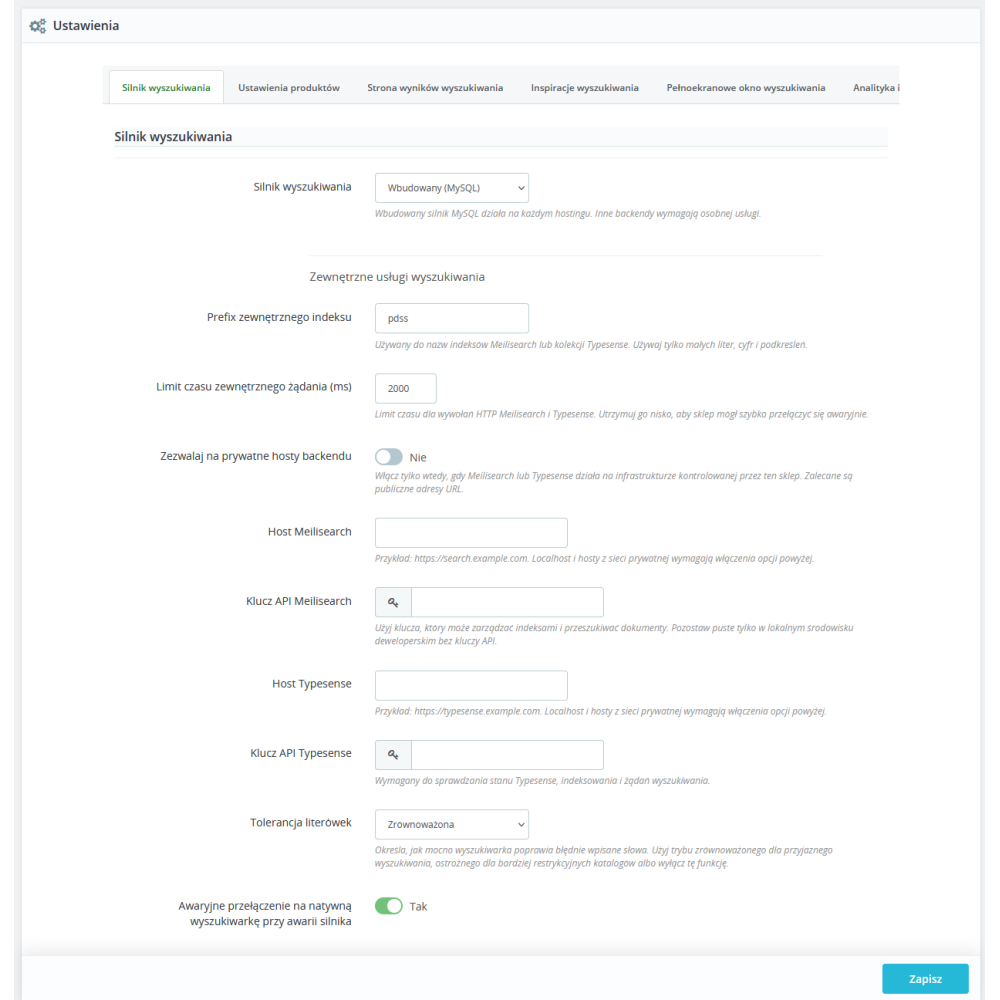
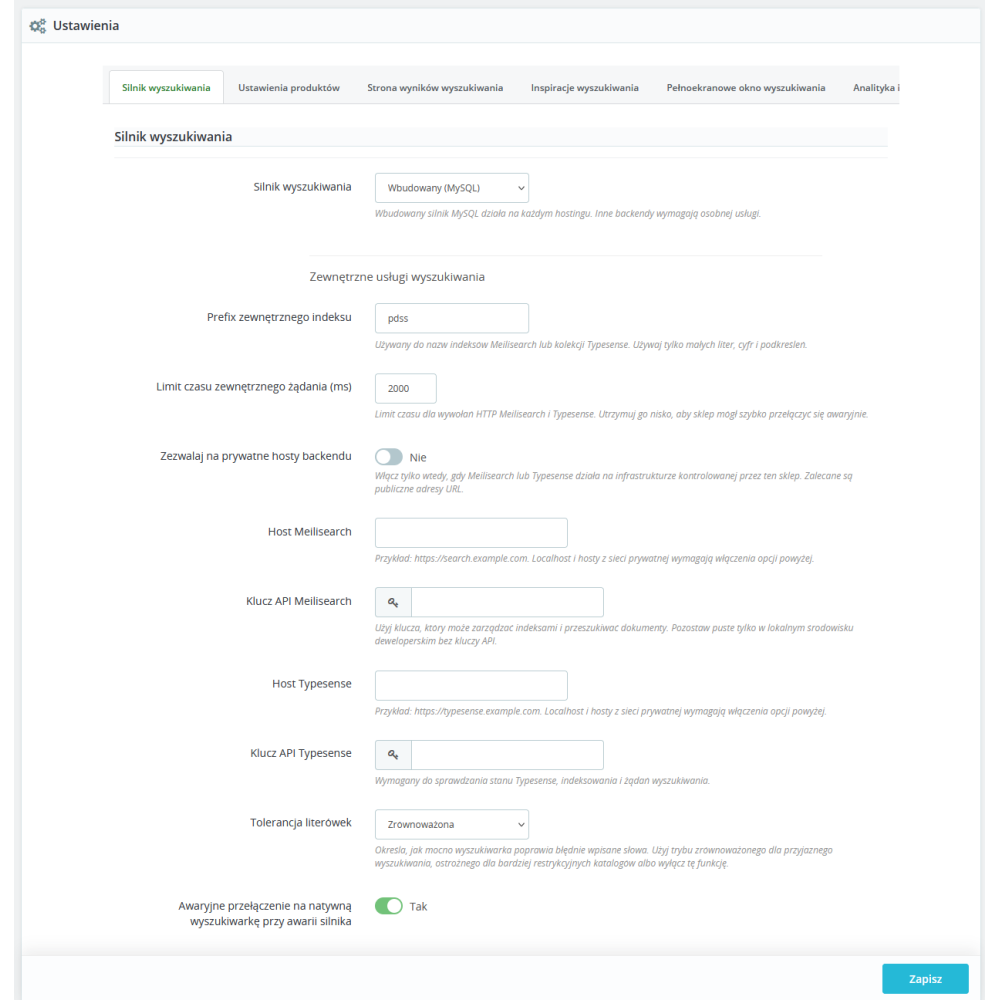
- Built-in MySQL backend: the basic version of the module runs on the store database and does not require a subscription for an external search engine. Products are processed into its own index, prepared for text search, product codes, filtering, sorting, and result presentation.
- Optional Meilisearch and Typesense backends: the administrator can switch the engine to one of the supported external services, provide the address, API key, index prefix, and connection timeout. This is an additional option; the store can remain on the MySQL engine.
- Emergency fallback: the setting to return to PrestaShop’s native search makes it possible to maintain basic query handling when the selected search backend is not responding.
- Index split by store and language: documents, facets, analytics, and data managed by the module take into account the current store and language context. Thanks to this, results can match the proper catalog, translations, and multistore configuration.
- Indexing without a product feed: the module retrieves data directly from PrestaShop. There is no need to prepare a separate XML or CSV file just to feed the search engine.
- Blue/green index: a full rebuild is performed in a new index generation, and switching to the prepared data set takes place after the process is completed. The current active generation can continue handling search while the new one is being built.
Scope of data included in search
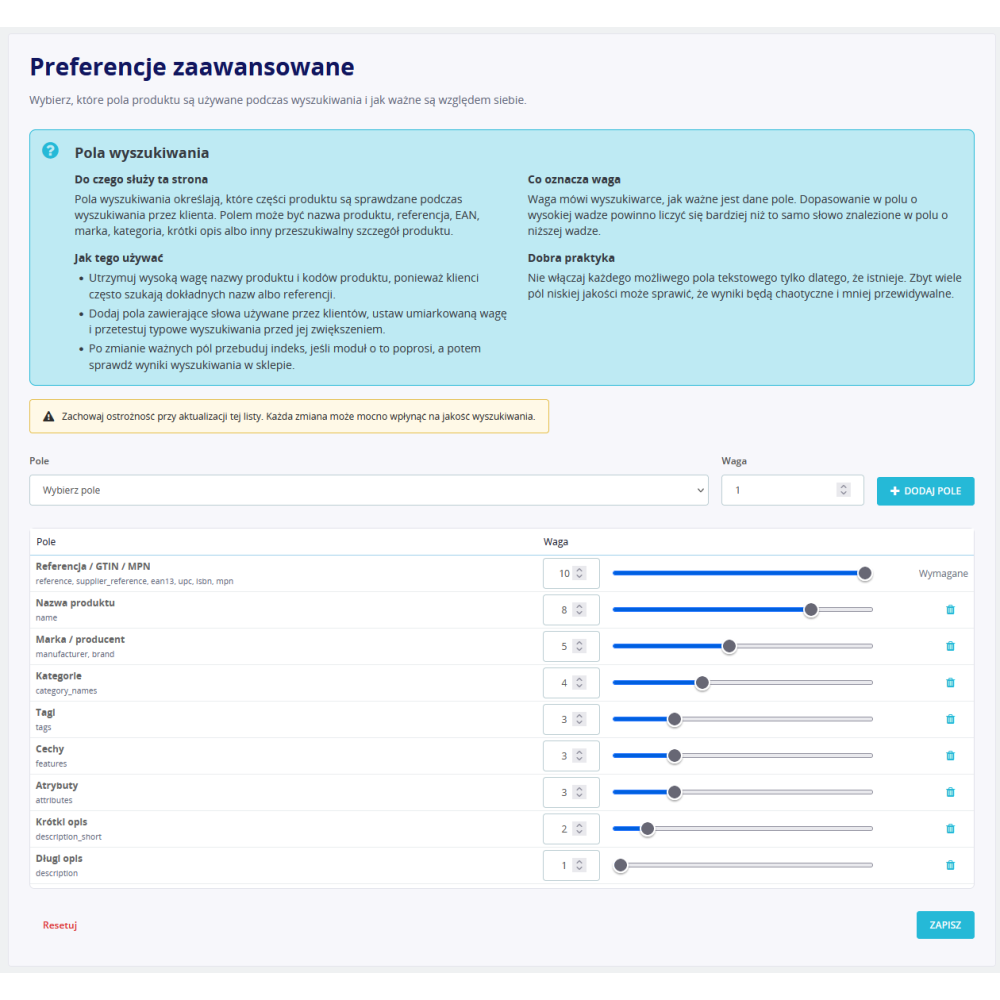
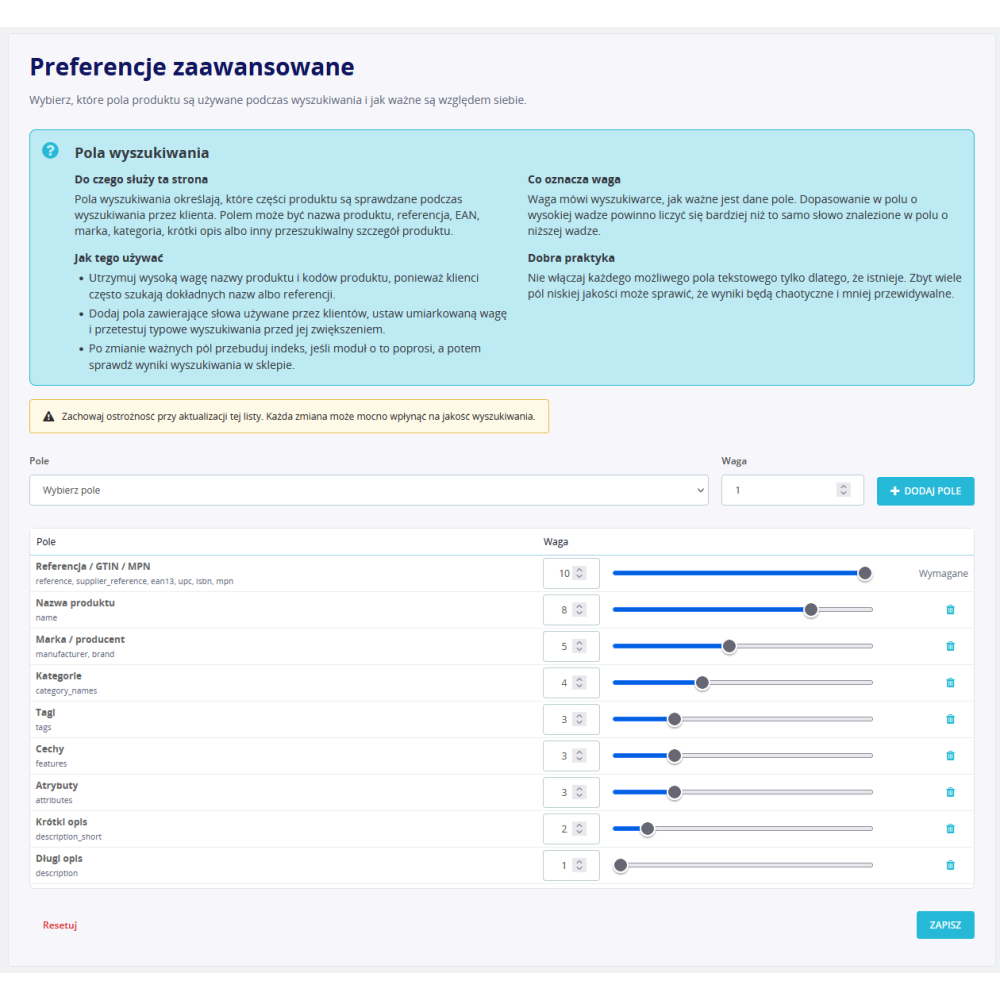
The administrator is not limited only to the product name. The module has a search fields panel where the scope of information used to find products can be controlled.
- Commercial codes and identifiers: search includes the product and supplier reference, EAN-13, UPC, ISBN, and MPN. The codes field remains a core element of the index, which makes it easier to find a specific product by its technical designation.
- Name, brand, and categories: the module can match the query against the product name, manufacturer or brand, and the names of categories assigned to the product.
- Tags, features, and attributes: product tags, feature values, and combination attributes can be included in the index, so the customer can also search by parameters and variants describing the offer.
- Short description and full description: the administrator can use product descriptive content as an additional matching source, with a different weight than the name or code.
- Configurable field weights: the relevance criteria panel makes it possible to determine which information has a greater impact on the order of results. Therefore, searching by an exact code can have a different significance than a word appearing only in the long description.
Autocomplete and search while typing
- Instant product suggestions: when autocomplete is enabled, the module fetches results while the phrase is being typed. The customer can identify the right product faster and go to its page without waiting for a full results reload.
- Keyword suggestions: the module can display related phrases derived from the product index. The limit of visible suggestions is configurable.
- Typo tolerance: balanced, conservative, and disabled modes are available. This makes it possible to adapt approximate search to the type of assortment, code lengths, and the expected level of flexibility for incorrectly entered words.
- Control of asynchronous queries: the front-end script uses typing delay, cancellation of outdated queries, and response order protection so that an older result does not replace the customer’s newer phrase.
- Keyboard-accessible interface: autocomplete uses combobox semantics and ARIA attributes, supporting navigation through suggestions without using a mouse.
Full-screen search modal
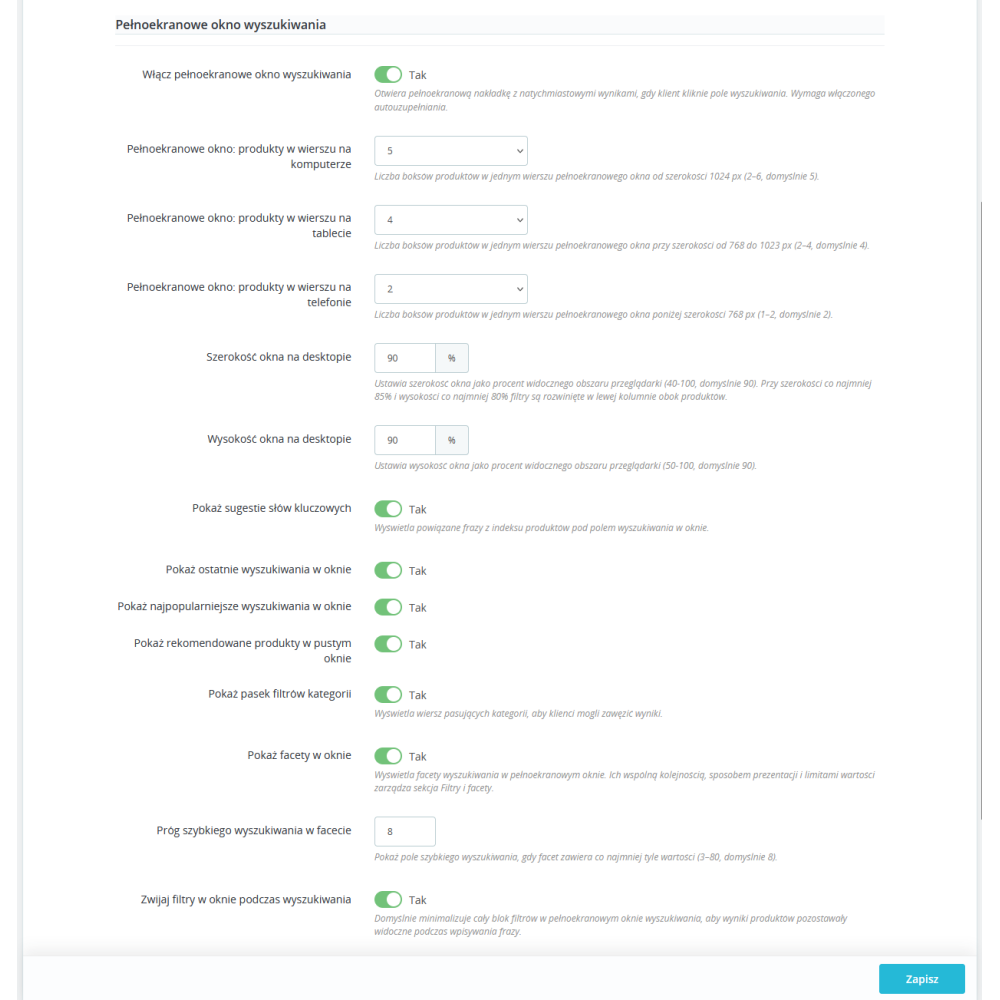
- Results without leaving the current page: after clicking the search field, the module can open an advanced modal with product results, suggestions, and tools for narrowing the list.
- Configurable size: the modal width and height on desktop are set as a percentage relative to the browser window. In the large variant, filters can form a separate column next to the products.
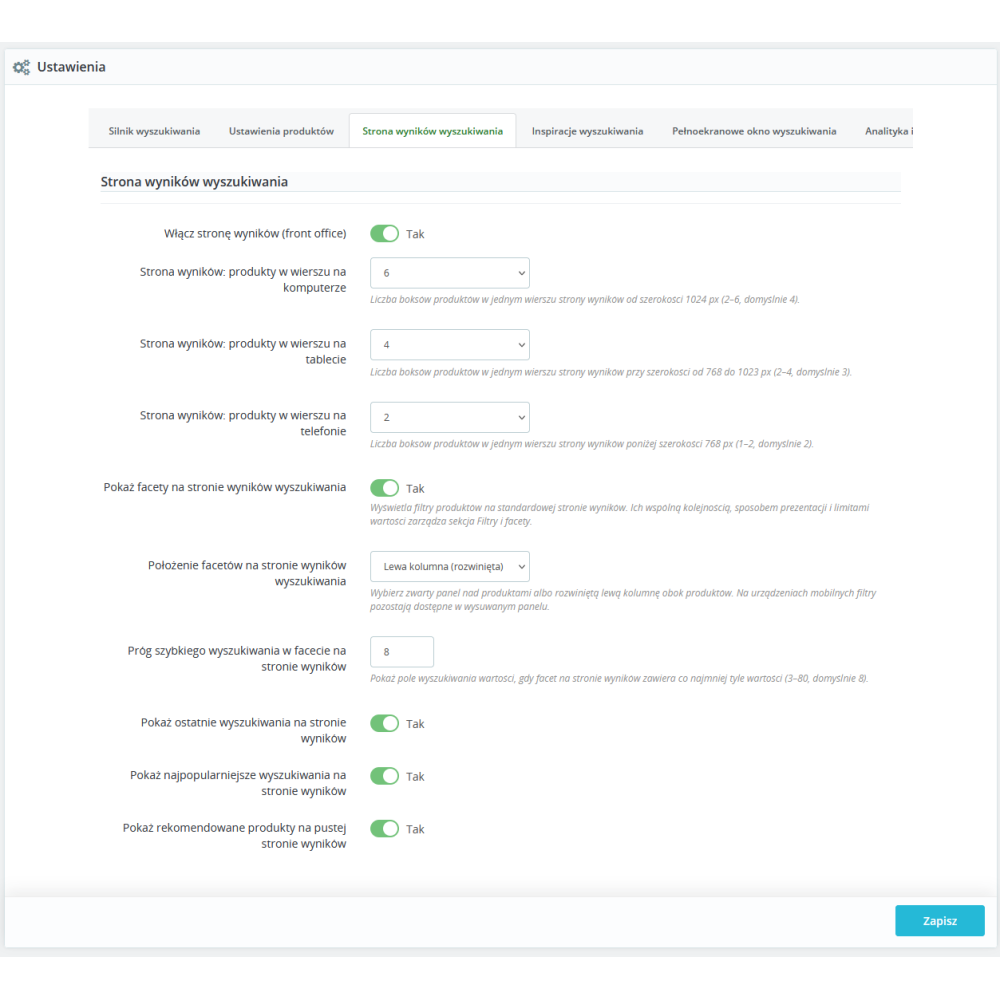
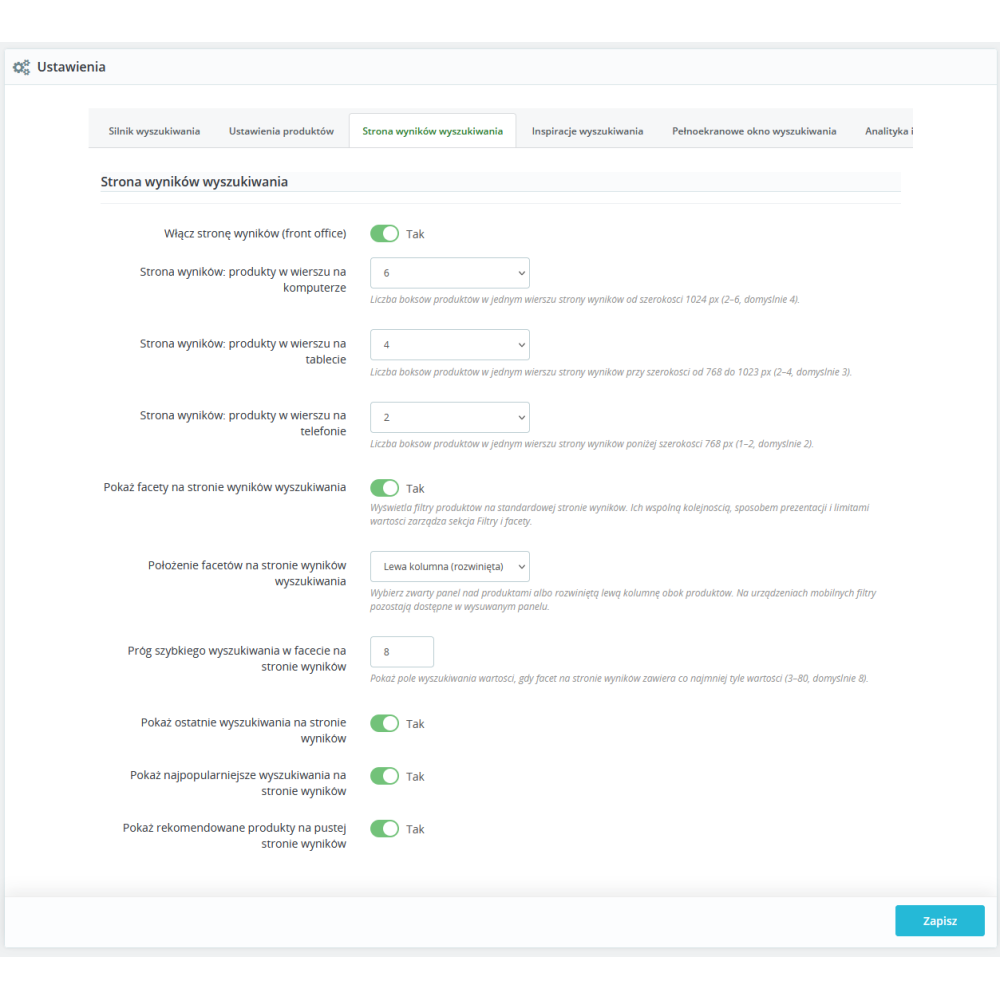
- Responsive product grid: the number of products in one row is set independently for desktop, tablet, and phone. This makes it possible to adapt result density to the store design and screen size.
- Two ways to browse further results: the administrator chooses automatic loading while scrolling or classic pagination. The limit of products fetched in one batch or per page is also configurable.
- Categories and facets in the modal: the customer can narrow results using matching categories and the same set of facets that applies on the standard search results page.
- Collapsing filters while typing: optionally, the filter block remains collapsed by default so that on smaller screens and while typing it does not cover the product list. The section state is also synchronized during loading, no-results states, and error handling.
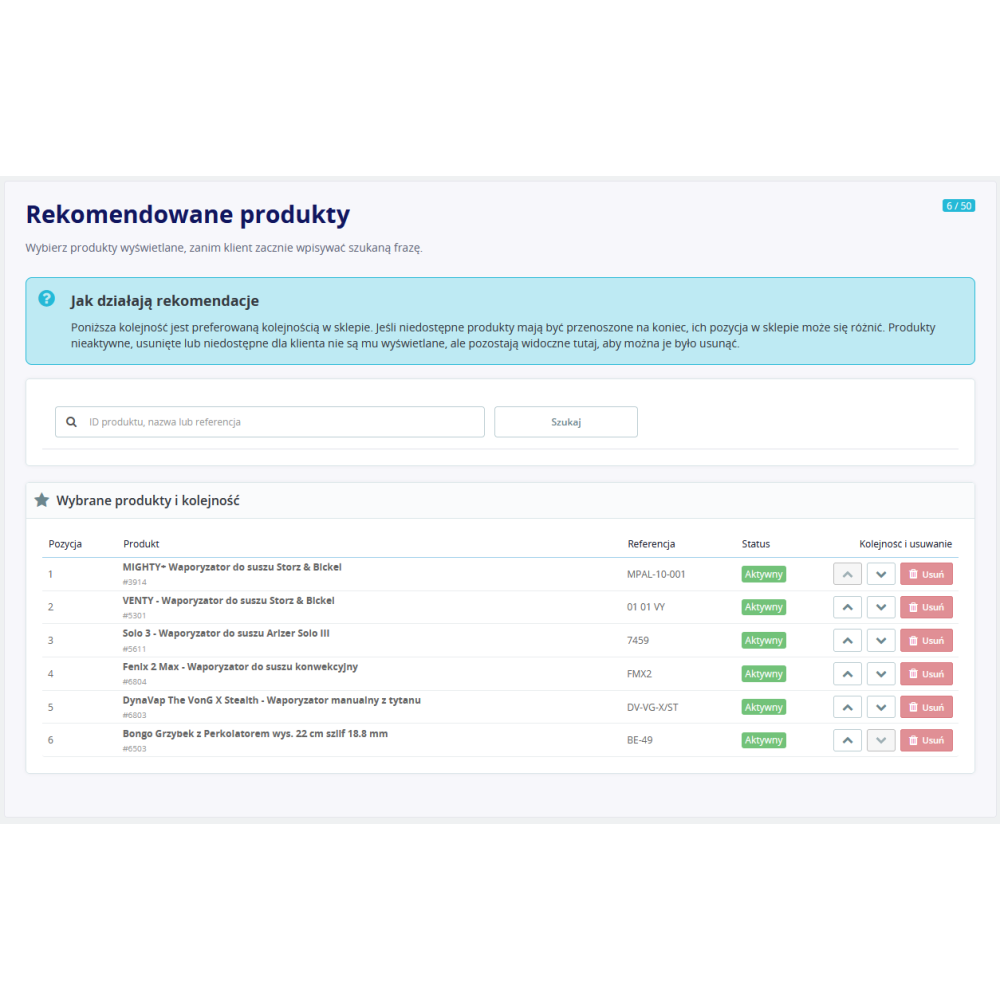
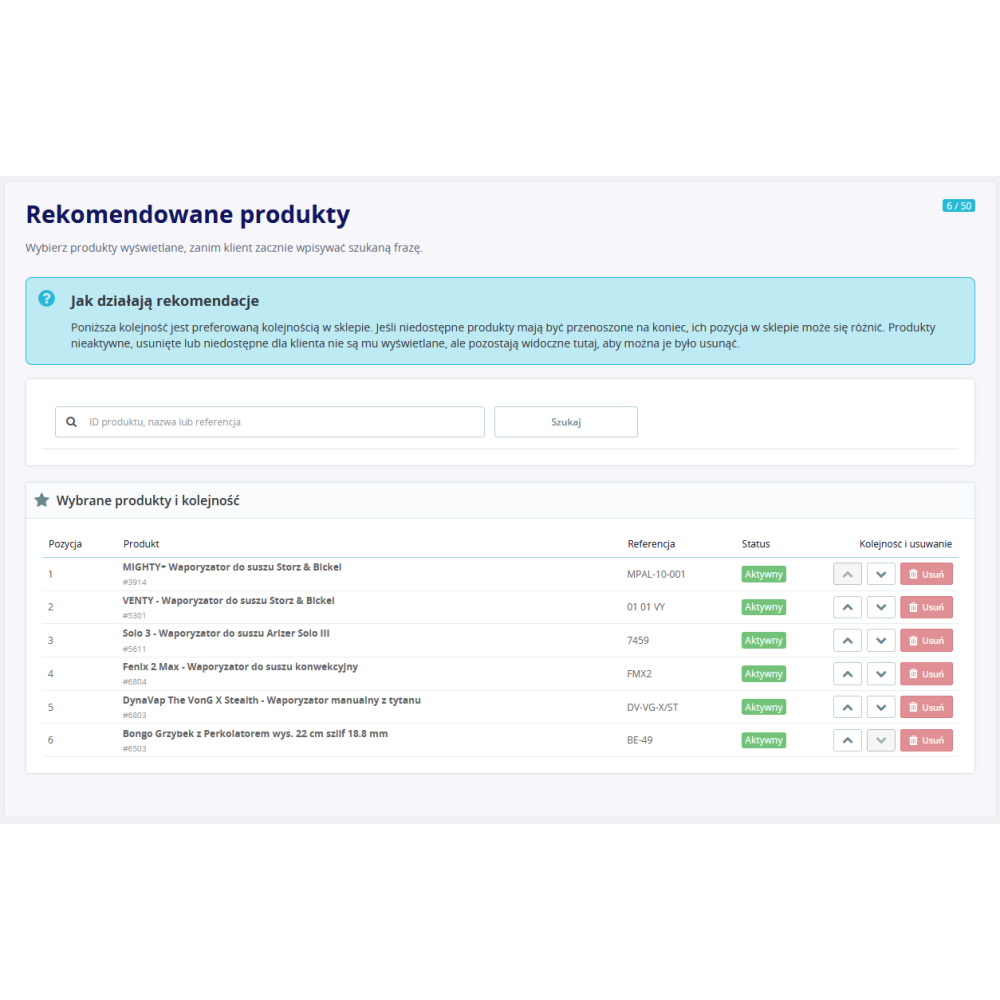
- Offer discovery view: before entering a phrase, the modal can display recent searches, popular successful queries, and manually selected recommended products.
Advanced search results page
- Native integration with the PrestaShop product list mechanism: the module provides its own results provider while also using the platform’s product list structure and sorting mechanism.
- Independent enabling: the results page, autocomplete, and modal have separate switches. This allows gradual feature rollout and keeping only those elements that are needed in a specific store.
- Separate responsive grid: the number of product cards per row on the results page is configured independently for desktop, tablet, and phone.
- Two facet layouts: filters can be placed as a compact panel above the products or as an expanded left column. The left-column variant can also create a two-column layout on a full-width results page, and on mobile devices the filters remain available in a drawer.
- Result sorting: the customer can choose relevance, available products first, name A–Z or Z–A, and price ascending or descending.
- Policy for unavailable products: the administrator can completely exclude products that cannot currently be ordered or keep them visible and move them to the end of the list. The module takes into account stock status, the out-of-stock sales setting, and the product availability-for-order flag.
- Help for an empty query: on the results page, recent searches, popular phrases, and recommended products can be enabled instead of leaving the customer with an empty view.
Filters and facets tailored to the catalog
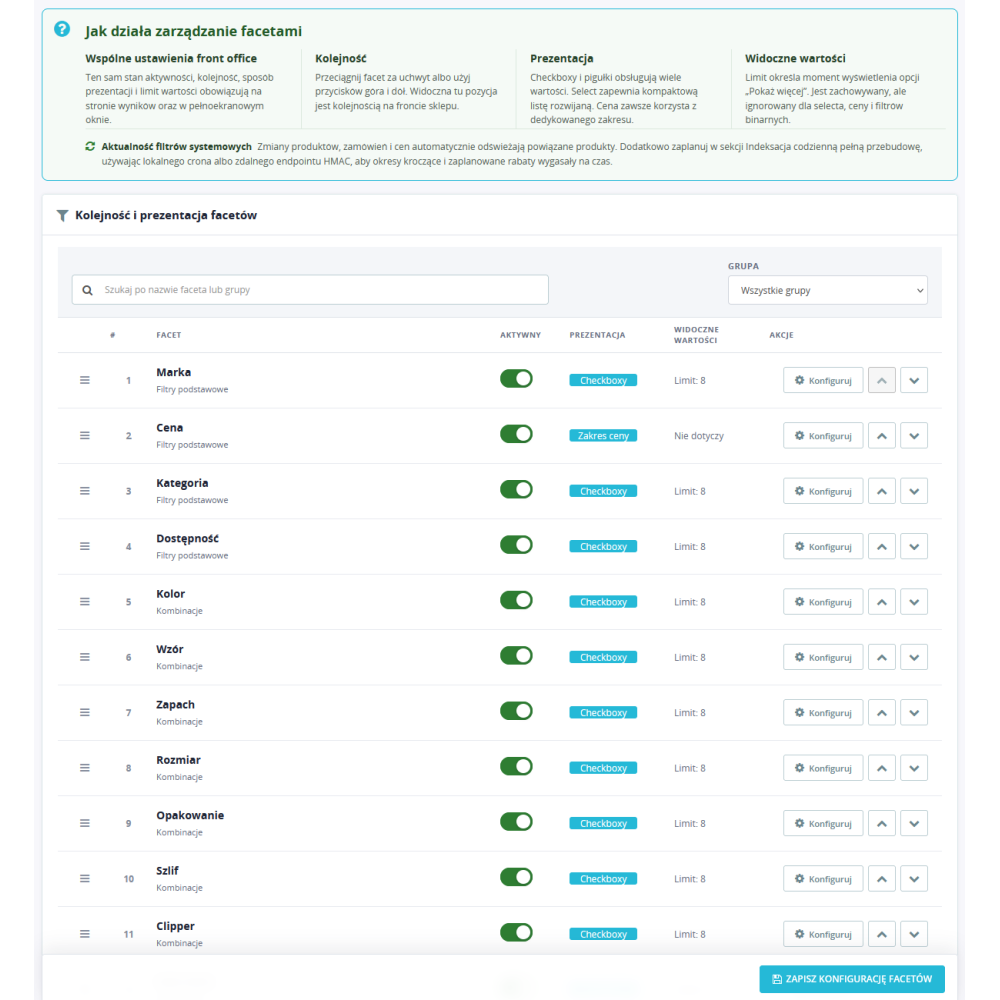
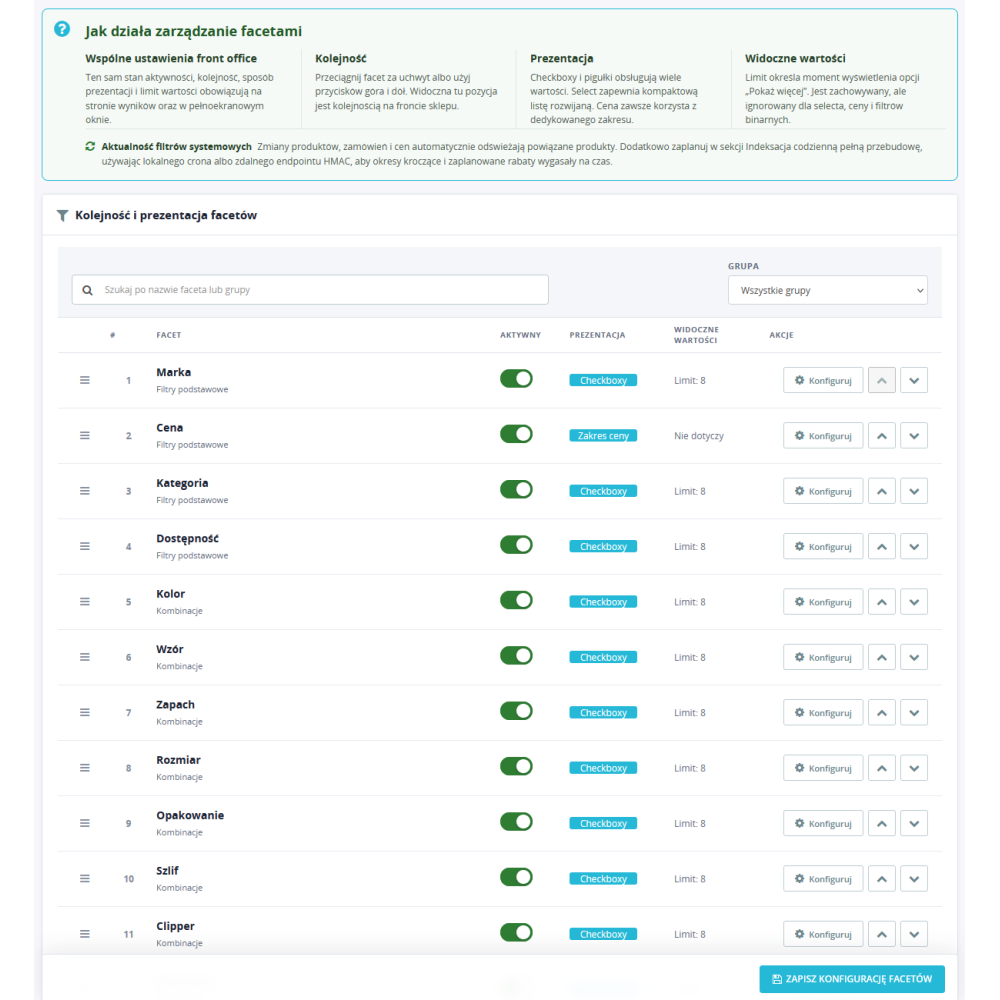
- Shared configuration for the modal and results page: the order, activity, and presentation method of facets are managed in one place, so the customer gets consistent filters in both views.
- Standard catalog facets: the module supports category, brand, availability, and price range.
- Dynamic product facets: attribute groups and features are retrieved from the catalog and receive stable identifiers. This makes it possible to configure separately, for example, size, color, material, capacity, or any other group existing in the store.
- Commercial facets: filters for new products, bestsellers from the last 30 days, and products covered by an active price promotion are available.
- Different presentation forms: for each entity, you can choose checkboxes, pills, or multiple selection with removable active values. The configuration does not impose one global display method on all filters.
- Individual order and limits: the administrator sets the order of facets and the maximum number of visible values separately for each entity. The order can be changed by drag and drop or with keyboard-accessible buttons.
- Quick value search: when a facet contains many options, the module can display an internal search field. The threshold for enabling it is configured separately for the modal and the results page.
- Active filters and safe URLs: selected values are presented to the customer as active filters, and the module code validates allowed filter types and price ranges before passing them to the backend.
Synonyms, relevance, and result quality control
- Synonyms managed in the Back Office: colloquial terms, abbreviations, alternative names, and different vocabulary variants used by customers can be linked. Query expansion takes place in the search layer, without rewriting product names.
- Configurable relevance criteria: the administrator can set the order of additional criteria used for results with similar text matching.
- Search preview in the panel: a separate tab makes it possible to check how a phrase works before evaluating results on the store front end. The module also prepares information explaining result matching and scoring.
- Recovery after no results: the search layer contains a mechanism for preparing alternatives for queries that returned no products, instead of limiting the whole process to an empty list.
- Control of purchasable products: relevance rules can be combined with the policy of excluding or lowering the position of unavailable assortment.
Search results merchandising
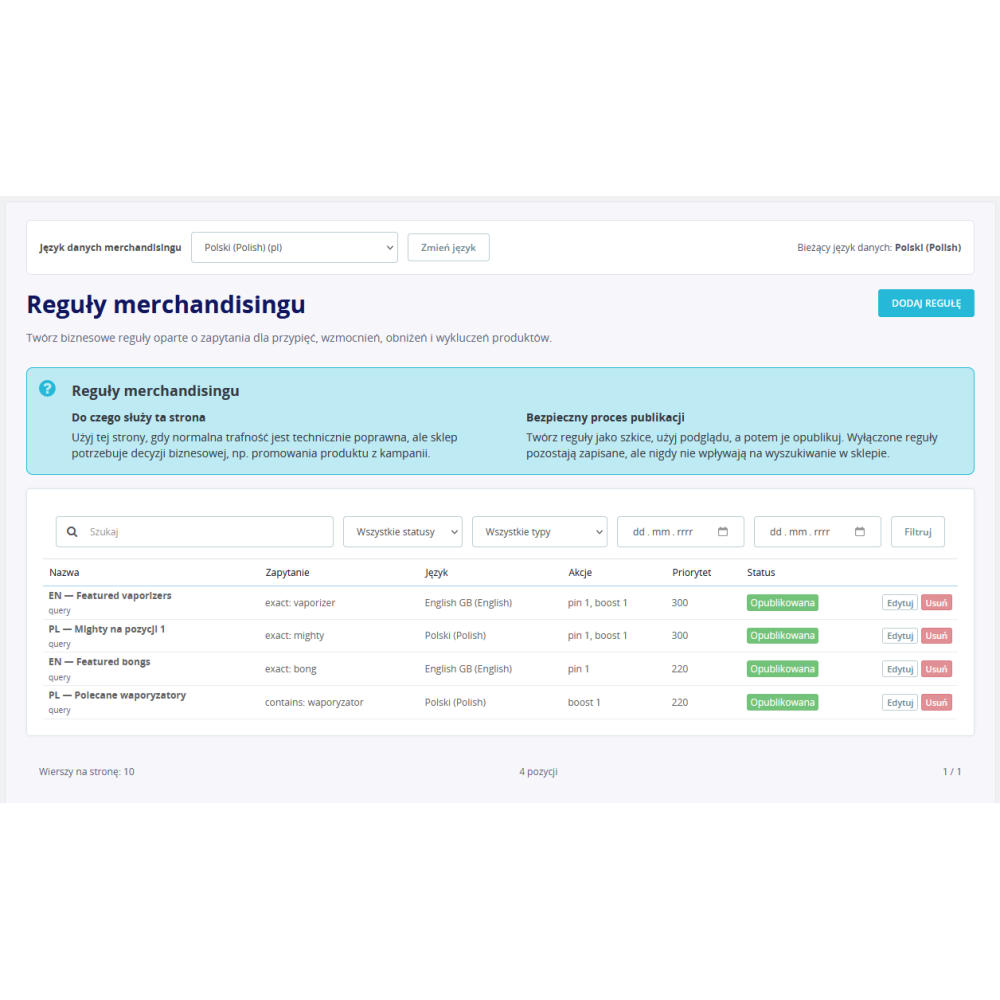
- Query-dependent rules: the condition can match an exact phrase, a prefix, or a query fragment. The rule can be limited to the current language or applied in all languages.
- Product pinning: the selected product can be placed at a specific results position for the query covered by the rule.
- Promoting and lowering positions: boost and bury actions change the score of indicated products using a configurable multiplier.
- Excluding from results: the rule can remove indicated products from the list for a specific phrase without deactivating them in the catalog.
- Priority, status, and schedule: rules have an internal name, priority, draft or published status, and an optional start and end time of operation.
- Deterministic conflict resolution: when several rules match the same query, the module resolves their effect according to action type, priority, and rule identifier.
Query redirects and banner campaigns
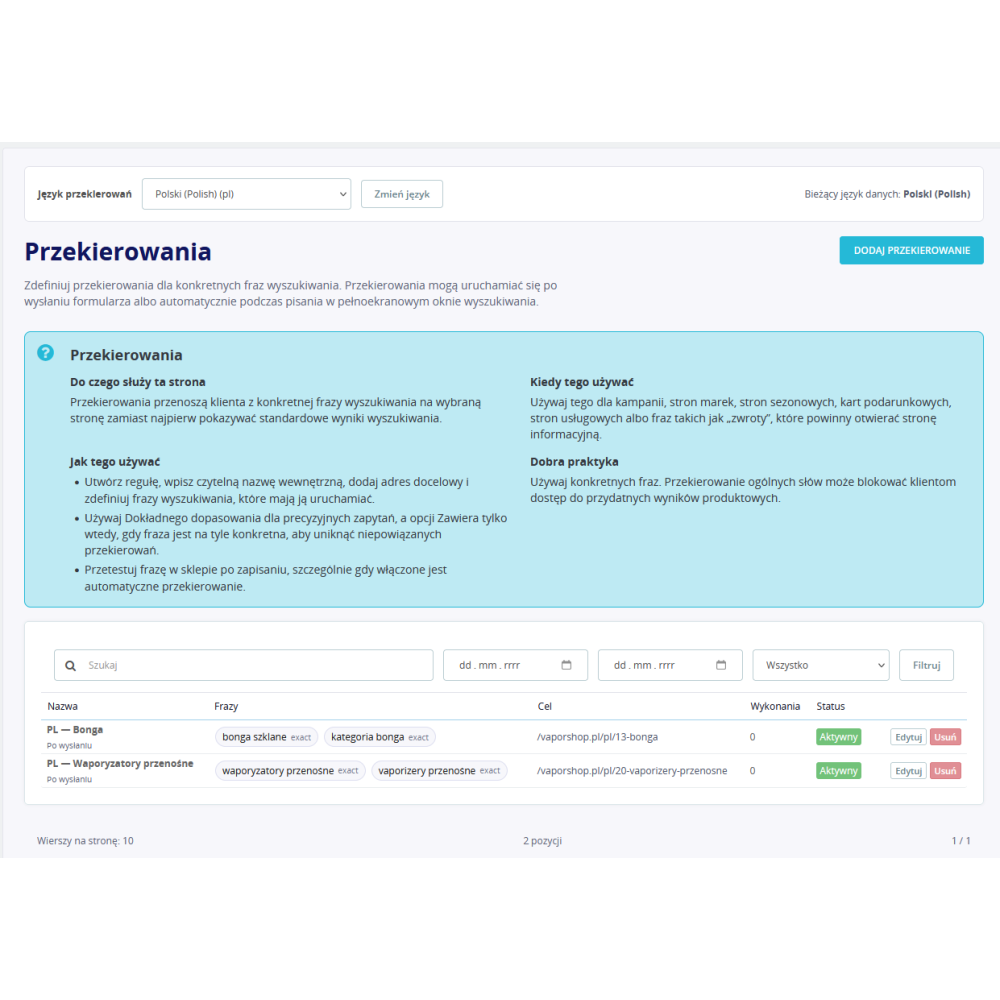
- Search redirects: a selected phrase or set of terms can be directed to a controlled target URL, for example a category, manufacturer, product page, or a prepared landing page.
- Target URL validation: the redirect resolver includes protection against open redirects, so the feature does not amount to unconditional use of any address sent in the query.
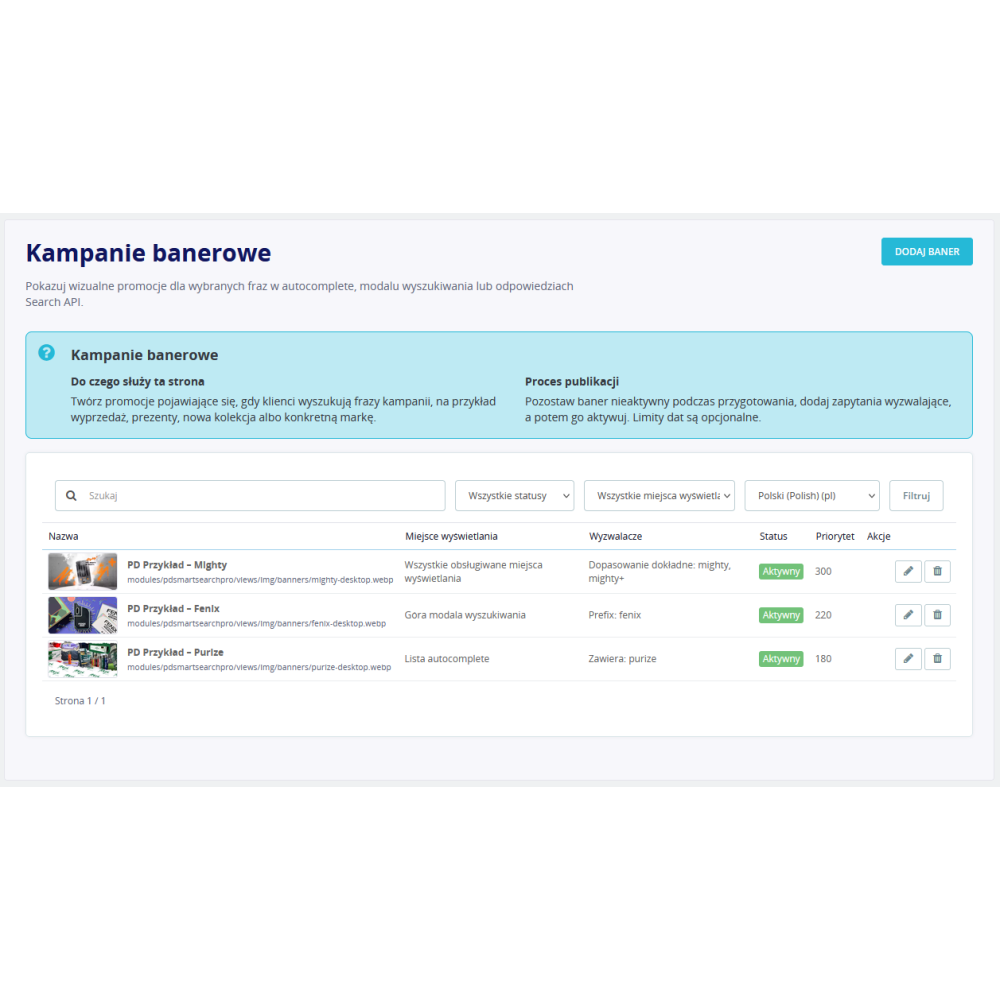
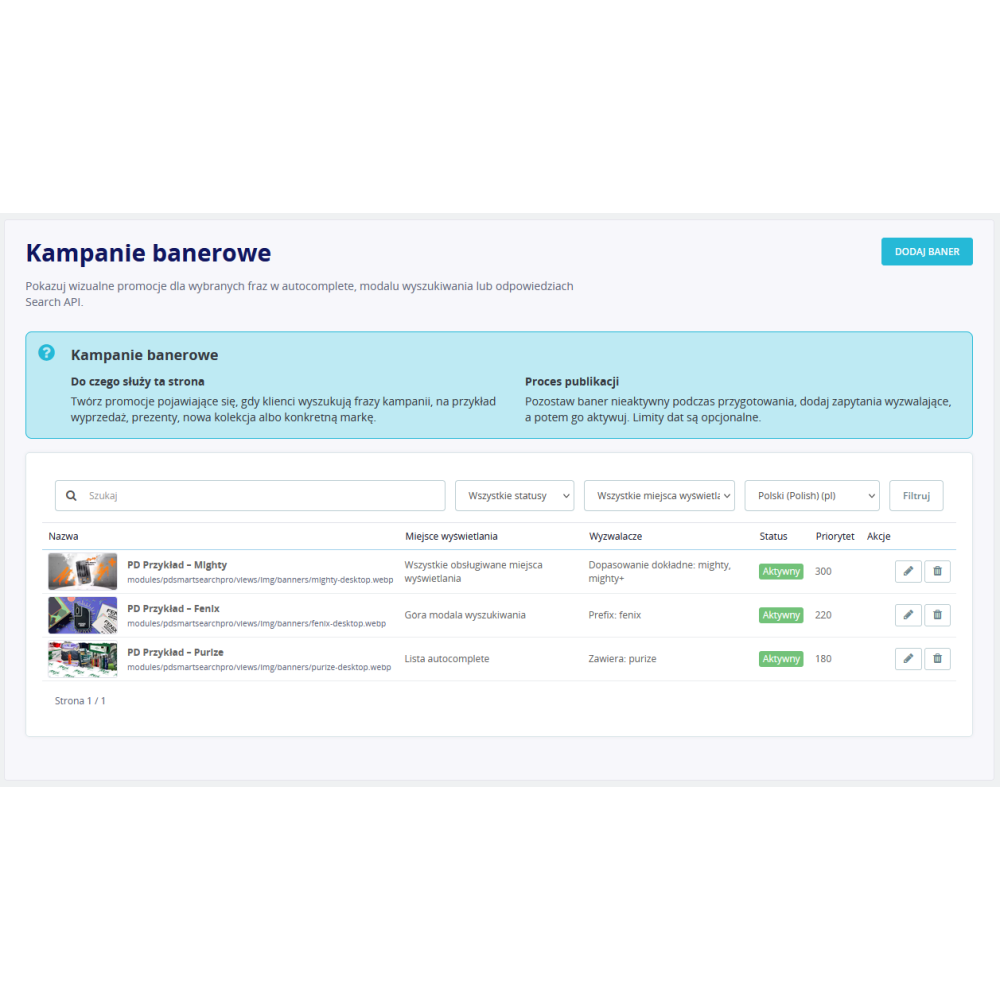
- Campaign matching to the phrase: banners have a list of triggers and a query matching mode. A campaign can be intended for the results page, modal, autocomplete, or all supported locations.
- Separate desktop and mobile images: the module stores the path to the main image and an optional mobile image, alt text, and target URL. A banner without a URL can be displayed as a non-clickable informational element.
- Language, priority, and schedule: campaigns are managed for the selected language, have an active state, priority, and an optional start and end date of display.
- Campaign measurement: after analytics is enabled and consent is obtained, the module can record banner impressions and clicks, combining the promotional function with reporting.
Recommended products and offer discovery
- Manually selected recommendations: the administrator creates an ordered list of products to be displayed before entering a query or on an empty results page.
- Separate view switches: recommendations, popular phrases, and recent searches can be enabled independently for the modal and the results page.
- Recent searches on the browser side: the history of recent phrases is stored locally in the customer’s browser, and its maximum length is configurable.
- Popular successful phrases: the module calculates the list based on aggregated analytics from the selected period. The administrator sets the number of items and the length of the analyzed period.
Search analytics and sales attribution
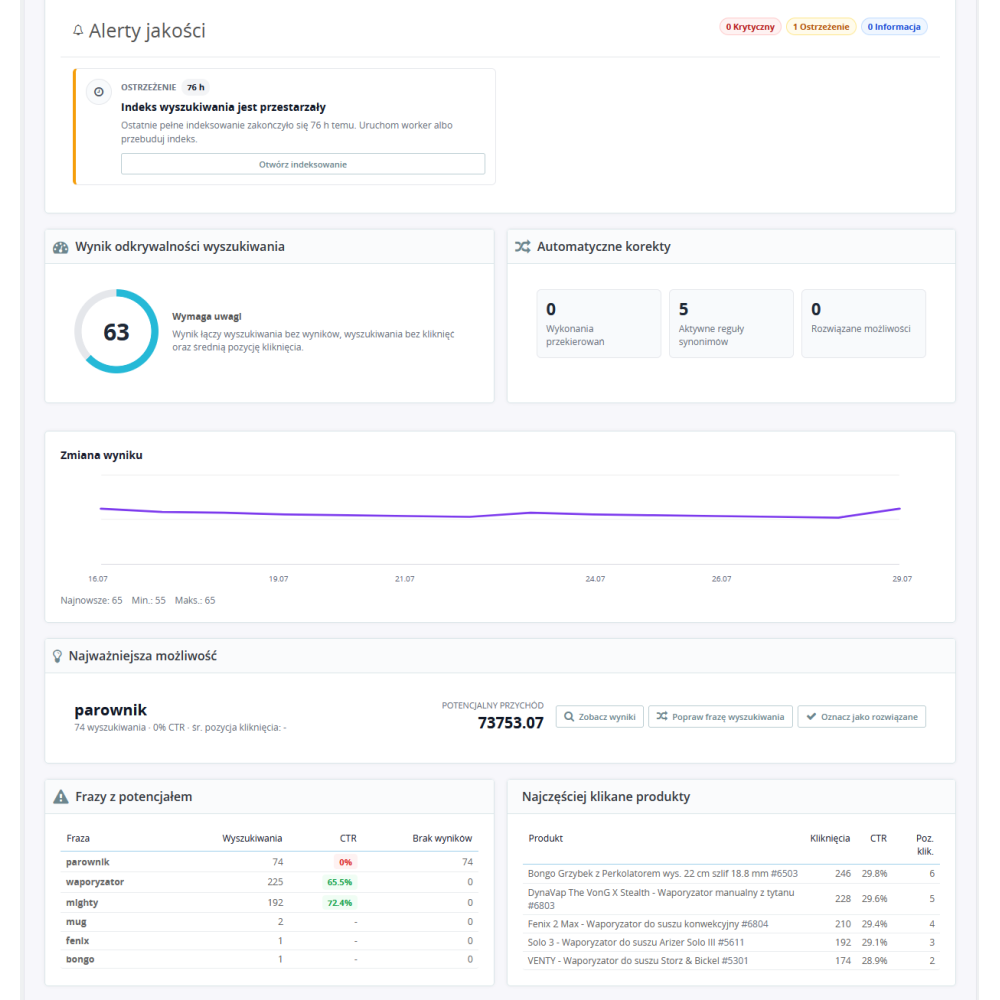
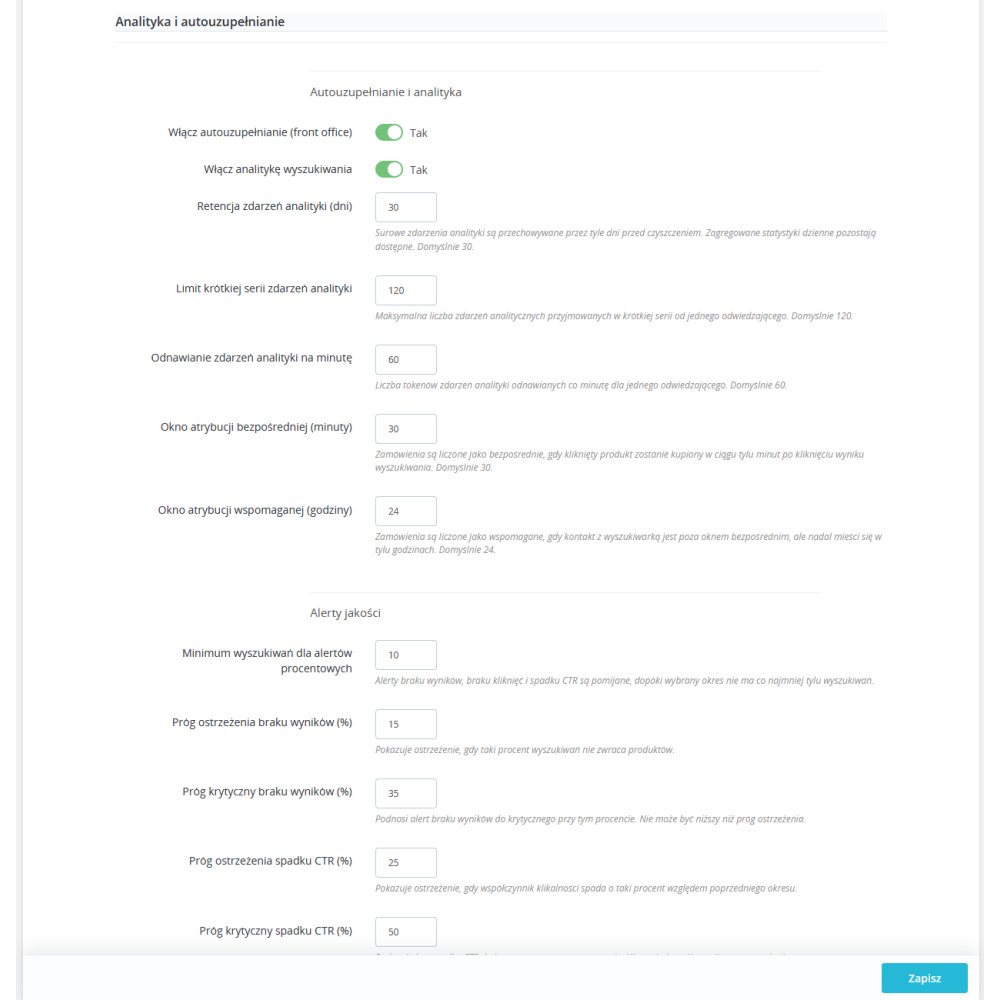
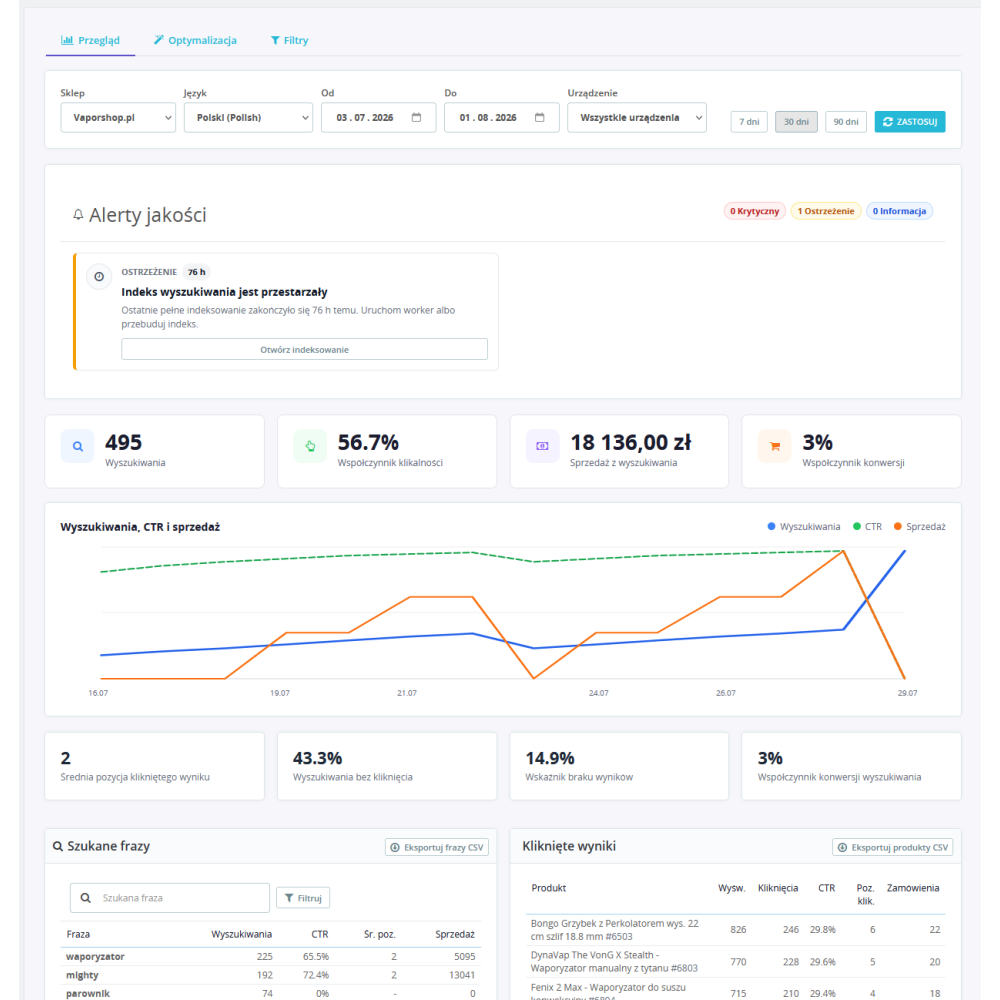
- Key search engine KPIs: the dashboard shows the number of searches, clicks, CTR, searches without a click, and phrases that returned no products.
- Phrase and product analysis: reports help verify what customers are searching for, which products are visible and clicked, and at which positions interactions occur.
- Filter usage analysis: the module aggregates events related to facets, making it possible to assess which filters and values actually help customers narrow the catalog.
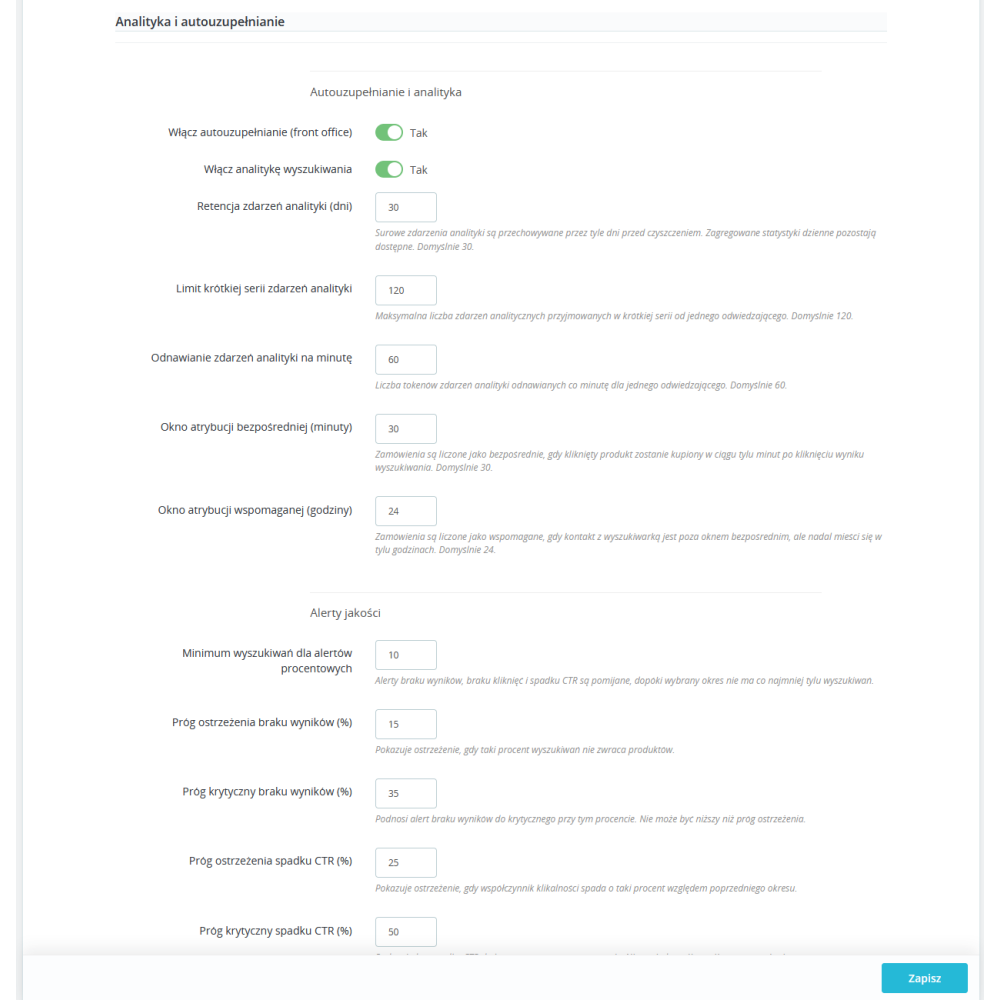
- Carts, orders, and revenue: the attribution mechanism links clicks with later adding the product to the cart and placing an order. Direct and assisted attribution windows are configured separately.
- Breakdown by language and device: daily aggregates can be analyzed in the context of language and device type, which makes it easier to separate the behavior of desktop and mobile users.
- CSV export: phrase, product, and filter data can be exported for further analysis outside the PrestaShop panel.
- Configurable retention: the storage time of raw analytics events is set in days, while aggregated daily statistics can remain available longer.
- Analytics consent handling: the module has a consent gate and separates consent-covered events from limited aggregates. This should not be treated as a substitute for the store’s consent platform configuration, but as a mechanism for respecting its state by the module’s functions.
Quality alerts and optimization panel
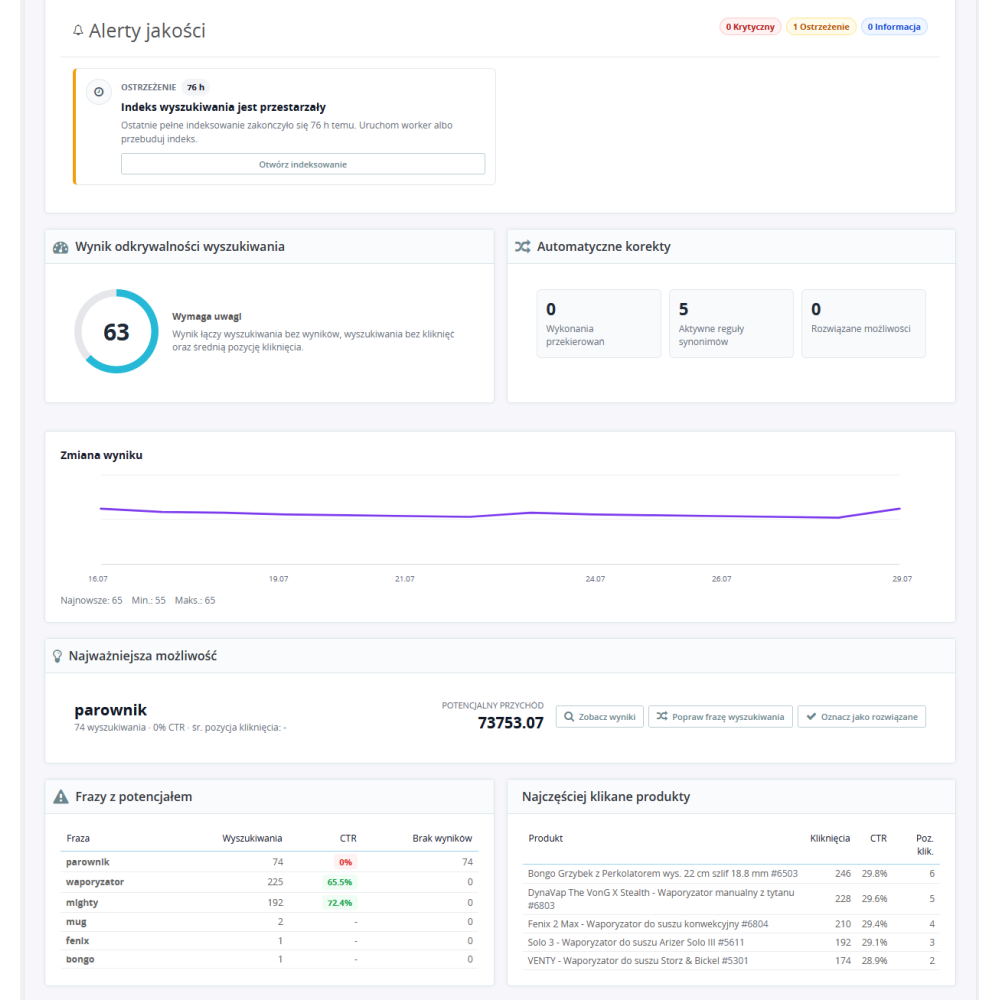
- No-results search alerts: the administrator sets warning and critical levels for the share of queries that found no products.
- No-click and CTR drop alerts: the module can signal deterioration in customer behavior after configured thresholds and minimum sample size are exceeded.
- Index freshness control: the dashboard warns when the last full indexing is older than the allowed number of hours.
- Queue control: separate warning and critical thresholds inform about the growing number of pending, delayed, or processing tasks.
- Optimization opportunities: the panel combines data on problematic phrases and products so the administrator can decide whether a synonym, redirect, product data change, or merchandising rule is needed.
Indexing, queue, and automatic maintenance
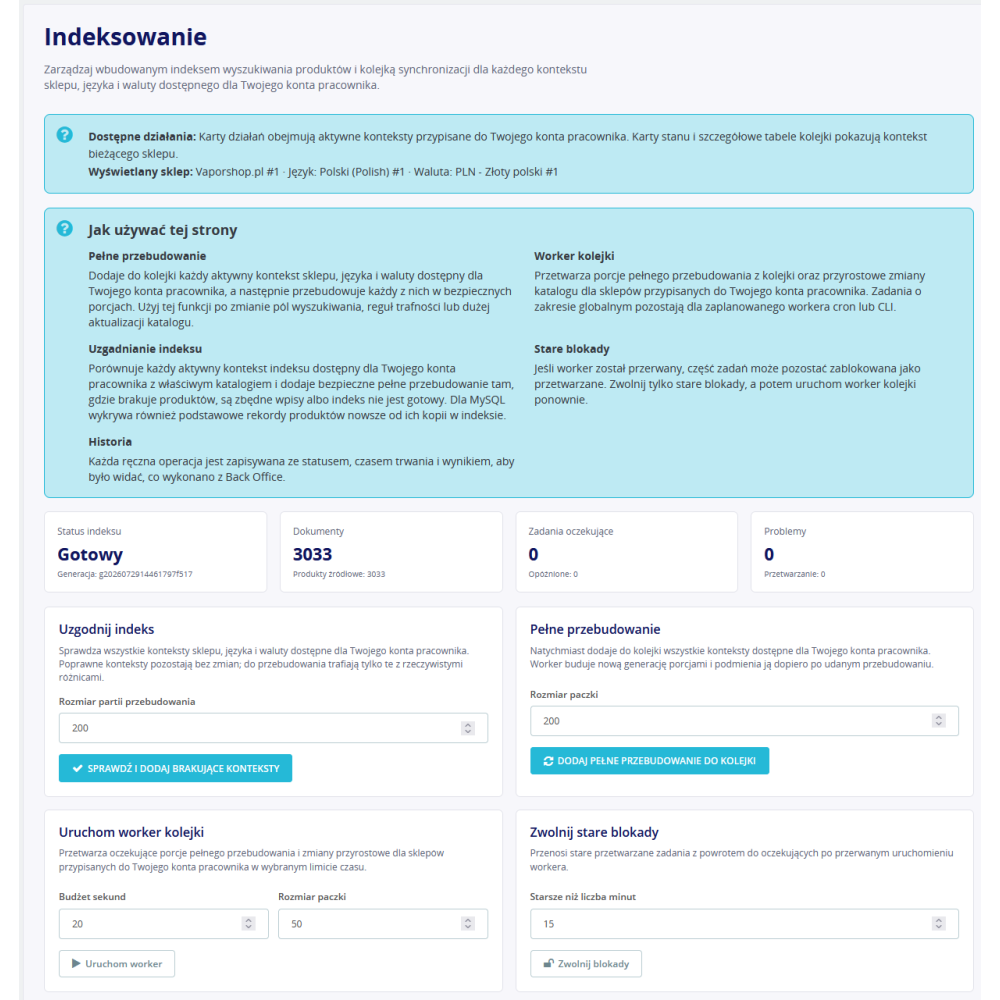
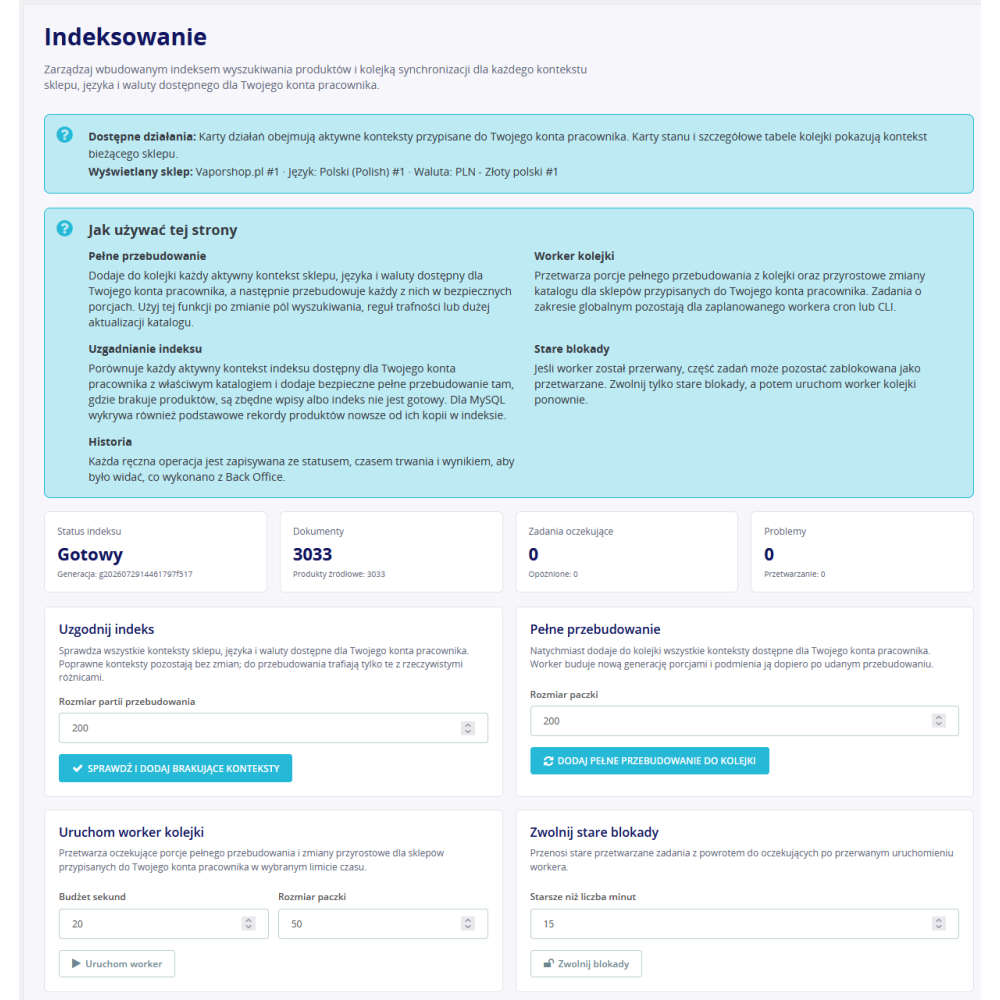
- Full index rebuild: the indexing panel allows launching a complete data generation for active store and language contexts.
- Catalog change queue: adding, updating, or deleting a product, changing stock status, category, special price, and selected related data causes the appropriate task to be added to the queue instead of performing a heavy rebuild in the hook itself.
- Task deduplication and retries: the queue repository merges repeated operations, supports task claiming by the worker, and retries with increasing delay.
- Index reconciler: the reconciliation operation detects missing, excess, or outdated documents and queues a limited repair.
- CRON tasks: the module provides actions for worker operation, reconciliation, and full rebuild. The Back Office panel shows ready information needed to configure a local or external schedule.
- Remote CRON protection: the endpoint supports HMAC signature and nonce, and heavier operations are separated from the public search process.
- Health check and diagnostics: the module has a status endpoint and diagnostic panels that help verify the backend, index, and configuration before enabling features on the front end.
Import and export of complete configuration
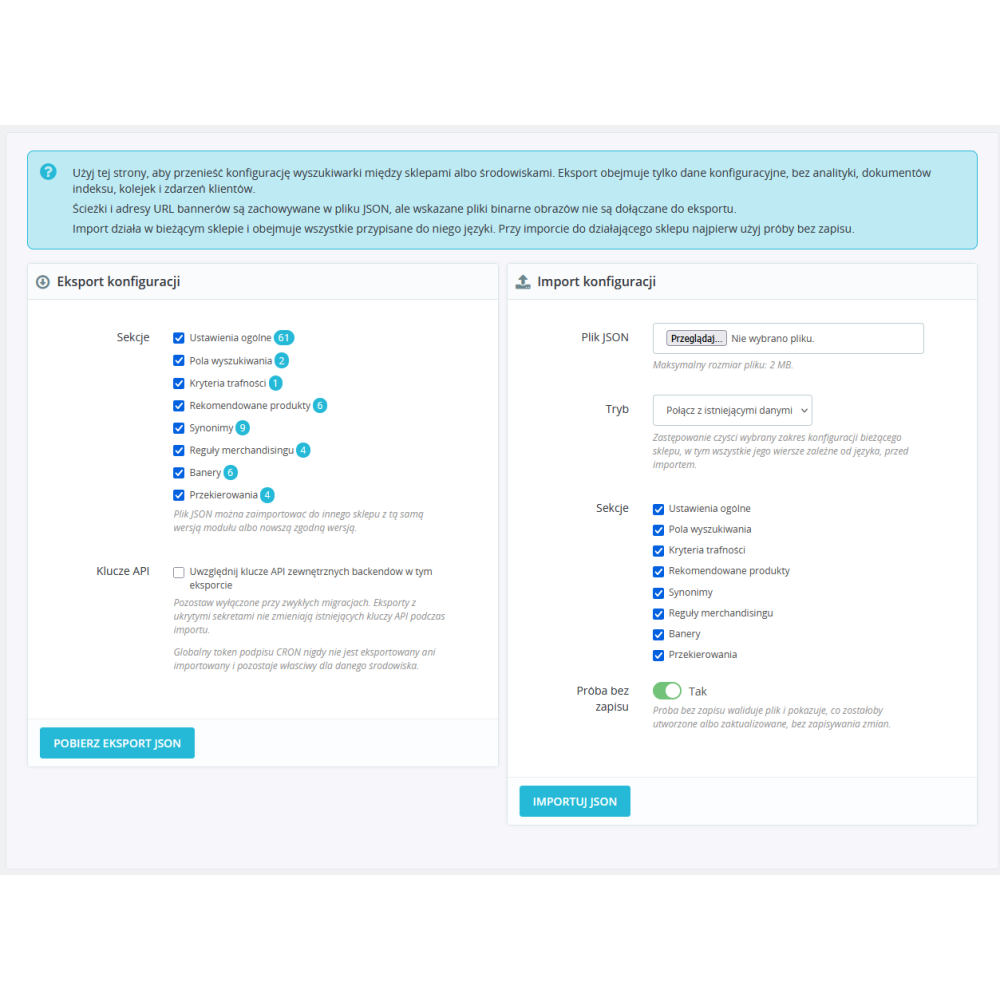
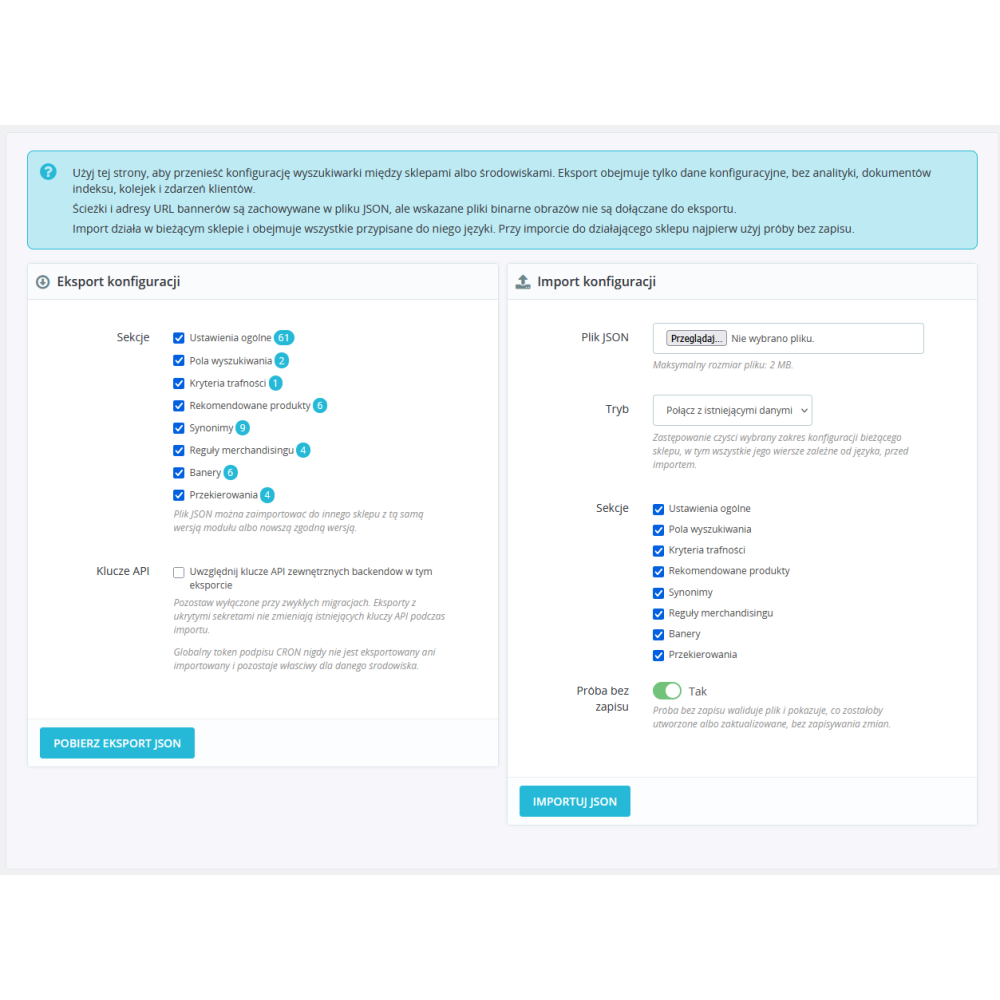
- Portable configuration file: export includes backend, front end, modal, results page, analytics, search fields, relevance criteria, and facet settings.
- Data managed in the module: together with settings, recommended products, synonyms, merchandising rules, banners, and redirects can be transferred.
- Language mapping: multilingual sections are transferred according to locale or ISO code, not only according to the local language identifier.
- Product transfer by stable identifiers: recommendations and products used in rules can be mapped based on reference, EAN, or UPC, which reduces the risk of assigning data to a different product after migration.
- Validation before saving: import performs schema and input data validation before starting changes. Saving is transactional, and in case of an error the module performs a rollback instead of leaving a partially imported configuration.
- Merge or replace mode: the administrator chooses how to apply the file, and the destructive replacement variant requires conscious confirmation.
- Secret protection: API keys can remain redacted, while the global CRON signature secret is not treated as a portable element of environment configuration.
Security, performance, and controlled rollout
- Front end disabled by default after installation: autocomplete, results page, modal, and analytics have separate switches, so the administrator can first build the index and verify results in preview.
- Event rate limiting: the analytics endpoint has a configurable short-burst limit and renewal rate so that a single user cannot generate an unlimited number of records.
- Search circuit breaker: the orchestrator limits retries to an unavailable backend and works together with the native fallback setting.
- No Core modifications: the module does not require overriding PrestaShop classes or manually rewriting theme files. It integrates through hooks, the search provider, and its own front-end assets.
- Conditional loading of front-end features: assets and configuration are added when autocomplete, modal, or the results page is active.
- Data handling after uninstallation: module data is preserved by default, and its removal requires prior enabling of the appropriate option in the settings.
Benefits for the online store
- Shorter path to the product: the customer gets results already while typing, can correct an imprecise query, and immediately narrow the list according to catalog features.
- Better use of product data: names, codes, brands, categories, tags, features, attributes, and descriptions work together instead of remaining separate, unused sources of information.
- Business control over result order: the administrator can promote, demote, pin, or exclude products for specific phrases without rebuilding the entire category structure.
- Data-driven decisions: reports show not only the number of queries, but also clicks, no results, filter usage, carts, orders, and revenue related to search.
- Functionally scalable solution: the store can start with built-in MySQL and later switch the backend to Meilisearch or Typesense, while keeping the module’s management panel and front-end features.
Compatibility
PD Smart Search Pro is prepared for PrestaShop 1.7.x, 8.x, and 9.x, PHP 7.0–8.5, and MySQL 5.6+ or MariaDB 10.x+. The module supports classic and newer PrestaShop environments without a mandatory external search service, while Meilisearch and Typesense integrations remain an optional choice for the administrator.
Link to the module demo:
Admin panel demo:
https://moduly-prestashop.eu/pdsmartsearchpro/admin-dev
Front-end demo:
https://moduly-prestashop.eu/pdsmartsearchpro