
Shopping Cart




What the module is for
- More product reviews. An invitation is sent to the customer after the configured time from payment or order fulfillment and includes only those products from the order that the customer has not yet reviewed.
- A reason for another purchase. The reward for a review is a coupon for the next order – with an expiry date, minimum cart value, and a reminder before it expires.
- Transparent reviews from the rewards program. Reviews created within the program are marked in the content, and the rating does not affect the reward, so the customer can leave either a positive or a negative rating.
- Control and results in one place. A list of collected reviews with moderation status and coupon, plus a statistics dashboard showing the path from invitation to order with a coupon.
Key default settings of a new campaign
- Invitation 14 days after the order enters one of the selected statuses (by default: payment accepted, remote payment accepted, preparation in progress, shipped, delivered).
- One reminder after 7 days and a link valid for 30 days.
- Reward: 10% discount in “one coupon per order” mode, issued after moderation, valid for 30 days, with a reminder 3 days before expiry.
- Limits: 1 reward per customer and 100 rewards per campaign.
- All time periods can be changed up to 365 days, and limits up to 10,000 rewards per customer and 1,000,000 per campaign.
Review invitation campaigns
Which orders and products are covered by a campaign
- Products and categories. Products are selected with the search tool (name or ID), categories from the list; a product qualifies if it is on the product list or belongs to a selected category. An empty list means the entire catalog.
- Exclusions of products take precedence over the product and category lists.
- Order statuses. An invitation is assigned to a valid order whose current status is selected in the campaign on the day the delay expires. The delay is counted from the last time the order entered a selected status.
- Campaign validity period (from–to), its activity, and priority.
- Campaign priority. When campaigns overlap, an order is assigned to the first matching campaign with available limits according to priority – even if its delay is still running.
- Already reviewed products are skipped. The invitation does not include products that the customer has already reviewed earlier in the reviews module, or products for which they have already received a reward.
- Guests without consent for messages do not receive invitations and do not take up space in the limits, because they do not have an account where they could see them.
Message content
- Reward name and message content separately for each store language (up to 150 and up to 3000 characters, plain text without HTML).
- Reward conditions (value, minimum cart, validity, combining with other coupons) are added to the message and review page automatically, in the customer’s language.
Coupons for reviews
Types of rewards
- Percentage discount – for the entire cart or for a list of selected products.
- Fixed amount discount in the selected currency – for the entire cart or for one selected product.
- Free shipping – as a standalone reward or as an addition to another reward.
- Free gift product, also in a selected combination. The gift must be active, available for order, and in stock (or allowed to be ordered when out of stock); otherwise coupon issuance is retried.
- Minimum cart value (gross, excluding shipping) and coupon validity in days.
What and when the customer gets a coupon for
- Order mode: one coupon for the first qualifying review from the order.
- Product mode: a separate coupon for a review of each product covered by the campaign; multiple quantities of the same product do not multiply the reward.
- After moderation or after submission. By default, the coupon is created only after the review is approved in the reviews module; it can also be issued immediately after the review is submitted.
- The star rating does not affect the reward.
- One reward per product and buyer in the store – also across campaigns and subsequent orders. The buyer is identified by an HMAC hash of the email address.
- Promise unchanged. Reward conditions and a place in the limit are reserved at the moment the invitation is created; later campaign edits do not change the promise made to the customer.
Coupon as a PrestaShop cart rule
- Native cart rule with a code, assigned to the customer, single-use, and without partial use.
- Combining with other coupons is set in the campaign; by default, a review coupon cannot be combined with others. In PrestaShop 9, the prohibition is checked by cart validation, and in PrestaShop 1.7 and 8 the module maintains native relations between cart rules (up to 100 rules and 2000 pairs). If the store has more active coupons, the review coupon is still issued, and the panel warns that the no-combination rule is then not enforced.
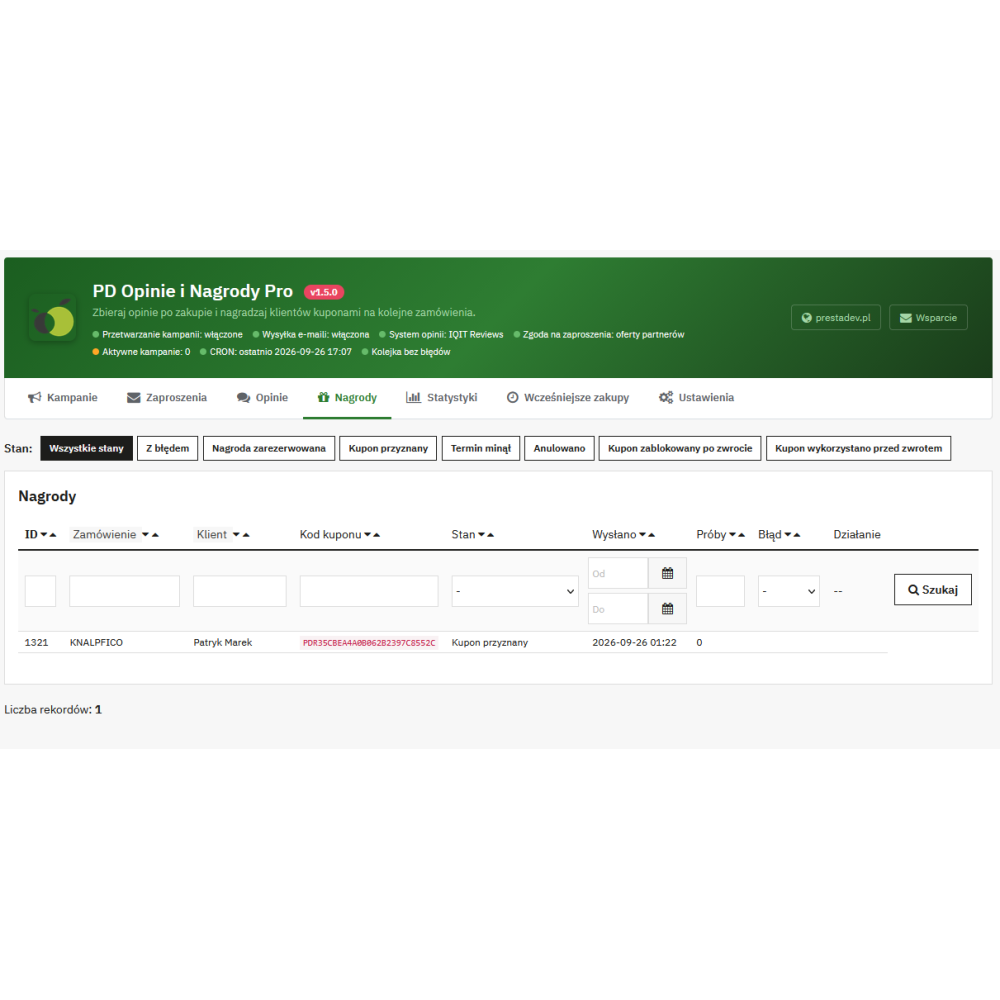
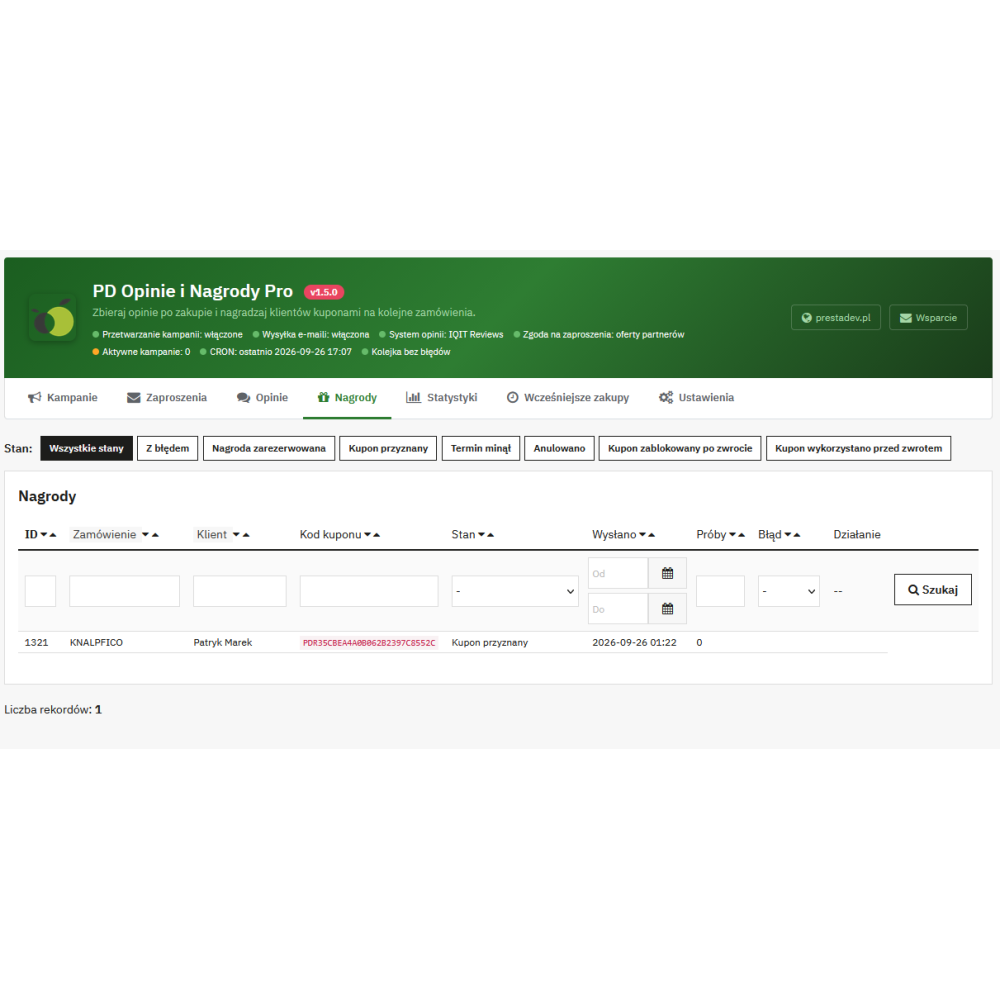
- Retrying issuance. Failed coupon issuance (e.g. gift out of stock) is retried with increasing intervals – from 1 hour to 1 day, up to 10 times; later the “Retry” button is available on the rewards list.
- Refund and cancellation. A full refund of the given product or order cancellation blocks an unused coupon. If the coupon was used earlier, the rewards list shows the status “Coupon used before refund”. A normal status change to the next fulfillment stage does not revoke the reward.
Reviews and moderation
- Works with IQIT Reviews or Product Comments. One of these modules is selected in each store; the review is saved there, and the reviews module publishes and moderates it. Changing the reviews module is blocked as long as there are unfinished invitations or rewards.
- Review form: rating from 1 to 5 stars, title (from 3 to 64 characters), and content (from 20 to 5000 characters); with Product Comments also criterion ratings defined in that module. The review is published with the customer’s first name.
- Review marking. The following text is appended to the content of every review added by the module: “Review after a confirmed purchase, added as part of the rewards program. The reward does not depend on the rating.” The marking is part of the review content, so it does not depend on the store theme or JavaScript.
- Moderator decision detected automatically. Each CRON run checks which reviews have been approved or deleted, and issues or cancels the reward. A review that nobody approves within 60 days after the invitation deadline releases the reward reservation.
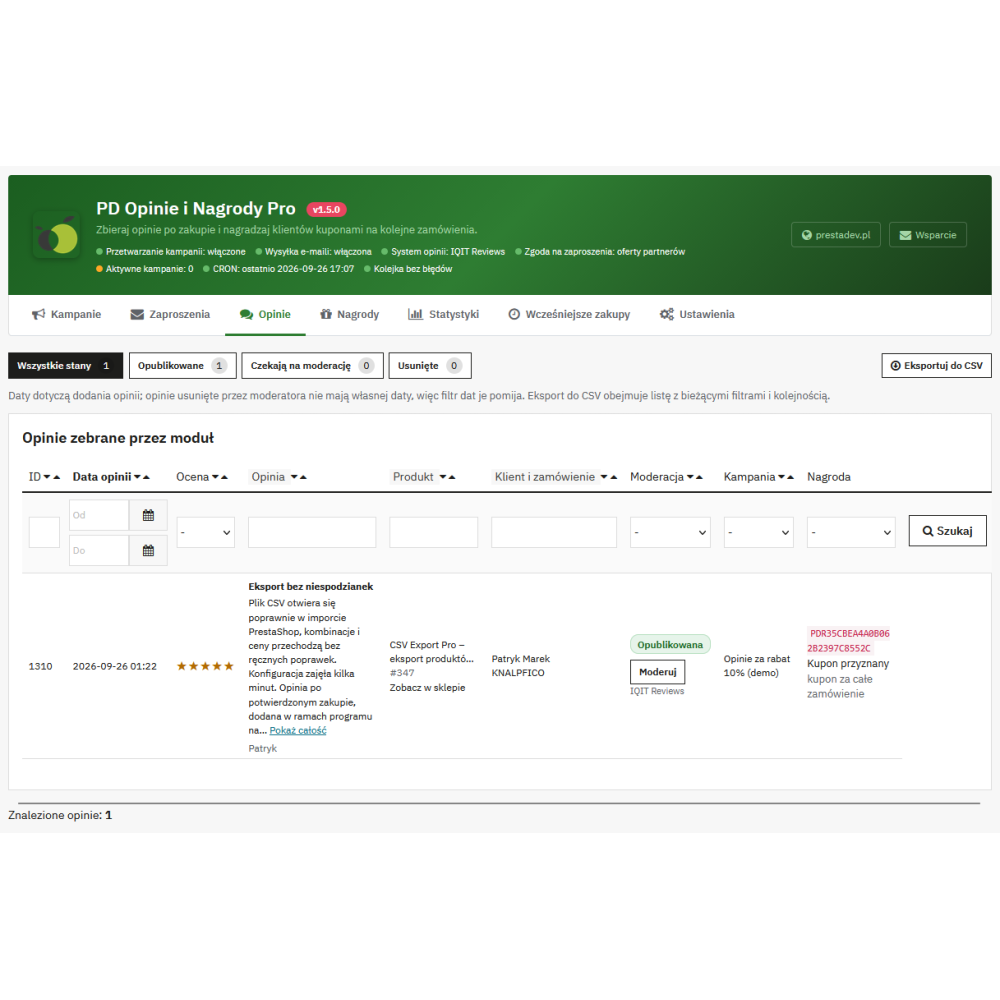
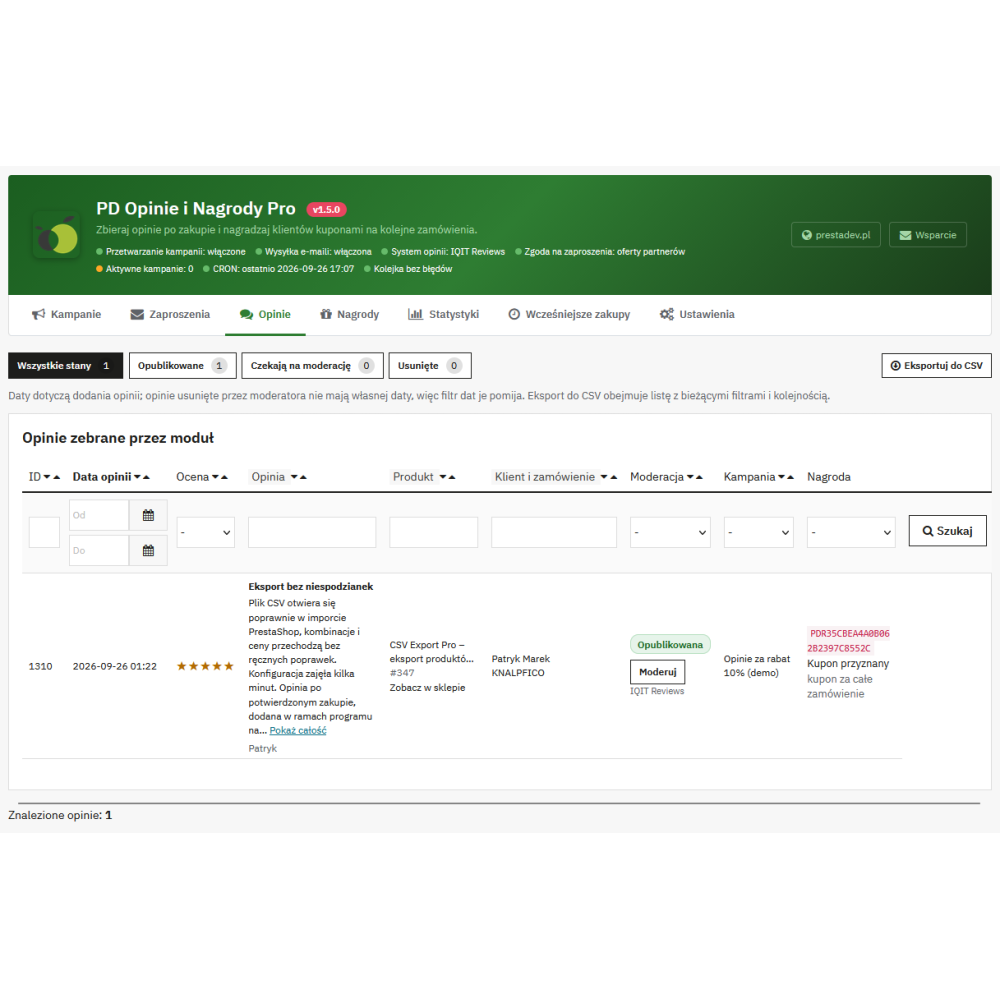
- “Reviews” tab in the panel: rating, title and content, product with a link to edit and to the product page in the store, customer and order, moderation status (published, awaiting moderation, deleted, review system unavailable), a “Moderate” button leading to the review in the reviews module, and the coupon for the review.
- Export reviews to CSV with current filters and sorting – up to 50,000 reviews in one file; requires permission to configure the module, because the file contains customer email addresses.
Pages and messages for the customer
Email messages
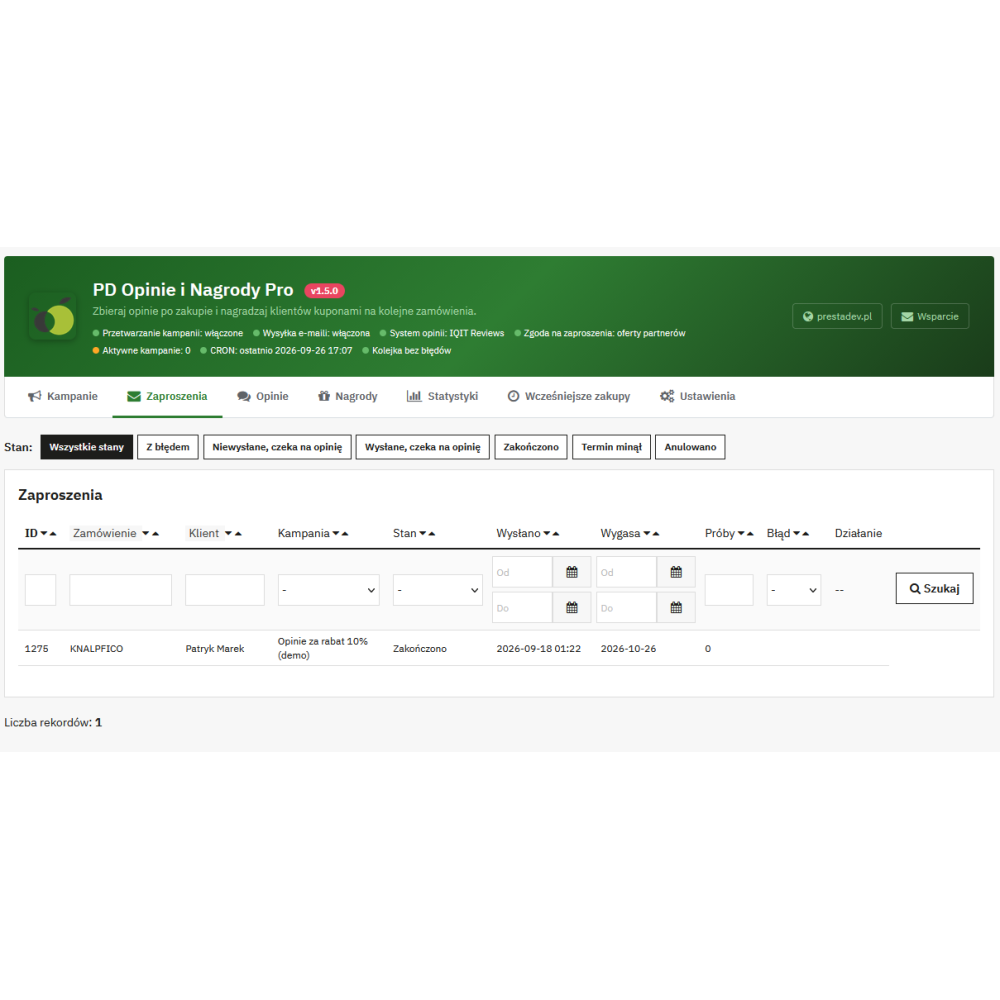
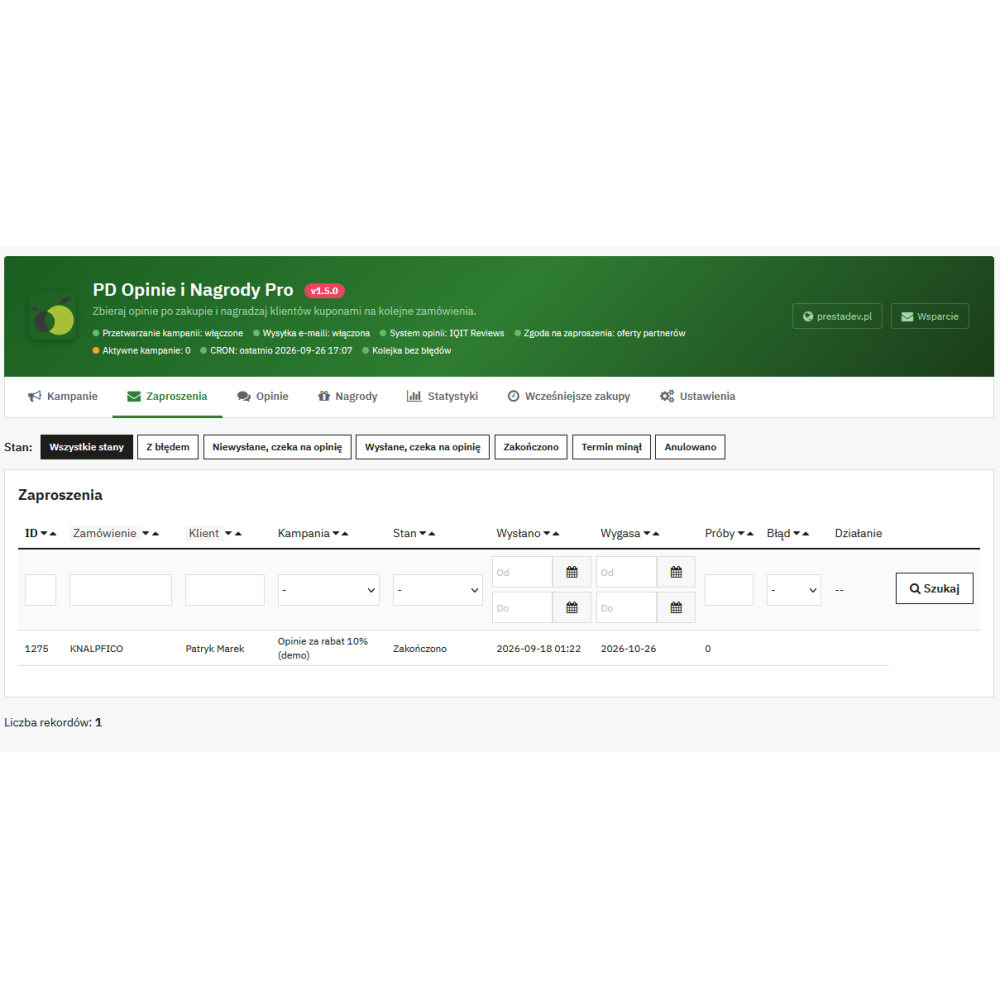
- Four types of messages: review invitation, one reminder, coupon message, and one reminder before coupon expiry. HTML and text templates in Polish and English.
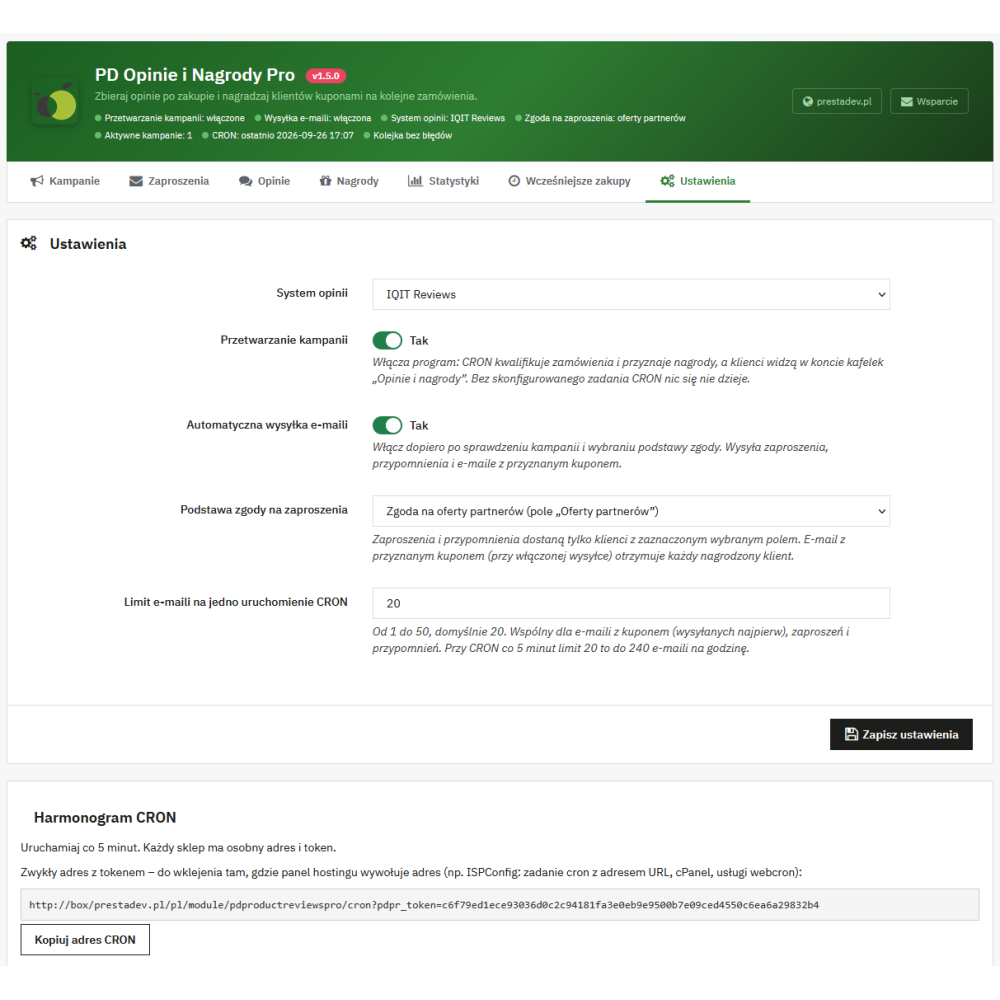
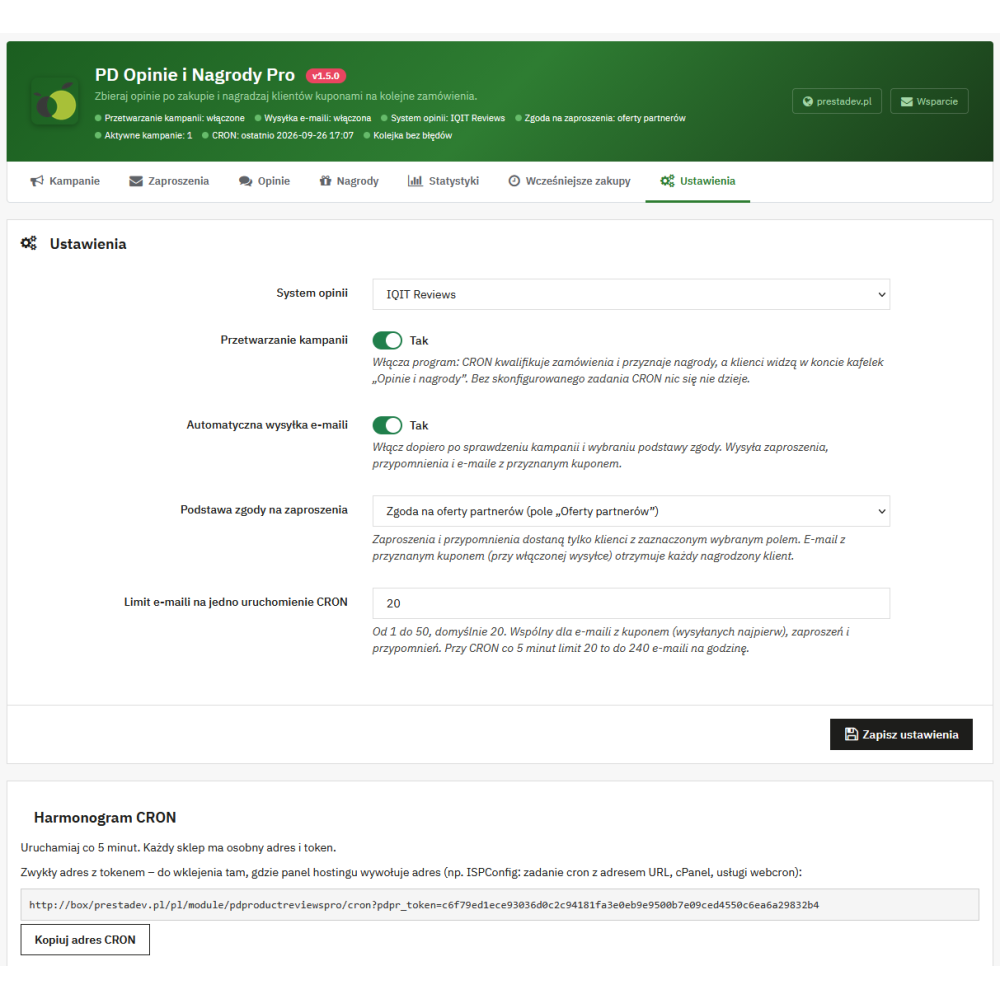
- Sending through PrestaShop mail configuration, with a limit of messages per CRON run (from 1 to 50, default 20). Failed sending is retried with increasing intervals, up to 5 times; the administrator can retry it from the list.
- Message language is the customer’s language when the module has a template for it; otherwise English or Polish depending on the active languages in the store.
- One-click unsubscribe. Each message has an unsubscribe link for invitations and reminders; unsubscribe also works after an email address change. A coupon message for a coupon already due to the customer remains a transactional message.
Consent for messages
- Selectable consent source: newsletter subscription or consent to partner offers (opt-in field) in the customer account.
- The “None” setting blocks promotional messages – invitations are then visible only in the customer account. Consent and customer data are checked again just before sending.
- Program and sending enabled separately. Installation, update, or reinstallation does not start sending to customers.
Review page and customer account
- Review without logging in. The link from the message is signed and assigned to the invitation; on first opening, the key from the URL is moved to the session and removed from the URL. The pages have
noindex,no-store, andno-referrerheaders, and saving a review and unsubscribe requires a form token. - “Reviews and rewards” tab in the customer account with a list of purchases covered by the program, the status of each product, and a “See products, reviews and coupons” button that opens the invitation page with the review form and granted coupons. The tile works in the classic, warehouse, and Hummingbird 1 and 2 themes.
- Purchase without an account. After a guest purchase, the customer can create an account with one button using the email address from the order (the password is set through a PrestaShop message sent to that address) or assign the coupon to an existing account with the same address.
- Several invitations at once. The session remembers the keys of the five most recently opened invitations, so the customer can work in several browser tabs.
Statistics dashboard
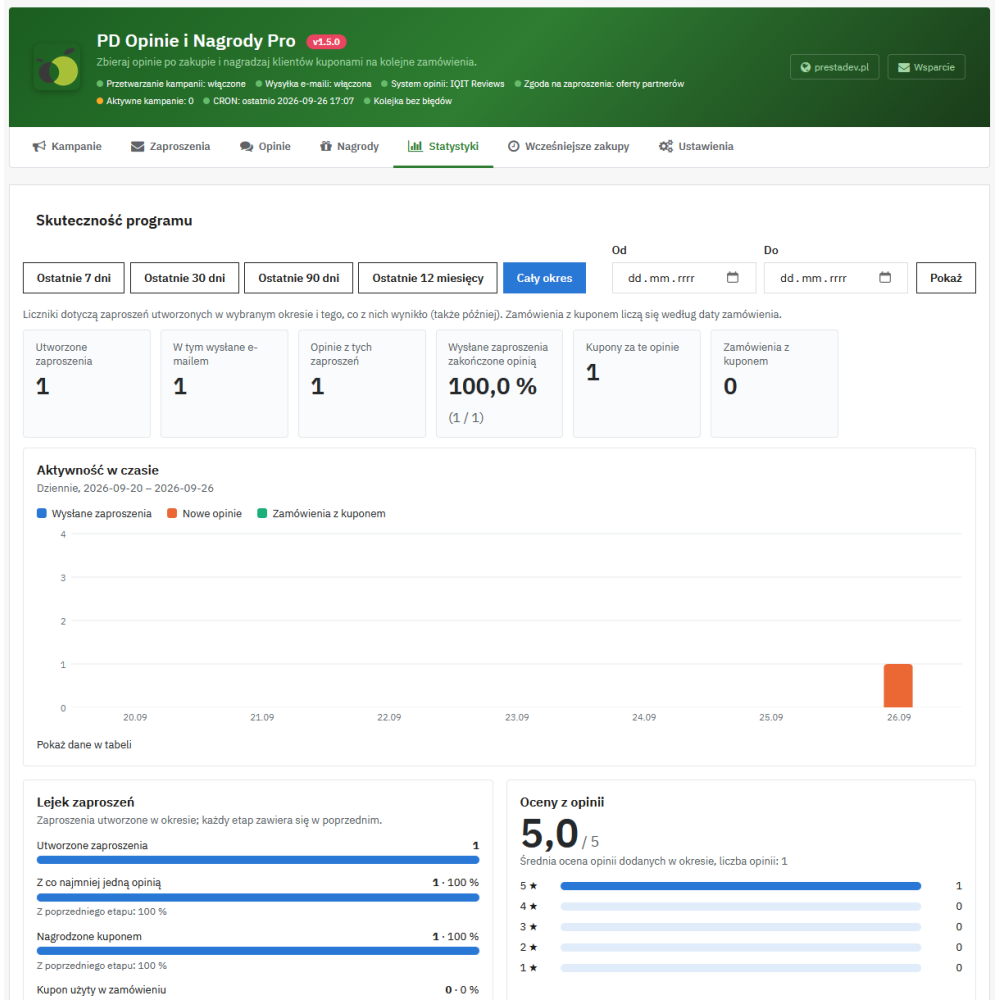
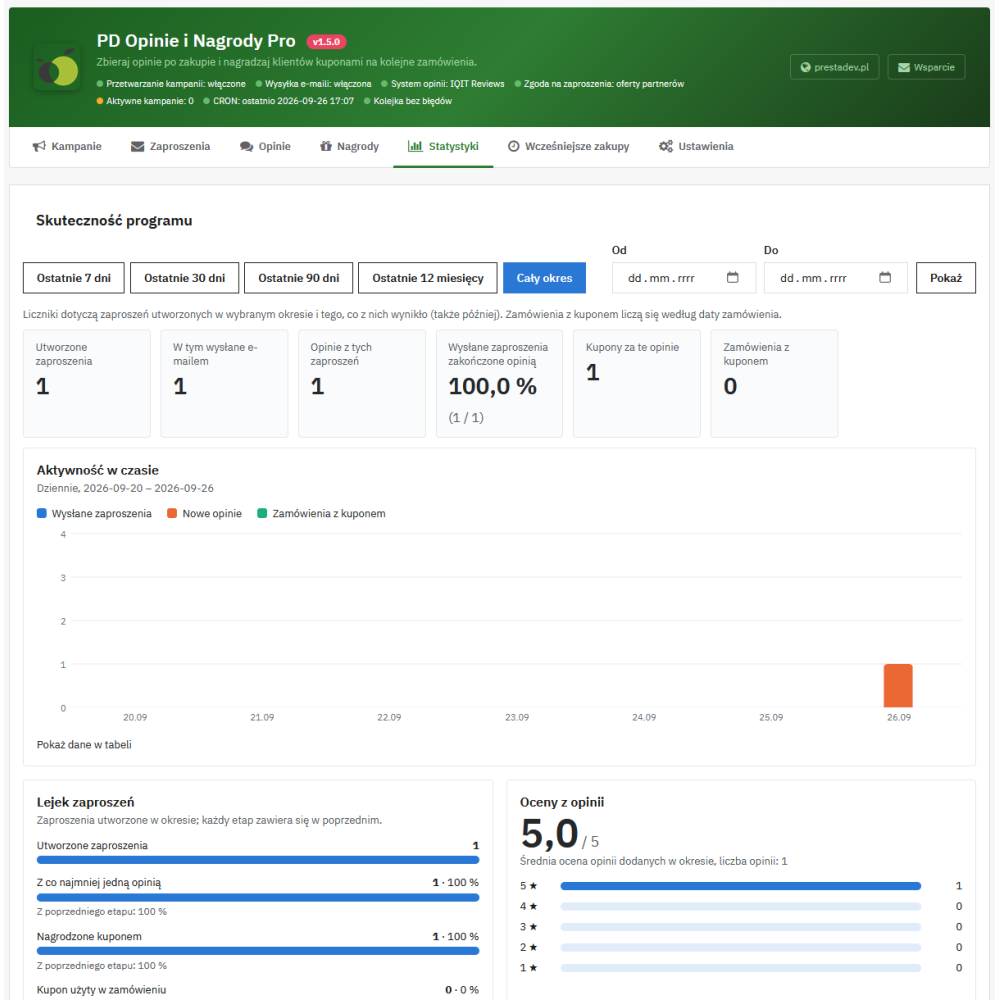
- Period: 7, 30, or 90 days, 12 months, entire period, or a custom date range.
- Counters for invitations, sent messages, reviews, response rate, issued coupons, and orders with a coupon – with change compared to the previous period of the same length.
- Activity chart (sent invitations, new reviews, orders with a coupon) daily, weekly, or monthly, with a data table.
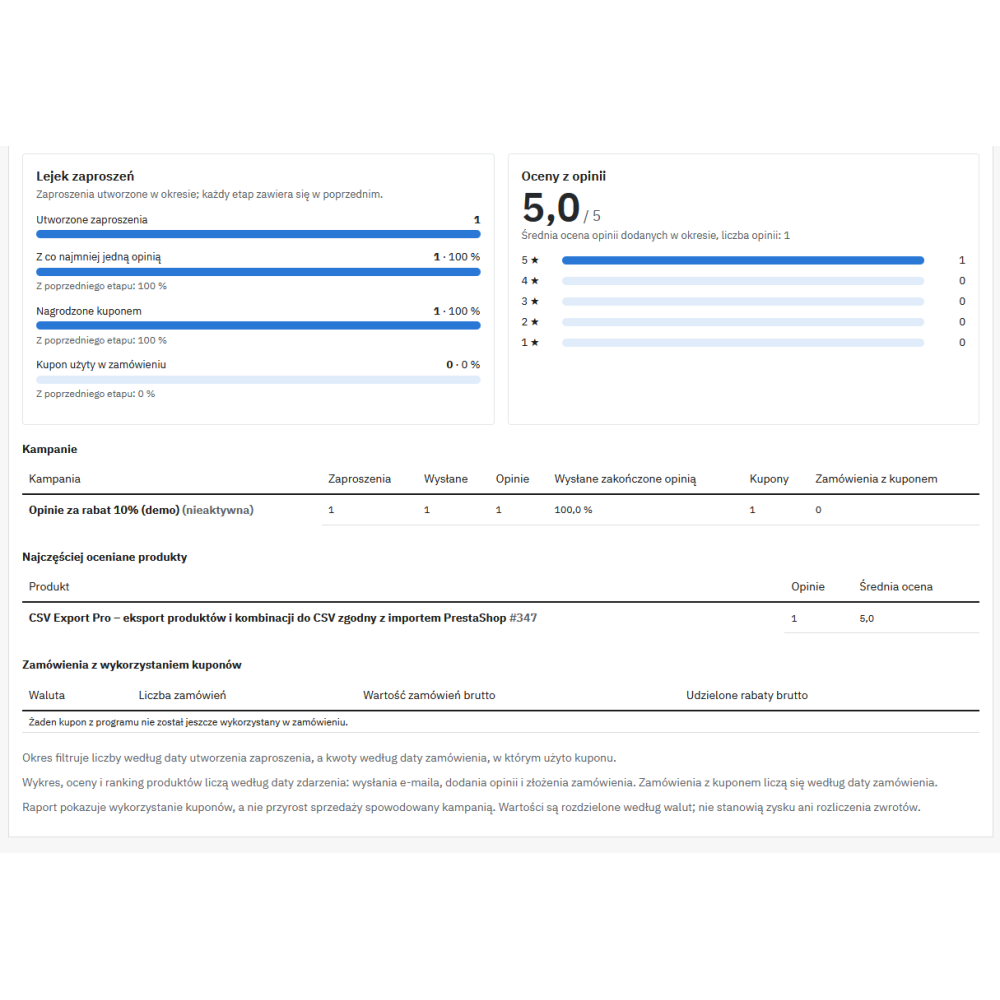
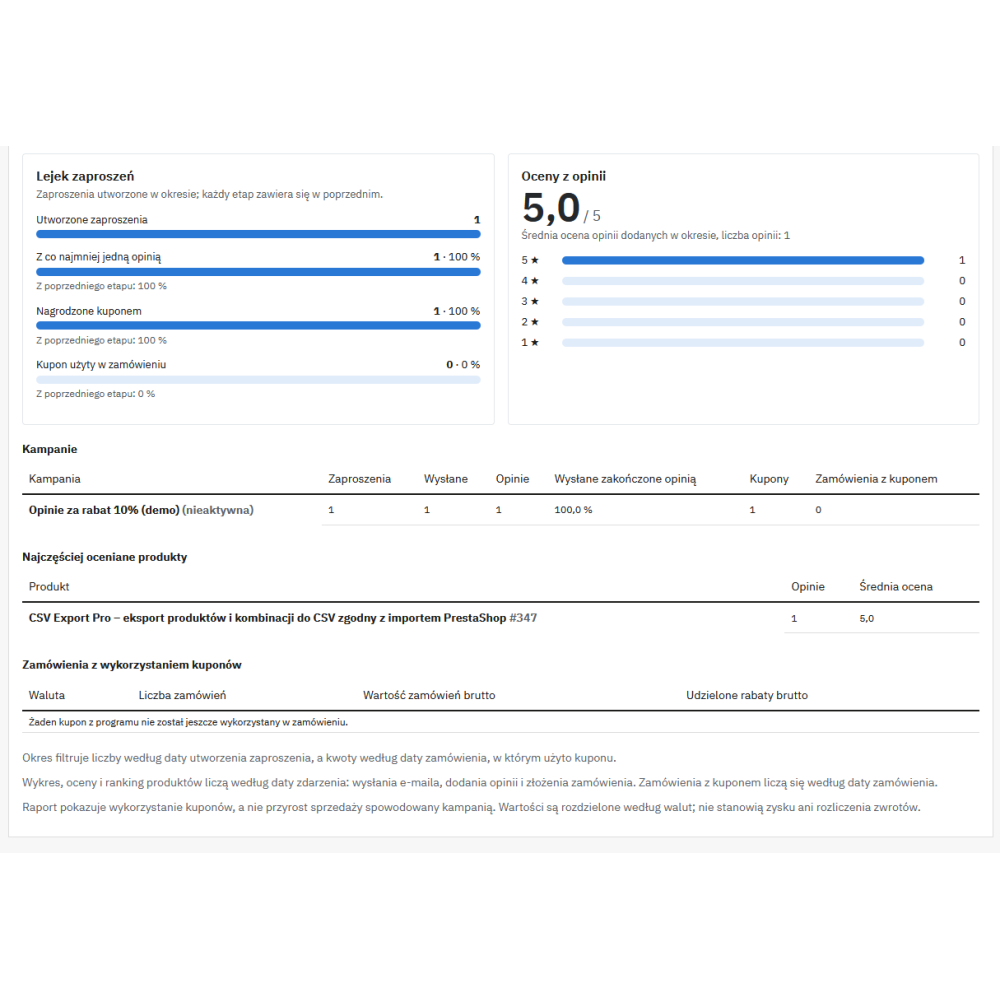
- Invitation funnel: created → with review → rewarded with coupon → coupon used in an order.
- Average rating with star distribution, most frequently reviewed products, and a campaign table; stars and products lead to the filtered reviews list, and campaigns to their edit pages.
- Revenue and discount value of orders with a program coupon, separately for each currency.
Administration panel
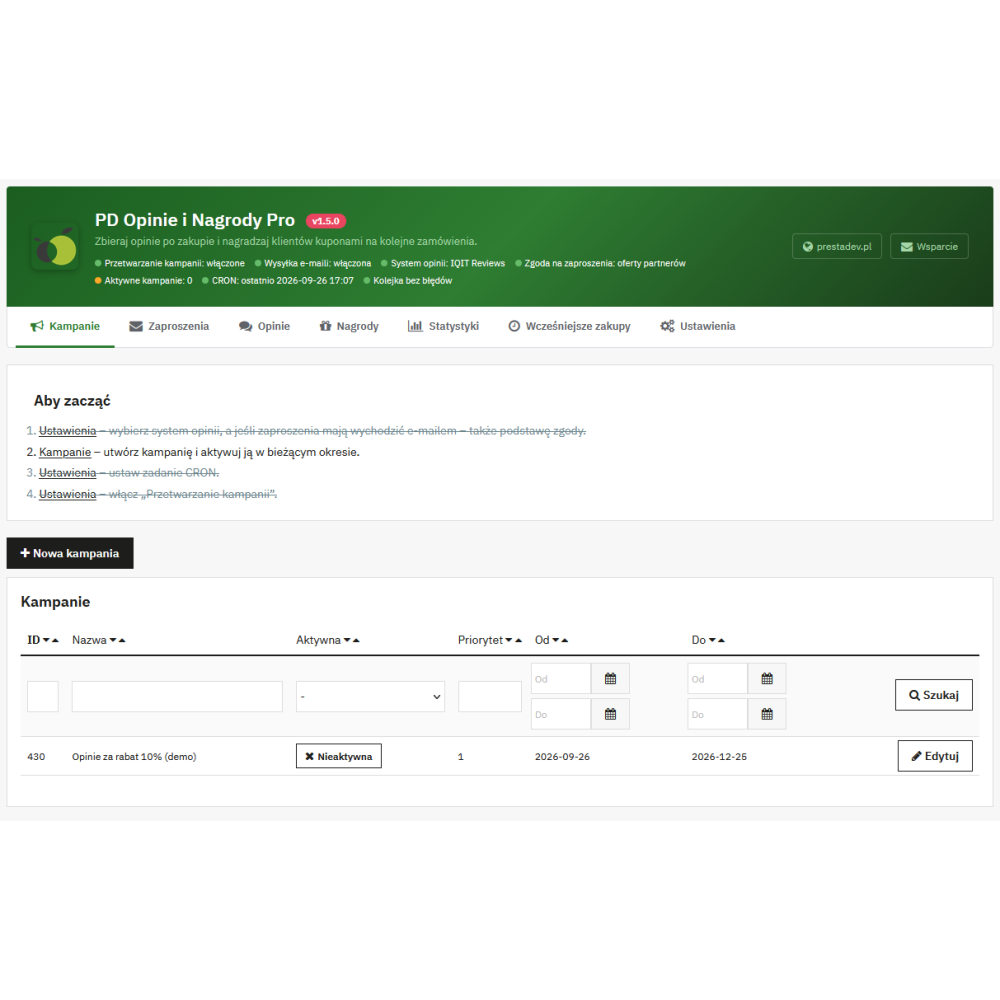
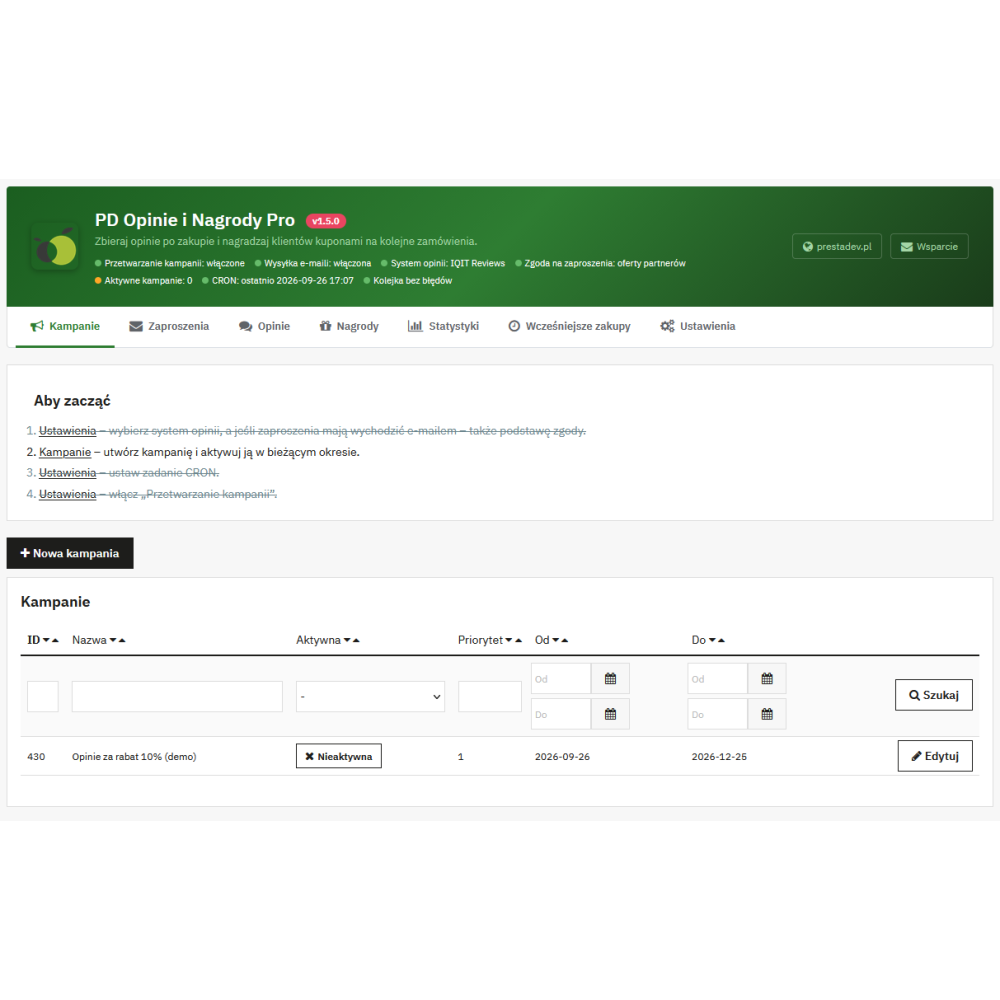
- Customers → Reviews and rewards menu and the module configuration page with a tab bar: campaigns, invitations, reviews, rewards, statistics, previous purchases, and settings.
- Header with program status: processing, sending, reviews module, consent source, active campaigns, last CRON run, and separately invitation and reward errors – each indicator leads to the place where it can be fixed.
- Native PrestaShop lists with a filter in each column, sorting, and pagination; filters are remembered for each employee separately for each list and store, and above the list you can see which filters are active.
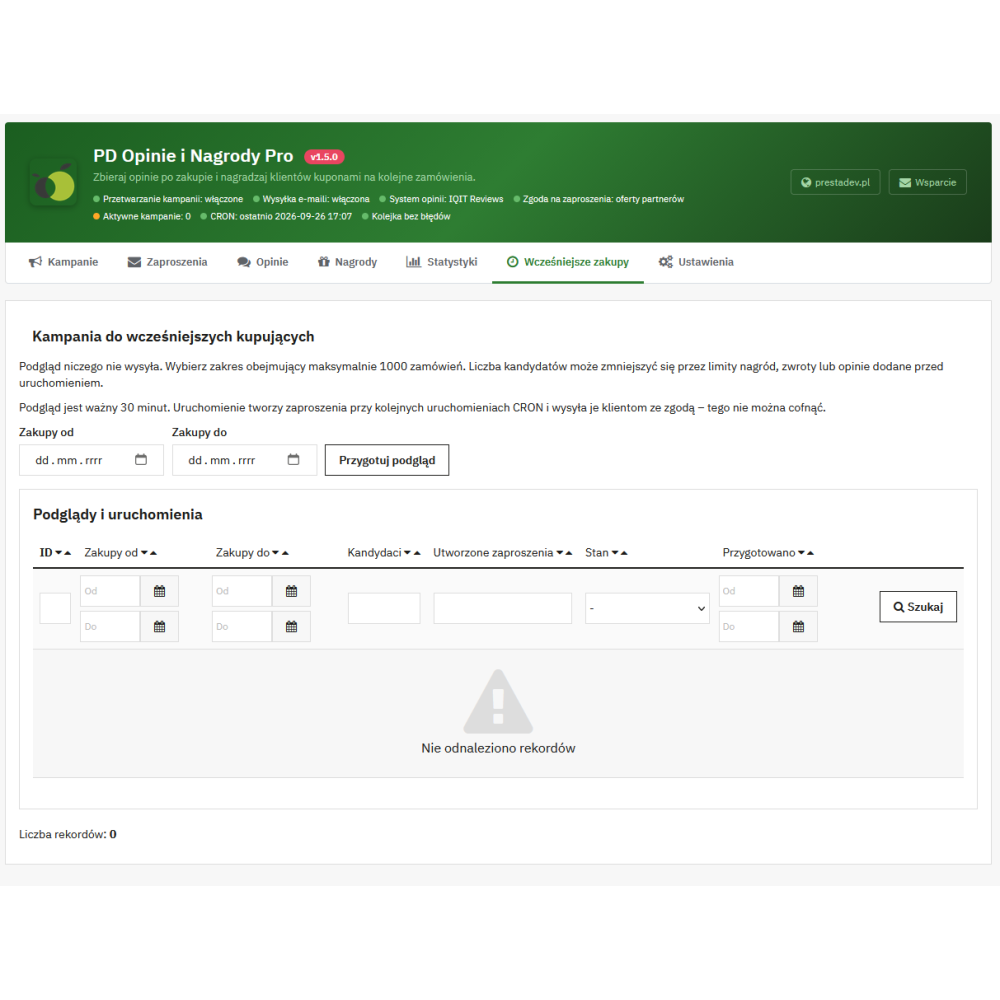
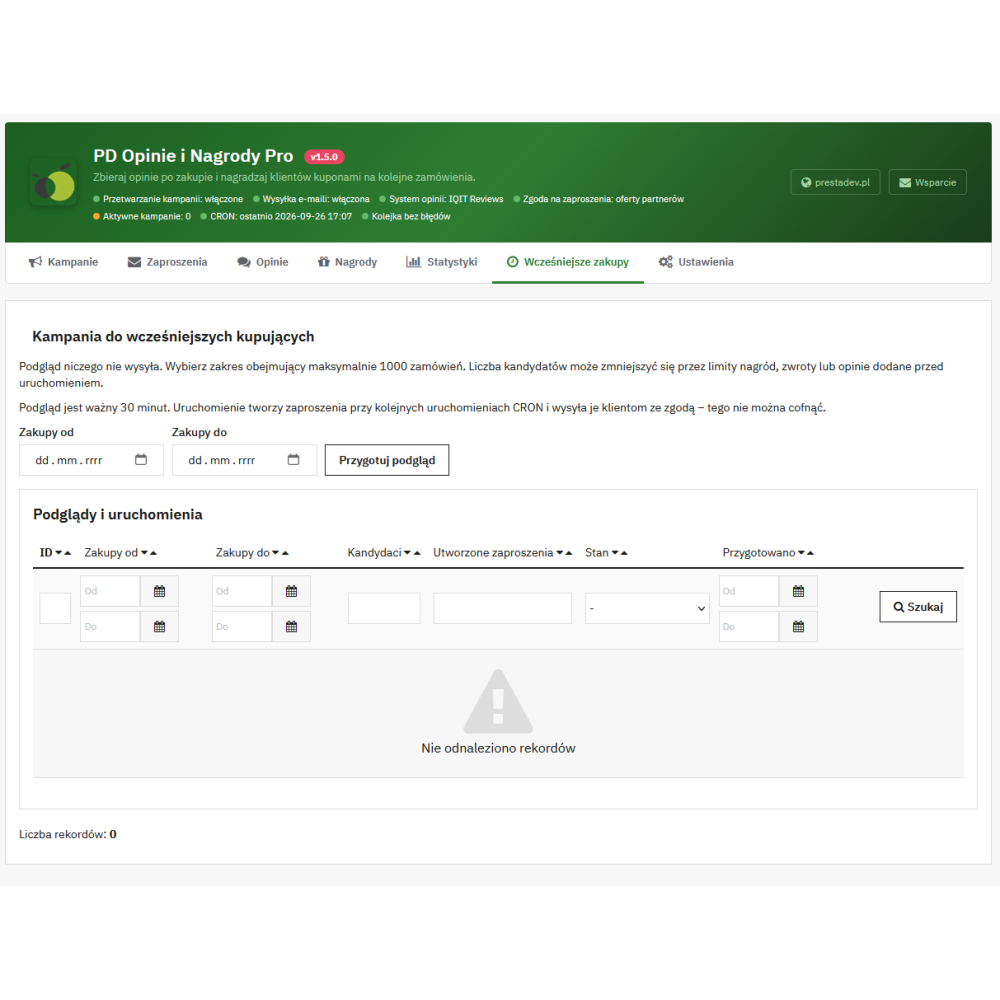
- Previous purchases. Orders from before installation can be included in the program: a preview of the selected range (up to 1000 orders, valid for 30 minutes) shows the number of qualifying orders, and invitations are created after the task is run.
- PrestaShop permissions. An employee with view-only access cannot change settings or campaigns; the CRON token and review export are available only to employees with permission to configure the module.
CRON task
- Run every 5 minutes. CRON qualifies orders, sends messages, issues coupons, and checks refunds and moderator decisions.
- Two ways to call it: a regular URL with a token (
…/module/pdproductreviewspro/cron?pdpr_token=…) – to paste into a hosting panel that calls a URL (e.g. ISPConfig, cPanel, webcron services) – or ready-madecurlandwgetcommands that send the token by POST, outside the URL. - Separate URL and token for each store. Concurrent runs are blocked, and processing is done in batches within the time limit of a single call.
- Order changes handled immediately. A status change, refund, or new review directs the invitation for checking in the next CRON run.
Security, GDPR, and data
- GDPR. The module supports export and deletion of customer data through standard PrestaShop mechanisms (also after linking a guest purchase to an account) and disables their program coupons in the process.
- Disabling the module suspends unused non-combinable coupons whose conditions depend on the module; re-enabling restores only coupons suspended in this way. The module does not re-enable coupons disabled manually.
- Uninstallation keeps program data (campaigns, invitations, rewards, and history), so reinstallation does not reward the same product a second time; the program and sending then remain disabled.
- Database requirements: program, review, and coupon tables must use the InnoDB engine (transactions); the module checks this before saving.
Multistore, languages, and integrations
- Multistore. Campaigns, settings, reviews module, consent, CRON token, and statistics are separate for each store. A store added later gets its own secrets, and the program starts disabled there.
- Polish and English translations in both PrestaShop translation systems (module dictionary and XLF catalogs). In languages without a translation, customer pages show the module texts in English until they are translated.
- Google reviews feed. The
pdgoogleproductsreviewfeedproreviews feed module from version 1.0.2 marks reviews from the program in the Google Product Reviews XML file as reviews after a confirmed purchase (is_verified_purchase) and incentivized reviews (is_incentivized_review). The feed is a separate module.
Compatibility and installation
- PrestaShop 1.7.0–9.x and PHP 7.0–8.5 (declared compatibility). Installation, panel pages, lists, export, and uninstallation are automatically tested on PrestaShop 1.7.2.4 (PHP 7.0), 1.7.8.10 (PHP 7.4), 8.0.0, 8.2.6, and 9.0.2, and full scenarios from order to coupon use – on PrestaShop 9.1.5.
- No external libraries and no Composer.
- Update from any earlier module version through the Module Manager; update scripts add tables, indexes, and hooks.
Important operating limits
- The module works only with the IQIT Reviews and Product Comments review modules. It does not display reviews on the product page and has no own moderation – display and moderation belong to the selected reviews module.
- Operation requires a CRON task run regularly on the server or in the hosting panel.
- Email invitations are sent only to customers with the selected consent (newsletter or partner offers); others see invitations only in the customer account.
- Orders from before module installation are not included automatically – the “Previous purchases” tool is used for that.
- Sending confirmation means acceptance of the message by the store’s mail system, not delivery to the recipient’s inbox.
- Statistics assign orders to the used program coupon; they do not measure sales uplift or margin.
- In PrestaShop 1.7 and 8, the prohibition on combining a review coupon with other coupons is enforced up to 100 active cart rules and 2000 pairs; above this threshold the coupon is still issued, but it may be combined with others.
- Review content is stored by the reviews module, and it is responsible for displaying and deleting it. The rules for publishing reviews in the store are set by the merchant.