A product may be active and available, yet the customer still will not find it in the PrestaShop search engine. The cause may be an incomplete index, a phrase that is too short, different wording, or poorly chosen result ordering. Before you replace the search engine, check its configuration. When you need greater control over search, filters, and query analysis, PD Smart Search Pro may be the solution.
What can the standard PrestaShop search engine do?
The native product search uses an index of words and the weights assigned to them. A query is split into words, matched against the index, and products are ordered by relevance. This is not a search based only on the product name: the index may also include other product fields. The mechanism is described in the PrestaShop technical documentation.
In the Shop Parameters → Search section, check in particular:
- Indexing: whether products have been added to the index and whether catalog changes are reflected in it. After an import, verify the index instead of assuming that the importer refreshed it.
- Minimum word length and exclusions: with a minimum of three characters, the two-letter “XL” may be ignored. Also check the list of words excluded from search.
- Field weights: the product name or reference should usually carry more importance than an incidental mention in a long description.
- Aliases and fuzzy matching: aliases allow you to map entered terms, and the fuzzy search function handles some spelling mistakes. It is available from PrestaShop 1.7.7.
So it would not be true to say that PrestaShop does not support typos or relevance adjustment. The available options are presented in the search configuration guide. Their operation must be assessed in the specific store version, with the theme and modules in use.
Where do empty or irrelevant results come from?
A typo, a synonym, and a product code are different problems. “Plecakk” requires typo tolerance. “Sofa” instead of the catalog term “couch” requires linking meanings. By contrast, with the code “AB-120” the customer is usually looking for a specific model, not any similar designation. Simply increasing typo tolerance will not solve all three cases.
Likewise, the phrase “30 l backpack” requires correct capacity data, while the broad query “backpack” requires the ability to narrow down the results. Baymard’s search usability research distinguishes, among others, queries for a specific product, a product type, and its features. This is a good starting point for evaluating your own search engine: check different intents, not just a few perfectly entered names.
An empty list may also result from active filters or product visibility settings. On the other hand, a long list does not necessarily mean success — if the right model is far down, the customer still has to search for it.
What does PD Smart Search Pro add?
PD Smart Search Pro for PrestaShop combines its own product index with a search interface and result management tools. The built-in MySQL engine retrieves data directly from the store, without a mandatory feed or an external search service. So it is not just a visual change to the “Search” field.
- Matching the language of your customers. The module has configurable typo tolerance, normalization of Polish characters, and managed synonyms. You can link alternative names and define the fields and weights used in search. It also takes codes into account, including reference and EAN. Synonyms require sensible configuration — they do not mean automatic understanding of every intent.
- Suggestions and more convenient result narrowing. Autocomplete shows suggestions while typing. An optional modal allows browsing products without leaving the current page. Faceted filters, that is, filters narrowing the list, include price, brand, availability, features, and catalog attributes, among others. For example, after entering “backpack,” the customer can choose capacity if it has been correctly saved and configured as a filter.
- Control over ordering and availability. Merchandising rules allow you to pin, promote, demote, or exclude products for specific queries. You can also move products unavailable for order to the end or exclude them. Such rules are worth using for relevant results, not for replacing the searched product with a random promotion.
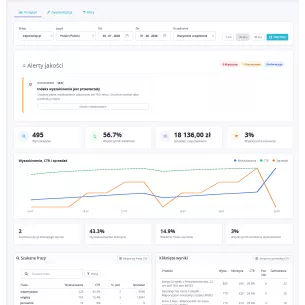
- Data for further improvements. Analytics includes queries, clicks, CTR, no-result phrases, and filter usage. It helps identify a missing synonym or an unclear product list. The scope of data depends on analytics being enabled and consent handling; the report should not be treated as a complete record of all visits.
A custom engine does not mean unlimited performance. Response time depends on the catalog, queries, settings, and server. The module also has optional integrations with Meilisearch and Typesense, but the external engine must be launched and configured separately.
How to implement the change and check the effect?
- Write down representative queries: names, codes, typos, synonyms, and phrases with parameters. For each one, indicate the expected products.
- Organize catalog data: identifiers, features, attributes, and names. A filter will not fix missing capacity or incorrect variant assignment.
- Build the module index and set its updates: the change queue must be handled by a worker run on a schedule. Only after the index is prepared should you enable the selected front-end functions.
- Check mobile and desktop: suggestions, filters, return to results, no results, and prices in the customer contexts you use.
- Compare results: the percentage of no-result queries, clicks, and the position of the correct product. An increase in the number of results alone does not prove improved relevance.
The store search engine vs SEO and GEO
An internal search engine does not replace navigation accessible to Google. Googlebot generally does not enter queries into search forms, so products should be accessible through regular category links. This is explained in the Google documentation for e-commerce.
Query data is worth using to improve names, category descriptions, and FAQs: it shows what wording customers use and what is missing from the content. This is practical work on SEO and GEO, meaning visibility in generative answers — not a guarantee of rankings or citation by AI. You can read about the separate issue of delivering content to agents in the article Markdown and Content Signals in PrestaShop.
First remove configuration and data errors, then expand search where you see a specific problem. PD Smart Search Pro provides tools for this kind of work; evaluate the effectiveness of the implementation based on the real queries of your own customers.


Comments (0)