
• -20%
Threshold discounts on the Pro cart value for Prestashop 1.6.x and 1.7.x
Discounts based on cart value in PrestaShop Pro | PrestaDev
Threshold discounts on the Pro cart value for Prestashop 1.6.x and 1.7.x

Tiered Discounts Based on Cart Value Pro for PrestaShop

Module version: 1.2.5

PrestaShop compatibility: 1.7.x 8.x 9.x

Module file updated: 10/29/2026 16:34:07

Product data updated: 04/8/2026 18:20:04


Cart Value Discounts Pro is a PrestaShop module that automatically grants discounts to customers based on the total value of products in the cart. Simply define amount thresholds and assign a reward to each one — a percentage discount, a fixed amount discount, or free shipping. The module automatically detects when a customer's cart meets the conditions and instantly applies the appropriate discount without the need to enter promotional codes. The customer sees a clear progress bar on the cart page showing how much more they need to spend to unlock the next reward. As a result, customers are more willing to increase their orders, and you gain a higher average cart value without any additional workload. The module works fully automatically — once configured, it does not require daily maintenance.

License type / update
zł 119.20
zł 96.91no tax zł 149.00 -20%
Lowest price in last 30 days before discount: zł 149.00

Description

Cart Value Discounts Pro — automatic discounts that increase order value

Cart Value Discounts Pro is a PrestaShop module that automatically grants discounts to customers based on the total value of products in the cart. Simply define value thresholds and assign a reward to each one — a percentage discount, a fixed amount discount, or free shipping. The module automatically detects when the customer's cart meets the conditions and instantly applies the appropriate discount without the need to enter promotional codes. The customer sees a clear progress bar on the cart page showing how much more they need to spend to unlock the next reward. As a result, customers are more willing to increase their orders, and you gain a higher average cart value without any extra effort. The module works fully automatically — once configured, it requires no daily management.

What can the Cart Value Discounts Pro module do?

Three types of rewards to choose from

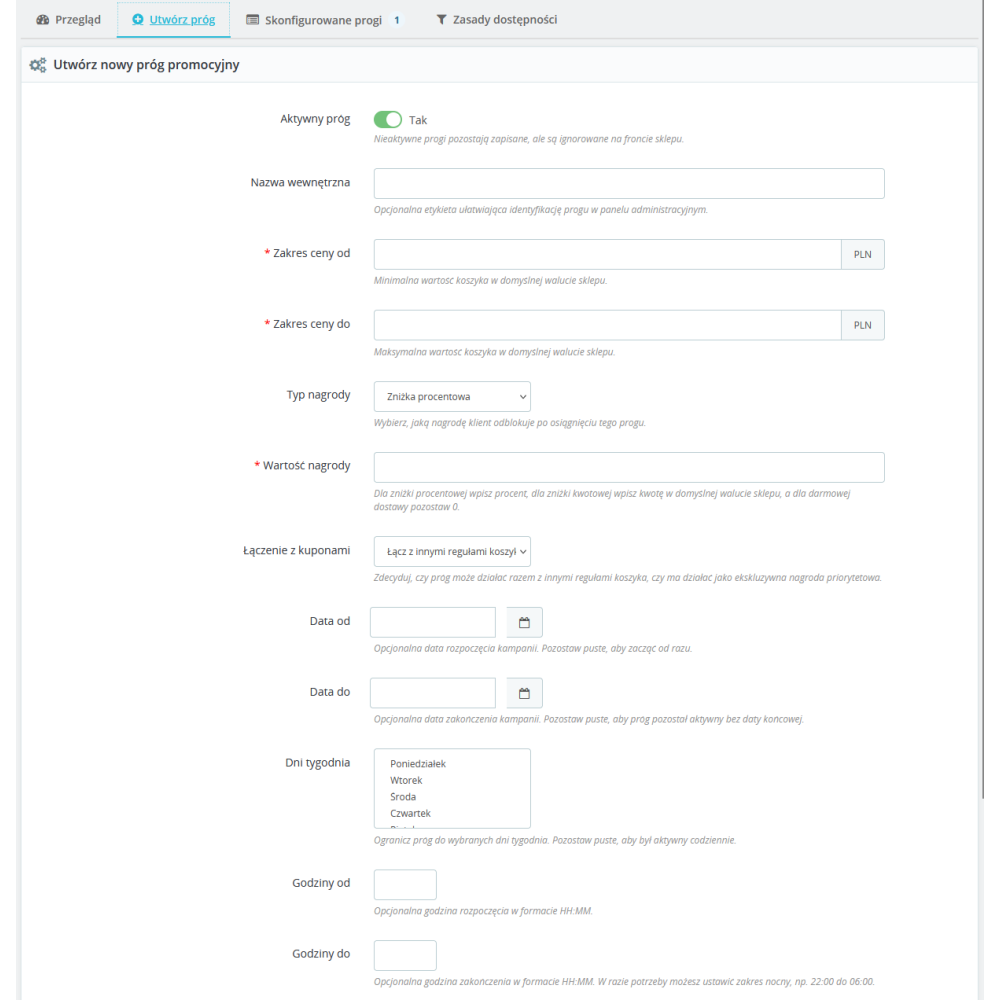
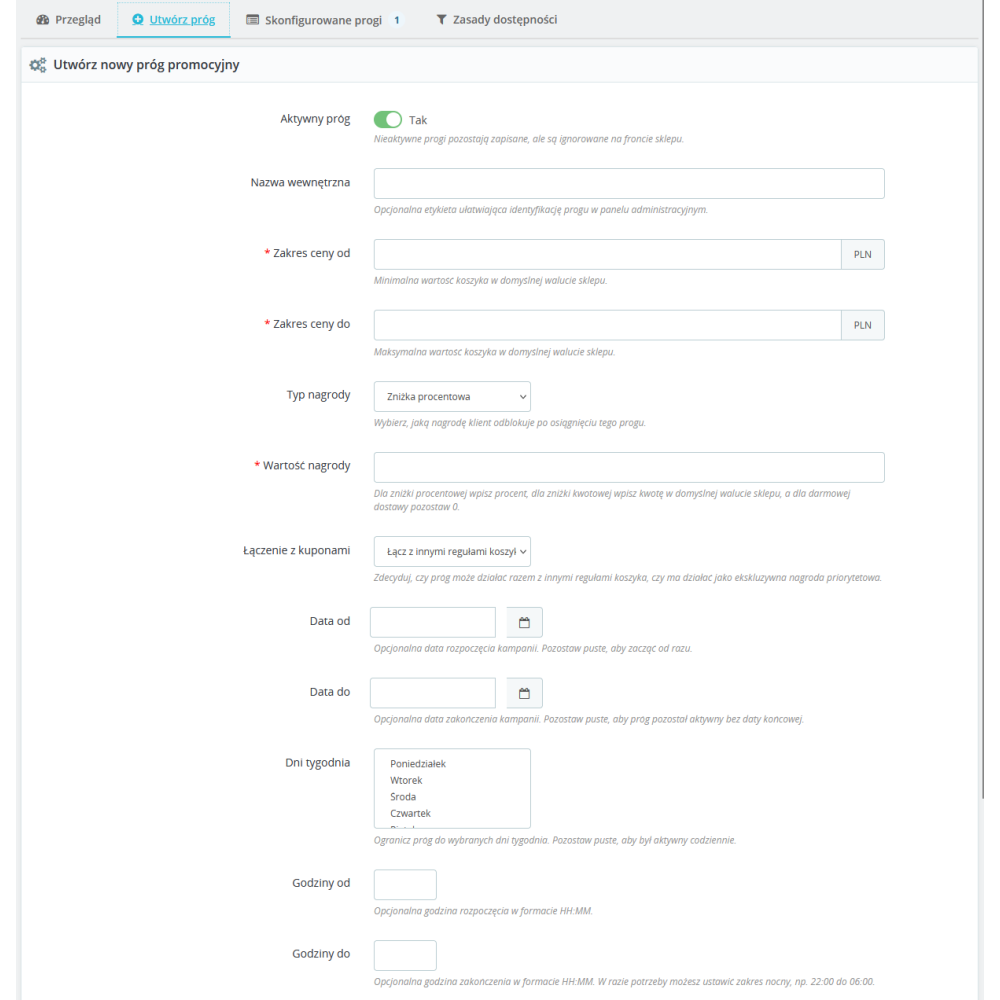
For each cart value threshold, you can choose one of three reward types. A percentage discount reduces the entire order by a specified percentage (e.g. 5% for carts over PLN 200). A fixed amount discount subtracts a specific amount from the total order value (e.g. PLN 30 discount for carts over PLN 500). Free shipping completely removes the delivery cost when the cart exceeds the selected threshold.

Multiple thresholds at the same time

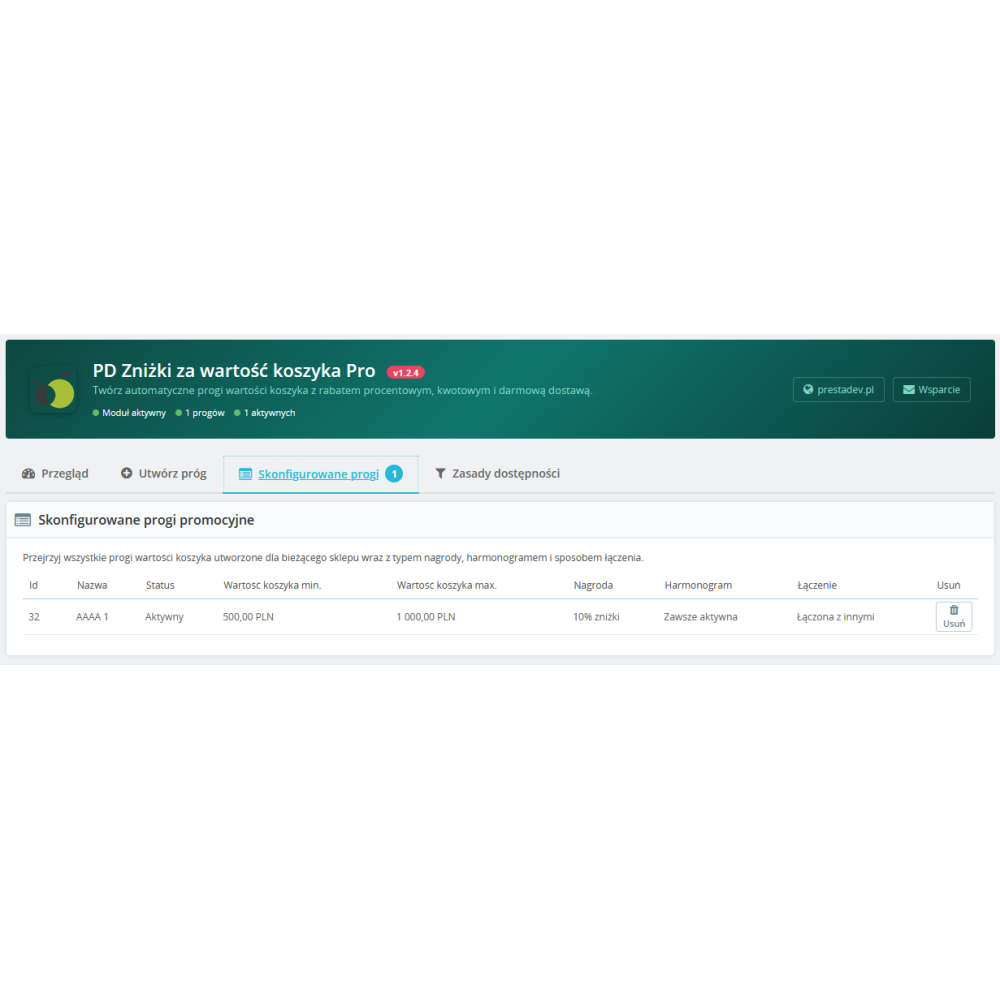
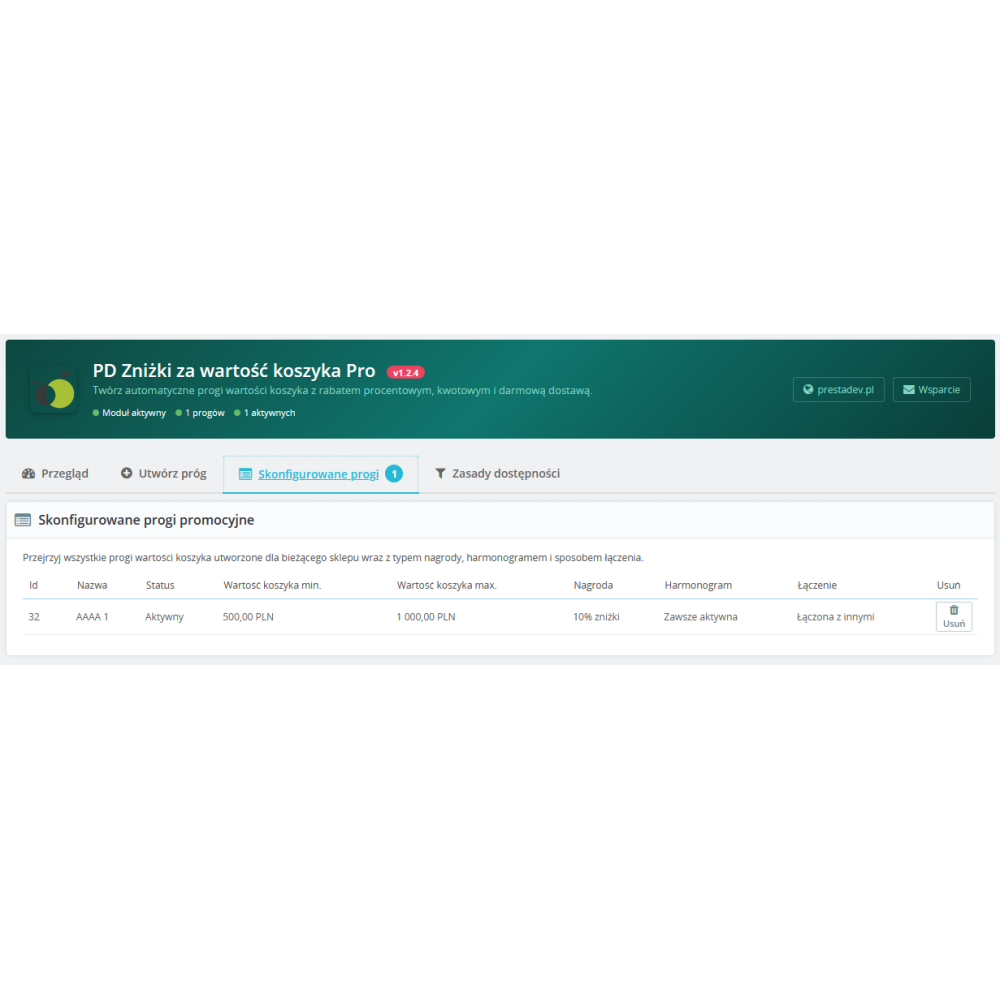
You can create any number of thresholds with different value ranges and rewards. For example: from PLN 100 — 5% discount, from PLN 300 — 10% discount, from PLN 500 — free shipping. The module automatically matches the most beneficial offer to the customer's current cart value.

Campaign scheduling and planning

Each threshold can have a date range set (campaign start and end), a restriction to selected days of the week, and a time range. This allows you to create weekend promotions, happy hours, or seasonal campaigns — such as Black Friday or holiday sales — in advance, without the need for manual activation and deactivation.

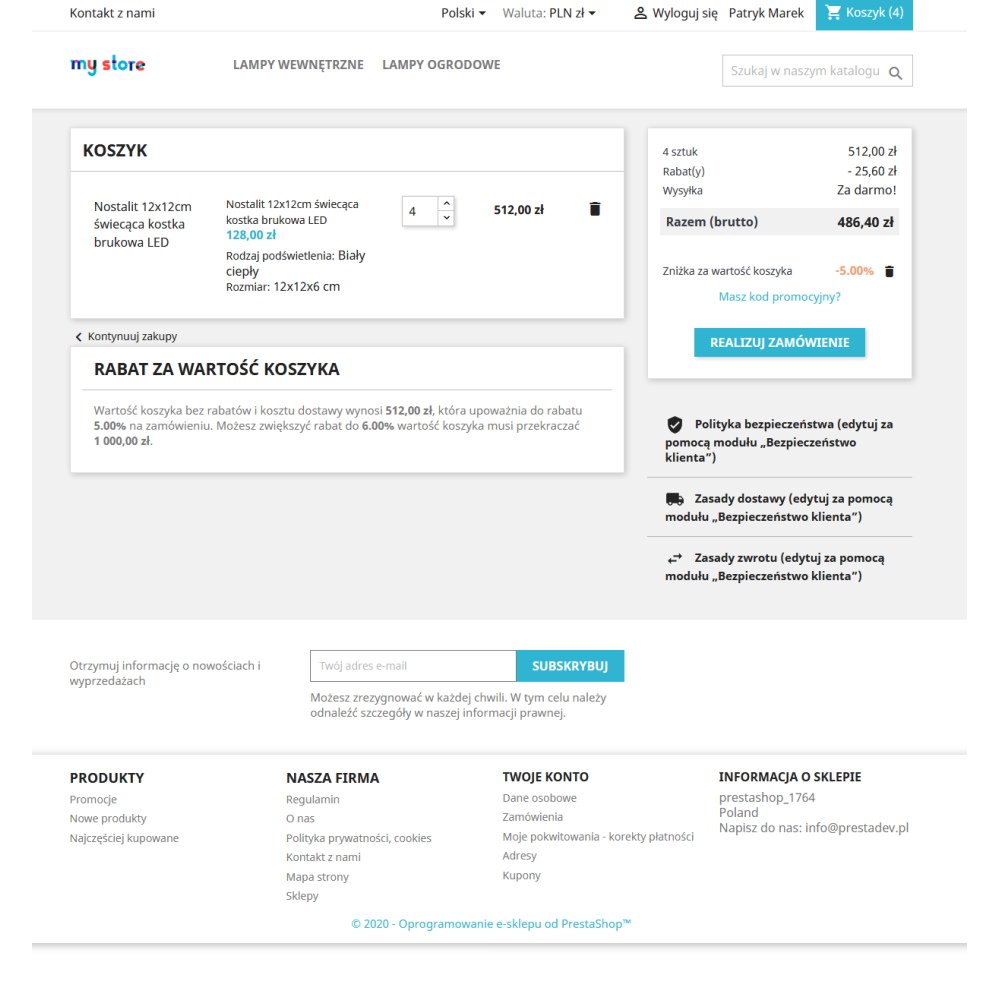
Progress bar in the cart

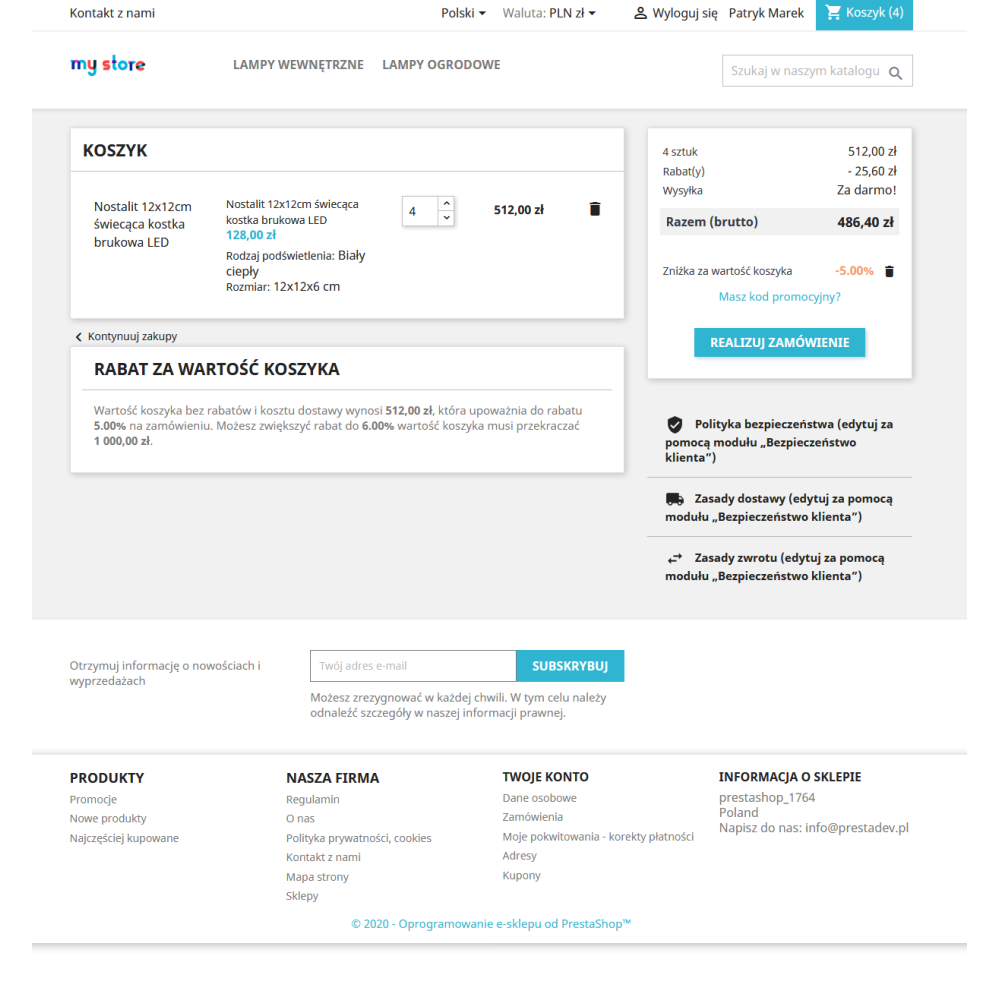
On the cart page, the customer sees a visual progress bar showing how much more they need to add to the order to unlock the next discount threshold. Once the threshold is reached, the bar changes into a message informing them about the applied reward. The bar updates automatically with every change to the cart contents — without reloading the page.

Precise availability rules

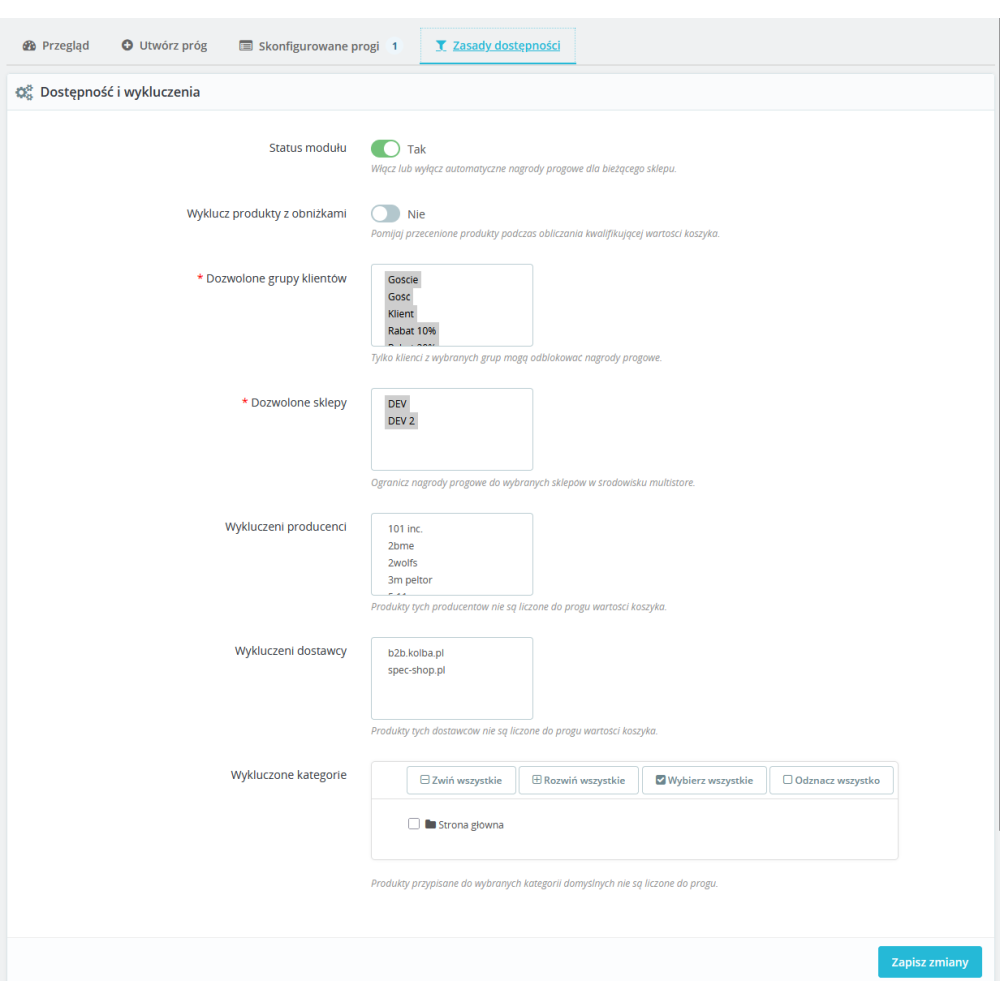
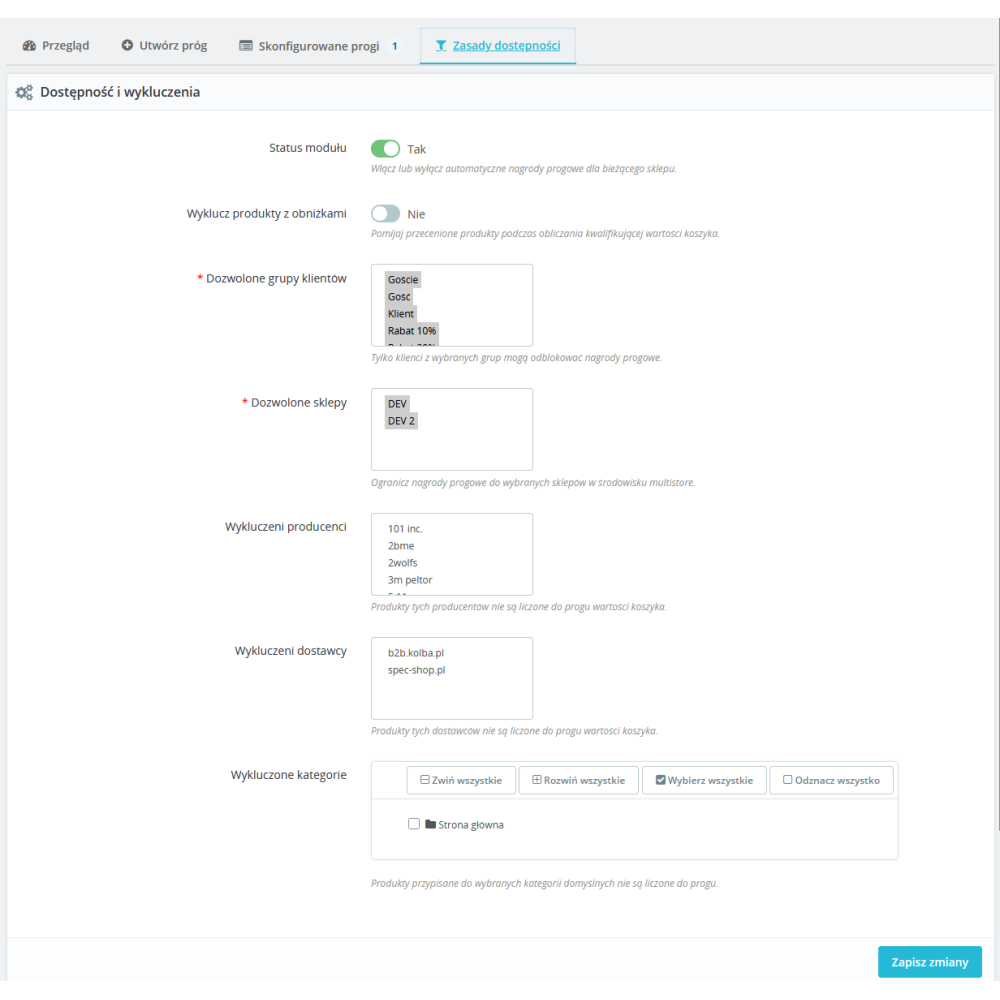
Define exactly who can use the discounts and when. The module allows you to restrict promotions to selected customer groups (e.g. only VIPs or wholesalers), stores in multistore mode, and also exclude products from specific manufacturers, suppliers, or categories from the cart value calculation. You can also decide whether products already covered by a price promotion should be included in the threshold.

Combination mode with other discounts

For each threshold, you choose whether the granted discount can work together with other coupons and cart rules (combined mode), or whether it should be applied as the only discount with the highest priority (exclusive mode). This gives you full control over the store's promotional policy.

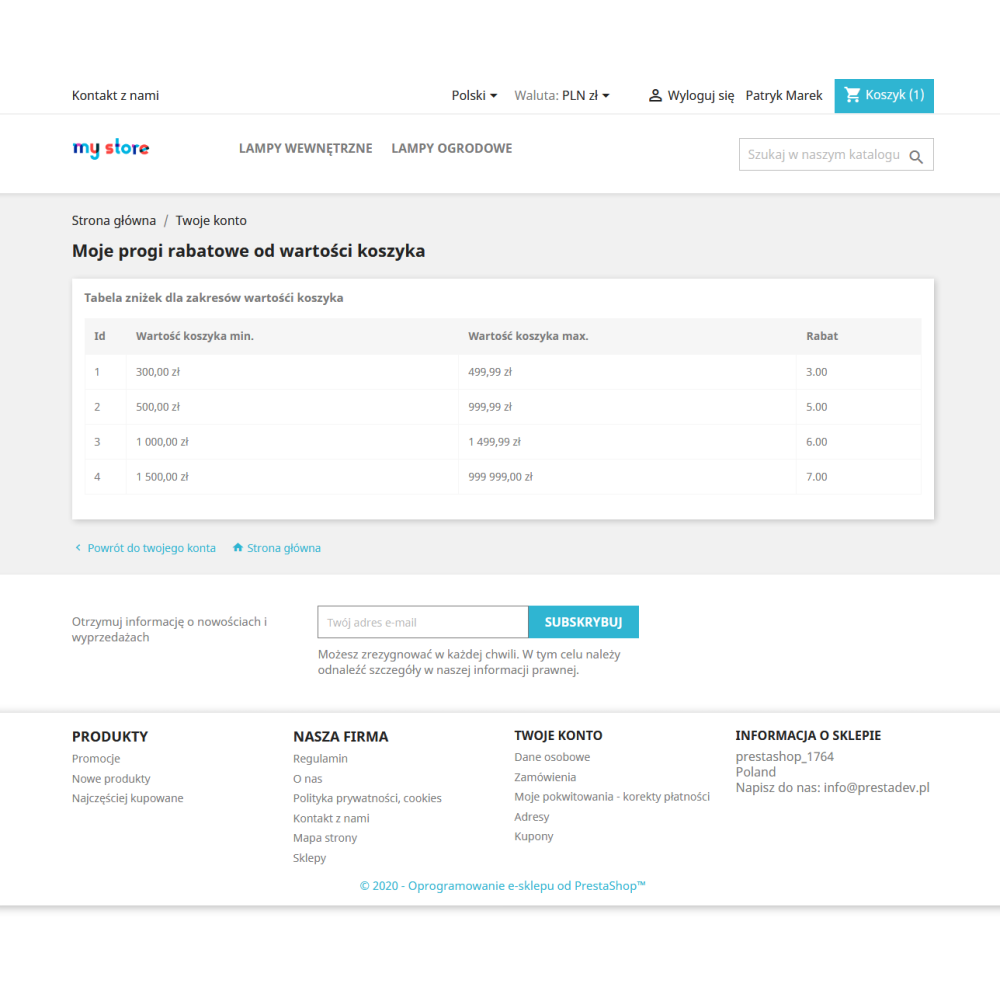
Customer page with a threshold table

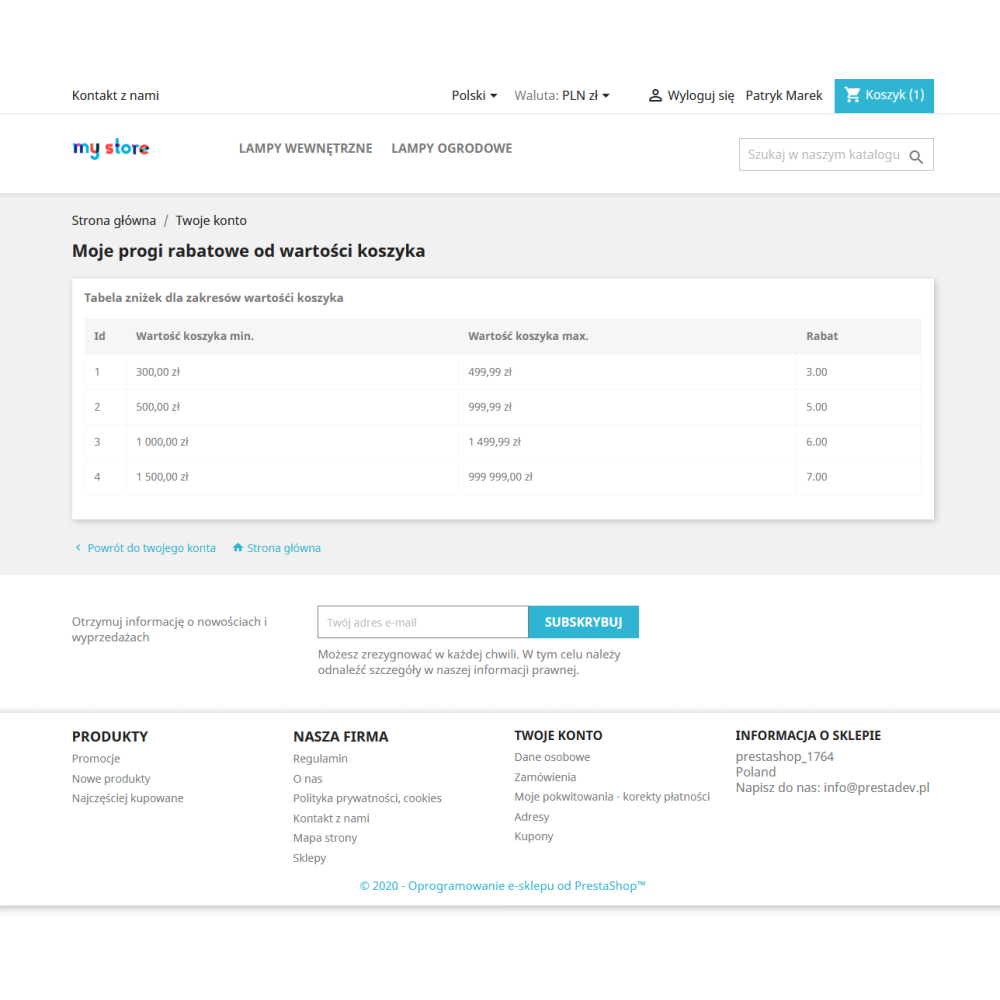
In the "My Account" section, the customer will find a dedicated subpage with a clear table of all available discount thresholds — along with the required cart value, reward type, and any applicable schedule. Thanks to this, customers know in advance what benefits they can get and plan larger purchases.

Module features and benefits

  • Three reward types — percentage discount, fixed amount discount, and free shipping, configured independently for each threshold.
  • Unlimited number of thresholds — create as many cart value ranges as you want, with different rewards for each of them.
  • Campaign scheduling — plan promotions in advance: date range, days of the week, time range — the module will enable and disable them automatically.
  • Progress bar in the cart — motivates customers to increase their orders by showing how much is missing to reach the next discount. AJAX update without page reload.
  • Threshold table in the customer account — customers can see all available rewards, which encourages them to plan larger purchases.
  • Filtering by customer groups — different discounts for different groups: retail customers, VIPs, wholesalers, guests.
  • Excluding categories, manufacturers, and suppliers — full control over which products count toward the cart value threshold.
  • Option to exclude discounted products — products already covered by a price reduction can be ignored when calculating the threshold.
  • Exclusive or combined mode — decide whether the threshold discount can coexist with other coupons or should have exclusive priority.
  • Full multistore support — different thresholds and rules for each store in one PrestaShop installation.
  • Automatic operation — after configuration, the module works independently, without daily management. Discounts are applied instantly with every cart update.
  • No promotional codes — the customer does not need to enter any coupons. The discount appears automatically when the cart value exceeds the threshold.
  • Compatible with PrestaShop 1.6 – 9.x — the module works with all modern PrestaShop versions and PHP from 7.0 to 8.5.
  • Zero external dependencies — the module does not require Composer, external libraries, or additional services. One-click installation.
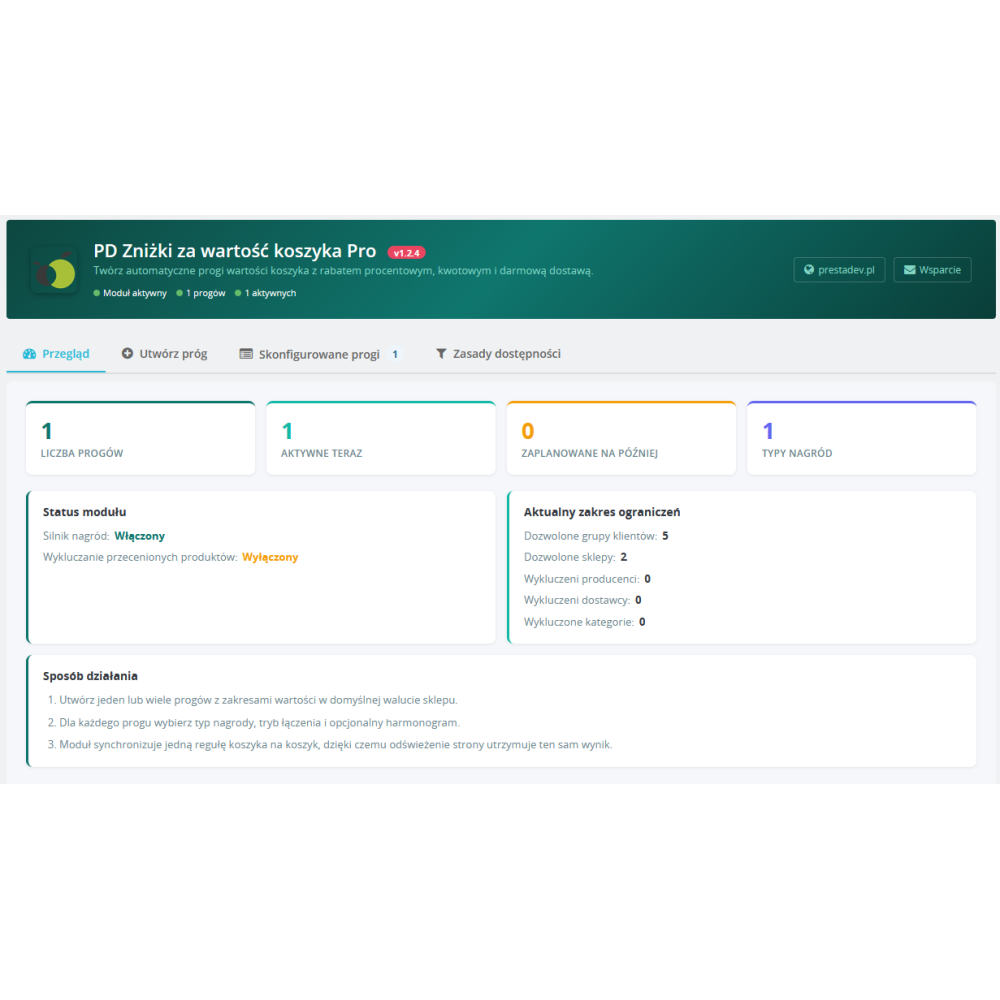
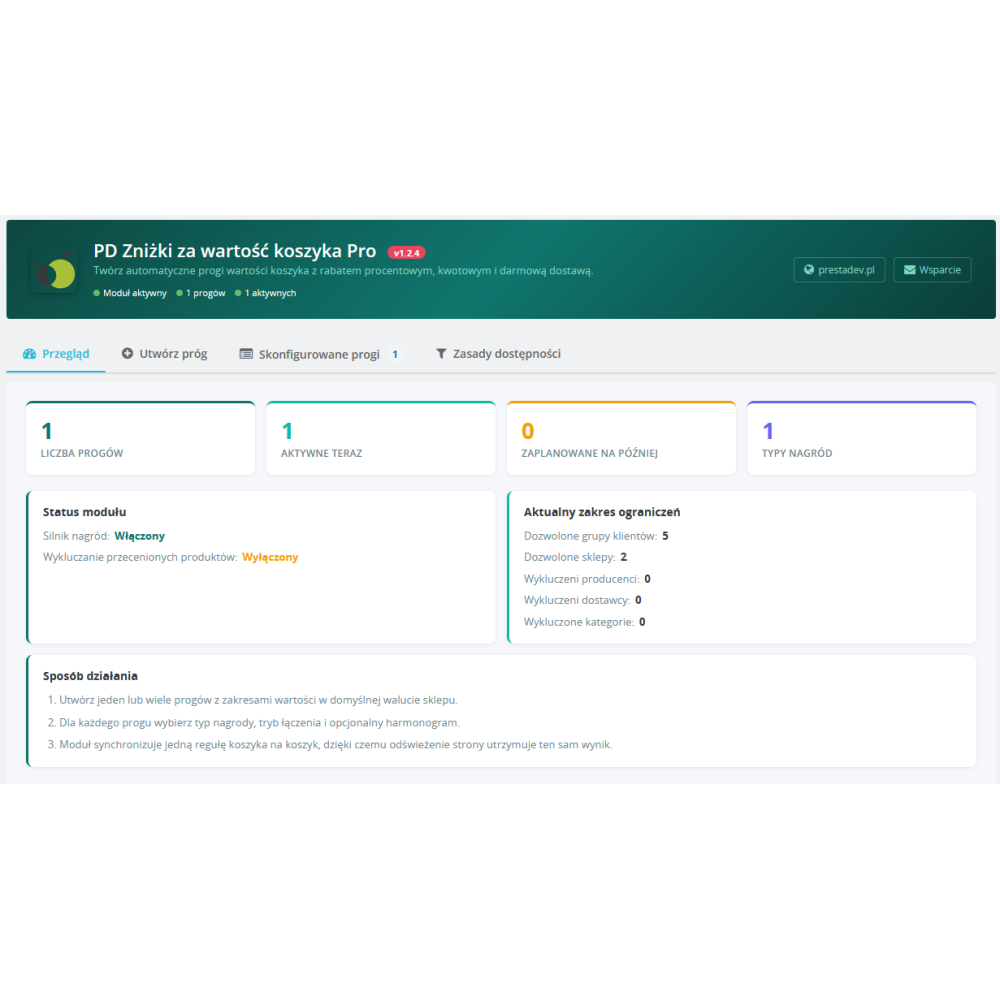
  • Professional configuration panel — a clear dashboard with a threshold summary, tabbed interface, and intuitive forms.

Who is this module for?

The Cart Value Discounts Pro module is perfect for any online store that wants to increase the average order value without reducing margins on individual products. It is ideal for stores with a wide assortment, clothing stores, drugstores, bookstores, and wholesalers — anywhere the customer can be motivated to add another product in exchange for an attractive discount.

Online store owners
Simple configuration, no technical knowledge required. Set thresholds, assign rewards — the module does the rest.
Marketers and e-commerce specialists
Plan promotional campaigns in advance, test different pricing strategies, analyze the impact of thresholds on the average cart value.
PrestaShop agencies and developers
Clean code compliant with PrestaShop standards, full multistore compatibility, no conflicts with other modules.


Link to the module demo:

Admin panel demo:
https://moduly-prestashop.eu/rabat-koszyk/admin-dev

Front office demo:
https://moduly-prestashop.eu/rabat-koszyk

Product Details

Prestashop 9.x support
Yes
Support for Prestashop 8.x
Yes
Prestashop 1.7.x support
Yes
Module translations
EN, EN
Free support
Yes
Free updates (1 year)
Yes
Easy Installation
Yes
Requires engine modification
No
PDDOTBVP-FULL

Changelog

Release history for this product. Expand an entry to see what changed.

  • moduł został kompletnie przepisany pod dla zachowania zgodności z PrestaShop 9.x

FAQ

Find answers to the most common questions about this product.
The module automatically grants a discount to the customer when the total value of products in their cart reaches a defined threshold. You define amount ranges (e.g. PLN 200–500, PLN 500–1000) and assign a reward to each of them — a percentage discount, a fixed amount discount, or free delivery. The customer does not need to enter any codes — the discount appears in the cart automatically.

The module supports three types of rewards: a percentage discount (e.g. 10% off the entire order), a fixed amount discount (e.g. PLN 30 off), and free delivery. Each threshold can have a different type of reward — for example, you can offer a 5% discount from PLN 200, and free delivery from PLN 500.

There is no limit — you can create any number of tiers with different amount ranges and rewards. The module automatically matches the most appropriate tier to each customer's current cart value.

No. The discount is applied automatically when the cart value exceeds the defined threshold. The customer does not need to look for or enter any coupons — the discount appears immediately in the cart summary.

The customer sees a progress bar showing how much more they need to spend to unlock the next reward. Once the threshold is reached, the bar changes to a message about the discount being applied. The bar updates automatically with every change to the cart contents — without reloading the page.

Yes. Each threshold has an optional campaign start and end date, the option to limit it to selected days of the week (e.g. weekends only), and a time range (e.g. happy hours from 18:00 to 22:00). The module automatically activates and deactivates thresholds according to the schedule.

Yes. In the module configuration, you choose which customer groups can use quantity discounts — e.g. only registered customers, only VIPs, or only wholesalers. Guests and other groups can be excluded.

Yes. You can exclude entire categories, manufacturers, or suppliers — products from these sources will not be counted towards the cart value. Additionally, you can enable the option to skip products already covered by a price reduction (promotions, special prices).

In combined mode, the threshold discount can work together with other coupons and cart rules. In exclusive mode, the threshold discount has the highest priority and excludes other coupons — the customer receives only the threshold reward. Each threshold can have a different mode.

Yes. Each threshold is assigned to a specific store. You can have completely different thresholds, rewards, and availability rules for each store in your multistore installation.

No. The module is installed with a single click in the PrestaShop administration panel. It does not require Composer, external libraries, or any modifications to the store files. All configuration is done through an intuitive tabbed panel.

The module works with PrestaShop from version 1.6 up to the latest 9.x, and with PHP from 7.0 to 8.5. It supports both the classic administration panel and the modern Symfony interface in PrestaShop 8 and 9.

Yes. In the “My Account” section, the customer will find a dedicated subpage with a table of all active thresholds — including the required cart value, the type of reward, and the schedule. This allows the customer to consciously plan larger purchases.

The module is optimised for performance. CSS and JavaScript files are loaded exclusively on the cart and checkout pages — they do not burden the store’s other pages. Discount calculations are performed only when the cart contents change, and the results are cached within a single request.

Yes — that is the module’s main purpose. The progress bar on the cart page shows the customer how much more they need to spend to receive the discount. E-commerce studies confirm that visible spending thresholds effectively motivate customers to add products to their cart, which directly translates into higher revenue.

Reviews (0)

No reviews