
Shopping Cart




How does it work?
After installing the module and entering your GLS API credentials (which you receive from your account manager at GLS Poland), the module starts working immediately. When an order in your store reaches the "Shipped" status, the module automatically starts tracking the assigned parcel number. From that moment on, it periodically queries GLS servers for current delivery events — parcel pickup, transit, delivery, delivery issue, or return to sender.
Each event is saved in the history along with the date, time, event code, location, and country. Based on these events, the module automatically changes the order status in PrestaShop — for example, it sets "Delivered" when the courier confirms that the customer has received the parcel. The customer then receives an email notification about the status change, exactly as with a manual status change made by the administrator.
Full list of features
- Automatic parcel tracking — the module starts monitoring the parcel on its own when the order changes to the "Shipped" status. You do not need to click anything or copy tracking numbers manually.
- Direct integration with the GLS Group API — the module communicates with the official GLS API (api.gls-group.eu) using the REST protocol and HTTP Basic Auth authentication. Parcel data is retrieved in JSON format, ensuring speed and reliability.
- Automatic order status changes — based on GLS event codes, the module recognizes five key parcel states and updates the order accordingly:
- In transit — the parcel has been collected by the courier and is on its way (event codes 1.x, 2.x, 11.x, 67.x)
- Delivered — the courier has confirmed delivery of the parcel to the recipient (event code 3.x)
- Delivery issue — unsuccessful delivery attempt, recipient unavailable at the address (codes 4.x, 12.x)
- Return to sender — the parcel is being returned to you as the sender (code 5.x)
- Awaiting verification — the tracking number has been added, but the API has not returned any events yet
- Complete event history — every parcel event is saved with the exact date and time, GLS code, text description, sorting facility or courier branch location, and country code. The history is available both to the store administrator and to the customer on the order details page.
- Email notifications for customers — when the module changes the order status (e.g. to "Delivered"), PrestaShop automatically sends the customer an email notification with the new status. The customer stays up to date on their parcel's progress without any effort on your part.
- Tracking panel for the customer — on the order details page, the customer sees a clear timeline with successive delivery events. They can see the parcel number, the current status in the form of a colored label, and a tracking link to the official GLS website.
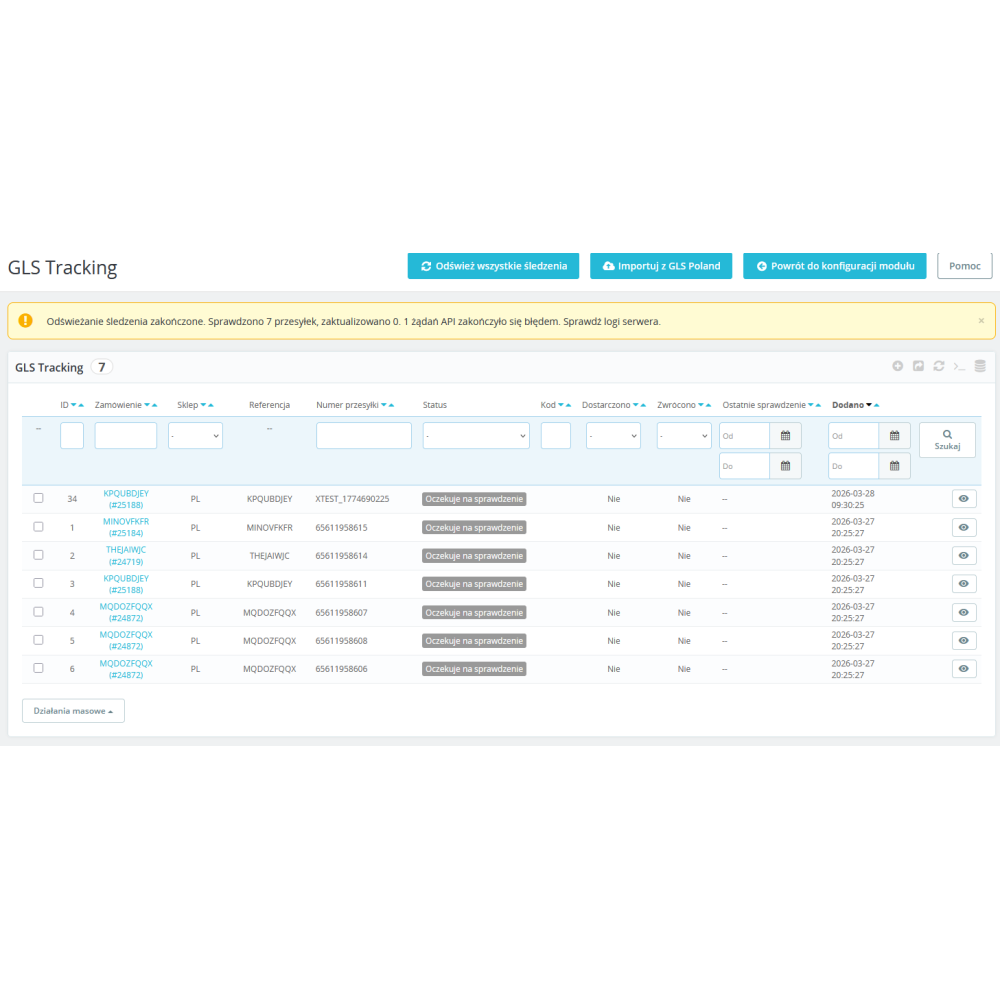
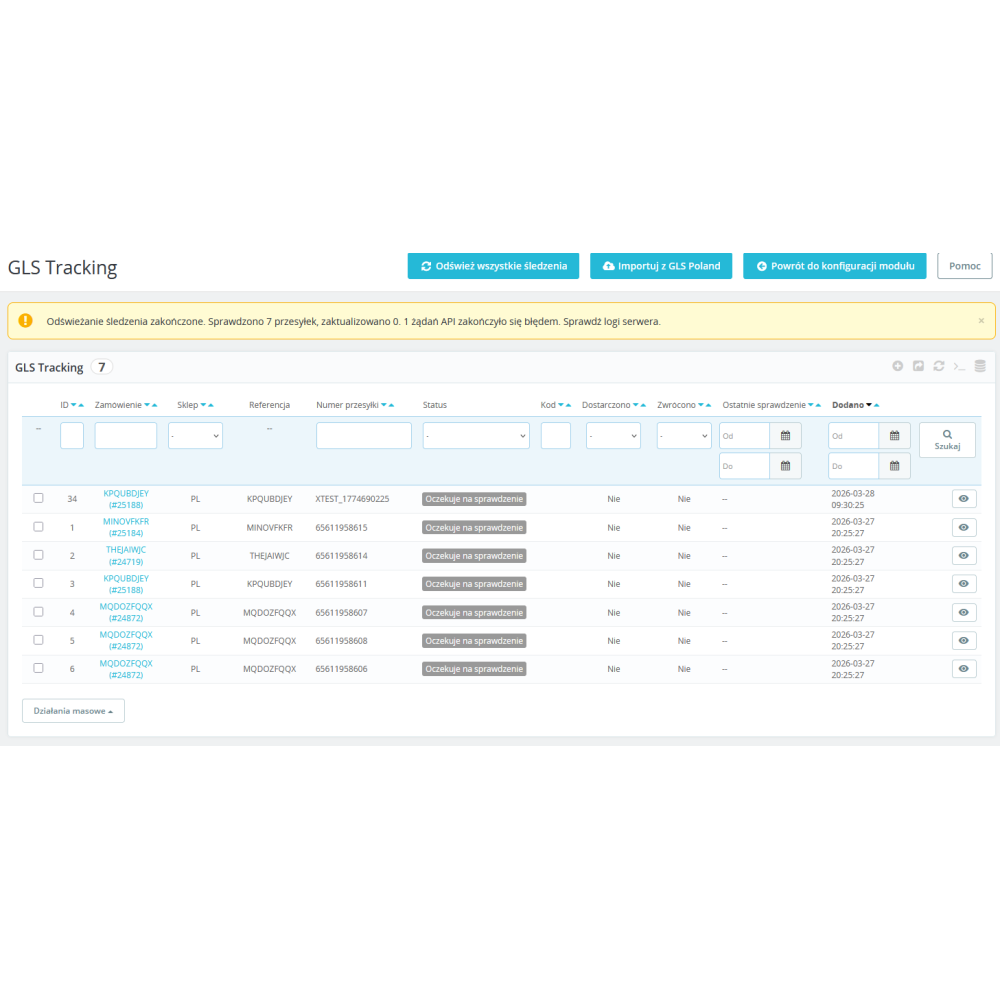
- Administrative panel with parcel list — a "GLS Tracking" tab appears in the PrestaShop administration menu with a complete list of all tracked parcels. The list includes filters, sorting, CSV export, bulk actions, and search by parcel number, status, event code, and date range.
- Status filter in the form of a dropdown list — in the header of the "Status" column, there is a dropdown with the following options: Delivered, Returned, In transit, Issue, Awaiting verification. One click filters the list to the selected state — ideal when you want to quickly see, for example, all parcels with issues.
- Event history preview in a modal window — clicking the "View events" icon next to any parcel opens a popup with the full event timeline, without leaving the list. Quick preview without reloading the page, thanks to AJAX technology.
- Bulk status refresh — the "Refresh all tracking" button in the toolbar retrieves current data from the GLS API for all undelivered and non-returned parcels at once. You can also select specific parcels and refresh only their statuses.
- Automatic import from the GLS Poland module — if you use the official glspoland module to generate shipping labels, the GLS Track and Trace Pro module can automatically import parcel numbers from that module's tables. You do not need to rewrite numbers manually — just select the "GLS Poland module" data source in the configuration.
- Two parcel number sources — the module supports two modes of obtaining tracking numbers:
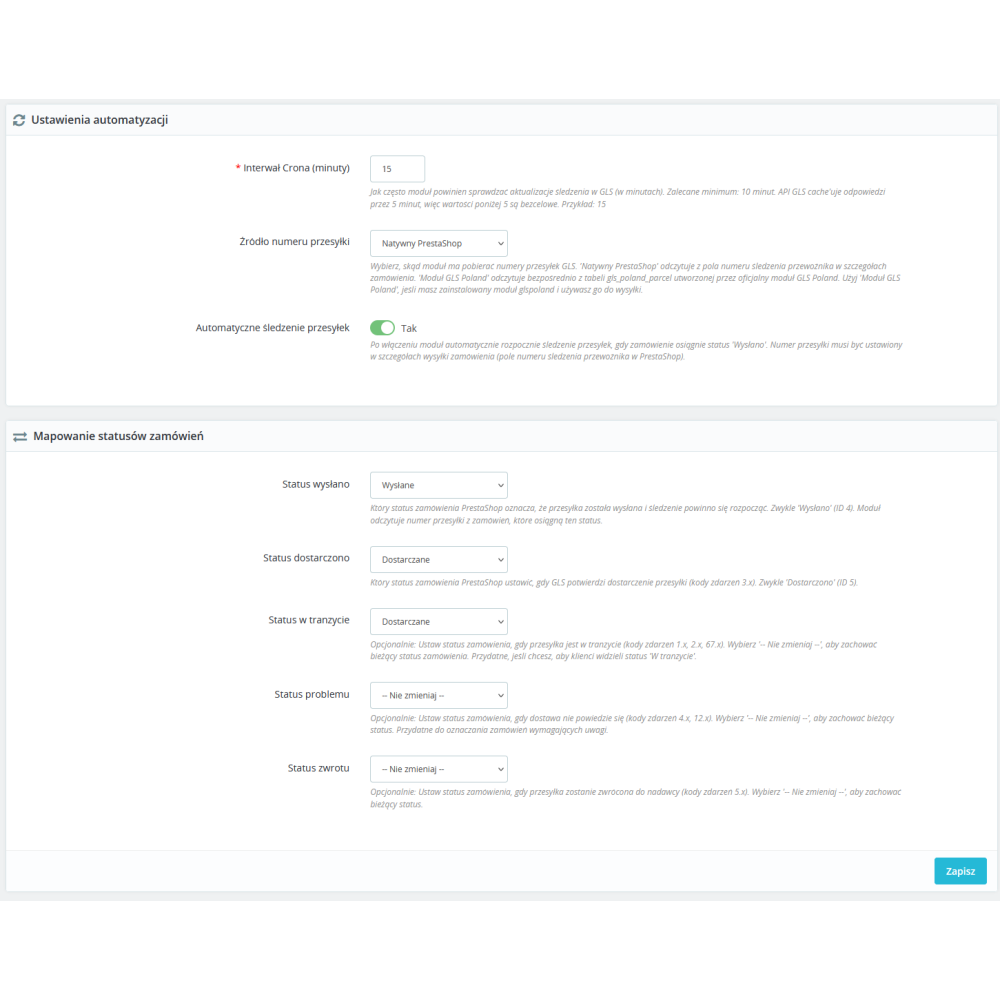
- Native PrestaShop — reads the number from the "Carrier tracking number" field in the order shipping details
- GLS Poland module — reads directly from the
gls_poland_parceltable created by the official glspoland module
- Cron mechanism with two phases — the cron job consists of two phases:
- Phase 1 — automatic import of new parcel numbers from the GLS Poland module (run on every cron call)
- Phase 2 — querying the GLS API for current events for all active parcels (run according to the configured interval, every 15 minutes by default)
- Two ways to run cron — you can configure cron in two ways:
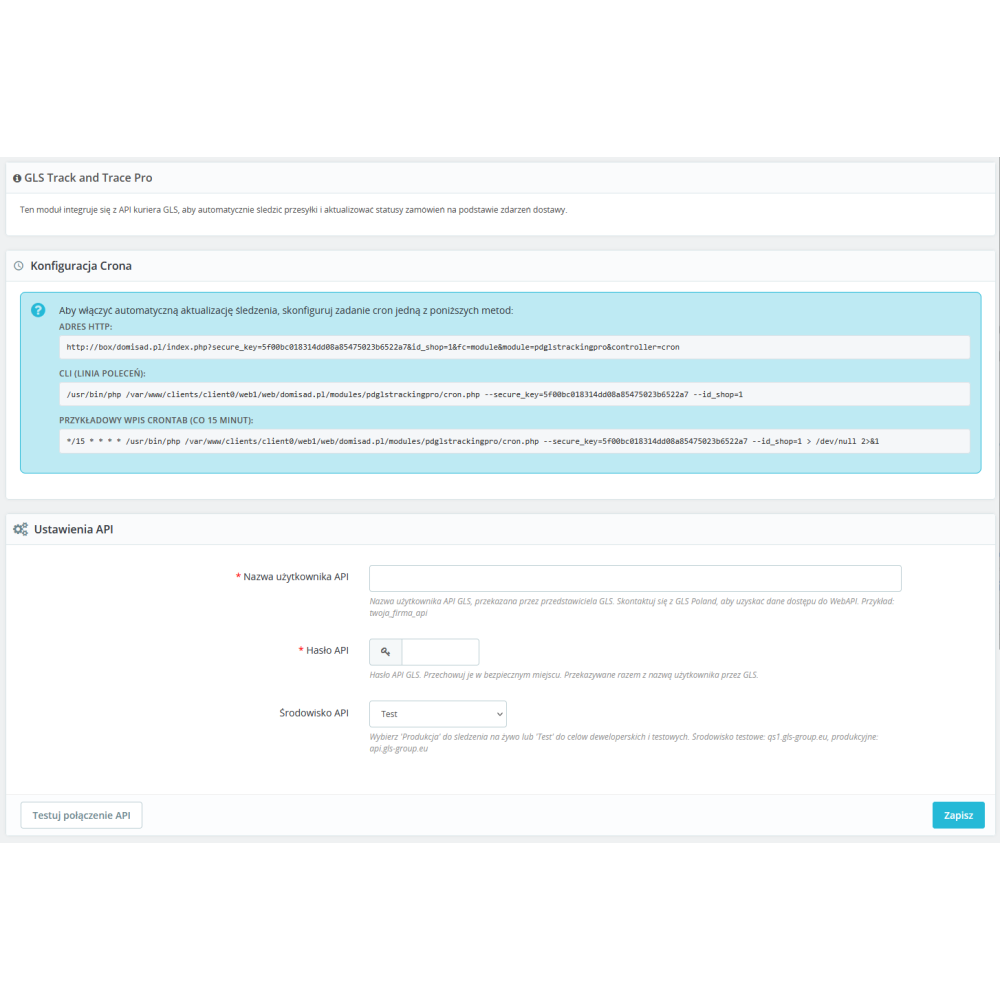
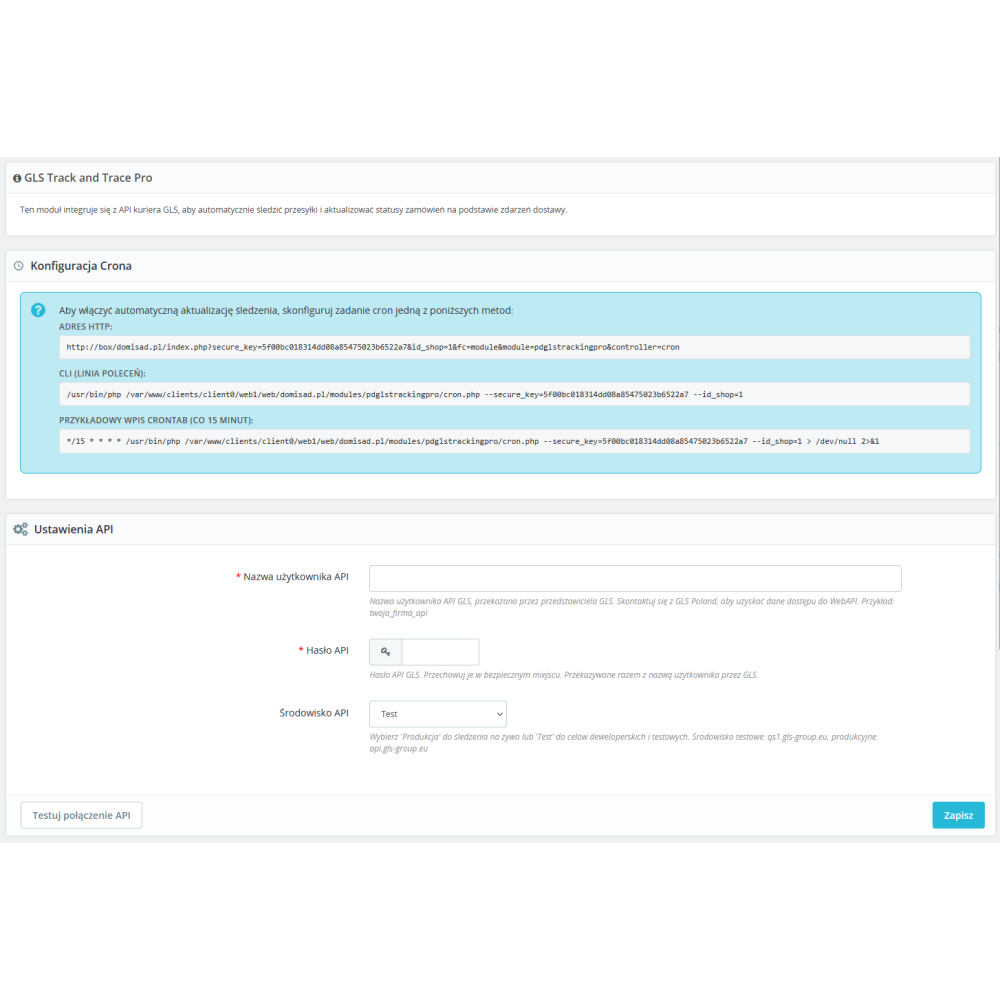
- HTTP — paste the provided URL into your hosting panel as a cron job (e.g. in cPanel, DirectAdmin, Plesk)
- CLI — run the PHP command from the command line, which is more efficient on VPS and dedicated servers
- Configurable query interval — you decide how often the module should check parcel statuses in the GLS API. The default value is 15 minutes. The GLS API caches responses for 5 minutes, so values shorter than 5 minutes make no sense and will not speed up updates.
- API connection test button — in the configuration form, you will find the "Test API connection" button, which immediately checks whether the provided login details are correct and whether the GLS server is responding. You do not need to wait for the first cron run to find out whether the configuration is correct.
- Test and production environments — the module supports both the GLS production environment (api.gls-group.eu) and the test environment (qs1.gls-group.eu). You can safely test the integration on a development server before launching it on the production store.
- Full multistore support — the module has been designed for PrestaShop multistore setups. Each store in the multistore network can have its own GLS API credentials, its own cron interval settings, and its own order status mappings. The parcel list in the administration panel automatically filters results to the currently selected store, store group, or all stores.
- Manual addition of tracking numbers — on the order page in the administration panel, you will find a form for manually entering a GLS parcel number. The module validates the number (letters, digits, and hyphens only, maximum 64 characters) and starts tracking immediately.
- Protection against duplicates — the module does not allow the same parcel number to be added twice to the same order. Both the user interface and the database mechanism (unique key) protect against duplicate entries, even in the case of simultaneous requests.
- Tracking link on the GLS website — for each parcel, a link is displayed that leads directly to the tracking page on the official GLS portal. Both the administrator and the customer can check full parcel information on the carrier's website with a single click.
- Colored status labels — parcel statuses are marked with colored badges for immediate readability:
- green — delivered
- red — returned to sender
- blue — in transit
- orange — delivery issue
- gray — awaiting verification
- Compatibility with PrestaShop 1.7.6 to 9.x — the module is compatible with PrestaShop from version 1.7.6 through the entire 8.x series up to the latest 9.x versions. It supports both the older legacy and the new PrestaShop translation system. It uses the bootstrap mechanism for proper display in the administration panel.
Who is this module for?
GLS Track and Trace Pro is intended for any PrestaShop online store that uses GLS Poland courier services or GLS in another European country. The module will work well both in a small store shipping a few parcels a day and in a large store processing hundreds of orders — thanks to the batch API query mechanism (batch processing, up to 20 parcels in a single request), the module efficiently handles large volumes.
If until now you have been checking GLS parcel statuses manually on the carrier's website and manually changing order statuses in PrestaShop — this module completely eliminates that work. Customers are kept informed in real time, orders update themselves, and you gain more time to grow your business.
Requirements
- PrestaShop version 1.7.6 or newer (including 8.x and 9.x)
- GLS WebAPI credentials (username and password) — you will receive them from your sales representative at GLS Poland
- Server with support for PHP 7.1+ and the cURL extension
- Ability to configure a cron job on the hosting server (available in most hosting panels)
Support and updates
The module is developed and supported by PrestaDev.pl — a Polish team specializing in creating modules and solutions for PrestaShop. If you have questions, configuration issues, or need the module adapted to your individual requirements — contact us at info@prestadev.pl.