

The module check the DPD delivery status for Prestashop 15x and 16x
DPD – sent and delivered status in PrestaShop | PrestaDev

DPD module check and set delivery status for Prestashop

Module version: 2.0.0

PrestaShop compatibility: 1.7.x 8.x 9.x

Module file updated: 09/27/2026 21:12:45

Product data updated: 09/27/2026 21:18:33


The module allows you to check the delivery status of orders shipped by the DPD courier company; the statuses that can be checked and set are shipped and delivered. It helps save time when setting order statuses to delivered or shipped.

License type / update
zł 139.00
zł 113.01no tax
Price history:

Description

What the module is for

  • No more manual status switching. Orders shipped with DPD are automatically changed to the shipped status, and after delivery – to the delivered status, without checking each parcel on the DPD tracking page.
  • Up-to-date information for the customer. A status change triggers the email assigned to that status in PrestaShop (e.g. about the order being shipped), so the customer receives a message on the first check after DPD actually takes over or delivers the parcel.
  • Order status kept tidy. The delivered status appears only when DPD confirms delivery.
  • Dispatch status. The status is set when the events of at least one shipment in the order include a code from the “shipment dispatched” list: collected by courier, dropped off at a DPD Pickup point, accepted at a sorting centre or branch, out for delivery, or waiting at a pickup point.
  • Delivery codes also count. If the parcel has already been delivered and the order still has a pre-shipping status, the module will set the shipping status and, in the same run, also the delivery status – if both checks are enabled and the shipping status is among the statuses checked for delivery (as in the default settings).
  • Just registering the data is not dispatch. The event “shipment data registered, shipment not yet dispatched” (code 030103) does not change the status.

Delivery status

  • All parcels delivered. The status is set when every shipment in the order has a code from the “shipment delivered” list: delivered to recipient, delivered with cash on delivery (COD), delivered with carry-in service, collected at a DPD Pickup point, and the other delivery codes from the DPD event table.
  • Waiting at a pickup point is not delivery. Code 410135 (“ready for collection at DPD Pickup”) means the parcel is waiting for the customer and does not change the status to delivered.
  • Returns and losses are blocked. DPD marks a return sent back to the sender with the same code as delivery, which is why a shipment with a code from the “returned or lost” list (return to sender, returned shipment) is blocked from being treated as delivered.

Shipment numbers

  • Multiple numbers in one field. Numbers in the shipment number field may be separated by a space, comma, semicolon, or vertical bar; the module also takes numbers from each carrier row in the order.
  • Up to 10 numbers per order. A number must be 6 to 32 letters or digits; letter case does not matter.

Editable DPD code lists

  • Three lists in advanced settings. “Shipment dispatched” (40 codes by default), “shipment delivered” (20 codes), and “shipment returned or lost” (24 codes). The default lists were built from the DPDInfoServices event table published by DPD Polska in 2026.
  • An empty list reverts to the default. Codes are entered as numbers separated by commas or new lines.

Which orders are checked

  • Selected DPD carriers. Carriers are saved by permanent identifier (reference), so editing a carrier in PrestaShop, which gives it a new ID number, does not exclude it from checking. The list includes carriers from all shops, including inactive and module carriers.
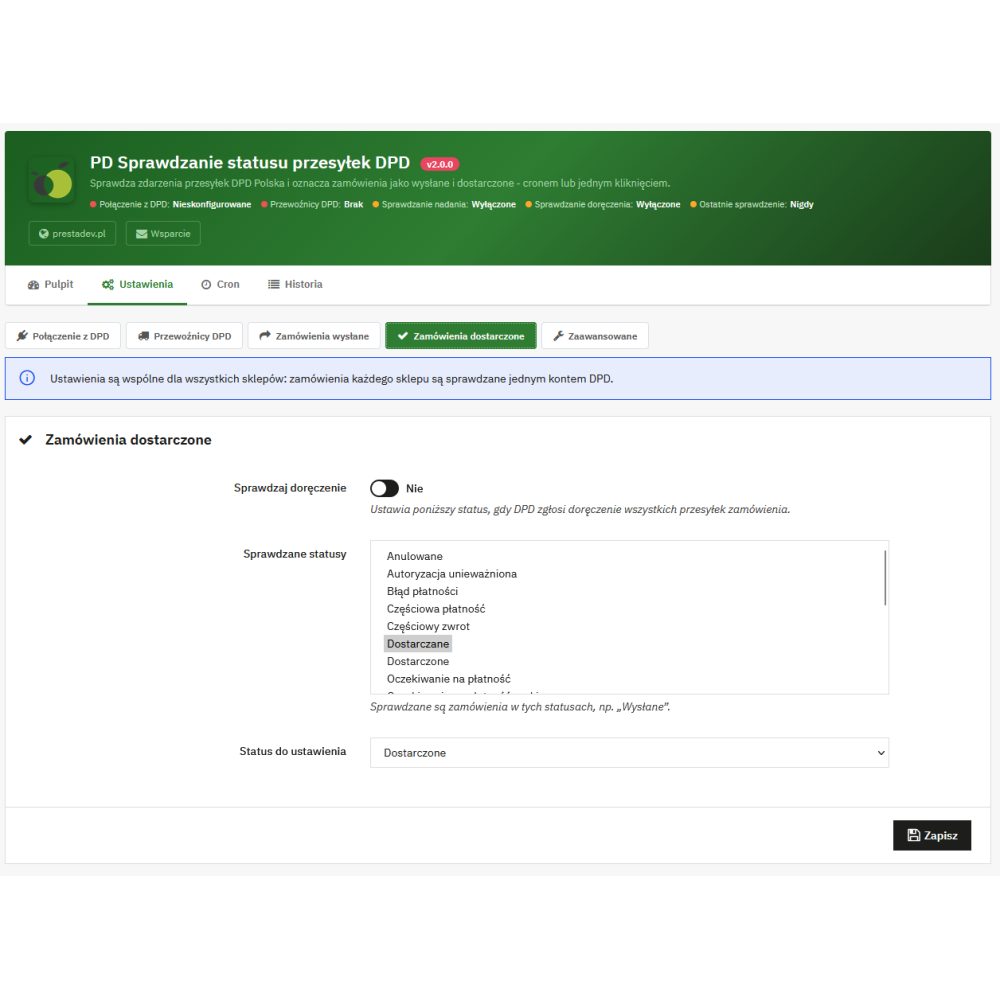
  • Selected statuses. For shipping and delivery checks, you separately choose the statuses to check and the status to set. After installation, both checks are disabled; by default, the status to set is the shipped and delivered order status, and delivery checking includes orders in shipped status. Orders that already have the target status are skipped.
  • With a shipment number. The number comes from the shipment tracking number field in the order, entered manually or by another module; on PrestaShop 1.7 the module also reads the older order shipping number field.
  • Not older than the selected number of days. By default, 30 days from placing the order; 0 means no limit, the maximum is 3650 days.
  • Queue without skipping. Orders never checked are processed first, then those checked the longest time ago. You set the number of orders per run from 1 to 1000 (default 100), and the rest wait for the next run.

Automatic checking via cron

  • Module controller URL. The Cron tab provides three URLs: checking dispatch and delivery, dispatch only, or delivery only, with copy buttons and a sample crontab line (every 30 minutes). The URL can be added to cron jobs on your hosting or to the PrestaShop “Cron jobs manager” module.
  • Works on PrestaShop 9. Cron is a module controller, not a separate PHP file in the module directory, whose calls are blocked by PrestaShop 9 .htaccess rules.
  • JSON response. It contains the run status, the number of checked orders, and the order numbers marked as shipped, delivered, and returned. HTTP codes: 200 after checking, 403 for an invalid token, 409 when another check is in progress.
  • Shop maintenance mode. Cron also works when the shop is disabled for maintenance and is not blocked by geolocation restrictions.
  • No parallel runs. A database lock prevents a second check from starting while the first one is still running.
  • Limited execution time. One request to DPD waits at most 20 seconds, and the run stops accepting new orders after about 50 seconds, leaving the rest for the next run. An invalid login stops the run on the first refusal from DPD, and three consecutive connection errors stop it after the third attempt.
  • URLs from version 1.x. On PrestaShop 1.7 and 8, the previous modules/pddpdcheckorderstate/cron.php URL still works because the update keeps the old key as the token. For 30 days from the last call to the old URL, the Cron tab displays a warning with its date. On PrestaShop 9, you must use the new URL.
  • Dashboard and manual tools. The module page shows counters for the last run (checked orders, status changes, returns and errors), the number of orders waiting for each check, status changes from the last 7 and 30 days, and the 10 most recent changes with links to orders.
  • “Check and update orders”. Runs the same check from the admin panel as cron, with the same limits.
  • “Test DPD connection”. Checks whether DPD accepts the saved login and password.
  • “Check shipment number”. Shows DPD events for a single shipment (time, code, description, branch) with an indication of which codes the module treats as dispatch, delivery, return, or redirection, and the result: what the module would do with the order. It does not change anything.
  • Settings in five sections. DPD connection, DPD carriers, Shipped orders, Delivered orders, and Advanced – switched by tabs and saved with one button. If there is a form error, the section with the first error opens, and sections with errors are marked.
  • Configuration warning. When the status set by the module is also among the checked statuses, saving displays a warning.

History and diagnostics

  • Every status change. Date, order with reference number and link, shipment number, previous and new status, DPD event code and description, event time, and source: cron, admin panel, or old cron URL.
  • Errors without flooding the history. An error for the same order is saved again only when it changes, and run-wide errors (e.g. login failure, no response, invalid XML) are saved once per run.
  • History list. Filtering by date, order, shipment number, source, and type (status changes, returns, errors); 50 entries per page. Entries older than 180 days are deleted automatically, and the “Clear history” button removes all entries.

Connection to DPD Polska

  • DPDInfoServices service. The module uses the getEventsForWaybillV1 operation – the single-shipment tracking service described in the DPD Polska documentation. The new DPD Services REST API does not include a tracking operation, so DPD Polska provides DPD shipment statuses through DPDInfoServices.
  • Login and password from your DPD account manager. Credentials for DPDInfoServices are provided by the DPD sales/account manager; they are usually the same as for DPD Services (label printing). The channel field (FID) is optional – fill it in only if DPD has assigned a channel number.
  • DPD test environment. The settings include the DPD test environment URL with a public test login. It checks login and request correctness, but does not return shipment events.
  • No SOAP extension. The module sends requests via cURL and does not require the PHP SOAP extension or downloading the WSDL file with every request.

Security and permissions

  • The DPD password is not sent back to the browser. The password field is always empty, and leaving it empty when saving keeps the saved password. When changing the service URL to another server, you must enter the password again.
  • Encrypted connection only. The service URL must start with https (http allowed only for an address on the same server), and the DPD certificate is verified.
  • Resistant to unusual responses. Responses with a DTD definition or larger than 2 MB are rejected.
  • Cron token. On installation, a random 32-character token; after updating from version 1.x – the previous key; the “Generate new token” button assigns a new random token and immediately invalidates old URLs, including the old cron.php URL. In a shop with SSL, an http call gets a clear error instead of a redirect.
  • Employee permissions. Saving settings and running checks require the module “configure” permission and edit rights on the modules page. An employee without these rights will not see the settings, DPD login, or cron URLs (PrestaShop 9 shows only the module header with information about missing permissions). Each form has its own module CSRF token, and actions are performed only after submitting the form.

Multistore

  • One DPD account for all shops. Settings are shared, and checking covers orders from every shop. The form displays this information.
  • Access for employees of all shops. Since settings and runs cover all shops, the module can be managed by a super administrator or an employee assigned to all shops.

Compatibility, installation, and update

  • PrestaShop 1.7.0–9.x, PHP 7.0–8.5. Automated tests cover PrestaShop 1.7.2.4, 1.7.5.2, 1.7.6.7, 1.7.7.2, 1.7.8.5, 1.7.8.10, 8.0.0, 8.1.7, 8.2.6, 9.0.2, and 9.1.5 on PHP 7.0–8.1: checking logic on orders created in the shop (with a DPD service mock), the browser panel (Playwright, Chromium), and the cron URL. The syntax of all files is checked on PHP 7.0–8.5.
  • Update from version 1.0.x. It migrates settings (including those saved in a single-shop context), converts saved carrier ID numbers to references, keeps the old cron key as the token, and removes files from the old version. Updating from 1.0.5 is verified by tests on PrestaShop 1.7.2.4, 1.7.8.10, 8.2.6, and 9.0.2.
  • Version 1.0.x on PrestaShop 9. The old version does not load on PrestaShop 9 (the old cron.php file is blocked by .htaccess, and the old admin page uses deprecated code). The new version keeps the same functionality and settings, and old cron URLs on PrestaShop 1.7 and 8 continue to work unchanged.
  • Languages. The module interface is available in Polish and English.

Important operating limits

  • The module does not create shipments, labels, or shipment numbers – the number must be saved in the order manually or by another module.
  • It supports only DPD Polska shipments checked through DPDInfoServices; a login and password for this service from DPD are required.
  • Each shipment number is a separate request to DPD; a large number of orders is processed in subsequent cron runs.
  • In the event of a return or loss, the module does not change the order status – it records the event in the history.
  • The module does not send its own emails: the customer receives the message assigned to the status in PrestaShop if email sending is enabled for that status. If the email cannot be sent, the status still changes, and the history records a warning.
  • The DPD test environment does not return shipment events, so status changes can only be checked on a production DPD account.
  • The module works in the admin panel and via cron – it does not add any customer-visible elements to the shop.

Product Details

Prestashop 9.x support
Yes
Support for Prestashop 8.x
Yes
Prestashop 1.7.x support
Yes
Prestashop 1.6.x support
Yes
PrestaShop 1.5x support
Yes
Module translations
EN, EN
Free updates (1 year)
Yes
Easy Installation
Yes
PDCDS-FULL

FAQ

Find answers to the most common questions about this product.

The module retrieves shipment events from the DPD Poland tracking system (DPDInfoServices service) for shipments saved in orders and, based on this, changes the order status to shipped and then to delivered. It checks only orders for selected DPD carriers, in selected statuses, and with a shipment number. It changes the status using the standard PrestaShop mechanism, so the change is recorded in the order history, and the customer receives the e-mail assigned to the new status, if that status sends one. The check is triggered by a cron job or a button in the panel.

After installation, both checks are disabled. In Settings, enter the DPDInfoServices login and password (DPD Connection section), select DPD carriers, and in the Shipped Orders and Delivered Orders sections enable checking and select the statuses to be checked and the status to be set. By default, the status to be set is the shipped order status and the delivered status, and delivery checking covers orders with the shipped status; the statuses to be checked for shipment must be selected manually. Finally, add the address from the Cron tab to the cron jobs on the server.

A login and password for the DPDInfoServices service are required. They are provided by your DPD Polska account manager; they are usually the same as for DPD Services, i.e. for printing labels. The channel field (FID) is optional – it should only be filled in if DPD has assigned an InfoServices channel number, as checking individual shipments does not require it.

Yes. The module uses the getEventsForWaybillV1 operation of the DPDInfoServices service, described in the 2026 DPD Poland documentation – the same shipment tracking operation is used by the official DPD shipping module for PrestaShop. The new DPD Services REST API covers shipment creation, labels, and courier ordering, but does not include tracking or status operations. The module sends requests via cURL and does not require the PHP SOAP extension.

Partially. The DPD test environment address is provided in the settings with the public login “test” and password “thetu4Ee”. The “Test DPD connection” button will confirm there that the login and query work, but the DPD test environment does not return shipment events, so order status changes cannot be checked there.

When a code from the “shipment dispatched” list appears in the events of at least one shipment in the order: collected by courier, dropped off at a DPD Pickup point, accepted at the sorting facility or branch, out for delivery, or awaiting collection at the pickup point. Delivery codes also count, so a parcel that has already been delivered will also switch the order to shipped. Merely registering the shipment data (code 030103) does not change the status.

When each shipment in the order has a code from the “shipment delivered” list, e.g. delivery to the recipient, cash-on-delivery shipment, delivery with carrying in, or collection at a DPD Pickup point. Code 410135 means the parcel is ready for collection at the point and is not treated as delivered. If the order still has a pre-shipment status, but the parcel has already been delivered, the module will first set the shipment status and then the delivery status in a single run – provided that both checks are enabled and the shipment status is among the statuses checked for delivery (this is the default setting).

The order will not be marked as delivered. DPD marks a return handed back to the sender with the same code as delivery, therefore a shipment with a code from the “returned or lost shipment” list (return to sender, return of export shipment, no shipment at branch, liquidation) blocks the delivery status. The order status does not change, and one entry “Return / loss” with the DPD event code and description appears in the history.

After a redirection event (code 230402), DPD provides a new parcel number. The module then also checks this new number and takes its events into account – up to two redirections. The module does not track numbers assigned during return to sender, because their delivery means a return.

In the shipment number field, you can enter several numbers separated by a space, comma, semicolon, or vertical bar, and the module also takes numbers from each carrier row of the order – up to 10 numbers in total. For the shipping status, one dispatched parcel is enough; the delivery status requires all parcels to be delivered. The number must be from 6 to 32 letters or digits, and letter case does not matter.

Orders from selected DPD carriers, in statuses selected separately for shipment and delivery checks, with a tracking number and no older than the configured number of days since placement (default 30, 0 = no limit). Orders that already have the target status are skipped. Orders that have never been checked are checked first, then those checked the longest time ago.

From the shipment tracking number field in the PrestaShop order, and in PrestaShop 1.7 also from the older order shipping number field. The module does not create shipments or numbers – the number must be entered manually or by another module, e.g. a parcel shipping module.

Nothing is wrong. When editing a carrier, PrestaShop assigns it a new ID number, but the module saves carriers by a fixed identifier (reference), so the carrier is still checked, also in older orders with the old ID number. The list in the settings contains carriers from all shops, including inactive and module carriers.

On the Cron tab there are three URLs: checking dispatch and delivery, dispatch only, or delivery only, with copy buttons and an example crontab line run every 30 minutes. You add the URL to cron jobs in your hosting or to the PrestaShop "Cron Jobs Manager" module. The URL returns a JSON response: HTTP 200 after checking, 403 for an invalid token, and 409 when another check is in progress.

PrestaShop 9 blocks the execution of PHP files from the modules directory via .htaccess rules. Therefore, in version 2.0.0, the cron is a module controller. In PrestaShop 1.7 and 8, the old modules/pddpdcheckorderstate/cron.php address still works, because the update preserves the old key as the token, and the Cron tab warns for 30 days from the last call that it is advisable to switch to the new address. The “Generate new token” button invalidates the old addresses, including cron.php.

Yes, the cron also works when the store is disabled for maintenance, and it is not blocked by geolocation restrictions. One run checks the configured number of orders (from 1 to 1000, 100 by default) and stops accepting new ones after about 50 seconds of operation – the rest wait for the next run. The lock in the database prevents two checks from running at the same time, and a single request to DPD waits a maximum of 20 seconds.

Yes, if the status set by the module has email sending enabled in PrestaShop, the module changes the status in the same way as an employee in the panel. The module itself does not send any of its own messages. If the email cannot be sent, the status is still changed, and the module history records the warning “Status changed, but the email to the customer was not sent”.

On the Dashboard there is a tool called "Check shipment number". It shows the DPD events for that shipment (time, code, description, branch) with an indication of which codes the module treats as dispatch, delivery, return or redirection, as well as the result: whether the order would be marked as shipped, delivered or blocked as a return. The tool does not change anything in the orders.

The result of the last check (who ran it, how many orders were checked, how many were marked as shipped and delivered, how many returns and errors there were), the number of orders waiting for shipment and delivery verification, status changes from the last 7 and 30 days, and the 10 most recent changes with links to the orders. There are also buttons “Check and update orders” and “Test DPD connection”.

Every status change (previous and new status, shipment number, DPD code, description and event time, source: cron, panel or old cron address), every return or loss, and errors. An error for the same order is recorded again only when it changes, and errors for the entire process – at most once per hour. The history can be filtered (all, status changes, errors), entries older than 180 days are removed automatically, and the “Clear history” button deletes all of them.

Yes, in the Advanced settings section there are three lists: shipment dispatched (40 codes by default), shipment delivered (20 codes), and shipment returned or lost (24 codes). The codes are entered as numbers separated by commas or new lines, and an empty list restores the default list, built from the DPDInfoServices event table published by DPD Poland in 2026.

The settings are shared across all stores: one DPD account checks the orders of each store, and the carrier list contains carriers from all stores. Since the settings and workflows cover all stores, the module can be managed by a super administrator or an employee assigned to all stores.

The DPD password is never returned to the browser, and when changing the service address to another server, it must be entered again. The service address must use HTTPS (regular HTTP is allowed only for the address of the same server), and the DPD certificate is verified. Saving settings and starting checks require the module’s “configure” permission and edit rights on the modules page; each form has its own CSRF token. The cron address is protected by a 32-character token, which can be replaced at any time.

The module declares compatibility with PrestaShop 1.7.0–9.x and PHP 7.0–8.5. It is automatically tested on PrestaShop 1.7.2.4, 1.7.5.2, 1.7.6.7, 1.7.7.2, 1.7.8.5, 1.7.8.10, 8.0.0, 8.1.7, 8.2.6, 9.0.2 and 9.1.5 on PHP 7.0–8.1 (status change logic, browser panel and cron address), and the syntax of all files – on PHP 7.0–8.5. PrestaShop 1.5 and 1.6 are no longer supported.

Simply upload version 2.0.0 over the old one and run the module update. The update migrates the settings (including those saved in the context of a single shop), replaces carrier ID numbers with references, keeps the old cron key as the token, and removes the old version files. Version 1.0.x does not load on PrestaShop 9 because it uses the removed Tools::encrypt function – updating to 2.0.0 restores functionality. The update from 1.0.5 is verified by tests on PrestaShop 1.7.2.4, 1.7.8.10, 8.2.6, and 9.0.2.

No. The module works in the administration panel and via cron—it does not add any elements to the store pages. The customer sees the effect in the form of a changed order status in their account and the email assigned to that status.

Uninstallation removes the history table and the order check status table, as well as all module settings, including the DPD login, password, and cron token. Order statuses and history in PrestaShop remain unchanged.

Reviews (0)

No reviews