
• -20%
Import discounts from CSV to PrestaShop – specific prices | PrestaDev

Import of Specific Prices from CSV Pro — Bulk Discounts in PrestaShop

Module version: 2.0.1

PrestaShop compatibility: 1.7.x 8.x 9.x

Module file updated: 09/9/2026 09:14:00

Product data updated: 09/27/2026 22:28:09


2 Reviews

Specific Prices Import from CSV Pro is a PrestaShop module for bulk creating and updating specific prices, i.e. discounts, on existing products and their combinations based on a CSV file. The value from the file can be a net amount, a gross amount, a percentage, or a fixed price — the reading method is selected in the settings. Column mapping allows you to use supplier price lists with any layout, and the selected identifier links file rows with the store catalog. Simulation, change limits, and a report with prices before and after import help verify the prepared price list. The module also provides export of current discounts, history with rollback, as well as file downloading and import triggered by an external CRON.

License type / update
zł 79.20
zł 64.39no tax zł 99.00 -20%
Lowest price in last 30 days before discount: zł 99.00

Description

Key features and benefits

  • Bulk discounts: create or change discounts for many items from a single file, without manually editing each product page.
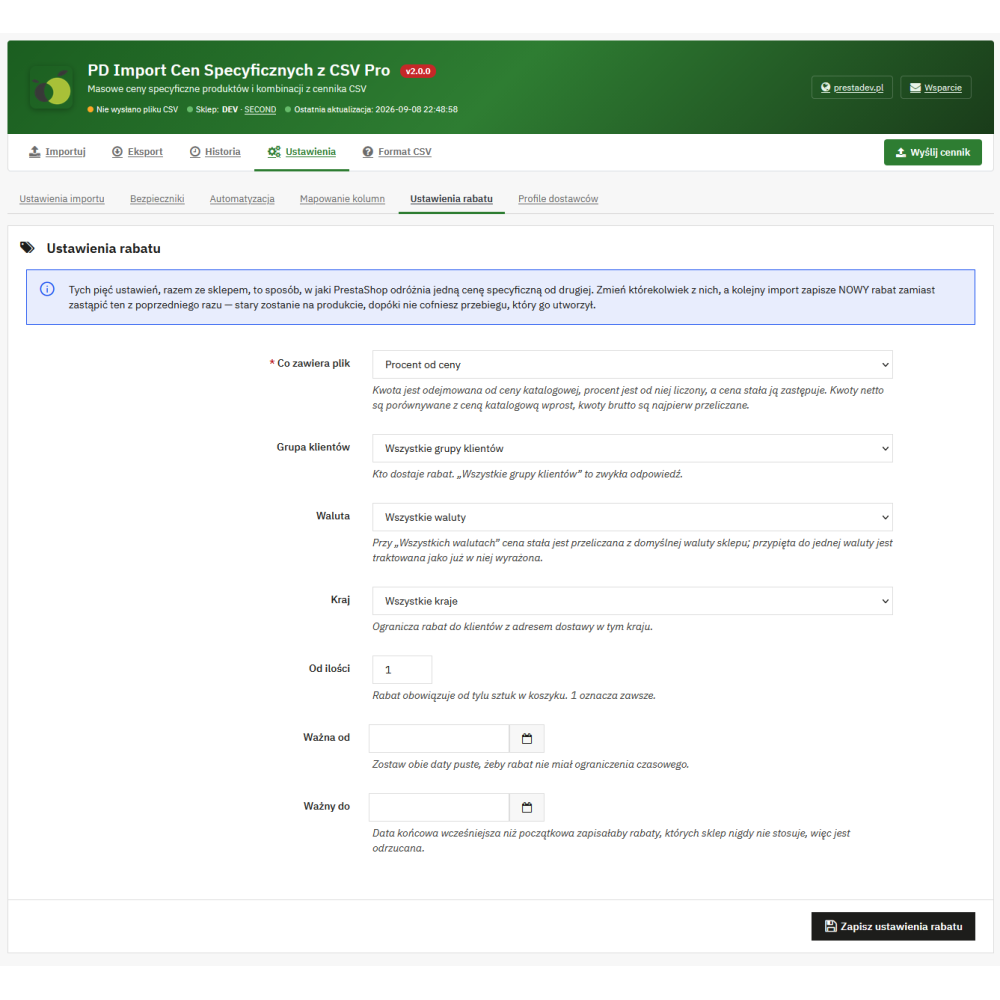
  • Four ways to interpret the value: amount from net price, amount from gross price, percentage of price, and fixed net price replacing the catalog price.
  • Products and combinations: discount for the entire product, for a selected combination, or a mixed file containing both types of identifiers.
  • Matching by catalog codes: reference, i.e. SKU, EAN13, UPC, product ID, combination ID, and MPN, if the relevant field is available in the installation.
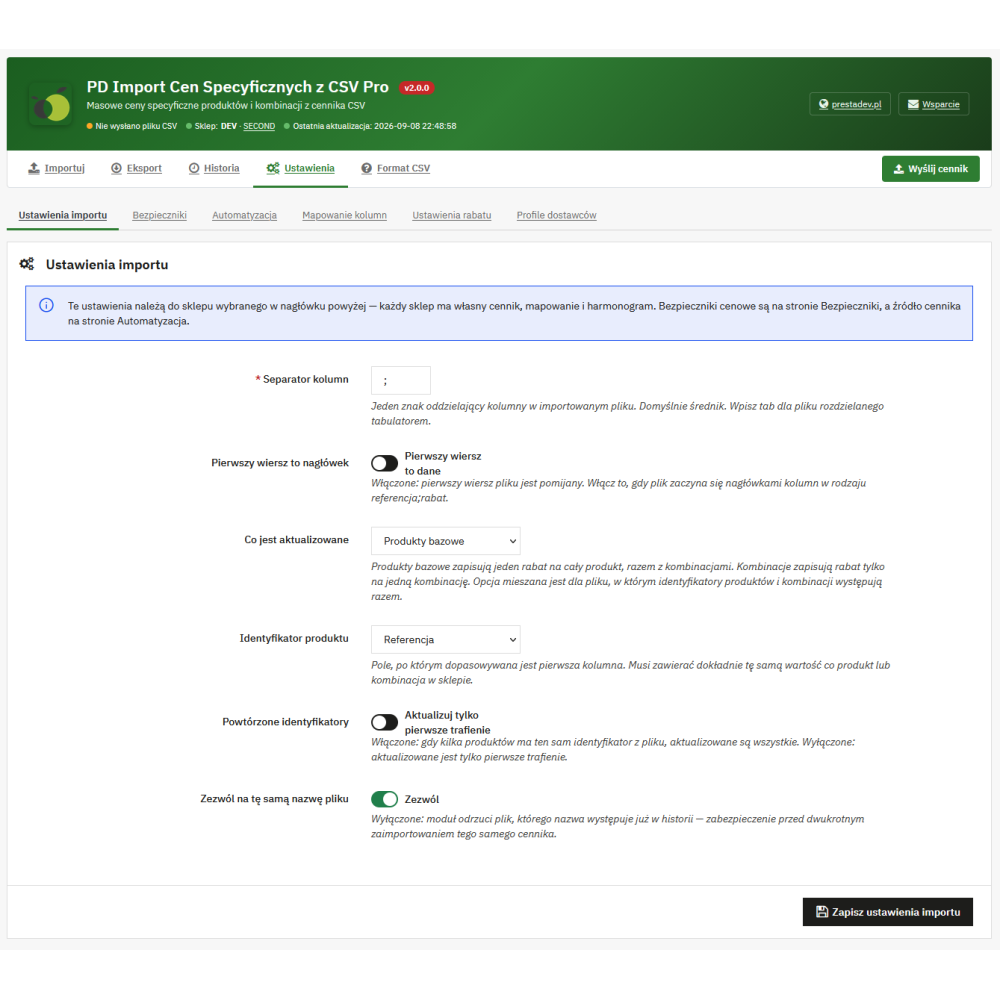
  • Supplier column mapping: indicate the identifier and discount columns, ignore additional data, and get a mapping suggestion based on recognized headers.
  • Full control over where it is saved: customer group, currency, country, quantity threshold, and the validity date window of the discount.
  • Protection of third-party promotions: the module changes and removes only the discounts it created itself. A promotion entered manually or coming from a catalog price rule remains untouched, and the row is included in the report.
  • Simulation before saving: a full decision report without making any changes to prices.
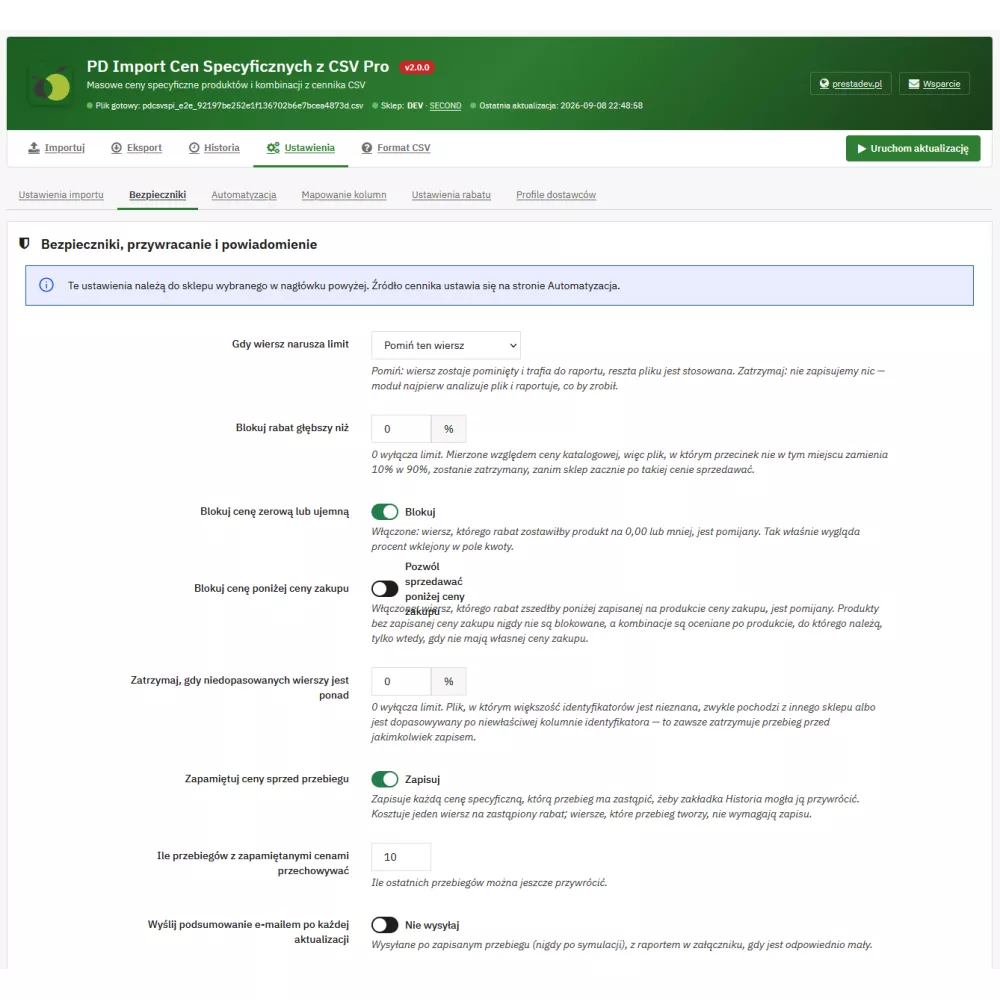
  • Safety limits: block a discount deeper than the indicated percentage of the catalog price, block zero or negative prices, block selling below purchase price, and set a threshold for unmatched rows.
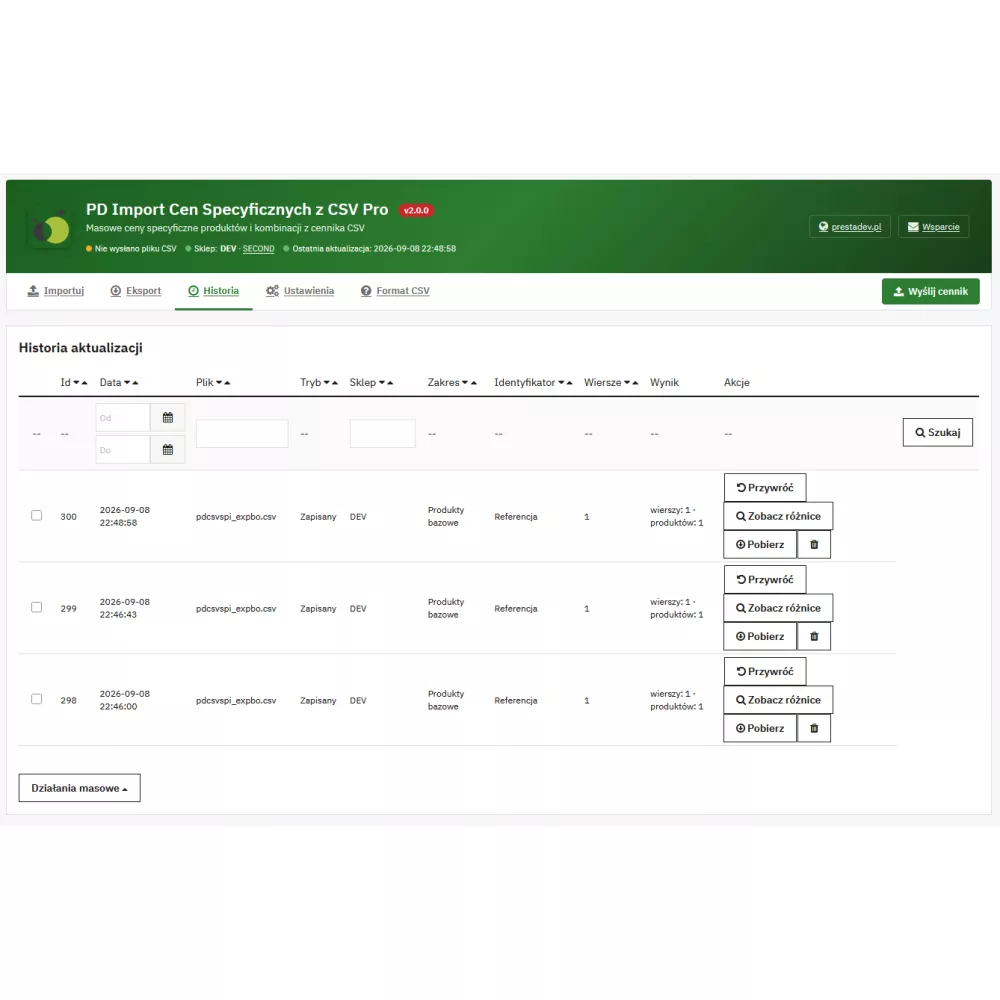
  • History and rollback: each run is saved together with the discounts it replaced, and one click restores the state from before the import.
  • Difference screen: price and discount before and after for each row, with filtering by decision, change direction, and amount threshold.
  • Automation: download the file from the supplier via HTTP, FTP, FTPS, or SFTP, supplier profiles, a secret-protected CRON URL, and an email with the report.
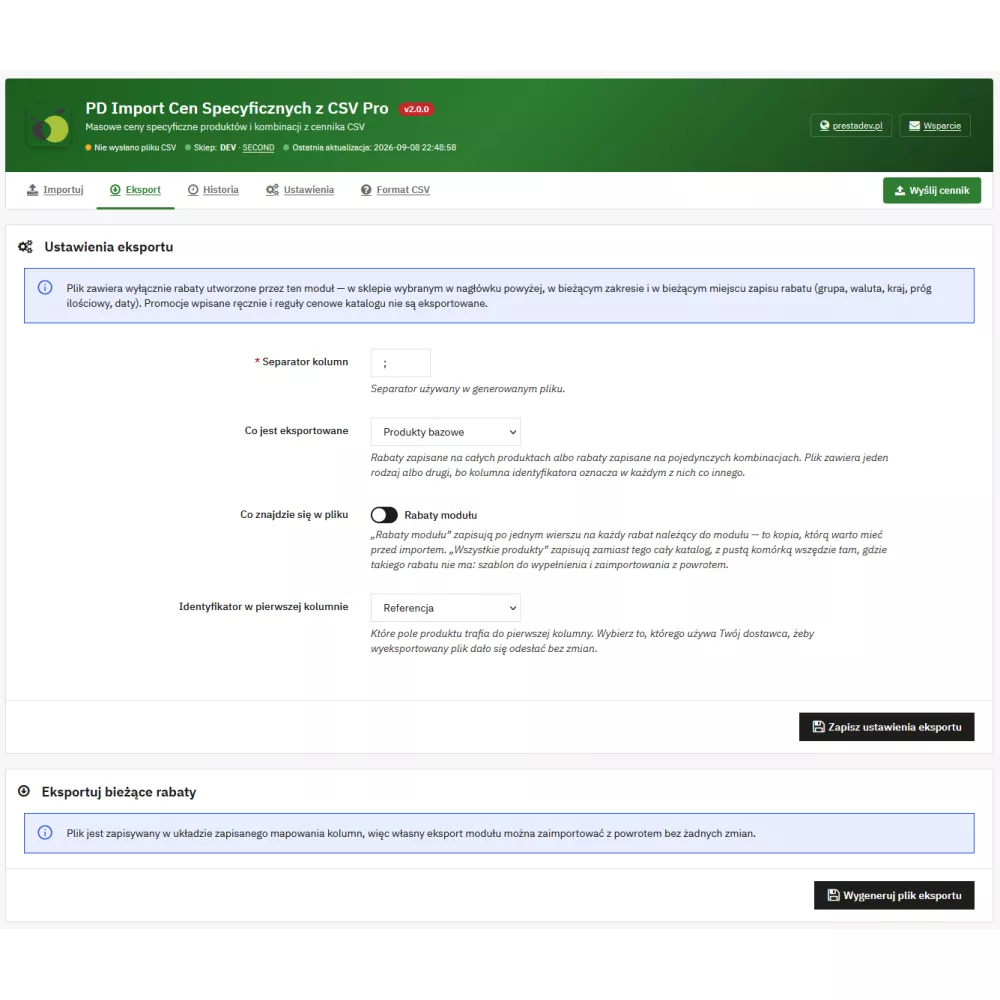
  • Export of current discounts: a file in the shape of the saved mapping, ready to be used as a backup.
  • Support for large files: imports above half a megabyte are split into stages with a progress bar, without exceeding execution time limits.
  • Work in multistore mode: each store has its own price list, settings, supplier profiles, and schedule URL.

How it works

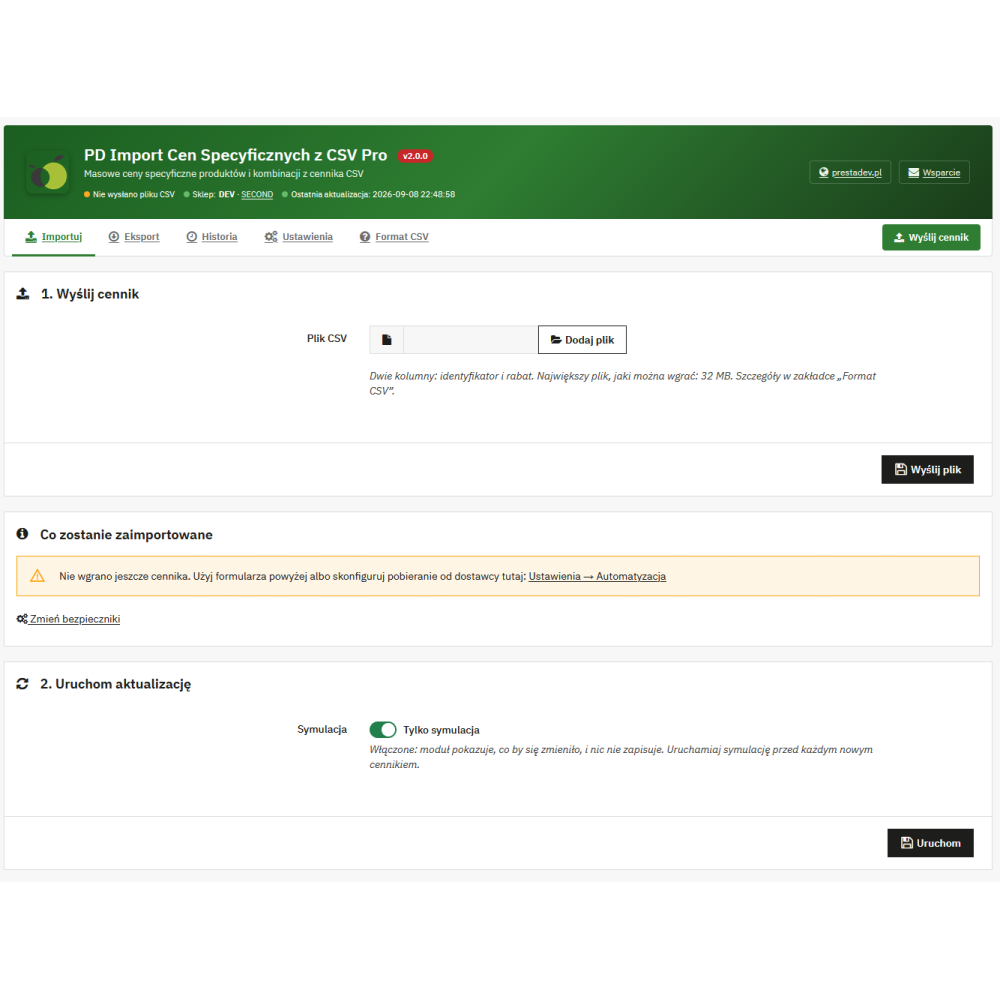
  1. Upload the CSV file in the Import tab or configure supplier download on the Automation page.
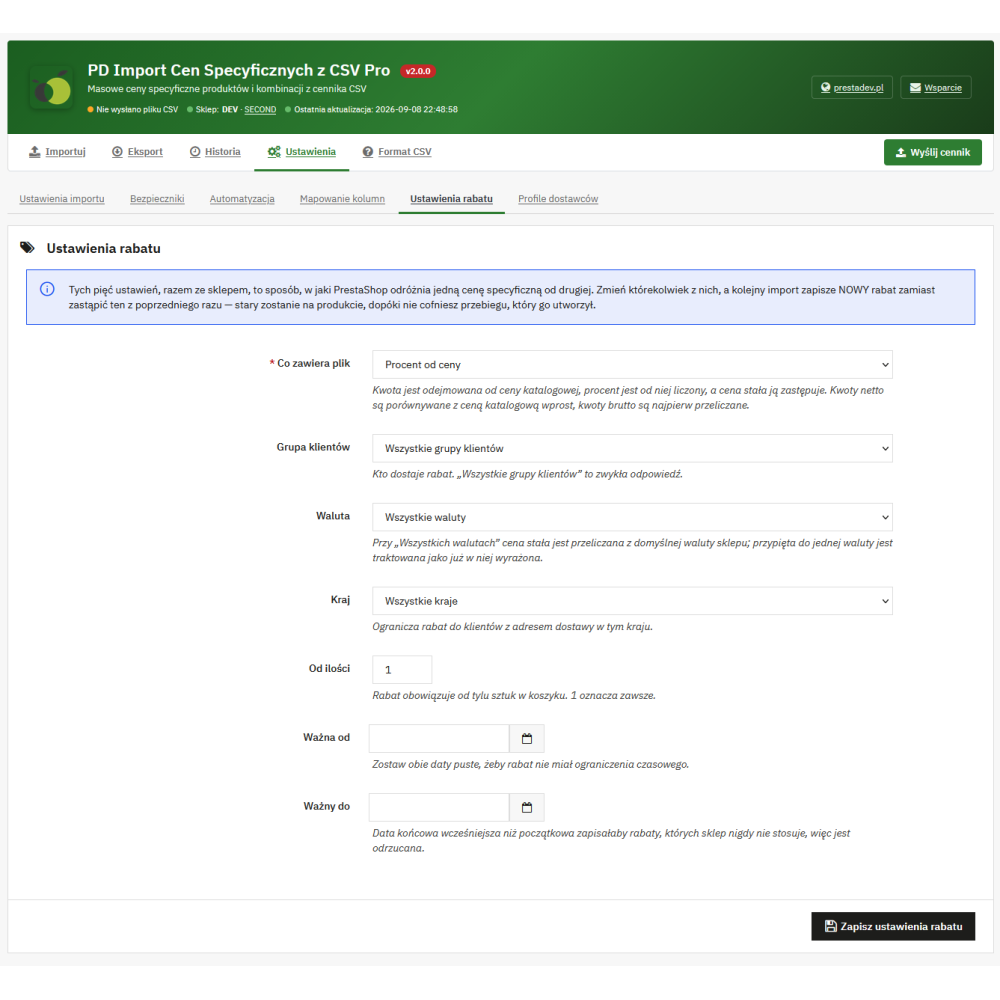
  2. Indicate what the value in the file means and where the discount should be saved on the Settings → Discount settings page.
  3. Set safety limits on the Settings → Safety limits page.
  4. Run a simulation and review the decision report.
  5. Switch the simulation to save mode and run the import.
  6. If needed, roll back the run in the History tab.

Requirements

PrestaShop 1.7.6 – 9.x, PHP 7.0 – 8.5, MySQL 5.6 or MariaDB 10.x. The module does not require external libraries or Composer. The employee account using the module needs permission to edit products.

Product Details

Prestashop 9.x support
Yes
Support for Prestashop 8.x
Yes
Prestashop 1.7.x support
Yes
Prestashop 1.6.x support
Yes
Free support
Yes
Free updates (1 year)
Yes
Easy Installation
Yes
PDSPIC-FULL

Changelog

Release history for this product. Expand an entry to see what changed.

  • moduł został kompletnie przepisany pod zgodność z PrestaShop 9.x

FAQ

Find answers to the most common questions about this product.
Specific Prices CSV Pro Import creates and updates specific prices, i.e. discounts, for existing products and combinations in PrestaShop based on a CSV file. It supports four methods of reading numbers from the file, column mapping, simulation, change limits, history with rollback, and export of current discounts. The file can be uploaded manually or fetched from a supplier, and the import can be run via an external CRON.

A specific price is a discount saved alongside the product’s catalog price. The catalog price remains unchanged, and the store displays the discounted price together with information about the reduction. Changing the catalog price itself is handled by a separate module, PD CSV Price Update Pro. This module deliberately does not touch the product price field.

It depends on the setting on the Settings → Discount settings page. Four readings are available: amount deducted from the net price, amount deducted from the gross price, percentage deducted from the price, and a fixed net price replacing the list price. The file itself does not indicate which reading applies, so it is selected once for the entire run.

No. The module keeps its own register of the discounts it has saved and changes or removes only those rows. A promotion entered manually or originating from a catalog price rule remains untouched, even if it occupies exactly the place where the import wanted to write. Such a row is included in the report with the information that the place is occupied.

PrestaShop distinguishes one specific price from another by shop, customer group, currency, country, quantity threshold, date window, and how the value is recorded. Changing any of these settings between imports causes the next run to write to a different place, which means it creates a new discount. The previous one remains on the product until the run that created it is rolled back.

Each run saves the discounts it replaces and remembers the ones it created. A rollback removes the discounts created by that run and restores the ones it replaced. It is also possible to roll back the first import in the store, which did not replace anything. If the place of a saved discount has in the meantime been taken by another promotion, that discount does not return, and the module states this explicitly.

Yes. A discount saved on the product applies to all its combinations. A discount saved on one combination applies only to that combination. The exception is a fixed price: when saved on a combination, it becomes its entire price, and when saved on the product, the impact of the combination is still added to it. This is how PrestaShop itself calculates the price.

This is what the limits on the Settings → Security limits page are for: blocking a discount deeper than the indicated percentage of the list price, blocking a zero or negative price, blocking sales below the purchase price, and the threshold for mismatched rows. Each limit can either skip individual rows or stop the entire process. Before saving, it is also worth running a simulation.

By default, two columns: product ID and discount. The separator may be a semicolon, comma, tab, or vertical bar. The number may include a decimal part written with a dot or comma, and the thousands separator is recognized. A file with a different layout supports column mapping, which indicates which column contains the ID and which contains the discount.

Yes. On the Settings → Automation page, you set the file source, i.e. the HTTP, FTP, FTPS or SFTP address, and receive the address to enter in CRON. The address is secured with a secret, which can be passed as a parameter or header so that it does not end up in the server logs. After each run, the module can send an e-mail with a report.

Yes. Each store has its own price list, column mapping, discount settings, limits, supplier profiles, and schedule address. The store is selected using the switch in the module header, and the import saves discounts exclusively in the selected store.

Uninstallation removes the import history, ownership register, and files stored by the module. Specific prices saved on products remain. If they are to be removed, you must first roll back the runs in the History tab, and only then uninstall the module.

Reviews (2)

2 Reviews

Ok
Zaje...fajny...
By Floow on 04/29/2025

Super
Tak szybko to jeszcze rabatów w 4 tysiącach produktów nigdy nie stworzyłem :-)
By Adam on 04/22/2025