Omnibus Module for PrestaShop – price history and the lowest price in 30 days

Omnibus Price Pro for PrestaShop automatically records and displays the product price history, so you can meet the requirements of the Omnibus Directive without manually tracking changes and without the risk of errors. On the product page, you can show the lowest price from the last 30 days (or another period) as well as an optional price history chart in a clear modal window.

  • PrestaShop 1.7 → 9.x
  • lowest price in 30 days or another period
  • recording mode: daily or event-based
  • listing + product page: 2 display levels

Why implement Omnibus in PrestaShop?

Omnibus requires price transparency: the customer must see what the lowest price from the relevant period was before the discount. In practice, the issue is not the text itself, but a consistent and reliable history during promotions, price changes, quick corrections, and frequent offer updates.

How does Omnibus Price Pro work?

  1. the module records the history of price changes in the selected mode (daily or event-based).
  2. based on the records, it calculates the lowest price from the last 30 days (or another period).
  3. it presents the data clearly on the front end: as text and (optionally) as a price history chart.

Features that solve real pricing problems

  • automatic calculation and display of the “lowest price from the last 30 days” (or another period), so you can meet Omnibus requirements without manually tracking price history.
  • a clear price history chart on the product page (separately for the regular price and the final/promotional price), which builds trust and reduces customer questions about discounts.
  • a data recording mode tailored to your store: daily or event-based, allowing you to choose simplicity or maximum accuracy when there are many price changes in a single day.
  • support for difficult scenarios (e.g. several discounts on the same day, quick price corrections, changes to the regular price before a promotion), so the history remains consistent and reliable.
  • UX-tailored presentation: a simplified view on listings and a full view on the product page, without cluttering the product box.
  • compatibility with PrestaShop 1.7 → 9.x, important for updates and changes in templates and the pricing system.
  • multilingual support and complete translations in the back office and on the front end, so messages look professional in every language.
  • a safe approach to data presentation: limiting unnecessary calls and focusing on making the history available “as much as needed” – without unnecessary exposure.

Compatibility, performance, and security

  • works across a wide range of PrestaShop 1.7–9.x versions, making the module easier to maintain after updates.
  • the data is presented in a lightweight and clear way, and the chart (if enabled) works responsively and does not harm the mobile UX.
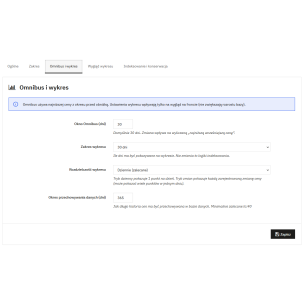
  • configuration is simple: you choose the views (page/listing), the Omnibus period, and the recording mode, and the module does the rest automatically.

FAQ – the most common questions about Omnibus in PrestaShop

What is the Omnibus Directive and what does it concern in an online store?

Omnibus requires transparency for price reductions – the customer must see information about the lowest price from the relevant period before the promotion, and the seller should have a consistent way of calculating and presenting this value.

How does the module calculate the “lowest price from the last 30 days”?

The module is based on the recorded history of price changes and selects the lowest value from the chosen period (30 days by default). This means the result comes from real data, not from manual entry.

Can I change the 30-day period to another one?

Yes – you can set a different period if you need to adapt the presentation method to your pricing process or the specifics of your offer.

Does the module work with combinations (product variants)?

Yes – variant scenarios are crucial because prices can differ between combinations. The module is designed so that the presentation remains consistent when switching variants as well.

Does the module distinguish between the regular price and the promotional price?

Yes – on the chart (if enabled), you can show the regular price and the final/promotional price separately, which is clearer and eliminates the “mixing” of values.

Daily or event-based price history recording – which should I choose?

The daily mode is simpler and lighter, while the event-based mode better reflects situations where the price changes several times in one day. The choice depends on how often you update prices.

Will the module show several price changes on the same day?

Yes – in event-based mode, the module can record and present several changes in a short time, which is important for dynamic promotions and corrections.

Can the price history chart be enabled/disabled?

Yes – the chart is optional. You can keep only the text with the lowest price or additionally show the chart if you want to build trust and transparency more strongly.

Does the module work on product lists (category, search results)?

Yes – you can enable a simplified view on listings so the information is visible but does not take up space in the product box.

Does the module affect page speed?

The module is designed to present data in a lightweight and clear way. The chart is responsive and launched when it makes sense (e.g. in a modal), rather than being forced into every location.

Does it work with PrestaShop 9?

Yes – compatibility with the PrestaShop 1.7 → 9.x range is one of the key assumptions, so the module is not just a temporary solution.

Is the module suitable for stores with frequent price changes?

Yes – that is exactly when the advantage of automatic history recording and event-based mode becomes most visible, because manually keeping Omnibus compliant with a dynamic pricing policy quickly becomes risky.

What does installation and getting started with the module look like?

You install the module like any other in PrestaShop, and then set the views (page/listing), the Omnibus period, and the recording mode. The rest happens automatically in the background.

Can I adapt the appearance of the text and presentation to the theme?

Yes – the presentation is designed so that it can be adapted to the theme (e.g. a simplified view on listings and a full one on the product page), without overloading the interface.

What is the biggest difference compared to “simple” Omnibus modules?

Most often, the difference becomes clear in difficult cases: frequent changes, several discounts in one day, distinguishing regular/final prices, and a consistent history that does not “fall apart” during promotions.

Do you want to keep your prices organised and stay worry-free with Omnibus?

If you care about automatic history recording and clear presentation for customers, Omnibus Price Pro is the solution that eliminates manual work and reduces the risk of errors during promotions.

buy now

Related products

Omnibus Module for PrestaShop – price history and the lowest price in 30 days Omnibus Module for PrestaShop – price history and the lowest price in 30 days 2
  • -30%
Security, cookies and regulations

Omnibus Module for PrestaShop – price history and the lowest price in 30 days

PrestaDev.pl
PDOMNIBUSPRQO
zł 139.30 zł 113.25no tax zł 199.00
1 Reviews
Omnibus Price Pro for PrestaShop automatically records and displays the product price history, so your store complies with the requirements of the Omnibus Directive in a way that is clear to customers and safe for you. On the product page, the module shows the lowest price from the last 30 days (or another selected period) and can display a clear price...

Comments (0)

No comments at this moment

New comment

You are replying to a comment