GPSR in PrestaShop is not just an additional tab with the manufacturer's name. The customer should find information in the offer that makes it possible to identify the product, contact the relevant entity, and learn the required warnings. The module helps organize this data, but it will not determine for the seller who is actually responsible for a specific product.
For a few items, information can be completed manually. With an extensive catalog, the problem becomes different data sources, repeated addresses, and missing language versions. This is exactly the area handled by GPSR Pro for PrestaShop: storing, assigning, and presenting product safety information.
What must an online offer contain according to GPSR?
GPSR, that is Regulation (EU) 2023/988 on general product safety, applies from 13 December 2024. It concerns consumer non-food products, with exclusions and taking into account specific regulations for particular product groups. Therefore, it should not be assumed that every product is subject to identical requirements. The basis is Articles 2 and 52 of the GPSR.
In distance selling, Article 19 indicates four groups of information that the offer should present clearly and visibly:
| Area |
Information in the offer |
| Manufacturer |
Name, registered trade name or trademark, and postal and electronic contact address. |
| Responsible person in the EU |
If the manufacturer is not established in the EU: the name and postal and electronic address of the relevant responsible person. |
| Product identification |
Photo, product type, and other markings enabling its identification. |
| Safety |
Required warnings and safety information, in a language appropriate for the sales market. |
This is a summary of Article 19 of the GPSR, not a universal set of warnings to copy into all products.
Manufacturer, importer, and responsible person — do not enter them at random
In practice, start with the supplier's documents. Determine which entity the data concerns and for which products it is appropriate. Do not automatically copy the wholesaler's contact details just because you buy goods from them.
The responsible person in the EU does not always mean a separately hired representative. The appropriate function may be performed by an EU manufacturer, an importer, or an authorized representative with written authorization. Under certain conditions, it may also be a fulfillment service provider. Distributor status alone is not sufficient to automatically assign this role. The list of entities is specified in Article 4(2) of Regulation (EU) 2019/1020, to which the GPSR refers.
Also be careful with the “website” field. UOKiK explains that the electronic address should enable actual contact: it may be an email address or an appropriate form. An informational website alone does not fulfill this function. Therefore, entering a technically correct URL does not settle the matter. See UOKiK's explanations regarding the electronic address.
How does GPSR Pro organize data in PrestaShop?
GPSR Pro makes it possible to separate company data from information specific to a particular product. Thanks to this, there is no need to treat each description as an independent sheet with addresses. In the verified version 3.0.0, the module provides:
- Manufacturer data: company name, address, and contact details, as well as information about establishment in the EU.
- Representatives and economic operators: representatives linked to manufacturers and entities assigned to products. A default entity is also available — it is worth setting only if it actually fits the assortment covered by it.
- Safety content: GPSR descriptions of products and manufacturers, as well as warnings with descriptions and icons assigned to products.
- Work with a larger catalog: CSV import of GPSR descriptions of products and manufacturers and bulk manufacturer assignment. Importing descriptions does not mean automatically completing all company data.
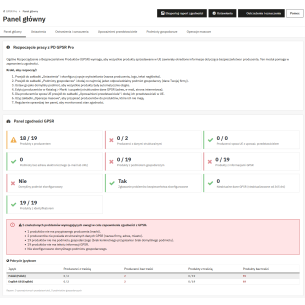
- Control of missing data: a statistics panel, completeness reports for selected information, and a language report. CSV report export is also available.
These are tools for handling data. Selecting a role in the form does not establish authorization, and saving an address does not confirm that the indicated company is actually responsible for the product.
What should be checked after enabling the module?
First, the full product page. The module may present an information block in the product tab. However, check the result in the theme in use, also on a phone: whether the section is accessible, the contacts work, and the warnings can be read without difficulty. The presence of data in the administration panel does not prove that the customer will see it.
The optional shortcut on the product list contains the name of the responsible entity, city, and country. It does not show the full postal address or electronic contact. Treat it as supporting information, not a substitute for full data in the offer. Its visibility also depends on the display locations supported by the theme.
The completeness panel helps find missing data, but it is not a certificate of compliance. It checks the presence of specific data, not the correctness of the risk assessment, the validity of the representative's authorization, or the adequacy of the warnings. A good report result is the beginning of content verification, not its end.
Also check languages. The module supports multilingual content and signaling missing data in GPSR descriptions, but it does not translate them automatically. A warning about a missing language does not block product publication. UOKiK indicates that safety information for the Polish market should be in Polish; selling to other countries requires taking their language requirements into account. Source: GPSR — UOKiK questions and answers.
Warnings, the CE mark, and Safety Gate are three different matters
Assign warnings based on information concerning the given product. The icon library makes presentation easier, but it does not determine what message is needed. For example, a warning concerning small parts should not be applied to the entire catalog just because it is available on the list.
The same applies to CE. The marking concerns products covered by specific regulations that require it — not all goods subject to the GPSR. Placing an icon in the store is not a conformity assessment or product certification. This is explained by the official EU guide on CE marking.
The module also allows adding a link to a Safety Gate notice to the product. This is an address entered by the administrator, not automatic monitoring of the European database. A separate function is a link for safety contact: email or an external form. It does not mean automatic notification to supervisory authorities. Handling a dangerous product requires separate actions appropriate to the entrepreneur's role; this is described by UOKiK in the obligations of manufacturers, importers, and distributors.
From supplier documents to a ready offer: six steps
- Collect sources. Obtain company data, product identifiers, and appropriate safety information from suppliers. Record where they come from and who confirms their validity.
- Determine roles. Separate the manufacturer, importer, and representative. Check the range of products to which the indicated responsible entity applies.
- Complete the module. Enter shared data, assign it to products, and add information specific to individual items. When importing CSV, start with a small sample.
- Review languages. Do not limit the check to the Polish version of the store if you also sell in other markets. Verify the content of translations, not only the presence of text.
- Open the offer like a customer. Compare the visible data with the source. Check the phone, the safety tab, and the operation of the electronic contact.
- Assign a person for updates. Determine who responds to a change of address, warning, or hazard information. It is worth including the missing data report in the handling of new products.
Do GPSR information help with SEO and GEO?
Their main task is to inform about the product and safety, not to gain rankings. From an editorial perspective, however, it is worth describing facts unambiguously: indicate the specific model, the correct manufacturer, and the limitations concerning it, instead of repeating the general text “safe product.” This is our practical recommendation regarding the readability of the offer, not a promise of a ranking effect.
Google states that the basics of SEO apply for presence in AI Overviews and AI Mode, and important content should be available in text form. There is no separate set of special technical requirements guaranteeing visibility in these features. Therefore, publish GPSR data clearly, not exclusively in an image. The module itself or simply adding the word “GPSR” does not guarantee citation by AI. Source: Google Search Central — AI features and your website.
GPSR in an online store — short answers
Do the information in the store replace markings on the product?
No. Completing the product page does not release you from the relevant obligations regarding markings and documents supplied with the goods. UOKiK also explains that a QR code may supplement the required information, but it is not intended to transfer all marking exclusively to the internet. Source: UOKiK explanations on markings and QR codes.
Does GPSR mean a mandatory EAN for every product?
Article 19 requires information enabling identification, including a photo, type, and other identifiers. It does not establish one mandatory EAN code for all products. Also check the requirements applicable to the given product category. Source: Article 19(c) of the GPSR.
Is it enough to install GPSR Pro?
No. The module provides space for data, links, warnings, and reports. You still need to collect reliable information, assign it to the correct products, and check the presentation of the offer. It does not replace safety assessment or the entrepreneur's obligations.
If the problem is scattered documentation and manual completion of the catalog, GPSR Pro for PrestaShop helps organize this work. Start with verified data for a few representative products, and only then extend the configuration to the remaining assortment.
Source status: 12 September 2026. This article is for informational purposes and does not replace an individual legal assessment or product safety assessment. The description of functions was based on the GPSR Pro 3.0.0 code.


Comments (0)