In PrestaShop, product images are not just “graphics for a nice look”. They have a real impact on SEO (Core Web Vitals, indexing, traffic from Google Images), conversion (clear thumbnails, fast loading), and store stability (correct image types after changing the theme or settings). The problem is that image regeneration in larger stores can take hours or end with errors—especially when the process relies on many short PHP calls, where each step rebuilds the entire PrestaShop environment from scratch.
What PrestaShop actually does when generating images
PrestaShop stores product images in the /img/p/ directory and generates various sizes from them (so-called image types), meaning thumbnails and variants used by category listings, product pages, modules, blog, slider, etc. When you change image sizes, switch the theme, add a new thumbnail type, or adjust quality settings, the existing files may no longer match the current configuration. In that case, regeneration is needed, meaning thumbnails must be generated again for the existing source images.
When image regeneration is necessary (or strongly recommended)
- Theme change or layout redesign (different image sizes on listings and the product page).
- Changing “Image Types” settings (adding a new type, changing dimensions, removing an old one).
- Store migration to another server or restoring a backup (missing thumbnails, different permissions, cache issues).
- Fixing quality and consistency (e.g. when thumbnails are stretched or cropped differently than they should be).
- Cleaning up errors after imports / integrations where images were added in a non-standard way.
Why regeneration can “slow down” the store and server
The biggest costs during regeneration are: CPU (scaling), memory (image processing), I/O (reading/writing thousands of files), and… application startup overhead. And this brings us to the key point: in a typical request-based approach (e.g. AJAX in a loop), each PHP call has to:
- load the autoloader and configuration,
- initialize the store context, language, currency, and store in multi-store mode,
- connect to the database,
- load the image class, settings, and often some modules/hooks,
- execute the logic… and then immediately terminate the process.
If there are several thousand such requests, the “startup time” alone (PrestaShop bootstrap + PHP) can consume a huge percentage of the total regeneration time. Even if OPcache is enabled, you still pay the cost of application initialization and repeatedly going through the same steps.
How to approach regeneration professionally (without making things up or promising “magic”)
Good image regeneration in PrestaShop is based on simple engineering principles: limit the number of process starts, do the work in batches, save progress, and do not overload the store frontend. Below is the approach that usually provides the best stability in larger stores.
1) Minimize the number of PHP launches – one job, many images
Instead of performing regeneration as thousands of short calls, it is better to run a longer process that handles the image queue within a single working session. This way, you pay the environment initialization cost less often, and the server works on actual tasks instead of repeatedly starting from zero.
2) Process in batches and save progress
Stable solutions divide the whole task into batches (e.g. several dozen/several hundred images), save a progress marker, and can resume work after interruption. This is important because regeneration may be stopped by a time limit, PHP-FPM restart, a single file error, or temporary disk overload.
3) Run it outside peak hours and do not “kill” the frontend
Regeneration is a heavy task. It is best performed at night or during a maintenance window, or at least with rate limiting (throttling) so it does not compete with customer traffic. If the store runs on a single server, consider a lower process priority, smaller batches, or scheduling via cron.
4) Take care of the technical conditions
- Disk space: thumbnails can take up a lot of space, especially with many image types.
- Permissions: the process must have write access to
/img/.
- PHP limits: memory and execution time are crucial with large files.
- Disk I/O: on slow disks (or overloaded VPS), regeneration can take many times longer.
SEO and images in PrestaShop: what really matters
If the goal is SEO, thumbnail regeneration alone is only half the battle. In practice, three things matter: speed, consistency, and image delivery quality.
Loading speed (Core Web Vitals)
- Use sensible image sizes – oversized thumbnails mean unnecessary transfer.
- Take care of server-side and browser-side caching (cache headers, CDN if you have one).
- Avoid generating images “on the fly” when a user visits – images should be ready in advance.
Thumbnail consistency and no 404 errors
- After changing image types, make sure the thumbnails actually exist on disk.
- Check whether the theme and modules refer to the current image types.
- After server migration, verify that the
/img/p/ structure and permissions are correct.
Quality and compression
In SEO and UX, it is not about the “heaviest quality”, but about the best compromise: the image should look good and load quickly. Optimization (reasonable compression, proper dimensions) usually gives a better result than blindly increasing quality.
The biggest “hidden cost”: PHP script startup time
In large stores, the difference between “regeneration in thousands of short bursts” and “one process that does the job in a queue” can be enormous. Not because image scaling suddenly becomes easier, but because you stop wasting time on repeatedly launching the PrestaShop environment. When the application bootstrap overhead is incurred hundreds or thousands of times, in the end you pay for “startup” more often than for actual file generation.
Summary
Image regeneration in PrestaShop is something worth doing once and doing properly: plan it, execute it stably, outside traffic hours, and with progress control. The biggest improvements usually come from reducing the number of PHP launches and working in batches with the ability to resume. This approach is simply more engineering-driven: fewer random interruptions, less overhead, greater predictability.
Regenerating Images Pro – a tool built for fast regeneration without wasting time
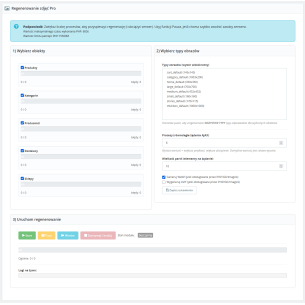
If you want to approach the topic professionally and not waste time repeatedly launching the same PHP scripts, our module Regenerating Images Pro was designed specifically for large stores and real performance issues. Instead of “clicking and praying it reaches the end”, we focus on a practical approach: regeneration in controlled batches, clear progress, and the ability to complete the process without chaos.
If your store has thousands of products, you often change image types, migrate between servers, or simply want to get your image management sorted quickly and without risk – Regenerating Images Pro will be the shortest path to order and better performance.



Comments (0)