Google reviews in PrestaShop let you show customer experiences where the next person is considering a purchase. This is especially important when they are visiting the store for the first time: they know the product and the price, but they do not know the seller. Integration with Google Business Profile or Google Places can supplement company information with reviews, a rating, and the number of opinions. However, this should not be confused with automatic SEO or a promise of star ratings in search results.
Store reviews vs product reviews — what is the difference?
A company review may concern contact, advice, order fulfilment, or post-purchase service. A product review describes a specific item. A company profile rating on Google is not a rating of every product in its catalogue. You can show it on the product page as information about the seller, but do not label it as a review of that product or assign this average rating to it in structured data.
First, also check whether your business qualifies for a Google Business Profile. An online store alone is not enough: Google lists businesses operating exclusively online among the businesses not eligible for a profile. Therefore, the integration makes sense for an eligible business with a real profile, for example a seller combining e-commerce with a physical store.
How to add Google reviews to PrestaShop without manual copying?
Manually pasted reviews require later updates. A screenshot is even less practical: the review text becomes an image that is difficult to read on a phone. What is needed is a mechanism for fetching data, refreshing it, and presenting it in the store theme.
Google Business Reviews Pro adds such integration to PrestaShop. The module can display the company rating, the number of reviews, and review cards with the author, content, and date. The availability of author photos and links depends on the data returned by the source and the selected presentation variant.
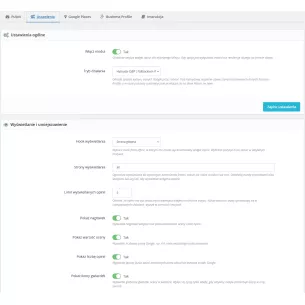
- Two layouts: a review grid or a scrolling slider, with a choice of style and accent colour.
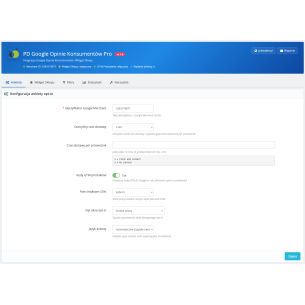
- Exposure control: card limit and settings for the header, average rating, number of reviews, and stars.
- Location choice: including the homepage, footer, product page, and cart — provided the theme supports the relevant location.
- Store settings: source and display configuration separately in the context of a specific store in multistore.
Google Places or Business Profile: where should reviews be fetched from?
The module supports both sources, but they are not interchangeable in every respect:
- Google Places API (New) uses an API key and a place identifier, i.e. a Place ID. Google returns a maximum of five reviews, selected by relevance. This is an API response limitation, not the full set of all company reviews. You should also take into account the required project billing and the costs of using the Places API.
- Google Business Profile API is used to fetch reviews for a managed location. It requires profile permissions, OAuth authorisation, and project access to the API; installing the module alone does not grant it. Google describes the conditions for obtaining access. In the verified version of the module, the synchronisation limit is from 1 to 250 reviews, while the widget displays from 1 to 10 cards.
The number of reviews next to the average rating may be greater than the number of displayed reviews. The summary concerns the profile, while the cards present only the fetched and displayed portion of its reviews.
In hybrid mode, the module prefers locally stored Business Profile data. If there is no GBP data to display, it can use stored Places data. Modes using only one source are also available. This is not a promise to fetch any number of reviews or to switch the source after every connection error.
Review freshness requires synchronisation
The widget reads locally synchronised data, so rendering it itself does not require fetching reviews from the API on every page view. A CRON job is responsible for periodic refreshing. In the panel, you can check the integration status, the last synchronisation and errors, and run available manual actions.
This is a practical separation of presentation from data fetching, but it requires supervision: a visible review block does not prove that the last synchronisation was successful. Before deployment, also check the current Google policies on presenting and storing Places data, including source attribution, authors, and access to the original review. Using the API alone is not confirmation that the entire implementation complies with these policies.
Do Google reviews in a store help with SEO?
You need to separate profile reputation from widget installation. Google indicates that the number of reviews and positive ratings may help with a company’s local ranking, alongside other factors such as relevance and distance. It does not follow from this that copying those reviews into PrestaShop will improve the rankings of product pages.
A separate issue is stars in organic search results. Reviews about a company placed on its own website do not qualify for review stars for the LocalBusiness and Organization types. Google states explicitly that this also applies to embedded third-party widgets. This is set out in the guidelines for review rich results. The widget is primarily meant to inform the customer; it is not a way to bypass these rules.
What do reviews mean for GEO and AI answers?
In the context of GEO, meaning preparing content for search with AI-generated answers, it is worth ensuring a clear context: which company the rating concerns, where it comes from, and whether it describes the seller or the product. The review content in the module templates is plain HTML text, not graphics only.
This makes access to information easier, but it does not guarantee that the store will be cited or recommended by AI. Google emphasises that for AI Overviews and AI Mode, the basic SEO principles still apply, without any special markup guaranteeing presence. The practical conclusion is that reviews should complement reliable information about the company, offer, and service, not replace it.
What should you check before showing reviews to customers?
- The right company: verify the Place ID or Business Profile location and the consistency of the data with your store.
- Working refresh: check CRON execution, synchronisation date, errors, and API limits.
- Clear labelling: label the block as company reviews, keep the required source attribution, and do not transfer its rating to products.
- Mobile preview: check content readability and slider controls. Reviews should not obscure the price or the purchase button.
Google Business Reviews Pro solves a specific problem: it brings the presentation of company reviews into the PrestaShop store and provides a mechanism for refreshing them. The benefit is access to other customers’ experiences before purchase — without the need to promise results that no widget can guarantee.



Comments (0)