Checking a Tax ID, retrieving company data, and confirming EU VAT are different operations. In a PrestaShop form, they may appear side by side, but they answer different questions. A correct checksum does not confirm an entry in the register, a retrieved address does not confirm EU VAT status, and a positive register result alone does not determine how an order should be taxed.
This guide helps B2B store owners and people implementing checkout organize data, messages, and responses to service outages. It concerns the technical process. It does not determine the VAT rate for a specific transaction.
1. First, determine what question you are asking
The message “Tax ID valid” can be too broad. It may mean only that the number of digits is correct, but the customer and support staff will read it as confirmation that the company exists. When designing the form, name the result according to the check actually performed.
Task, source, and limit of the obtained result
Task
Source
What you get
What it does not confirm
Tax ID structure check
Local rule for length, digits, and checksum.
Information on whether the number meets the technical rules.
The existence of the company and its current status in registers.
Tax ID status check
The relevant KAS service.
The status of the number in the tax administration system.
A complete tax determination for the order.
Retrieving name and address
REGON/GUS or another appropriate source of entity data.
Data available in that source’s response.
EU VAT status automatically, or the correct delivery address.
EU VAT check
VIES and national administration data.
Information on whether the number is registered for intra-EU transactions at the time of the check.
That all conditions of a specific transaction are met.
Tax determination
Adopted settlement rules, transaction data, and store configuration.
A decision executed by the order process.
That a green label next to the number alone is sufficient as the basis for the decision.
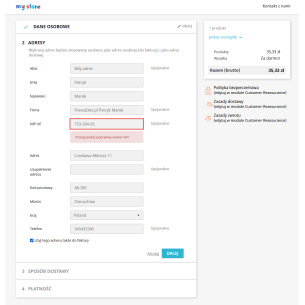
The customer may enter the number with spaces, hyphens, or a country prefix. Determine which formats the form accepts and how it stores the result. Validation should take the country into account; it is not enough to apply the Polish checksum to all foreign numbers.
In the code of VAT Validation / VAT EU Pro 1.6.4, a Polish Tax ID goes through a local check of length, characters, and checksum. This is a technical stage. It does not replace a query to the register and should not be described as current verification of the business partner.
Also check what happens when the country is changed after entering the number. The validity label and saved data should not suggest verification of the new set if the previous one was checked. During acceptance, prepare a case of a one-digit mistake, a missing number, and a prefix inconsistent with the selected country.
The company data retrieval by Tax ID module in the reviewed version 1.1.7 sends Polish data to GUS and the other supported cases to VIES. It then maps the received information to the form fields. The availability and completeness of the name or address depend on the source; a foreign address cannot always be split flawlessly according to a single scheme.
After autofill, the customer should be able to verify the billing details and indicate the correct delivery address. The registered office address retrieved from the register does not have to be the warehouse, pickup office, or the place where the parcel should be delivered. Do not automatically overwrite corrected fields after every checkout recalculation.
4. In VIES, distinguish between a negative result and no response
The European Commission explains that VIES refers to national data, and a negative result may have various causes related to the registration of the number. The service may also be temporarily unavailable. The official VIES guide recommends retrying in such a case and describes the possibility of clarifying discrepancies with the relevant administration.
Therefore, in the store process it is worth distinguishing at least: “confirmed”, “not confirmed by the register”, and “could not be checked”. A timeout should not become proof in communication with the customer that the company does not exist. Nor should it silently turn into a positive verification.
In version 1.6.4, the validation module has a configurable provider chain. Moving to the next one happens on a recognized error, not after every properly received negative response. It should not be described as querying successive services until one of them accepts the number.
5. Prepare a controlled failure scenario
Before implementation, agree on what the store should do if the register does not respond. The example below is an acceptance checklist to be carried out on a copy of the store with a controlled data provider. It does not describe a specific customer failure or a query made to a real company number.
Demonstration test: no response from the register
Step
Controlled event
What should be checked
Entering data
The customer provides the country, number, and company name in the test form.
Field correctness and data retention during subsequent steps.
Query
The test provider exceeds the timeout or returns a service error.
Whether the lack of determination, the error source, and the attempt time were recorded.
Message
The form receives the result of a failed attempt.
Whether the customer understands the difference between a number error and a service problem.
Next step
The customer tries to correct the data or continue.
Whether the agreed store policy works and whether the button has not remained permanently blocked.
Retry
The service responds again.
Whether a new check was actually performed instead of showing the old status.
This is also important for the address retrieval button. In the reviewed template of module 1.1.7 there is an AJAX timeout limit, but there is no full handling of every transport error through callbacks restoring the button state. Therefore, do not assume that after any network interruption the form will automatically return to proper operation. Check the possibility of manually completing the data and retrying the operation.
6. Allowing the form to proceed does not mean positive validation
In VAT Validation / VAT EU Pro, the settings that allow continuation after failure also apply to negative results of individual checks, not only to API failures. Therefore, the decision “we allow it to proceed” must be distinguished from the result “number confirmed”. Determine who will later handle unresolved cases and where they can see their status.
Also pay attention to cache. In the reviewed version, the AJAX hint reads a previously saved result; by itself it does not mean a new query to the register. The tax mechanism may also use the last saved response, and refreshing it has a separate path. In the implementation documentation, record when the number was checked and how the results are updated.
Automatic tax rules require agreement with the person responsible for settlements and verification of the data of the specific order. Do not enable the zero rate just because the number field changed color. The number, country, delivery, transaction type, and adopted rules must form a consistent process.
Checked on 13.09.2026. Module sources: validation 1.6.4, data retrieval 1.1.7. Registers: documentation of the Ministry of Finance/KAS, GUS, and the European Commission. The failure table is an acceptance scenario, not the result of a query to customer data.
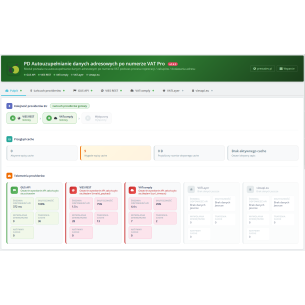
PD VAT Pro Address Data Auto-Completion is an advanced PrestaShop module that automatically retrieves and fills in company details based on the NIP or EU VAT number. The module displays a search form above every address form in the store — on the checkout page, registration page, address edit page, and in the administration panel — without the need to...
PD Check VAT Number Pro is a comprehensive solution for VAT number validation in PrestaShop 1.7.x – 9.x stores, which automatically checks the validity of EU VAT numbers (VIES) and Polish tax identification numbers (GUS API) during customer registration or address saving. The module’s unique feature is a configurable provider chain — you can set up to...
Patryk Marek — owner of PrestaDev.pl and a developer specializing in PrestaShop. For many years, he has been involved in creating, developing, and maintaining online stores. He combines work on store and module code with the configuration of the server environment in which these solutions operate.
He designs and develops PrestaShop modules, customizes existing features, and prepares integrations with wholesalers and external services. He works on product data import and updates, catalog management automation, the order process, and tools supporting the store owner's daily work.
His experience also includes store updates and migrations, error diagnosis, performance analysis, and the configuration of servers and services required for PrestaShop to operate. When solving problems, he takes into account the dependencies between modules, the theme, PHP, the database, and hosting settings.
On the blog, he shares knowledge gained from many years of programming practice and working with the technical backend of stores. The guides focus on specific problems, ways to verify them, and the limitations of the described solutions. They help store owners and technical specialists prepare changes, assess their scope, and verify the result.



Comments (0)