Adding the German language in PrestaShop does not mean the customer will get a German version of the entire offer. The menu may already show “Warenkorb”, while the product description, feature names, and delivery information still remain in Polish. Translating a store therefore requires organizing the content, choosing the scope, and controlling subsequent changes. PD Store Translations Pro helps you do this work without manually moving every text between the panel and the translator.
Why is a new language in PrestaShop only the beginning?
PrestaShop supports multiple languages and provides tools for installing translation packs. A pack delivers interface translations; your own product names and catalog descriptions require separate preparation. Management of languages and official translations is described in the PrestaShop documentation.
The problem is easy to overlook if you check only the homepage. In the new language, go from the category to the product, select a variant, and open the delivery information. Does the customer understand the material, size, set contents, and fulfillment conditions? Assess the completeness of the language version across the entire path to purchase. The language switcher alone does not answer these questions.
What should be translated before launching international sales?
Start with the content that helps customers find the product and make a decision. For the selected market, prepare a consistent scope:
- Products: names, short and full descriptions, use cases, set contents, and compatibility limitations.
- Features and variants: parameter names, their values, and option labels that the customer selects before purchase.
- Categories and brands: category names, descriptions, and content that helps compare the offer.
- Metadata: SEO titles and meta descriptions matching the content of the given page version.
- Supporting content: CMS pages, guides, and answers to questions about the product, delivery, or order handling.
You do not have to start with the entire catalog. Choose a category that you can actually sell in a given market and prepare it completely. Translated delivery information should describe the actual service: the translator will not activate a carrier or change the store’s offer.
Translation vs. localization: the words must fit the product
A correct sentence can still be a poor commercial description. “Cartridge” may mean a filter element, a printer cartridge, or a part of another device. The translation provider needs context, and the store needs consistent terminology. The same feature should not have several random names across the category, filters, and product page.
Localization takes into account the audience’s vocabulary and the way the offer is presented. However, it does not give the right to change the facts. If the source describes a lamp with a power of 8 W and a color temperature of 2700 K, the translation must preserve these parameters. It should not add dimming, waterproofing, or compatibility with a smart home system if the specification does not confirm them.
Before a larger batch, establish proper names, model markings, and industry terms. Compare several translations with the help of someone who knows the language and the assortment. This is a more practical evaluation than choosing a tool based on one smoothly sounding paragraph.
How does PD Store Translations Pro help with a larger catalog?
PD Store Translations Pro for PrestaShop connects the store panel with DeepL, Google Translate, OpenAI, Anthropic Claude, and Microsoft Translator. It lets you choose the provider as well as the source and target languages. It saves the results in the store content fields, so you can work on them later in the panel.
- Scope selection: you indicate the tables and fields to translate, check the preview and estimated cost. You can process products, categories, CMS, and other detected multilingual content.
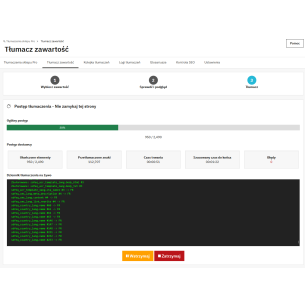
- Batch work: the queue organizes tasks, shows their status, and allows handling failed attempts. This is useful when a single product has several fields to translate into several languages.
- Vocabulary consistency: glossaries help pass preferred terms. Their use depends on the provider; the module includes, among other things, synchronization with DeepL and passing the glossary in the instruction for OpenAI.
- Change control: settings define overwriting of existing content. When backups are enabled, the module saves previous values of translated fields and provides batch restore.
- Use of previous results: enabled cache can reuse the current entry for the same text, provider, and language pair, reducing repeated API calls.
The module detects multilingual text fields, but this does not mean automatic support for every custom structure of any add-on. Before launching a batch, check whether the required content is within the available scope. Copies of individual fields also do not replace a backup of the entire store database.
What happens after a product description is changed?
A one-time translation is not enough if you regularly add products and update descriptions. The module has optional automation for products, categories, CMS pages, and integrations with SimpleBlog and ETS Blog. After a supported save, it adds eligible fields to the queue according to the configuration.
Automatically adding a task does not mean the translation is completed immediately. Background work is handled by CRON, that is, a scheduler that starts queue processing. Execution time depends on the number of tasks, batch size, and API availability. After changing an important specification, check task completion and the content in the target language.
Also decide how to treat manually corrected translations. The non-overwrite mode can fill in gaps and detected incomplete content; the way copies of the source text are treated depends on the settings. Enabling overwrite requires taking previously completed language editing into account.
How much does automatic store translation cost?
The cost depends on the text volume, number of languages, provider, model, and retranslations. The number of products alone is not enough for a quote. One thousand short names is a different scope than one thousand extensive descriptions with parameter tables.
For example: 1000 products × 5 selected fields × 2 target languages gives 10,000 potential field translations before you take empty fields, existing translations, and cache into account. This is an example of the scale of work, not the number of API requests or a final quote.
The module provides an estimator and usage tracking. Treat the estimate as planning support; billing for the external service results from its terms and actual usage. To work, you need configured API access for the selected provider. Purchasing the module does not mean unlimited use of these services.
PrestaShop translation and SEO: take care of content and URLs
Google recommends separate URLs for language versions and indicating their relationships using hreflang. It recognizes the page language primarily based on visible content. A translated menu with a description left in the source language therefore does not create a consistent language version. This is explained in the Google guide on multilingual sites.
Check whether page equivalents point to each other reciprocally and whether links lead to the correct products. Details are described in the guidelines for localized page versions. Content translation and configuration of these tags are separate tasks.
PD Store Translations Pro has a report of basic issues in product fields, including metadata length and correctness of friendly URLs. It does not replace checking indexing, links, or the entire SEO implementation. When translating the name, the module can also save a new friendly URL. If you change URLs already in use, check the operation of old links and the appropriate redirects.
Do translations help with GEO and AI answers?
GEO, meaning optimization of visibility in generative answers, starts here with useful information: what the product is, what it fits, and what its limitations are. In practice, it is worth providing this data clearly in the target language as well — in descriptions, parameters, and answers to customer questions.
Google does not require separate technical optimization for AI Overviews and AI Mode. It points to SEO basics, content accessibility, internal linking, and reliable information. Meeting the conditions does not guarantee that the page will be displayed. This position concerns Google features, not a common rule for all AI systems. See the Google documentation on AI features.
So it is not worth multiplying language versions just to increase the number of pages. Google warns against mass-generating content without value for the user and recommends checking the accuracy of metadata as well. This applies to work with content created with the help of generative AI. The tool speeds up translation; the editorial team is still responsible for meaning and compliance with the offer.
How to start translating a store in practice?
- Choose the market and scope. Determine the source language, target language, and the product category you will prepare first.
- Organize the source text. Complete the parameters, remove inconsistencies, and establish terminology. An error in the source can be repeated in subsequent languages.
- Run a small test batch. Include a short and long description, a table, features, and metadata. Check the language, numbers, units, and HTML appearance.
- Set the rules for further work. Define overwriting, backups, cache, cost range, and queue schedule.
- Check the finished store version. Go through the purchase path on phone and desktop, check URLs, metadata, and missing texts. Only then expand the scope.
Most common questions about translating a PrestaShop store
Do you need to use all five providers?
No. You can configure the selected provider. The module also allows assigning providers to language pairs. Base your choice on the translation quality for your own assortment, language availability, and API terms.
Does the module also translate all theme buttons?
Its primary scope is store content saved in multilingual fields and supported integrations. This should not be equated with complete translation of interface dictionaries for every theme and module. Check buttons and messages separately in the PrestaShop translation system.
Can the finished translation be corrected manually?
Yes, the result goes into the store content fields. After correction, check the automation and overwrite settings so that further processing does not replace the corrected text.
If the biggest problem is the scale of the catalog and keeping translations up to date, PD Store Translations Pro gives you a specific process for that: content selection, queue, saving, and result control. Check the Store Translations Pro module and start with one well-prepared language version.

Comments (0)